Hacker News new | ask | show | jobs
by jaysonelliot 4500 days ago
The designer gave a lot of thought to the problems with current touchscreen UI in cars, and kudos to him for doing so.

However, it's not the solution yet, in my opinion.

First, all the methods of interaction are invisible. There are no cues to tell the user what two fingers vs. four fingers will do, or what the difference is between a close-fingered gesture and a wide gesture. At best, you'd have to standardize the meanings across all cars (something that rarely happens in autos, even today there's no standard for where the wiper controls go, for instance), and even then, people would have to memorize those invisible gestures before they could use their car.

Secondly, accidental inputs would happen with some frequency. People have a wide range of hand sizes, motor control skills, even number of fingers. Suppose I've got two of my fingers in a cast? I can use an existing car's dashboard just fine with that temporary impairment, but not this.

Finally, it's addressing a problem that already has a solution—physical, dedicated input devices. Humans have spatial memory, we learn where things are, and learn to reach for them without looking or even thinking. Your muscle memory tells you how to reach the wiper stalk or the gear shift, which is why it's sometimes disconcerting to get into a car with the gears on the steering column if you normally shift in the center console. We need in-car systems that let the physical feedback, affordances, and reliable location of buttons, knobs, and switches interact with display systems that are designed for the attention a driver requires. You should be able to keep your eyes on the road and still adjust the air conditioning—something the designer in this video recognizes—but that shouldn't require learning invisible gestures that are prone to user error.

6 comments

I'll also add that there are way too many ways of interactions that must necessarily be learned with a substantial time investment. Time might not seem a big deal when dealing with cars since you keep one at least for a couple years, but the mental effort required to learn all those gestures from scratch is so high that it'd definitely put off most users and result in a frustrating experience for a long stretch of time.
You had the same gut reaction as me but if you look at the beginning before he started using it there was a legend of how many fingers map to each icon (no room for text as well?).

Beyond spatial memory what's good about this is that you don't have to look anywhere while still adjusting (some speech feedback about what mode you've selected would be good). The lack of sight is the most compelling aspect -- but I can guarantee you my parents would likely never remember the mappings and always have to look at the legend. Even then they'll probably be confused.

By "cues," I mean visual affordances that persist, not instructions that are shown before using it. It's a violation of one of the fundamental rules of usability, "Recognition Rather than Recall."

Look at a traditional dashboard. The air conditioning knob is a different shape and size from the stereo's volume knob, and located in a different place (ideally). Those things make it easy for the the driver to distinguish one from the other, and find them while keeping their eyes on the road.

There are other cues that usually exist to help as well, such as a blue-to-red graphic around the temperature control, the volume control being next to other audio features like the radio display, etc.

In an environment where the user has to keep a 3,500 lb steel machine safely controlled while traveling 100 feet per second, the rules of usability become incredibly important.

"The air conditioning knob is a different shape and size from the stereo's volume knob, and located in a different place (ideally)."

You've nailed it sir. Shape coding[1]. If it's good enough for F-14 fighter pilots, it's good enough for my Toyota Camry.

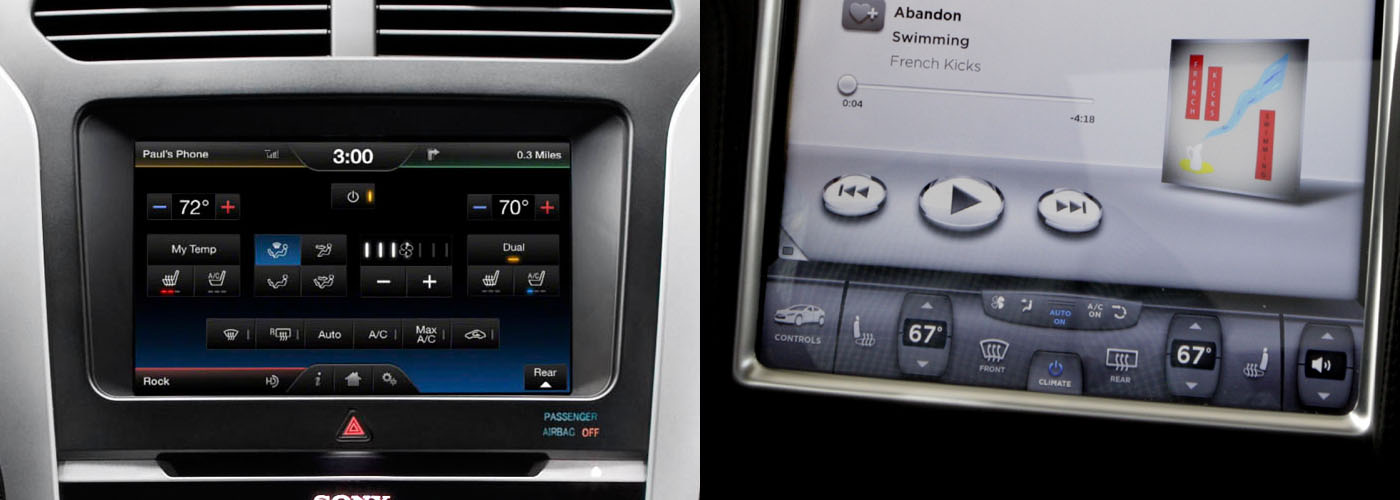
I echo the sentiment of others. The OPs heart is in the right place here. Mimicking sight free displays on a touch screen is laughably terrible. Take this picture [2] from OPs post. Why are the media buttons ellipsoids? They're just smaller targets to hit compared to squares!

In academia, we've been researching this problem, eyes-free mobile interaction, for a very long time. Particularly in the context of interaction while walking.

There are numerous approaches (e.g., Flower menus [3], utilizing pressure [4], utilizing motion [5], the list goes on). The big takeaway is that it seems like more successful systems result from the multimodal approach.

OP, you've done some good work here, but consider incorporating other sensors. Voice? A camera for in-air gesture recognition? A biometric sensor that gives reasonable defaults automatically based on learned use of the driver? Touch is only one part of the problem if we move away from shape coding, and we will very likely need to utilize multimodal input if we hope for success...

...or, you know, we could just stick to that whole buttons and knobs thing.

-----

[1] http://en.wikipedia.org/wiki/Alphonse_Chapanis

[2] http://matthaeuskrenn.com/new-car-ui/images/statusquo.jpg

[3] http://www.youtube.com/watch?v=QRSASiEBw5k

[4] http://www.mobilevce.com/newsite/sites/default/files/infosto...

[5] http://katrinwolf.info/wp-content/uploads/2013/05/MobileHCI2...

I think you got it right. My proposal was definitely not meant to be the end of the conversation. Much rather the beginning. I'm sure there are huge opportunities in exploring a more diverse set of input mechanisms (and their combination).

In this case, I'm simply trying to make a point that touch screens can be more control panels with buttons and sliders on them.

Oh yes, and I feel you made that point. It's just my hope that you (and/or others) keep moving the conversation forward :).
Memorably differentiating the possible commands is the reason I designed the layout of the pie menus in SimCity the way I did.

SimCity has a tool pallet of various building and editing tools, which are related to each other in various ways, and have different costs, functions and properties. I tried to arrange them into a set of submenus that made those relationships and differences more obvious and easier to learn. I also arranged the static tool palette on the screen to reflect the layout of the pie menus and submenus, to serve as a kind of map to the pie menus (which foreshadowed the spatial map design I explored with Method of Loci, described in another posting).

Here is a screen dump of the multi player version of SimCity running on a Sun workstation on TCL/Tk/X11: http://www.donhopkins.com/home/catalog/simcity/SimCity-Sun.g...

The top level menu includes: magic marker and eraser (for drawing on the map), roads and rails, power lines and a bulldozer, and submenus for common zones and bigger buildings. The zone submenu includes residential, commercial and industrial zones, police and fire stations, and a query tool. The building submenu includes a stadium, park and seaport, coal and nuclear power plants, and an airport.

As you can see, the size of the icon reflects the cost of the tool. The borders of the icons are color coded to reflect the cursor you see on the map that shows where the tool will affect. (That was useful for multi player mode, so you could see which tools the other players had selected, so the tool palette served as a legend for the cursors on the screen.) And the tool palette looks kind of like a totem pole, which is vertically asymmetrical, differentiating different kinds of tools and making them look unique, and horizontally symmetrical, reflecting pairs of similar tools and making it look aesthetically pleasing.

If all the tools were the same sized squares arranged in a regular grid, it would be much harder to differentiate them and quickly select the one you want. Instead, they're arranged more like a bouquet of unique flowers that each have their own special features that make them easily recognizable and memorable, while telling you something about themselves.

Designing user interfaces this way is a artistic balancing act, highly dependent on the set of commands, and requiring a lot of iteration, testing and measurement, as well as willingness to explore and experiment with many different alternatives. It is not easy, and there is never a best solution, or even always a good one. It's not something you can expect end-users to be able to do with their own custom built menus. But it's worth the effort to try, and I think it's also worth the effort to train designers and even users to promote a literacy in interface design.

One idea I've had is to develop a game called "PieCraft", that has user-editable pie menus that are first-order in-game player craftable artifacts. World of Warcraft and its rich ecosystem of user interface extensions supports a wide range of player customizable user interfaces, because there are so many different commands, spells, buffs, weapons, armor, etc, and each role of each character of each player requires a totally different set of them in different situations. The more casual MMPORG "Glitch" had bags that users could arrange in hierarchies and put their items inside, which were surfaced on the user interface as buttons they could press and objects they could drag in and out of the world and other bags. How well you arrange your items in WoW and Glitch had a significant effect on gameplay.

PieCraft could take this further, to train players in user interface design literacy (much like "Code Hero" aims to train players in computer programming). You could find empty or pre-populated pie menus in the world, pick them up and make them your own, and edit them by moving items around, putting them inside of other menus, and modifying them as you leveled up and earned more powerful menu editing skills and resources. The capacity and layout and allowed contents of some menus could be restricted, to constrain the ways you used them, forcing you to figure out which were your most important items, and giving them front row seats so they were easiest to select.

To put further pressure on players to design efficient menus, your menus could be vulnerable to attack from warriors and theft from pickpockets while they were popped up, and only be able to take a limited amount of damage, before they would break open and spill their contents out all over the world! Then you (and your enemies) would scramble to pick up all the pieces, and you would be compelled to arrange your most important items so you could find and select them as quickly and easily as possible, so you could "mouse ahead" swiftly during combat and in crowded public settings, to avoid damage from attack and loss from thieves.

Don Hopkins! I've read the pie menus paper more than once in my academic career, and it took this post for me to make the connection between The Sims (which I played in my youth), pie menus, and you.

So, since I have the opportunity to fanboy out a second: thank you for your contributions, both to gaming and human-computer interaction.

Thank you! I still ask Ben Shneiderman to review stuff that I write, and value his feedback -- I've learned a lot from him, and he really cares a lot for users and is great at explaining stuff. He's the one who insisted on calling it HCI instead of CHI, to put Humans before Computers. I got to talk with Mark Weiser about The Sims before he passed away, and he thought it would be popular, but he never got to play it, unfortunately. He certainly had a clear vision about where ubiquitous computing was heading, and would be fascinated and excited about what's possible now, so I try to be that way myself on his behalf.
You're making a bunch of good points. All of them show that there's still a lot to try, learn and discover in this space.

And keep in mind: I was thinking of this as being an additional mode to whatever the more "standard" interface would be. You could always have your standard AC controls (on a tactile-feedback-less screen though) but this quick input mode could be invoked when you know what you're doing.

I don't agree that he is making good points. He is making points that are of the current mindset. I can see myself and others like me easily transition to that type of interaction until the next generation of customers, aka, kids grows up knowing and feeling comfortable interacting in that or a similarly smart manner.

I do think that the gestures could be broken out into additional interactions, e.g., gestures towards the top do a different thing than the same gestures at the bottom or even have four quadrants that initiate different interactions.

I would think that it would require a type of introduction and practice mode that progressively teaches how to interact and also allows a demo mode like display that can be engaged for those who are not versed in that type of interaction. If not being intuitive was really an impediment there would be no keyboard shortcuts. If you can't take a second to memorize some keyboard shortcuts that will quadruple your effectiveness and efficiency then you cannot be helped.

This is an interesting (and beautiful) implementation, good to see another fighting the good fight against distracted driving. I suspect though that you may not have tested this during actual driving situations. The amount of concentration required to maintain 2 fingers or more on a flat, glassy surface while driving is immense and would result in mistaken inputs in all but the most placid of driving conditions.

One suggestion is to look at the Cognitive, Visual, and Manual Load framework common in automotive UI design. http://www.esurance.com/safety/3-types-of-distracted-driving

This UI concept has a low visual, but very high manual and cognitive load.

Maybe the designer could attack the standards problem by writing this for embedded android with the idea that android will fill the car ui space soon (assuming the _embedded_ android docs improve).

The UI can provide user feedback with static electricity, and the current could increase with the speed of the car.

As for the final point, a ten key resting within hands reach would work fine. You could memorize the number sequence for different commands, and get audio feedback. Talk about a proven UI, basically the telephone. Baby boomers ought to be comfortable with it.

From my experience working at TomTom, which uses touch screen as well as voice commands and feedback, and has purchased automotive oriented companies and integrated their products and employees into their own, I've learned that the automotive industry moves at a glacial pace compared to the computer industry.

There are both good and bad reasons for this. But the important point is that automotive interfaces are designed to be built into cars at the factory, and used for many years without requiring any updates. Even if updates are possible, most people don't get them. So it's a completely different mindset and approach and time scale than people from the Silicon Valley dot-com startup industry have.

Another factor is that the devices built into cars have a very long design and production lead time, and by the time the car comes out, the built in hardware and software is already quite obsolete compared to the smartphone the driver probably owns.

Factoring the problem out of the car to run in a smartphone or tablet itself also has its own frustrating problems, because when you're designing an automotive computer system, you can't predict what kind of technology and standards will be available or popular by the time it ships.

It's a very difficult problem space, and the stakes are extremely high, not just financially, but also because cars are weapons of mass destruction that kill more people and destroy more property than all terrorists combined could possibly dream of.

"Factoring the problem out of the car to run in a smartphone or tablet itself also has its own frustrating problems, because when you're designing an automotive computer system, you can't predict what kind of technology and standards will be available or popular by the time it ships."

Would you mind to elaborate on this statement?

To me it seems like moving control over some functions within the car, for example music or calling, might make more sense to do on the phone specifically because of the phone's fast upgrade cycle and tie-ins to one's personal information cloud.

They prefer to invent their own protocols and busses for the different systems of the car to communicate with each other, that aren't compatible with phones or even protocols like http.

For example, TomTom had a big emotional investment in some 1990's-style proprietary remote procedure call protocol that one of the automotive companies they bought had developed. It had its own interface definition language and rpc stub compiler, which seemed revolutionary in 1988 when some clever student came up with the same idea to make it easier to write C wrappers for SunRPC protocols so you didn't have to write them by hand.

More rational heads were pushing to just use modern off-the-shelf technologies like http/rest/json/etc, but the jobs of some people in some department depended on them being perceived as having been doing productive work on their own proprietary message bus for the past three years or so, and that was what they delivered, so that was what they were damn well going to use.

Smartphones are a huge threat to companies that make their own little boxes that are hard to convince people who have smartphones to buy, so they weren't exactly enthusiastic about embracing and supporting smartphones and tablets.

When a company that operates at glacial automotive development speeds has been working on their own proprietary solution to a problem that modern technology has made trivial to solve in a standard way, they're often reluctant to throw out the proprietary solution they've developed, and just use standard off-the-shelf protocols that would enable third party developers to plug into their systems and make their expensive products superfluous.

You may think it's a great idea for your car to simply be running a web server on a TCP/IP network that you can just connect to with bluetooth or wifi, but that's a terrifying concept to companies that are trying to lock you into systems they developed years or decades ago...

Even after they finally bit the bullet and decided to use WebKit in the TomTom device to implement the user interface, they still insisted on plugging their silly RPC protocol into the web browser via an old school NSAPI plug-in adaptor to talk to their fancy proprietary protocol library, instead of just talking http between everything. They wouldn't listen to reason, or technological arguments, because the political arguments had already been made and the decisions had been set in stone that they were going to use their proprietary technology for a long time. And no way were they ever going to offer third party developers access to their silly RPC protocol, which they were clinging to because they actually perceived open standards as a threat, not a blessing. People's jobs depended on it!

They knew and gave lip service to the idea that they had to think "out of the box" to survive against the onslaught of google and cheap android phones, but hell if they were going to go through that particular door, like trying to force a cat out a window it refuses to go through.

You may recall how TomTom for WinCE used to have an SDK that let you hook into the TomTom Navigator app in a few unsatisfying ways -- it was extremely sub-optimal: you would write files out into a directory and stick your thumb up your ass until the app noticed the file, read it, did something, and wrote another file with a reply, that you had to keep polling for. Instead of developing that into a real API for integrating with TomTom Navigator, they just kind of took it out back and suffocated it with a pillow -- a step in the wrong direction if you ask me! It would have been so straightforward to simply expose an http service, but that dog won't hunt in a company like that.

I'd heard of the TomTom SDK, but never even explored the option for quite a few of the concerns you managed to affirm from first hand experience.

I very much agree on your point about platform lock-in worries associated with automotive OEMs. Though Google via the Open Auto Alliance is making headway to push forward a more standard platform, it seems likely that OEMs will still wage territorial wars to lock app devs out of the data garden. The OEM caution is not without merit, they're the most likely legal target if someone drives into a wall because of poor usability from some buggy 3rd party Music app on their platform.

Given all of these potential in-car platform issues, how do you feel about creating an interface on the smartphone that makes accessing apps safer?

I feel its good concept and addresses current problem of UI in cars. Still, its not a permanent solution as User has to physically touch the screen which is still a distraction while driving. I feel permanent solution would be through a Voice activated controls where you have 360 Degree freedom for yourself. Till then this idea is very much usable for majority of People,Leaving few corner cases as you mentioned("People have a wide range of hand sizes, motor control skills, even number of fingers").
I don't really understand why a car's sound system or climate control can't be effectively controlled with physical knobs and buttons. This touchscreen fad will go away, just like the digital speedometer fad of old.
It's supposed to reduce costs and material use (if everything uses touch screens, they're cheaper to mass produce) and the dashboard design will be simplified, like how digital electrical systems replaced the miles of wires in analog-wired cars.

But yeah, right now it's stupid - I can't even use my phone well outside when it's a bit cold and my fingers are dry...

A touch (on a physical object) can make a change in half a second, requires no thinking, and can be done without looking.

Voice control (even if it works reliably, which it does not today) takes several seconds and requires thought in composition and execution.

Touch on a flat screen may be quick, but requires looking. But it's probably not quick, because you'll probably have to change modes, which will require thinking and several seconds of manipulation.

Just put some damn hard buttons on the dash. I know why manufacturers love the screens: they require no tooling, provide lots of real estate for all the doohickeys you want to cram in, and they're hip (Ooh! Like and iPad(TM)!). But they don't belong in cars. Even good ones like Tesla's are bad.

Years ago I said I wouldn't buy a car with screen controls. Now it looks like I just won't be able to buy a new car.

I repeat: Just put some damn hard buttons on the dash.

Pie menus frame this kind of interaction as pop-up menus, which provide a "self revealing gestural user interface". The menu pops up and leads you through the possible selections. That feedback trains you to rehearse the gestures. Soon you begin to make the gesture without looking at the menu, then wait for the menu feedback to confirm you're doing the right thing. Finally you gain enough skill and confidence through "muscle memory" to make the gestures quickly without even looking at the screen or requiring any feedback.

It's best if the menus can provide real time in-world feedback, like applying the effect of the interaction immediately as the menu is tracking. That makes it feel more like immersive "direct manipulation" than indirect "menu selection". It's important that pie menus support "reselection", which makes them much more forgiving and differentiates them from traditional blind gesture recognition, so you at any time during tracking you can change the selection to any item you desire.

Pie menus completely saturate the entire possible gesture space with usable and accessible commands: there is no such thing as a syntax error, and you can always correct any gesture to select what you want, no matter how bad it started out, or cancel the menu, by moving around to the desired item or back to the center to cancel.

Handwriting and gesture recognition does not have this property, and it can be quite frustrating because you can't correct or cancel mistakes, and dangerous because mistakes can be misinterpreted as the wrong command. Most gestures are syntax errors. Blind gesture recognition doesn't have a good way to prompt and train you with the possible gestures, which only cover a tiny fraction of the possible gesture space. All the rest of the space of possible gestures is wasted, and interpreted as a syntax error (or worse, misinterpreted as the wrong gesture), instead of enabling the user to correct mistakes and reselect different gestures.

Even "fuzzy matching" of gestures trades off gestural precision with making it even harder to cancel or correct a gesture, without accidentally being misinterpreted as the wrong gesture. That's not the kind of an interface you would want to use in a mission critical application such as a car or airplane.

Another way to reframe the gestural, self revealing and reselectable qualities of pie menus is as navigation through a map, as opposed to climbing up a hierarchical menu tree. Instead of laboriously climbing up a tree of submenus, you simply navigate around a map of "sibmenus" -- sibling menus that you can easily move back and forth between by moving in opposite directions.

This demo of an iPhone app I developed called "iLoci" demonstrates the idea, enabling users to create their own memorable maps of "locations" instead of "menus", which they can edit by dragging around, that are related to each other by two-way reversible links. It exploits the "Method of Loci," an ancient memorization technique from the time before iPhones when people had to use their own brains to remember things, in order to leverage your spatial navigation memory and make it easy to learn your way around. http://vimeo.com/2419009

https://en.wikipedia.org/wiki/Method_of_loci "The Method of loci (plural of Latin locus for place or location), also called the memory palace, is a mnemonic device introduced in ancient Roman and Greek rhetorical treatises (in the anonymous Rhetorica ad Herennium, Cicero's De Oratore, and Quintilian's Institutio Oratoria). In basic terms, it is a method of memory enhancement which uses visualization to organize and recall information. Many memory contest champions claim to use this technique to recall faces, digits, and lists of words. These champions’ successes have little to do with brain structure or intelligence, but more to do with their technique of using regions of their brain that have to do with spatial learning."

I like the idea of moving away from hierarchal menu navigation, towards spatial map navigation. It elegantly addresses the problem of personalized user created menus, by making linking and unlinking locations as easy as dragging and dropping objects around and bumping them together to connect and disconnect them. (Compare that to the complexity of a tree or outline editor, which doesn't make the directions explicit.) And it eliminates the need to a special command to move back up in the menu hierarchy, by guaranteeing that every navigation is obviously reversible by moving in the opposite direction. I believe maps are a lot more natural and easier for people to remember than hierarchies, and the interface naturally exploits "mouse ahead" (or "swipe ahead") and is obviously self revealing.

Here is another video demonstrating a prototype exploring this interface that I developed in Unity3D for Will Wright. It shows both an "iLoci" map editing interface, as well as traditional pop-up pie menus using "pull-out" distance parameters with real time in-world feedback to preview the effect of the selection (plus it also has cellular automata, at Will's request!): http://www.DonHopkins.com/home/StupidFunClub/MediaGraphDemo1...