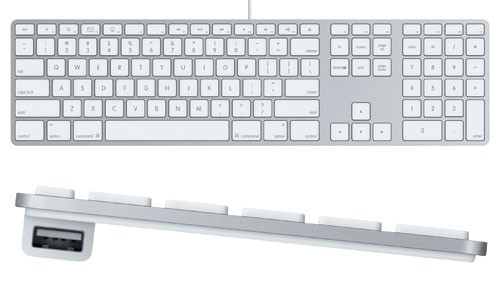
That model, but without the numpad, is still my favorite keyboard (the A1242). I've tried mechanical keyboards for fun, but I keep coming back to this one for the low profile.
It was only sold for a year or so before the wireless model replaced it, and it's hard to find them now. What I did was to look for used iMacs from 2010, see which ones have the A1242, then ask the seller to only sell me the keyboard.
Based on the replies I wasn't the first one to ask! Seems like there are still some fans around.
This isn't widely known, but the Magic2 keyboard can be turned into a wired keyboard by simply plugging in a thunderbolt wire. It will function entirely without bluetooth.
(This also seems to fix Bluetooth connectivity issues. I've got a Mac that likes to forget its connections, and doing this appears to force a "oh, I recognize that device".)
I doubt many people don't like the Magic Keyboard because it's wireless, but rather because it has a different key feel. Although I have an A1243 at home and had a Magic Keyboard at the office and didn't feel like there was much of a difference between the two. If my A1243 failed for some reason, I'd probably just get one of those (since buying a mechanical keyboard with a Mac layout is impossible).
I have an A1243 at home and a Magic Keyboard 2 at work. The difference in feel doesn't bother me, but the fn in the left corner gets me every time. Caps lock is mapped to control on both, but apparently I use that other control key when switching browser tabs.
I've had a Matias Laptop Pro for Mac for years and I've been super-happy with it. Mechanical but very quiet. So it wasn't impossible for me, but you might have other criteria that would make it so.
I can highly recommend ... not buying the DAS keyboard with mac layout.
I have one I got gently used from a coworker, who special ordered it... it's got a sticky spacebar that will random lock up and need to be lubricated; the keys are just printed on ABS so they're already wearing out and they look ugly as sin (plus they get so grimy so quickly).
the only pro on this thing is the volume wheel / media keys, and the fact that the mac will recognize it and follow the "correct" behaviour. had tons of problems with previous keyboards since mac osx doesn't seem to have the same level of customization as eg kde.
they're also advertised as having cherry keys, but they're really no-names -- not even Kalih, Outemu, or Gateron (who at this point are as reliable or better than cherry).
Hard pass. My coolermaster keyboard ended up being a lot better. not holding my breath that apple gets its shit together and adopts a better keyboard layout. did wish someone made a mechanical that maybe used a dip switch or something easy to switch between layouts.
I'm currently dithering between buying that or the Das as my own A1243 is slowly dying, but at least that one looks like all the buttons are in the right place.
The current Magic Keyboard has the weird arrow key layout that Apple already phased out again on its laptops. I also don't like how it feels to type on. But the ability to use a Lightning (not Thunderbolt) cable is a godsend on my Magic Trackpad 2, for some reason I'm getting a lot of lag with Bluetooth.
Using Magic2s on my PCs. Wired. Windows needed a driver extracted from bootcamp to make fn key work properly. Those I consider to be the best keyboards I have used so far; and I have used many, including the much hyped original IBM mechanical ones (with the PCs they came with).
People seem to have forgotten eBay exists -- the A1242/3 is still readily available on there.
I cringe a little seeing all this affection for the A1243, after having seen scads of them go into the scrap heap at my local nonprofit electronics recycler.
Check with your local Apple authorized service provider (AASP)! At least in the US, they can still order those keyboards from Apple as repair parts. You don't need a computer serial number (or maybe you do, but the AASP can just stick a serial number on it). Pricing should be the same as the original retail MSRP, but it's possible some AASPs could add a markup if Apple allows them to (which I don't know).
AASPs were also able to order the iMac Pro space gray keyboards the same way, back when they were exclusive to the iMac Pro and weren't sold standalone.
Apple low-profile keyboards have been my keyboard of choice for over 10 years on any platform and for any use (gaming included). I know a lot of people swear by mechanical keyboards, but personally I type much faster with the low-profile keys and love the feel of them.
Apple has put out two versions of their tenkeyless keyboard -- one powered by AA batteries (and with a substantial battery hump to hold them), and a low-profile version with an internal battery that charges via Lightning. I had been using one of the latter for at least 5-6 years (before a key died, courtesy of something falling on the keyboard). I've had my current keyboard for about 4 months, and I haven't yet had to recharge it after the initial charge.
I would hope they can achieve a 50 year battery lifespan...
After all, in the life of a keyboard it probably types 10,000 characters per day for 50 years. Call that 400 Million events that need to be sent to your mac via bluetooth low energy.
The system can be entirely powered down when no key is pressed, so the only energy loss is a pre-keypress amount. That works out to about 3 Watt-hours (assuming each keypress is transmitted 3 times for interference-resistance and has a packet length the same as an advertisement). A long-life alkaline battery has a low enough leakage to last 50 years, and about the volume of an AA cell can easily power daily use for 50 years. If you want to go smaller and lighter, you could get 10 years out of a coin cell.
It would probably work out cheaper because you don't need to ship the device with a cable or charge circuitry too. Users don't have one more thing to worry about charging either.
> It would probably work out cheaper because you don't need to ship the device with a cable or charge circuitry too. Users don't have one more thing to worry about charging either.
Knowing Apple they'd probably solder or glue the battery so that you have even one less thing to worry about
I’ve been using the original USB magic keyboard (same as in this link but without the number pad) and the original Bluetooth magic keyboard for about 12 years with no issues.
Just got an M1 MacBook and it’s so nice to have a pretty consistent feel compared to my other keyboards.
My gf and I each have a wireless keypadless AA-powereed apple keyboard, one of which takes two batteries and one of which takes three. I only know because I was using one and it ran low, and I discovered I had prepared the wrong number of batteries.
Me too.. I absolutely hate the feel of the newer 'magic' keyboards. Still use the old ones everywhere. The 'butterfly' laptop ones I just can't use at all.
Not surprised these are totally unrepairable by the way. Luckily they rarely need to be repaired.
I've been using this model keyboard for probably around 10 years now. I even have a couple spares sitting in a drawer since they don't make them anymore.
* they're very durable (talking normal usage + spilling drinks a few times a year — no stuck or broken keys)
* the key labels never fade
* there's 2 low-power USB ports (I think USB 2.0?) which aren't good for much, but good enough to plug a mouse into
* it's not the easiest thing to take apart but if you get crumbs under a key, it's pretty easy to pry it up and then click it back in
Interesting, a cup of sweet tea killed my A1243. Water got inside and shortened some pads or tracks, since pressing one key instead generated 3 or 4 others. I tried to dry it with rise and silica gel for weeks - didn't help. Then I tried to open it and that was an excellent example of an Apple product which feels great while it works and has 0 repairability, so is an e-waste when broken. Disassembly of any other keyboard would allow to fix such a simple problem. At the end I've got a used A1243 from ebay and am typing on it right now :) (if it breaks I would probably go to Logitech MX keys for Mac).
Yep, a splash of coffee is what finally did mine in and they’re totally unserviceable.
Fortunately low-profile keys have been growing in popularity in the mechanical keyboard community so there are some excellent options to choose from now.
During disassembly what surprised me the most was that the back plate is really rigid, since that plastic is reinforced with a metal plate. Instead of fixing that plastic-metal assembly with excessive use of glue, some 6-10 screws on the perimeter could produce the same solidity feel. Unfortunately much less repair-friendly and probably more expensive solution was used instead.
I've been using my desktop with a portable monitor and a lapdesk, due to recent high demand for work-from-home space in my apartment. We shouldn't undervalue those USB ports, it is really nice to have all the non-monitor user interface stuff go through a single wire, if the alternative is to have a bunch of wires tangled around you on the couch.
My coworker apparently managed to dump at least some tea into his 15-inch MacBook Pro and it actually survived. I found it quite surprising, would've figured it was a death sentence for sure.
I don't know. I have one spare left — when that's gone I'm toast. I think I remember reading something about a logitech keyboard with similar key travel, but that was years ago and I don't remember the model.
This is the exact same keyboard I'm typing this on (I actually didn't know the model number, I had to check).
It's a good one! The keys definitely have more travel than modern MacBook keyboard keys. I like its size, incline, and weight too. I'm split on the size, on the one hand it's kind of long, so it fits awkwardly in my backpack and I find myself pushing it left and right often.
On the other hand, I like having a dedicated delete key and full-size arrow keys. A version of it with the separate arrow keys but no num-pad would be perfect for me.
The USB ports aren't very good for data, but they're great to plug a mouse into. I have a wireless Logitech mouse with the USB receiver, not Bluetooth. It's easy forget it's not Bluetooth though because the receiver has just been tucked in under the keyboard the whole time.
I forgot about these until this post. I used to have one when they came out, and I worked at a retail store where all of our kiosks had these.
Does anyone else get electric shocks often from them? I would get them anytime I touched the metal case of it. I never thought to google it or anything.
If you use the long cable to plug the charger into the wall you’ll avoid this, it has the additional ground conductor which connects to the large round metal post on the charger.
This is a characteristic of your mains AC supply. You won't get a shock off things not connected to the mains AC earth (usually plugged in appliances and radiators/water pipes).
The MacBook power adapters here (NZ) don’t have an earth pin, but my MacBooks give me vicious shocks. I always wondered if finding an earthed adapter (must be available in other countries!?) would fix this.
In most countries untried it is illegal... But if you crack open the power supply and remove the "Y" capacitor (usually the only bright blue component in there), these shocks won't happen anymore.
The downside is your MacBook might start giving out radio frequency interference...
Usually when electronic devices have a metal housing, they're tied to ground. Getting shocked could be a sign of a wiring issue in the building. Ground should be at zero electrical potential.
The tingling you may feel is absolutely normal. Most devices (Mac minis and MacBooks while connected to the charger) don‘t even connect to PE (only 2 connectors on the plug).
The tingling comes from some leakage across the transformer isolated primary/secondary but is so small that it’s not dangerous.
That’s also completely unrelated to static discharges that zap you once you touch something that can equalize the potential
The post on the AC adapter (that the duckhead or extension cable slots into) is earthed, and some adapters (other than the 2 prong US duckhead) continue this to the building ground.
The US extension cable is earthed, and I believe some duckheads in other countries are as well. The power adapters that were in use for mac desktops during the time period that the person I am replying to was referring to were earthed. https://th.bing.com/th/id/OIP.vmVNrqGAR3raMcey5fAXUQHaE6
Although you are correct in cases where the device is not earthed.
I'm measuring 1.8mm of total travel on my A1243, and 0.8mm on my 2020 Macbook Pro but it could just be a matter of technique. 1.3 would probably be great.
I think keyboards could be more powerful. I remember apple had a keyboard with usb ports[1] and sun had keyboards with speakers[2]. I don't why keyboards can't have some inexpensive useful features.
Actually A1243 has an internal USB hub with two ports on both sides of the bump underneath. Those ports are very handy for Logitech wireless adapters: wherever the keyboard is plugged to the mouse comes with it.
Just FYI, the speaker in the Sun keyboard only existed to emit status beeps when the computer is powered on and self-tests. Most non-suns have the same speaker integrated into the computer itself. At least when those sorts of beepy-PC-BIOSes were more common.
Yeah, when I changed from the HHKB to the Ergodox EZ, I found myself disappointed by my new keyboard's lack of USB ports. It's the best place for a wireless mouse dongle; one cable now brings both your mouse and keyboard to another computer.
If it had been a blog post, would the submitter even have come across it? I agree Twitter isn't a great platform for this sort of content, but it's where the people are. Not me, I don't use it (nobody goes there, it's too crowded) so I sympathise, but if I come across links to content like this I don't begrudge it.
I like the A1048 that immediately followed this one even better[1]. Sharper keycaps and (imo) a crisper feel, though that could be subjective. Definitely also a crumb tray!
Most keycaps could be interchanged between these keyboards and the truncated one from the original iMac (M2452)[2] which I did on a couple of keyboards, mostly because I liked the way it looked. I only stopped using my 2452 last year when I decided I really, really needed a keyboard with a forward delete key.
Used this until recently too but the keys where actually really not smooth to press. The big ISO enter key is especially bad, because it needs to be pressed in the right spot to move. I can confirm the trapped crumbs which are almost impossible to remove because the keyboard is really not easy to open up. I remember it having more than 30 screws scattered on the metal plate.
Yeah, the M7803 is great. Still have the one from my G4. A couple of years ago, I found a guy on FB market place that was clearing out an office with a bunch of those. Bought two, a black/clear and white. With those as backups, I took my original one apart to give it a good cleaning.
Used them for past ten years, on Windows. So quiet. I used Apple’s drivers to have the nice osd for media keys.
I love how the AAK feels sturdy. It’s one large slab, it doesnt slide easily on the table thanks to the rubber pads. It gives a nice low vibration thud when you type on it, it doesn’t feel cheap.
However i got myself a mechanical keyboard lately. The only issue i have with the AAK is that the function keys have no separation, always need to double check if I’m pressing the right key. For gaming this can be annoying. On many other pc kkeyboards you get f1-f4 grouped, then some space, then f5-f8 etc. so it’s much easier to find them if you eg. need to pres f5 quickly.
Now I’m on a Ducky One 2 TKL with "cherry mx silent red" and what a joke. It?s WAY more noisy than the AAK. The transition was rough... but i start to like it... i guess you can get used to either, the AAK now feels a bit weird.
Anyways, long story to say only after switching away i realized just how nice these "scissor" switches feel. I genuinely never even paid attention to the small resistance of the keys, before they activate.
I was using a Microsoft ergo keyboard, among others, for years and suffered from what I thought was going to be lifelong tendonitis, making life rather difficult as a programmer.
Then I started using this keyboard and my tendonitis went away in a few weeks and never came back. Thank you Apple.
After going through the entire thread, it seems that since ZX Spectrum everything is more or less the same only thing that has improved were materials and the fact we are buying our computers each 1 - 2 years. Concepts I saw were very much the same as back then.
For those that love this keyboard: the new MacBook magic keyboard feels similar and is great, but be warned that the current standalone magic keyboard hasn’t been updated from butterfly keys yet.
The new MacBook keyboards use the same switches as the current standalone Magic Keyboard. Apple has never released a standalone keyboard with butterfly keys.
Huh, that's true. Playing around with it now, it certainly feels closer to my 2018 macbook pro than my ancient magic keyboard, 2015 macbook pro or M1 macbook pro, although it's somewhat in the middle of those.
Anyone looking for a wireless mechanical keyboard - I can't recommend Logitech G913 more. Especially if it's employer sponsored. Low profile, compact and great switches. Love it :)
It was only sold for a year or so before the wireless model replaced it, and it's hard to find them now. What I did was to look for used iMacs from 2010, see which ones have the A1242, then ask the seller to only sell me the keyboard.
Based on the replies I wasn't the first one to ask! Seems like there are still some fans around.