Hacker News new | ask | show | jobs
by skrowl 4252 days ago
I've been reminding everyone I know who still uses Chrome to try Firefox again. Many have switched back. It's simply a better browser. One e10s is in stable, it's going to be even better.

Google is a for-profit company that makes money selling your data and targeted, personal ads.

Mozilla is not-for-profit and just wants to make the web better.

7 comments

I don't think there is actually any evidence they use Chrome for much more than

1. disrupt IE/MS - i can say for certain they originally backed Firefox for this effort and only decided to split away to build chrome in the first place because they felt starting fresh they could build a better core and i believe they did.

2. enabling more people to build on the web, enables more of their ads to be shown. Firefox achieves this just as well as chrome. IE was dominating not too long ago and you could argue much of google's ad revenue growth can be attributed to more people having access to a higher quality web.

That said... I don't see why you should believe google would need or desire to sell data from what it might collect from Chrome. More likely they see it as a means to ensuring web dominance by ensuring the web is never locked down by one mega corp. It's similar in away to what they have done in the mobile space. Android is more of a technology to disrupt Apple and ensure it can't be dominate, but really does google have any control over Android?

If you sign in to Chrome, your bookmarks and full browsing history are uploaded to Google's servers. Only your passwords are encrypted locally before being sent to Google.

https://support.google.com/chrome/answer/1181035 contains info on how the encryption works.

chrome://terms/ links to https://www.google.com/intl/en/chrome/browser/privacy/ which links to http://www.google.com/policies/privacy/ to define "how we use information we collect." From that page: "We use the information we collect from all of our services to provide, maintain, protect and improve them, to develop new ones, and to protect Google and our users. We also use this information to offer you tailored content – like giving you more relevant search results and ads."

Your full browsing history is a treasure trove of information useful for making Google's core services (search and ads) more effective. They would be stupid not to use it to improve the quality of their services. I challenge your assertion that Chrome is an altruistic endeavor.

Don't forget about omnibox predictions. By default, all keystrokes in the address bar are being sent, even while you're logged out.

References:

"Get predictions in the address bar" https://support.google.com/chrome/answer/95656?hl=en

"Logging policies for omnibox predictions" https://support.google.com/chrome/answer/180655?hl=en

uhh… with any "omnibox" UI in any browser, every keystroke is sent to Google.
Based on my current knowledge, I believe you are wrong. Firefox' Desktop Awesomebar (which actually predates Chrome's omnibox) does not send every keystroke to Google[0], and never has.

Even Firefox' Mobile Awesomebar doesn't do that[1] unless you click that "Yes" button.

On the other hand, Google's Chrome browser is clear about the fact that it does send everything in the omnibar[2]:

> When you type URLs or queries in the Chrome address bar (omnibox) or App Launcher search box, the letters you type may be sent to your default search engine so that the search engine’s prediction feature can automatically recommend terms or URLs you may be looking for.

If you still believe you are right, I would be interested in seeing your sources.

[0]: https://support.mozilla.org/en-US/kb/awesome-bar-find-your-b...

[1]: https://blog.mozilla.org/privacy/2013/01/08/search-suggestio...

[2]: https://www.google.com/chrome/browser/privacy/

Huh. Your first link says nothing about search suggestions. I based my comment on my experience of having to disable search suggestions every time I start a new browser. I hope you're right…
The point is: Omnibox in Chrome sends every key stroke. The Awesomebar in Firefox doesn't send anything to Google until you initiate a search.
That's a feature of most "cloud" services that allow multi-device synchronisation.

It could be said Google already have your browsing history (of sites that they serve adverts on, or that use their analytics). I doubt Chrome's syncing data would give them any more information than what they have already.

Firefox provides synchronization without relying on 3rd-party servers, you can just use your own or one provided by a trusted friend.

and it's quite easy to block Google from tracking your browsing habits using GA or Ads: just use an Adblocker and something like Ghostery, RequestPolicy or Disconnect to block Google Analytics.

1) Google never backed Firefox with a billion-dollar-a-year advertising campaign like they have Chrome for several years now.

2) It's not an accident that Google's webservices work best (sometimes only) in Chrome.

They're way past the "disrupt IE" goal. They're into the "tightly couple our web service and Chrome and try to force out other options" goal.

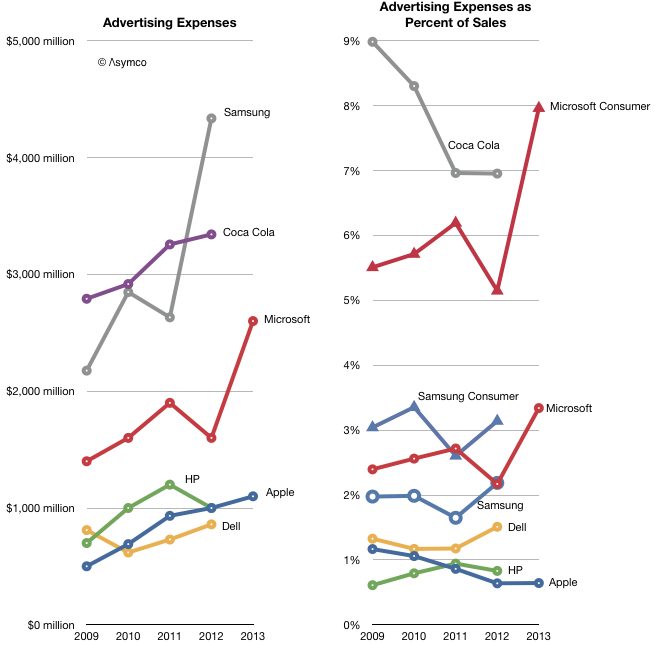
I'd like to see a source for the billion-dollar-a-year campaign, that sounds crazy. That's 3 times Mozilla's entire budget, if memory serves me right.
365 days a year for several years Google has had a Chrome banner ad on www.google.com showing to Firefox users. That page is the most lucrative property on the web in terms of eyeballs, so take your most outrageous ad rate you can find and do the math. It's billions per year worth of advertising.
It's also completely free for Google to advertise on their own website.
Yes but that doesn't mean the economic value is non-existent.

Theoretically Google could sell that space. They trade this potential profit to promote their own product, at a loss, of how ever much that space could be sold for. This is like economics 202, opportunity cost.

$1 billion is Apple's ad budget as of two years ago and a non-trivial fraction of Coke's overall annual ad budget. I call bs.

(http://www.asymco.com/wp-content/uploads/2013/11/Screen-Shot...)

> I'd like to see a source for the billion-dollar-a-year campaign

I can't find a source for the figure right now, unfortunately. And the whole thing is a guess, since Google doesn't release this information. All it releases is overall sales/marketing spending, which in 2012 was about $6 billion if I understand right (see <http://www.quora.com/How-much-does-Google-spend-on-advertisi...). That includes salaries for the marketing folks, etc, not just direct spending on campaigns.

As I recall, the $1b estimate broke down something like 30% actual spend (primetime TV ads, ads all over the London Tube, etc, etc) and 70% in-kind placement (i.e. "every search you do on Google with another browser shoves an ad for Chrome in your face"). I'll see if I can hunt down where I saw that...

> That's 3 times Mozilla's entire budget

Yep.

I recall seeing a heavy metro ad campaign in Paris. All the slots were used. The campaign cost listed[0] (Q-Massifs) doesn't even have a regular price. Extrapolating from the regular campaigns, it cost Google beyond a million euros a week, and the campaign lasted more than that, if I recall correctly. And that is just one city, one campaign.

As for Google Search ads, let's take the number of search requests[1], an example CPC they give[2], an example CTR they give[3], the StatCounter portion of non-Chrome users[4], we get 1216373500000 * (1-0.3) * $0.10 * 0.005.

That's $425,730,725 for a one-year campaign in 2012. Given the prominence of this ad (and its unintentional scare value), the CTR is probably off, so that's a very conservative figure.

If that is indeed 70% of the whole campaign cost, the total is $608,186,750 per year.

[0]: http://www.mediatransports.com/wp-content/uploads/2013/12/Qu...

[1]: http://www.internetlivestats.com/google-search-statistics/

[2]: https://support.google.com/adwords/answer/2375420?hl=en

[3]: https://support.google.com/adwords/answer/2615875?hl=en

[4]: http://en.wikipedia.org/wiki/Usage_share_of_web_browsers#Sum...

The "billion dollar" number is speculation, since the Google front page ad space that Chrome got isn't for sale to anyone else. "Priceless" would possibly be more accurate.
What do you think it would cost to put an Ad on the google homepage?
You are correct. If you try to go to inbox.google.com, it says "Sorry, this only works in Chrome."
> It's not an accident that Google's webservices work best (sometimes only) in Chrome.

A web service that only works in Chrome? Maybe you mean web application (web service would be really odd to work in just one browser). Do you have a source for this regardless? I hadn't heard of this.

I mean the services Google provides to users in the form of web applications, yes. The terminology is sucky.

As for concrete examples, Hangouts only works in non-Chrome browsers (including ones with WebRTC support) if you install a Google-provided binary blob. Which you may not be able to do.

Gmail only supports offline access in Chrome (see https://support.google.com/mail/answer/6557?hl=en the "two exceptions" bit). Whether not having offline access to your mail counts as mail "not working" is up to you, I guess; for me it counts as "not working".

Various Google properties use UA sniffing to deliver degraded content to non-Chrome browsers. https://bugzilla.mozilla.org/show_bug.cgi?id=921532#c9 is an example.

https://bugzilla.mozilla.org/show_bug.cgi?id=973754 is an example where as far as I can tell they built the feature around non-standard Chrome-only functionality even though Firefox supports the standard version.

Google news menus don't work in standards-compliant browsers because they rely on a Chrome/WebKit bug. See https://bugzilla.mozilla.org/show_bug.cgi?id=1083932

Google patent search uses UA sniffing and locks out various browsers as a result. See https://bugzilla.mozilla.org/show_bug.cgi?id=1013702

Google Translate will fail to work in Firefox unless you have Flash installed (good luck on Mobile).... or spoof the Chrome UA string. See https://bugzilla.mozilla.org/show_bug.cgi?id=976013

They do fix these bugs sometimes (the UA sniffing ones, where they just got the sniffing flat out wrong, tend to get fixed once someone diagnoses them). And sometimes not.

> Hangouts only works in non-Chrome browsers (including ones with WebRTC support) if you install a Google-provided binary blob.

The Google Hangouts website uses some carefully-constructed language to imply that people must download Chrome to use Hangouts, even though a Hangouts NPAPI plugin supposedly exists:

https://www.google.com/hangouts/

  The Hangouts Chrome extension won't work in your current browser. You'll need to
  download Chrome before installing the Hangouts Chrome extension. Do you want to
  download Chrome now?
Google+ photo editing is another Google feature that requires Chrome. I believe it uses NaCL to optimize some photo effects.
The NPAPI plugin is the binary blob bz was referring to.
Google Inbox is also Chrome-only. It UA sniffs and tells you to download Chrome if you aren't using it.
This is a huge problem for the overall strength of the open web and Mozilla unfortunately is no less guilty of this. Many of the tools developed for FxOS are targeted for Gecko and wont run on other rendering engines. More and more it seems the only people actually building libs for the open web are independent developers and small shops. :(
I think there's a difference between ChromeBook or FxOS apps, which may need functionality and more importantly permissions that are not available on the web yet and creating web apps that use functionality that's supported in multiple browsers but restricting to only one browser.

That said, I agree that more FxOS bits need to end up on standards tracks. The permissions issue really needs solving to make serious progress there.

http://www.otsukare.info/2014/10/28/google-webcompatibility-... has a more complete rundown of the still-extant issues in case you're interested. The whole post is well worth reading, because it does say something important that needs to be said: there are many individuals at Google who believe in things like interoperability, web sites working in all browsers, etc, and strive for that (sometimes against internal opposition). It just happens that Google as an overall organization cares a lot more about its sites working in Chrome than it cares about them working in other browsers, with predictable results.
An example of this is Google Drive's offline mode, which only runs on Chrome (https://support.google.com/drive/answer/2375012?hl=en)
I can't entirely blame them for this one considering the alternative is either using something standard (localStorage) where they're only going to be able to store a really insignificant amount of information or creating something proprietary for multiple web browsers which is difficult to maintain.

If there was a web standard way of caching 5GB of files locally then I would be annoyed.

IndexedDB is supported on all major browsers by now.
Google has used it's position in Android and Chrome to undermine privacy. Both platforms encourage users to "knowingly" give up privacy. This is beyond simply preventing monopolies.
> More likely they see it as a means to ensuring web dominance by ensuring the web is never locked down by one mega corp.

I wouldn't let Google off the hook so easily.

More like, they want to ensure that if/when it is, they are that one mega corp: https://i.imgur.com/AIxYzl9.jpg

If you ask me, the only reason they haven't moved even faster in this direction is because they're afraid of triggering the same legal action that Microsoft did back in the 90s with IE, but that doesn't mean that they wouldn't love to have that form of dominance - it can only help them.

Disrupting MS is a big goal of Google's, but that ambition runs far beyond displacing IE. Google, via Chrome (and ChromeOS) and their online services, wants to displace Windows, Office and Exchange. Firefox helped (and still helps) to fend of Microsoft's browser share, but development of Chrome is what Google is using to push browsers towards being able to replace Windows and Office for enterprise customers.
There never was a good reason for Chrome to exist in the first place. Content companies should not produce browsers, it is too much of a temptation for them to optimize their content for their own browser and vv.
> There never was a good reason for Chrome to exist in the first place.

Chrome kicked off the browser performance wars, especially javascript. A fast and performant web was important to any strategy Google could have had, regardless of their status as a good or evil company.

Please check your history. There was a JavaScript performance war in full swing, with both Firefox and Safari producing new JITs and working on improving them, before Chrome ever appeared.
My memory was that there was a cold war, but not hot-and-heavy competition until chrome, although this article seems to agree with you.

But man, Chrome sure got good fast.

http://www.cnet.com/news/browser-war-centers-on-once-obscure...

Your memory might be based on press releases, not what was actually going on. Safari and Firefox had the jits in their development builds, and were actively competing with each other, but hadn't shipped them in a final release yet at the point when the existence of Chrome was announced. Those JITs shipped a few months after that, with the attendant press hoopla.
I agree. IE kicked everyone else's butt first (in terms of market share), and the Web stagnated. Then Firefox kicked IE's butt, and the Web didn't stagnate quite as much, but let's be honest -- it stagnated. At the moment, Chrome is dominant but no browser is really trampling its competition, especially not in terms of overall quality. And the Web is improving faster than it ever has. (Well, not quite -- the "catch up" phases of the browser wars probably saw faster improvement while they were happening.)
Chrome does not exist to give the world a fast and performant web, it exists to give google full control over the audience from request to delivery, it exists to increase google's control and serves as a collection mechanism for data that it would not otherwise get at.

That it's a performant browser is a side-effect.

There could be multiple equally valid reasons for Chrome to exist.
> data that it would not otherwise get at.

My argument is that nobody would have put that data online in a slow and sucky web. If you think Google wants full control over the audience, surely they also want a large audience.

(Note that I do not think that Google is evil. But if they were, I don't think they would need chrome to get most of that information anyways, given all the other ways they are collecting data. Sure, there are some corner cases they would miss but I don't think the incremental coverage would be worth the effort.)

The web wasn't 'slow and sucky' before chrome appeared.
Honestly, my issue with Firefox all comes back to the Omnibar: I just like how Google does it better. And the only Firefox plugin I've seen that gets similar to that behavior, is slower at every step of the way. Also, having to manually add every search engine is a hassle even if you are willing to put up with the extra steps that plugin asks.

I really like Google, but I want to support open source(and am not quite willing to put up with Chromium). But for me, core usability is still king, and nothing really touches Chrome for that.

That doesn't really fix what I like most.

I like being able to hit a, see Amazon.com hilighted, hit tab, and have that be searching Amazon.

Or to do the same thing with GMail, Wikipedia, Youtube. It's the core functionality I like most with Chrome.

How do I enable the Omnibar search behavior you describe? When I enter "a" in the Omnibar, I see amazon.com in the Omnibar drop down list, but when I hit tab, Chrome just highlights the next item in the drop down list. It doesn't search Amazon. Have you manually added Amazon to Chrome's "Manage search engines" list?

Firefox has something similar: "Keyword Searches" bookmarks. I define my own search shortcuts, such as "am" for Amazon, "imdb" for IMDB, "nf" for Netflix, and "w" for Wikipedia. Using "am Harry Potter" or imdb or nf or w will use those respective website's own search forms to find "Harry Potter".

https://support.mozilla.org/en-US/kb/how-search-from-address...

http://kb.mozillazine.org/Using_keyword_searches

From my experience, Chrome seems to learn about a search engine by using it. So search for something on amazon.com and it should start working.
Nice! After loading amazon.com from the Omnibar, Chrome learned that "am" was "Search Amazon Search".
Wow, I didn't have any idea that that existed. That doesn't look discoverable at all and the Chome UI provides feedback that Firefox doesn't - but the ergonomics are just as good and that's enough for me to switch my home computers back to defaulting to Firefox.
You can do that in Firefox and with more granular control. If you right click in a search box you can choose to "Add a keyword for this search" and then you can make the keyword whatever you choose.

For example: I have a folder in my bookmarks containing like Youtube which is this url https://www.youtube.com/results?search_query=%s&oq=&gs_l= associated with the keyword "yt" so I can type yt <search term> and it loads the Youtube results. I've also added one for the Mozilla Developer Network (mdn <search term>), Python Documentation (py2 <term> or py3 <term>) and I add others as I use them more.

I use that, but it isn't as good as it used to be in Opera. Opera auto-completed your search using the target search engine's autocompletion. I don't use Chrome often enough to know if it does that too, but it might make me switch. (I switched from Opera to Firefox because of the plugin ecosystem.)
Chrome has all those features too, it let's you add search engines via right-clicking a searchbox, ,you can change the search keyword, and "<search-keyword> <search-terms>" in the omnibar works as described by you.
My solution to this issue is to use DuckDuckGo along with their bang commands [1]. So if you were to look for a replacement Wacom stylus on amazon, you would input "!a wacom stylus".

DDG bangs works with all large website or search engine (!g for google, !w for wikipedia), and with smaller, specialized one as well (I can look up words definition in the Trésors de la Langue Française Informatisé with !tlfi , and a particular protein in the Protein DataBase with !pdb).

If you use the official extension[2], you also get search suggestion out of the search box

[1] https://duckduckgo.com/bang.html [2] https://addons.mozilla.org/en-US/firefox/addon/duckduckgo-fo...

I agree, this is the single most lacking feature in Firefox. That said, I gladly sacrifice it to get a bit less under Google's control.
>makes money selling your data

To... other advertisers? Google is the advertiser. It not only goes against their Terms of Service to sell that data, but also makes zero business sense.

I swear people just make things up when it suits their world views.

I went back to FF after using Chrome since its release, for about 2 weeks before I was fed up with it not playing every youtube video.
So because of non-standard DRMed content, you decided that the best way of preventing that to be a problem in the future is to install the only non-standard browser which renders this non-standard DRMed content from the same provider?

Would you even considered that if that one provider was anyone but Google? No? If so, why do you give Google a free pass?

It just said "cannot play video", did not inspect why because it said something about a plugin, and it made me annoyed, so I switched. This page http://www.youtube.com/html5 had only 2/6 checkmarks in FF.
I try Firefox quite frequently. It's still nowhere near better for me than Chrome.
> It's simply a better browser.

Mozilla does not respect the rules of my native OS. For over five years, they insisted that double-clicking the upper-left corner of the window should not close the window like every other app on the system. Nope. They insisted on doing it their way ignoring the complaints of thousands of users.

Firefox also makes you press Shift to use access keys. Totally non-standard amongst browsers and OSes and annoying for devs and users.

Is Firefox the only browser left that hasn't switched to multiple processes?

No, Firefox isn't better and I don't trust Mozilla anymore than Google.

No, no it's not.

I just spent an hour trying to figure out why ff freezes on the partner's computer. Yay 780mb sqlite wal. Who the fuck knows what that's doing. Why on earth does using a browser require vaccuming sqlite files? Dunno, because there's no good reason.

If she'll finally switch to chrome I'll stop hearing complaints the internet is slow.

Try Help -> Troubleshooting -> Reset Profile (upper right). That fixes most problems of that sort with (often ancient, migrated since FF 2.0 or 3.0) profiles.

Most things are retained, even cookies. It does remove some things (often things that can cause problems, like badly out-of-date-unmaintained extensions, clears DOM storage, download history, plugin settings): https://support.mozilla.org/en-US/kb/reset-firefox-easily-fi...