Hacker News new | ask | show | jobs
by wtallis 4696 days ago
So they claim that the fine print warns about character substitution. But they still are willing to label the option with that problem "normal quality" and suggest using "high quality" to get strictly image compression applied with no OCR. They don't seem to understand that a photocopier should in its normal operating mode never do post-processing that creates such surprising and misleading artifacts - better illegible and obviously so than legible but incorrect.

Don't get me wrong - using OCR is a great compression technique, but if it isn't reliable enough, it shouldn't be the default or "normal" setting.

3 comments

This has nothing to do with OCR. It's an issue with the JBIG2 compression re-using similar patches as substitutes for certain areas of the images if they're "close enough". This issue is exacerbated at lower resolutions.
The process that's in use and what you consider to be true OCR are very similar, differing mainly in the last step (where OCR maps to a standard character set, but JBIG2 creates one on the fly along with a corresponding font). However, the errors at issue arise from part of the process where JBIG2 and OCR are doing pretty much the same thing, so even if the analogy is flawed, it is still highly instructive. Saying this has nothing to do with OCR is quite simply wrong, since this is clearly very closely related with OCR even if it doesn't meet your exact (unspecified) definition of OCR.
Thats OCR...
Well, it doesn't go all the way, at least in this implementation (contrary to Xerox's statement, we've been told compression is not standardized), to actually recognize the symbols it finds. If it did, it would presumably make many fewer of these errors, maybe almost none since when it's uncertain it could just go with the original.
O-SubC-R then perhaps. Still is recognizing shapes/symbols which is the very basis of OCR.

This seems a bit hair splitty when the end result is the same as invalid OCR dictionaries.

Well sure, but then why don't we just call it "lossy GZIP"? OCR is a pretty specific subset, and produces characters - this does not produce computer-readable characters, therefore not OCR.
What are you on about? What does it produce if not computer-readable characters? Computer illegible characters? Are you saying it cannot read from the dictionary it creates? Or from the characters it is later optically recognizing off that dictionary?

Again from the JBIG2 wiki[1]:

"Textual regions are compressed as follows: the foreground pixels in the regions are grouped into symbols. A dictionary of symbols is then created and encoded.."

It seems not only is JBIG2 being deployed as OCR by Xerox for whatever reason, its implementation in this case is an absolute failure.

[1] http://en.wikipedia.org/wiki/JBIG2

OK down-voter. Read the JBIG2 wiki[1].

"Textual regions are compressed as follows: the foreground pixels in the regions are grouped into symbols. A dictionary of symbols is then created and encoded, typically also using context-dependent arithmetic coding, and the regions are encoded by describing which symbols appear where."

Then from the OCR wiki[2].

"Matrix matching involves comparing an image to a stored glyph on a pixel-by-pixel basis; it is also known as "pattern matching" or "pattern recognition"."

Furrow your brow and smash the down-vote arrow all you wish. It won't stop JBIG2 from doing much of what people consider OCR as doing today. Recognizing characters, just JBIG2 adds in making it's own dictionary which opened the path to this topic today.

[1] http://en.wikipedia.org/wiki/JBIG2 [2] http://en.wikipedia.org/wiki/Optical_character_recognition

There's no OCR involved here. None.

All it's doing is recognizing "similar" patches of the image and coalescing them, which is what it's supposed to do, according to the standard. Yes, it's too aggressive.

The stated goal of JBIG2 is to recognize 'characters' on the fly and compress them together. It's not traditional OCR but I wouldn't take such a hard line.
It is essentially OCR where the alphabet is constructed on the fly from the document itself.

A major and highly pertinent difference is that if this OCR-ish procedure incorrectly classifies two identical letters as being different, accuracy is not affected, and the only consequence is a larger file. With normal OCR, seeing two As and saying they're different would be an error, but in this case, it's fine.

What this means is that, while regular OCR is inherently error-prone, this compression procedure can be fully tuned anywhere between no errors and nothing but errors, with file size being the tradeoff.

The ability to run this algorithm in a way that produces no errors may be enough to disqualify it as "OCR", depending on your point of view. In any case, it certainly changes things from "that's just how it is" to "this is a royal cock-up on Xerox's part".

Whether or not we're calling it OCR has zero bearing on the point of this comment. I can't believe this entire thread is hackers bikeshedding about whether it's OCR or not - it's like the definition of pedantism.
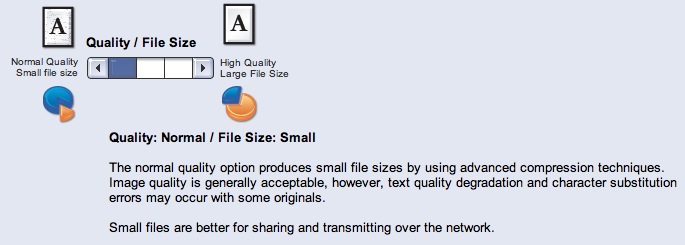
> We do not normally see a character substitution issue with the factory default settings however, the defect may be seen at lower quality and resolution settings.

I might have read it wrong, but from how I understood it the default settings don't have this problem. It's when people adjust the quality settings to be lower. Am I wrong?

You are correct. The default setting is "high" or "higher"; I don't know which. The setting that may copy blocks of characters around is the lowest setting and is called "normal", and comes with some small print on the screen that actually warns you for the character substitution.
Xerox also explicitly recommends the lossy/lousy/normal setting if you need to send the scan over a network.

http://www.dkriesel.com/_media/blog/2013/colorqube.jpg

Oh wow, why didn't anyone mention this before? Or have I been missing it? I'm not being sarcastic, the fact that the warning about char-substitution is displayed to the user like that changes this whole story. I still think it a bad idea to even have that setting at all and Xerox should just remove it from future devices - but the user was warned, in as much as the average user ever reads warnings on computer screens......
Well, the person who changed the setting was warned. The warning does not appear on the main copying/scanning screen. And calling such a setting "normal" verges on criminal.

And even the support person didn't know about the consequences of the setting.

Also, it seems that the setting was also used when copying, not just when scanning (still seeking confirmation on that one), which would be quite useless.