Hacker News new | ask | show | jobs
by xahrepap 4694 days ago
> We do not normally see a character substitution issue with the factory default settings however, the defect may be seen at lower quality and resolution settings.

I might have read it wrong, but from how I understood it the default settings don't have this problem. It's when people adjust the quality settings to be lower. Am I wrong?

1 comments

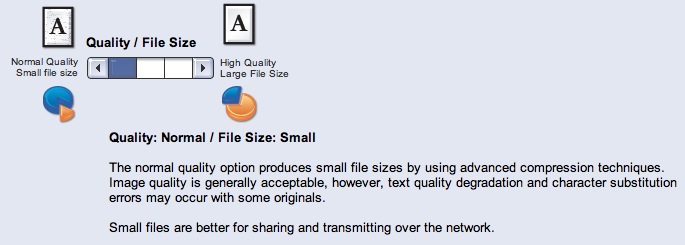
You are correct. The default setting is "high" or "higher"; I don't know which. The setting that may copy blocks of characters around is the lowest setting and is called "normal", and comes with some small print on the screen that actually warns you for the character substitution.
Xerox also explicitly recommends the lossy/lousy/normal setting if you need to send the scan over a network.

http://www.dkriesel.com/_media/blog/2013/colorqube.jpg

Oh wow, why didn't anyone mention this before? Or have I been missing it? I'm not being sarcastic, the fact that the warning about char-substitution is displayed to the user like that changes this whole story. I still think it a bad idea to even have that setting at all and Xerox should just remove it from future devices - but the user was warned, in as much as the average user ever reads warnings on computer screens......
Well, the person who changed the setting was warned. The warning does not appear on the main copying/scanning screen. And calling such a setting "normal" verges on criminal.

And even the support person didn't know about the consequences of the setting.

Also, it seems that the setting was also used when copying, not just when scanning (still seeking confirmation on that one), which would be quite useless.