Hacker News new | ask | show | jobs
by somat 6 days ago
I suspect(with out reading the source to find out) that screens are the traditional X11 screens as opposed to the modern xrandr combined screen.

Traditionally each screen in an X11 setup was it's own separate thing with it's own separate frame buffer. While technically applications could move between screens, this depended on the application caring enough to do so. It had to maintain two(or more) mirrored windows(one per screen) and keep them all aligned. So realistically no application did this.

The modern method of doing multi monitors on X11 involves one large virtual screen with each monitor assigned a section of it. This has downsides, for example; this is where the myth that X11 can't do mixed DPI setups comes from. But it has one huge massive overwhelming upside. The application does not have to be aware that there are multiple screens and multi monitor setups just work.

4 comments

Just did a quick `xrand -q` to confirm I'm doing multiple DPIs, etc (cuz laptop and external monitor) on a single screen with 0 issues. Unless the physical misalignment of the monitors, which reflects as a vertical jump when moving the mouse pointer across the virtual boundary, can be considered an issue.
> So realistically no application did this.

Old versions of GIMP (back when the toolbars etc. were separate windows) used to let you move any of its windows to a different X screen. And by "move" I don't mean drag - there was a menu where you could select the screen to move to.

I really miss the tear-off-into-their-own-window menus. They were so handy.

I have to wonder if the fact that Wayland either never had or has only very recently gotten support for applications that need to place their windows at application-commanded locations on the screen meant that those lovely tear-off menus had to die.

The gtk3 docs give the following reason for the deprecation:

Menus are not meant to be torn around.

Yeah, they are meant to be implemented with web technologies and look like shit.

BTW, this tear-off style is probably quite old. Long ago, I used an early version of ANSYS (for Windows) which apparently was still close to its Unix original, and it had its menus pop up like real windows, with close buttons! They were nicely cascaded, but one could rearrange them.

> BTW, this tear-off style is probably quite old.

Yeah, I agree with that. I was using some ancient X11 program that had tear-off menus, but I'll be fucked if I can remember which one it is.

> Yeah, they are meant to be implemented with web technologies and look like shit.

Yuuuuuup. If you always take the "yes" side, you'll come out quite a bit ahead of your fellow gamblers for the "Will GNOME make things worse for sophisticated users and call it 'simplicity'?" wager.

FWIW, they have been unfashionable for much longer than Wayland has been usable, on all platforms.

And that’s understandable. It’s not actually good usability.

> It’s not actually good usability.

They're really great on systems that let you hold a modifier key and then a mouse button to drag windows around... rather than requiring you to find the very-small-compared-to-the-size-of-the-entire-window portion of the window you can click to change the window position. They get even better when you're on a system that reliably remembers the position of application windows.

Folks who have never used a system that lets you relocate and resize windows without first moving your mouse cursor to "blessed" regions of the window absolutely do not know what they're missing.

> ...they have been unfashionable...

Fashion is for people who love doing busywork. Where fashion gets nasty is when that busywork makes a bunch of work for everyone else.

The downside is your refresh rate is locked to the slowest monitor.
This report doesn't agree with what I tested just now.

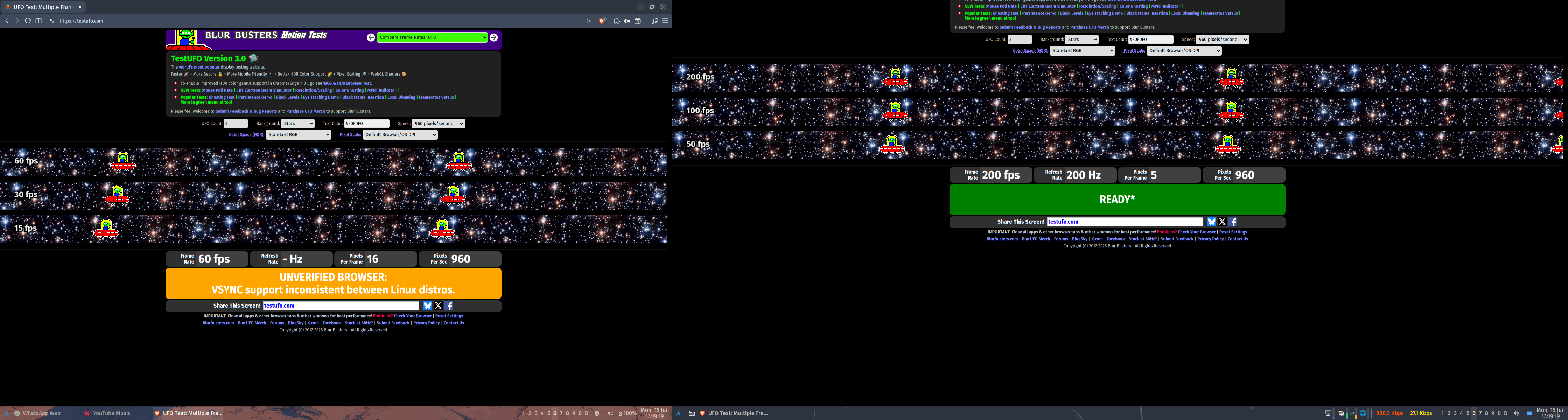
Using the xrandr CLI to set the refresh rate to 24.0 on my primary monitor and 60.0 on my secondary results in "cinematic" visuals on the primary monitor and normal "soap opera" visuals on the secondary. Setting the refresh rate back to 60 on my primary results in "soap opera" visuals on both.

I'm currently using Windowmaker, but I see no reason why this wouldn't work with KDE. I'm using xorg-server 21.1.23 (which supports RandR 1.6), xf86-video-amdgpu 25.0.0, xrandr CLI version 1.5.4, and kernel 7.0.12.

I'm on Gentoo Linux. I would not be surprised to learn that Debian (and Debian-derived distros) never shipped a version of Xorg or the related libraries where this worked correctly.

It's possible it has been fixed in the last couple years but for a while it was the case.
Were you -perhaps- using GNOME and the GNOME-provided GUIs to change monitor refresh rate? Given GNOME's history of legendarily user-hostile decisions made in the name of "simplicity", it would surprise me not even a little bit that the GNOME folks decided to pretend that the active monitor with the lowest refresh rate dictated the fastest you could drive any monitor.
This is basically a built in limit of X. The only exception is that monitors that support variable refresh rates may be able to offer this feature in multiple monitor configuration subject to software and hardware options.

I'm personally very dubious of the claim. This has basically never been supported because x treats all screens as one big screen unless you run multiple X screens which disallows moving Windows between screens which is a pretty big barrier to normal usage

> unless you run multiple X screens which disallows moving Windows between screens which is a pretty big barrier to normal usage.

Is it? Or is it forgotten?

Around 1994 I had a Pentium 133 with 16MB. In it a Diamond Speedstar 24(Pro?) (Tseng ET 4k) Vesa Local Bus, some ISA Trident 8900, and an ISA Hercules, driving one 17", one 15", and the Hercules at something like 12" IIRC. One could choose in the BIOS which "GPU" ...err... frame buffer should have priority at boot, or rather which slot, so when you've chosen VLB it took that, and the others were a matter of the OS to initalize and drive way after boot.

At the time I compared 386BSD, NetBSD, SLS(Softlanding Systems), early Slackware and SuSE, and lo and behold, I could move windows across all of them on all of them!1!!

With proudly created custom modelines for all of them, even the Hercules, with different Hz & DPI for each screen.

Though it didn't really make sense, because X on the Hercules was very laggy and jerky, coz' 8-Bit ISA. Was more useful for syslogs and debugger.

Anyways, it worked, even if only as POC, to show off.

Now that wasn't Xorg, but XFree86, but still?

1994. Worky, worky!

IIRC that also applied to Accelerated-X, at least for the Tseng and Trident.

Didn't try the Hercules with X then.

> This has basically never been supported because x treats all screens as one big screen unless you run multiple X screens which disallows moving Windows between screens which is a pretty big barrier to normal usage

Hmm.

I'm not sure what windowing system you've been using over the past ~thirty years, but you seem to be unaware of both Xinerama (released in the late 1990s) and XRandR (version 1.2 [0] of which was released in like 2006). Maybe you've been using an X11 implementation provided by some proprietary *NIX for all of these years, but whatever you've been using, it has certainly been neither XFree86 or xorg.

> The only exception is that monitors that support variable refresh rates may be able to offer this feature in multiple monitor configuration subject to software and hardware options.

1) Monitors have been able to support multiple refresh rates for ages. This is a big part of why EDID and friends exists.

2) I note that VESA standardized Adaptive Sync in ~2009, and that VRR-supporting monitors were extremely uncommon in the consumer space until the introduction of GSync and the addition of Adaptive Sync to the DisplayPort standard... which both happened in ~2014. Add to that the fact that my secondary monitor does not support VRR, and it becomes very clear that VRR is not a prereq for driving multiple monitors at different refresh rates.

[0] IIRC, 1.2 is the version that gave it feature parity with Xinerama

Here:

amdgpu + x11 + xfwm4

  $ xrandr | grep -A1 ' connected' | sed 's/^/  /'
  eDP connected 1920x1200+0+240 (normal left inverted right x axis y axis) 286mm x 178mm
     1920x1200     60.03*+  40.02  
  --
  DisplayPort-0 connected primary 2560x1440+1920+0 (normal left inverted right x axis y axis) 597mm x 336mm
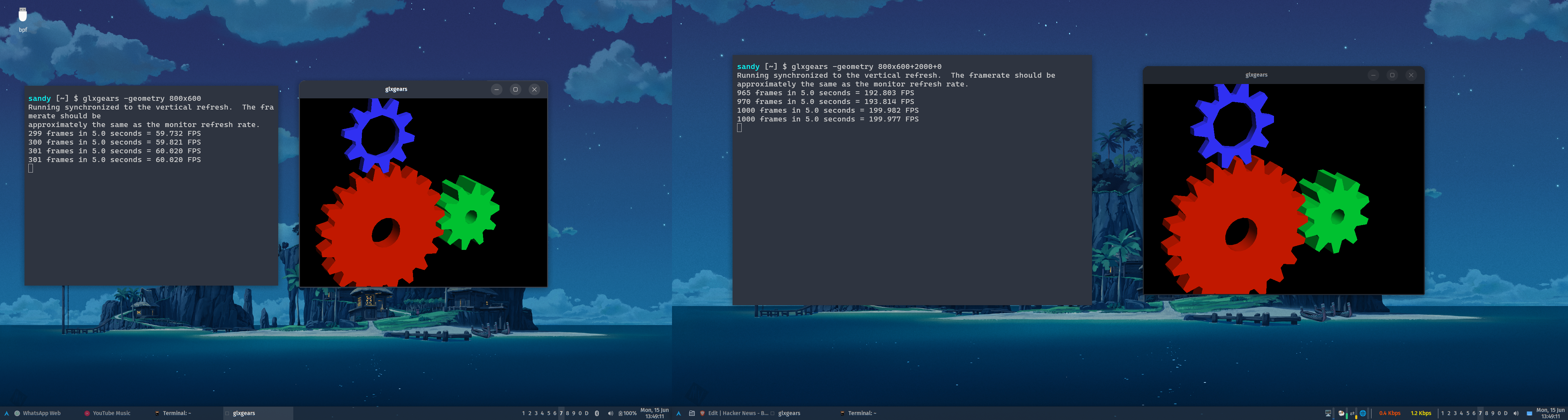
     2560x1440     59.95 + 200.00*  179.96   144.01   120.00  
https://u.cubeupload.com/porridgewithraisins/img.png

https://u.cubeupload.com/porridgewithraisins/img3.png

Not true, see my comment a little deeper down this thread
Can you pls share smt on how to properly do multi dpi in X? It is hard to find and I struggle with it
The mixed DPI support on X11 is just that each monitor provides a DPI attribute that applications can query. It's up to the application or the toolkit it uses to actually look at this attribute and scale itself properly. In practice, this means that only Qt software will have DPI awareness on multi-monitor setups, and it requires having the "QT_AUTO_SCREEN_SCALE_FACTOR=1" environment variable set for applications that don't explicitly opt into it.

What most X11 users actually do is set the global DPI to that of the highest DPI monitor, and use xrandr to scale down the framebuffer of the lower DPI monitor, which "zooms it out". Note that this has performance and image quality implications. There's a guide on how to do this here: https://blog.summercat.com/configuring-mixed-dpi-monitors-wi...

The irony is that despite the myth to the contrary wayland does not even try to handle mixed DPI at all and only fakes it via the fractional scale hack and X11 has supported mixed DPI from probably day one.

Admittedly X11 mixed DPI was using separate screens which were awkward to deal with and early versions of the unified screen tech (xinarama and xrandr) did not support mixed DPI. And even modern X11 while it provides the needed DPI information requires the application to care enough to support it. Which really means unless the toolkit provides it for free most applications are not going to do anything,

> The irony is that despite the myth to the contrary wayland does not even try to handle mixed DPI at all and only fakes it via the fractional scale hack and X11 has supported mixed DPI from probably day one.

I'm not sure what you're talking about, fractional scaling is just another way to describe DPI. The scale factor is just the DPI divided by 96. If you're referring to windows getting scaled by the compositor for fractional scales, that's only used for older software. Both Qt 6 and GTK 4 support natively rendering window contents at fractional scales on Wayland.

In a fractional scaling setup you first create a homogeneous virtual screen at the dpi wanted then get the right size by scaling the monitors out to fit. A dpi aware application will draw itself at the correct size on the appropriate screen. The main difference is the dpi aware application still looks good on all monitors. where as the fractional scaled stuff suffers scaling artifacts.

Wayland only supports fractional scaling. and there is a good argument that this is a better system, not because it looks better, it does not. but because applications don't have to be aware of it where a mixed dpi requires the application to actively deal with it.

My favored article on the subject is http://wok.oblomov.eu/tecnologia/mixed-dpi-x11/
This + mixed refresh rate are the key selling points of Wayland.
Xorg does per-monitor DPI and per-monitor refresh rate. Debian probably never shipped a version that does, but it works fine on Gentoo Linux.

I've tested per-monitor DPI before, and [0] mentions one way to do it. I tested per-monitor refresh just now. Using the xrandr CLI to set the refresh rate to 24.0 on my primary monitor and 60.0 on my secondary results in "cinematic" visuals on the primary monitor and "soap opera" visuals on the secondary.

I'm currently using Windowmaker, but I see no reason why this wouldn't work with KDE.

[0] <https://news.ycombinator.com/item?id=48533247>

Maybe it's possible now. It wasn't back when I last used X. Now that Wayland is the default on most distros and works on nvidia now I don't see any reason to go back.
Good for you? But mixed-monitor DPI and mixed-monitor refresh rate haven't been key selling points of Wayland for like eight to ten years, at least.

It has been nearly eighteen years since the Wayland project started, and they are still not at feature parity with the major windowing systems. [0] It's nuts how long it's taking them. [1]

[0] As one example, apparently the Wayland policy for clients that stop responding for a few seconds and fill up their event mailbox is still to terminate the stuck client. If memory serves, Windows 9x handled stuck clients better than that.

[1] I'm sure it's good enough for what you're doing and you never run into any rough edges or misfeatures, so don't bother chipping in with that retort. ;)

I agree it used to be fiddly at best but in recent years I had found it to be pretty easy in X11.

I haven't had complaints there for Wayland but I will say that it breaking other things has been annoying.