Hacker News new | ask | show | jobs
by al_borland 754 days ago
I've been using Kagi for about a year and love it. Searching without ads, with a bunch of power-user features, and a thoughtful approach to AI, has been very nice. - https://kagi.com

I've also been enjoying NotePlan. I stumbled upon a system I like for managing my work in Obsidian at work using some plugins, and then found NotePlan is basically an app designed around the exact system I cobbled together, with some added quality of life improvements. My data is in plain text files, so that makes it future proof (to a degree), which I also like. - https://noteplan.co

Merry Sky is another. A spiritual successor to Dark Sky, since Apple bought it and shut it down. It's not as nice as Dark Sky was, but hopefully it gets there. It's nice for seeing the upcoming week of perception forecasted in one visual view. - https://merrysky.net

2 comments

I'm working on an even more user-friendly version of Merry Sky: https://weather-sense.leftium.com

Still very WIP, but I'd love any feedback/requests. (What do you wish either Merry Sky or Weather Sense did differently?)

Very cool! I'll definitely keep an eye on it.

Looking at it right now, here would be my initial feedback and some ideas:

- Depending on where you're located, I'm not sure if you've noticed that when there is a space in the city name it throws a %20 in there instead of space. Probably need a url decode on there... interestingly, this issues goes away when I just the locate button within the map and location services are triggered.

- It seems to find my location without actually prompting, are you using an IP lookup or something instead of location services? It seems to work, but having the ability to also specify a location where I'm not at would be good (I'm sure this is planned). As mentioned above, the location services are called when using the map locate button, so I imagine the bug in the first bullet is related to the 2 different methods of gathering location.

- I'm not sure if showing the a date or two in the past is for your testing or on purpose, but I kind of like it. People seem to ask me all the time if it rained yesterday, so having an easy reference for things like that is nice. For something really extra... something that shows what the forecast was vs what actually happened would be really interesting for getting a sense of how accurate the forecasts were. Presenting something like that well, so it's easy and obvious would be a big UI challenge. I know a lot of people complain about weather apps having bad data and are always looking for a better one. Having actual data every time the site/app is opened that shows how far off it was would go a long way to prove those criticisms right or wrong. My trust in a weather report would go way up if I regularly saw those deltas were small.

- A way to visually see temperature and precipitation for the full 7 day forecast is always the main thing I'm looking for. High and low temp, graphed, for the week (this is the one thing Apple did take from Dark Sky that I still like). Inter-day temps for each day in a similar format to the week. And the precipitation like you have it (or as an area chart). I did really like the Dark Sky way of having a vertical bar for the precipitation, with the temps plotted next to it. I think that made it easier to see the separation between the days, while having everything horizontal makes it all blend together a little more.

- I'm not totally sure what's going on with the 3 precipitation forecast bars. It looks like 2 of them have a current time marker. I'm going to assume this is you playing with different ways to show it, 24hr vs 48hr? My initial gut thought for the current weather view is a 24 hour bar with 4 hours in the past and 20 hours into the future (for temp and precipitation). Then the 7 day forecast can show 24 hours at a time for each day, which could be expanded or collapsed.

- A way to change between imperial and metric measures would be good. Right now I'm seeing the temp in Fahrenheit, while the distance and precipitation is in metric, so it's a bit of a mix out of the box.

- Sunrise / Sunset timing is something I find useful, though I have it on my phone's lock screen at this point.

- Something I've recently discovered in Apple's weather app is the Averages tile. I've started using this a lot any time I'm looking at traveling somewhere, so I can get an idea of when to go or how to pack. This isn't a critical MVP feature at all, so I wouldn't prioritize it. But if you end up taking this really far, that is something I find pretty useful and cool.

- Just spitballing... I wonder if the 7 day forecast bars would be good all lined up horizontally with a horizontal scroll to look into the future, so it's more like looking through a calendar week. I think this might make it easier for someone to more easily see it will ran in 3 days, rather than having to know today is Friday and it says it will rain on Tuesday, which is 4 days away. This would be another UI challenge to do well without it being a cramped mess. It would probably need to default to a collapsed view, then clicking on a day would expand that day's bar to show more details.

- I assume all the json data is for your own testing

Thanks for the feedback!

- I have sometimes noticed the `%20` issue; it should be simple to fix. (The location name can come from multiple sources.)

- The app first tries to estimate your location based on your IP address. There is less friction (no additional prompts/permission required) but it can be very inaccurate. Eventually, you will be able to specify most settings/input via UI and/or URL params. For example, you will be able to enter all or none of: lat/lng, location name, C/F, etc. When a value isn't provided, a logical default will be used (like lat/lng from location name, or location name from lat/lng).

- Showing previous dates is very intentional (https://blog.leftium.com/2013/12/how-to-display-temperature-...). Weather stats are very relative, so "trendcasts" combine past history with future forecasts. (Also see the previous version: https://uw.leftium.com/)

- "I did really like the Dark Sky way of having a vertical bar for the precipitation, with the temps plotted next to it." I'm not sure exactly how that looked. Can you share any screenshots?

- The daily precipitation forecast bars will have an option to toggle showing the previous history. I was playing around with how they would look. The "current time" marker will track the cursor/finger on hover so you can see exact numbers in the sticky top section (Merry Sky sort of has this, but it's not sticky and hover only works in a few places.)

- You can already click any temperature stats to toggle between Fahrenheit and Celsius. I default to F because I still believe it is the more "human" metric for weather temperature. I use mm for precipitation because I feel that is the more useful unit for precipitation, but in the future this will also be configurable/togglable.

- Sunrise/sunset is one of the features I plan to steal from Merry Sky. The data is available in the JSON, but Merry-Timeline doesn't support rendering like Merry Sky (https://github.com/guillaume/merry-timeline/issues/4). I will probably end up writing my own forecast timeline component.

- Merry Sky already kind of has forecast bars lined up horizontally; I think shading the days with alternating colors would make it more readable. Openweather also has this (although it also needs to shade to make the days more distinguishable, too.) I'm not a big fan of horizontal scrolling, but I may add it as an option.

>Showing previous dates is very intentional

Excellent. Happy to hear it. This is the same reason I was thinking to add several hours of history in the daily forecast as well. I'm glad I'm not the only one who thinks this matters.

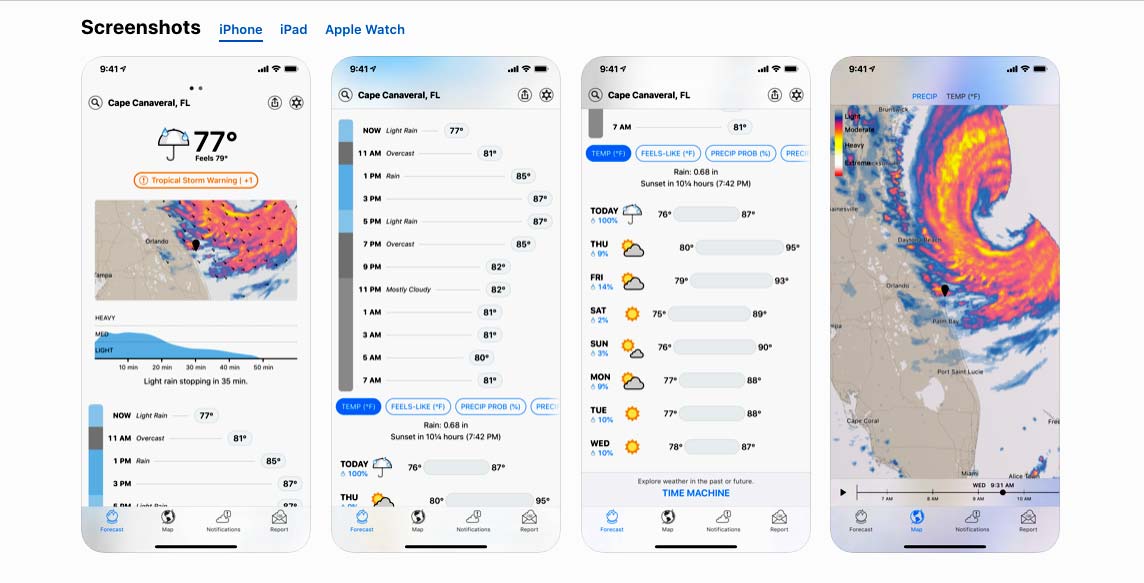
>"I did really like the Dark Sky way of having a vertical bar for the precipitation, with the temps plotted next to it." I'm not sure exactly how that looked. Can you share any screenshots?

This is a good overview.

https://www.cultofmac.com/wp-content/uploads/2020/03/DarkSky...

Pic 1: The area graph with the heavy, mid, light show the rain for the next hour if it's going to rain. If I remember correctly this went away when it wasn't going to rain. Below that is the vertical upcoming forecast, hour by hour... with the temps shown show it is easy to visually see if the temp is going up or down.

Pic 2: The full view of the current forecast. The pill allow the user to see different metrics in the same format.

Pic 3: The week ahead, showing the low and high for each day. Tapping on any of these days expands the day to show it in the same format as the current format in pic 2. Time Machine at the bottom would let you go look at stuff in the past, but kind of out of the way, that's where I think it would be useful to bring it into the last day or two.

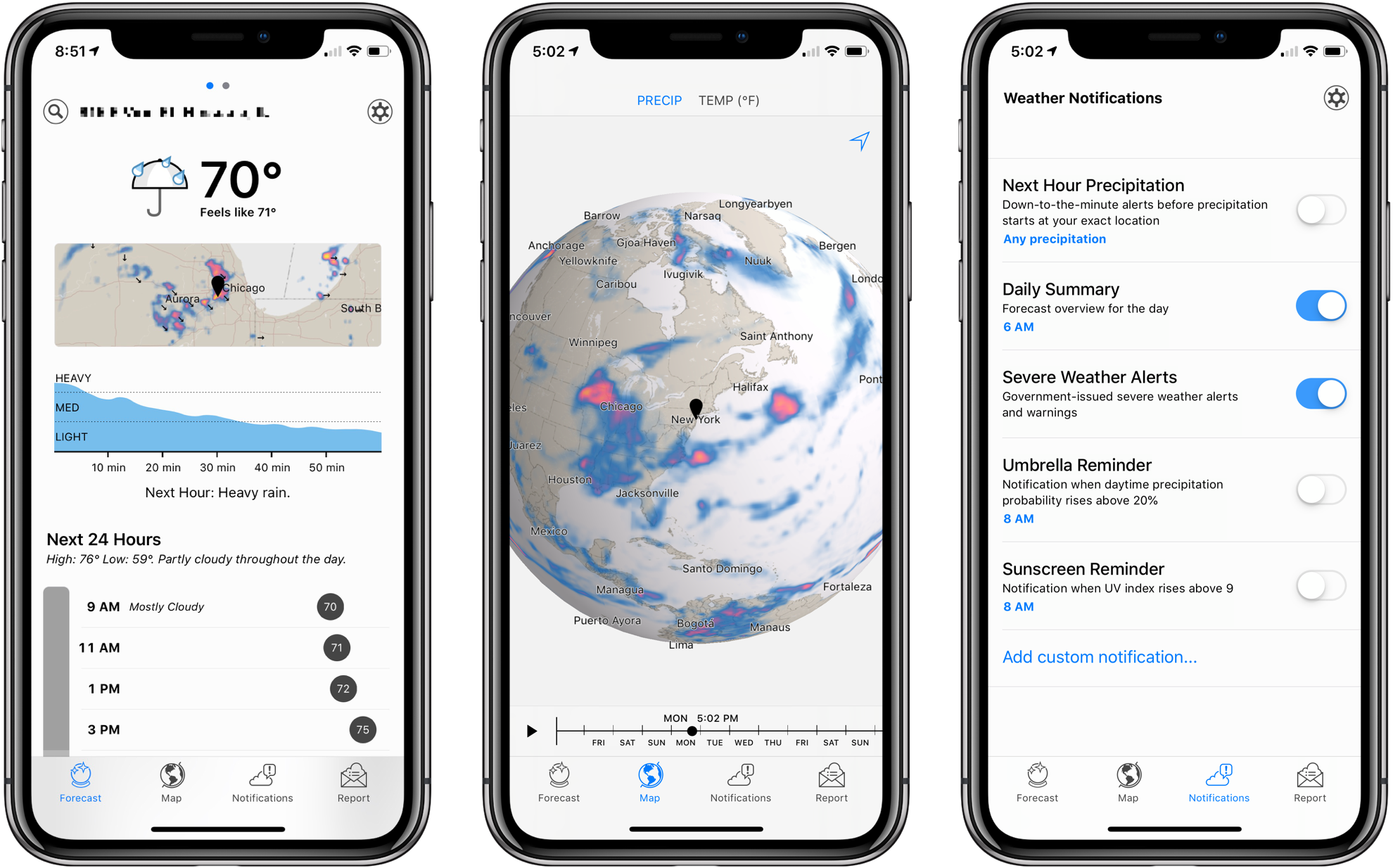
Pic 4: The map. It was a pretty cool map, zooming out would expand to a 3D globe that could be spun around any which way. It was pretty satisfying. (pic 2 here - https://cdn.macstories.net/001/2018-08-21-10-56-21.png)

- You can already click any temperature stats to toggle between Fahrenheit and Celsius. I default to F because I still believe it is the more "human" metric for weather temperature. I use mm for precipitation because I feel that is the more useful unit for precipitation, but in the future this will also be configurable/togglable.

Cool. I agree that F is the more human temp. I'm in the US, so I use F. It was the mm I was looking to change, thought that's not as big of a deal as the temp. I have garage inches vs cm/mm better than I can F vs C.

>Merry Sky already kind of has forecast bars lined up horizontally

It might help if I illustrated what I was trying to talk about.

This is kind of what I had in my head...

https://imgur.com/ibEvZR8

So the upcoming week reads more like a week in a calendar (left to right). In one chart I can see the high and low each day, along with the precipitation forecast details for each day... and I can intuitively see all of this visually. Tapping on a bar would expand it out, like the right side of the image, where the intraday temps (or whatever else) could be seen, and the rain bar would grow to the full height to see details and line it up with the hours.

At first it's simple, but it has depth to the data once interacted with. But even in the simple view it gives a lot of information at a glance.

(forgive the text temps not really being correct based on where they are in the image. I set them all and then rearranged everything a bit to clean it up).

Thanks for the images~ I used to use DarkSky myself, but I had completely forgotten about the vertical precipitation bars!

The "minutely" 60 minute precipitation forecast (graph) is one of the reasons I am re-writing my weather app: I was constantly using other weather apps because my app was missing the 60 minutely forecast. Unfortunately Open-Meteo doesn't provide minutely data, and I wasn't able to get the Apple WeatherKit API working. My plan is to merge the minutely data from https://openweathermap.org

I stole the radar map from Merry Sky because it didn't seem too difficult add. I thought https://www.windy.com used to let you zoom out all the way to a globe, but maybe it was a different service?

My current idea is show all the precipitation timelines in a compact "grid" next to where the weather icons are currently rendered. The tick marks will only be shown for the currently "active" day so the grid can be more compact. The precipitation timelines will also overlay the temperature graphed as a sparkline. The sparklines will be normalized so all the timelines share the same min/max temperature.

Hovering/touching a timeline moves the vertical red tracker line and updates the stats in the sticky top section, so you can see the exact numbers. I may also add "ghost" trackers on the other timelines so it is easier to compare the other days.

I wonder how my idea would compare to your idea for vertical timelines?

Sounds interesting. I'll keep an eye on it. Good luck with it. I know a lot of people who feel a bit lost without Dark Sky, so as crowded as the weather app market is, it seems like there is still a gap to fill.
Exactly my experience with both Kagi and NotePlan — Obsidian is great and free, but NotePlan looks gorgeous, has native apps, and works exactly like my brain expects right outta the box. Huge fan.