Hacker News new | ask | show | jobs
by anon23432343 926 days ago
Jenkins works...

No it dosen't or maybe it does for java which I don't care about.

The ui looks like from the 90s.

Finding anything in bigger projects/companies is impossible... I have browser bookmarks to find anything.

The log view is annoying at best.

I have nothing good to say about jenkins, it feels like it is stuck in the 2000s and refuses to change.

2 comments

The 90s were the last actual advance in UI design anyway. Design has drifted in a terrible direction, in the past decade or two especially. Some of this is justified (by some) by optimizing for mobile, but that’s precisely the kind of thing I wouldn’t want creeping into my CI tooling anyway. I don’t do that on a phone.
For desktop apps maybe. Not for websites though. Jenkins has an absolutely objectively terrible UI. Super ugly, inconsistent and incomprehensible.

I've used Buildbot, Travis, Gitlab, GitHub and Teamcity. None of them are anywhere near as bad as Jenkins. Even Buildbot has a much much saner UI and that's a weird Python CI system that practically nobody uses.

Jenkins is just an objectively terrible choice.

This idea that design peaked in the 90s does a big hand wave over a whole bunch of horrible examples of the user interface from that era.

Is the Space Jam website peak UI design? What about Microsoft’s “hell of tabs” settings dialog boxes?

Or the original Amazon home page: https://www.versionmuseum.com/images/websites/amazon-website...

What link do I click to find my order status? Where do I go to search for a book by keyword? What will happen if I click the link for “first time customers click here?”

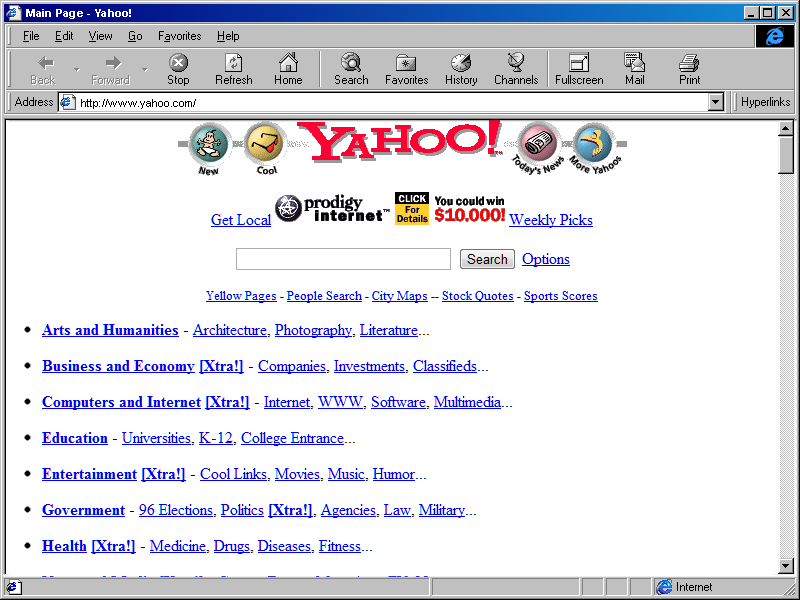
Same deal with Yahoo!, what to the “new” and “cool” and “more yahoos” buttons do? http://2.bp.blogspot.com/-JAp1M-Q_0_Y/TkAwsyueWxI/AAAAAAAAAM...

If I want to check a build status on my phone what’s the excuse for the web page to not display nicely on that device? You really think there’s no good reason for me to want to do that? Doesn’t modern CSS allow you to completely customize the viewing experience for both platforms in the same codebase?

Confusing web design and desktop UI design in the 90s does little to dispute the assertion that desktop UI design peaked in the 90s. In the late 90s, the browser was completely new - so there was a lot of skeuomorphism, borrowing from other media to try to make the web work well. Space Jam's format was familiar, though to users of multimedia CD-ROM and other interactive hypermedia of the era.

The desktop application GUI - which is really what people are claiming hit the peak in the 90s, really did. Menus, windows, tabs, dialogs, scroll bars etc... all were fairly well settled, and users understood them. A user who knew Word for Windows could do pretty well using WordPerfect for Windows. Most day-to-day applications were pretty easy to figure out because discoverability was very well done, and wizards and how-to dialogs helped users through the rough bits.

There was consistency between applications - save in areas where the OS didn't really provide GUI guidance - so design, CAD, and other creative apps (hi, Adobe) often had divergent ways of doing things and came with a steep learning curve. The web took off because it actually worked a lot like the multimedia CD-ROMs that preceded it - and websites were a lot easier for developers to build.

I'm not confusing web and desktop UI design. I presented examples of both areas that were miseralbe in the 90's.

There was not consistency between applications back then, only if you cherry-pick the ones that you like. Every Java GUI application would have a completely different UI from the base OS. Programs like America Online, RealPlayer, WinAmp, and Microsoft Bob, and Windows Media Player 7 and above would completely ignore existing OS conventions. Many programs had a habit of making the entire user interface out of bitmaps and only having a menu bar as the last vestige of the OS.

Websites might have been easier for developers to build, but they did almost nothing in comparison to what you can do with a web application now. Did Microsoft Word run entirely in a web browser like it does today? Were there any maps and driving directions where you could scroll the map without refreshing the page or order a taxi and visualize its progress? Remember typing your address into MapQuest and printing out your static map and directions list?

Arguably, delivering a 90's web app experience doesn't even require writing HTML code anymore and is therefore far easier than it was in the 90's.

> only if you cherry-pick the ones that you like.

As did you. Every item you've cherry-picked used a multimedia app paradigm (similar to a CD ROM of the era) or was a novelty (Winamp). If you look a best-selling titles of the era, you'll find a lot of buy-in to both Mac and Windows HIG. Back then people bought word processors, spreadsheets, and other software and had a pretty high expectation for interop and usability compared to now.

> Did Microsoft Word run entirely in a web browser like it does today?

Of course not! Developers were still figuring out what you could do with primitive browsers and limited servers. Most developers from the 90s were unaware of the web until 97-98.

Desktop program UI design mostly peaked in the 90s (search-to-launch becoming ubiquitous is about the only really good thing to happen since then). Desktop web design peaked somewhat later, in the two- and three-column era. ‘00s. It was nice when most sites looked and worked about the same way, and that way also happened to have great info density for a desktop screen.

Mobile web design, I’m not sure it’s had a peak yet. Phone os UI peak was iOS6.

> Phone os UI peak was iOS6.

I couldn't disagree more strongly with this.

The UI can't just be considered on its own without a discussion of the underlying functionality that it presents. iOS6 is like a caveman's OS compared to what today's OS versions can accomplish.

So it may be true that iOS felt simple and intuitive, but it was also presenting so much less functionality that it really makes broad comparisons seem disingenuous.

Most of the important functionality that’s been added didn’t require the changes to UI that I consider a downgrade.
The UI absolutely has to change to accommodate new functionality. New functionality means more “buttons and switches” to contend with.

For example, iMessage didn’t used to have any app integration to insert things. It used to be pictures/videos and text. Now it has the ability to insert a whole bunch of things and from a variety of first and third party apps. It can handle things like payments and location sharing. There has to be some kind of UI to handle that, and arguably there’s no way it can be “as clean” as an older version of the OS that simply didn’t have that functionality.

Another example: AirPlay 2 allows you to cast to multiple speakers at the same time and adjust volumes individually. You can also send audio from one app to one speaker and a different app to a different speaker and still play audio on the phone itself. So, now the AirPlay interface has radio buttons and more volume sliders, and it has a way to change which device’s audio you are controlling, and it has to fit and make sense somehow.

When the iPhone started there was just one volume bar for everything, so of course that UI was more intuitive - but it was also far less capable.

"refuses to change". Is there an active team working on it or is this anthropomorphism of a software project?