Hacker News new | ask | show | jobs
by krackers 960 days ago
See also his twitter for some speculation as to how on earth simply changing refresh rate would cause boot corruption: https://social.treehouse.systems/@marcan/111329614147717090

>Why? I can tell you why: because Apple hates display modeset flicker, and switching modes between ProMotion on/off causes a modeset flicker, so of course they made it so that is stored in nvram somewhere and applied when the screen is turned on during early boot, so when macOS boots it doesn't have to flicker again.

>And they didn't test it with older OS bootloaders, so display handoff/init just fails catastrophically with those when this mode is enabled.

4 comments

The messiness of resolutions during boot always annoyed me on PCs. It was understandable back in the days of BIOS, but ith the advent of UEFI it seems like it should be possible to run EFI config screens and the like at monitor native rez (or at minimum, native aspect ratio) but I’ve never seen this… it’s always 1024x768 or somesuch stretched to fit a 16:9 monitor which looks awful.
EFI config screens should be text mode only, full-stop. So they can easily be used over serial console redirection.

Ran into one recently that was high-rez graphical. It needed a USB mouse to change critical settings because the tab order for the onscreen widgets didn't work.

Anyone responsible for creating graphical EFI config screens should stop writing software for the good of humanity.

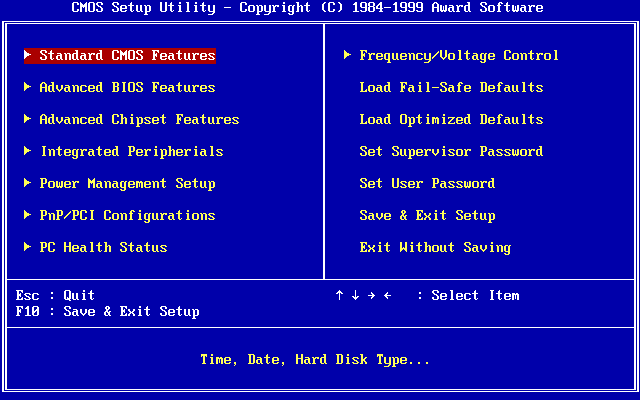
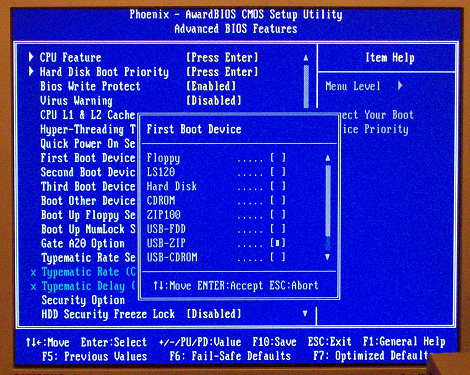
Text-only BIOS setup was the norm for a long time before the stupidly bloated EFI graphical stuff became common. Even then, there were the better full-featured TUIs:

https://upload.wikimedia.org/wikipedia/commons/0/05/Award_BI...

https://liveusb.files.wordpress.com/2010/05/awardbios-firstb...

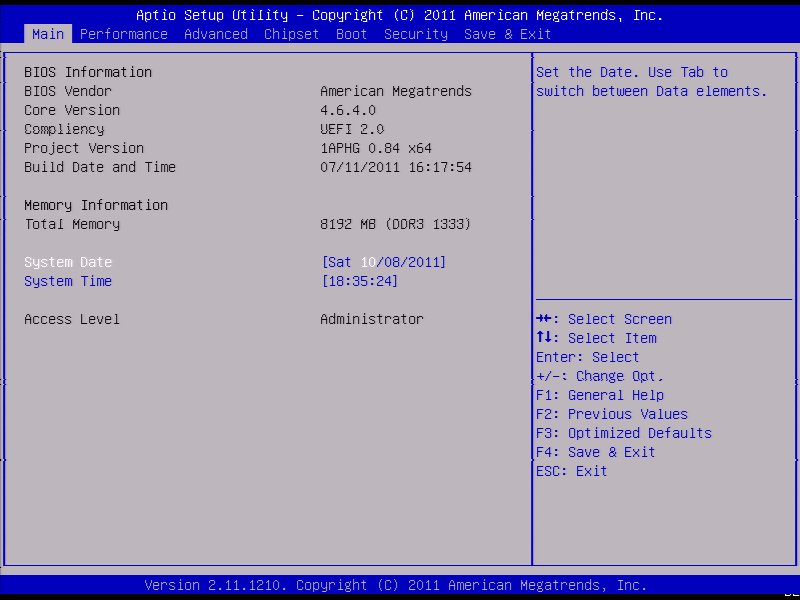
And the simplified crap with tabs that often came with prebuilt PCs but later seems to have spread to others too:

https://cdn.staticneo.com/a/Intel_Sandy_Bridge_Z68_P67/S%20B...

To my horror, I recently had to visit the UEFI firmware setup of a Lenovo tablet.... That was touch enabled.
And it is to be expected to be able to configure a touchscreen device using the touchscreen.
Most gaming laptops' UEFI screens are so "gamer" it's cringe. Dell XPS series have UEFI GUIs that are quite neat and absolutely an improvement over the text screens.
I'm also partial to the Surface devices'. MS put a surprising amount of effort into making them look Windows-y.
I did enjoy my Dell touchscreen-supported firmware setup when there was a menu 15 items long and an incredibly slow mouse speed.
> Text-only BIOS setup was the norm for a long time

Long-time Thinkpad users scoff at that ... while the figure of a duck suddenly enters their minds..

(Yes: I clearly remember my pre-USB thinkpad having a graphical BIOS with windows, icons, and a duck-shaped mouse cursor).

For those who haven't seen it: https://www.youtube.com/watch?v=XTaNi6uL41s

BIOSes of the time were all written in highly-optimised Asm, and I suspect those little "easter eggs" they added were because the programmers knew they had enough space left over to put some more fun stuff in.

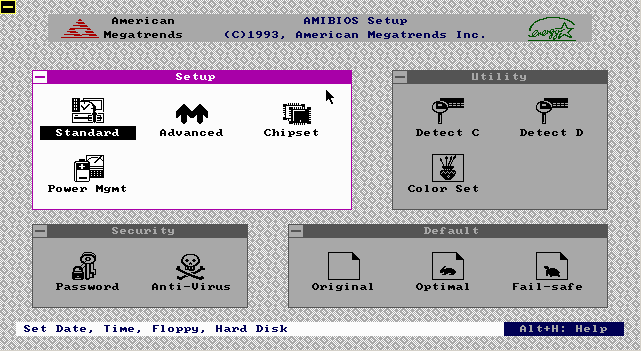
There was also AMI WinBIOS that provided a GUI, but I remember it being much less featureful than other BIOSes of the time with a TUI and didn't like mobos that used it, so in that case they may have sacrificed functionality for appearance.

I miss Openboot firmware that was on SunOS servers and workstations. It was IIRC mostly written in FORTH and we could write forth snippets at the serial console to make mods / query the pre boot environment. I also found the SGI boot firmware similarly functional. Both allowed changing boot settings and allowed to boot from network without any trouble at all. Graphical BIOS that came with the x86 systems was such a downgrade for us especially since you could not interact over serial/remotely with a simple terminal connection. IMHO
A 90's TUI that will forever be more productive than Windows 11.
> Text-only BIOS setup was the norm for a long time

I've had a GUI BIOS setup on almost every PC I've owned since the first 486 I built back in 1993.

The GUI was rendered in text mode. It's called a TUI (Text-based User Interface)
Plenty of 486 era machines had the AMI ”WinBIOS” whose setup utility kinda-sorta emulated a Win 3.x look and ran in (EGA 640x350 4bpp?) graphics mode, with mouse support:

https://media.moddb.com/images/groups/1/4/3107/winbios.gif

TIL, I thought TUI meant Terminal UI
You know what's funny?

UEFI actually lets you provide both touchscreen-capable bells&whistles gui, and a text UI for the frankenstein VT-UTF8 standard (essentially, VT-220 compatible with UTF-8, kinda like linux console) - all in mostly one codebase.

There's a standard UI description language which is used to specify menus, options and values (and how they are written into nvram), which is then interpreted by text mode interface driver (enabled when you connect over serial port) and graphic mode interface driver (where you can drop all sorts of graphical bells & whistles).

It's also how you can integrate menus from add-on cards into firmware setup.

Text UIs don’t actually require different resolution and refresh rates. Even Macs can boot into a text mode, but there’s no jarring mode-change flicker when it switches in and out of it!

Besides, there’s nothing to prevent you having a nice graphical boot configuration while still having a text version as a fallback (which is exactly what Intel Macs do)

Even for text-only I’d prefer native rez if possible to reduce scrolling, label truncation, etc.

That said yes, there’s no reason why there shouldn’t be a low rez textual fallback.

Then you'd need scaling and all that. Seems a bit overkill for something people rarely use.
scaling? nah, I'd say to just choose at runtime a sane text size (only to avoid using the same pixel size on a 1024x768 as a 5k screen) and set the number of rows and columns to fit the screen. Even if there isn't enough to fill the screen that's fine.

> Seems a bit overkill for something people rarely use.

Okay, but a lot less so than a full GUI with mouse and thousands of colors, like many motherboards have gone to.

The "sane text size" is naturally going to be the 80x25 text mode (720x400) which is what those config screens were originally defined for. Monitors will usually upscale lower resolutions anyway.
I think the rest of the PC industry could use some of the "paint the back of the fence" mentality that apple has; as of right now, many aspects of PCs off of the happy path are ugly as shit
It’s not even that Apple paints the back of the fence. Apple does not have a BIOS or a UEFI or now iBoot screen at all! They made sure not to have a fence at all.

You’re either in macOS or booted in its recovery partition.

Real boot loaders have embedded Forth interpreters!
Do Macs still have this?
No, it stopped for the Intel switch, I believe.
Yeah, the Open Firmware preboot Forth console was a PowerPC only thing.

Now Apple’s bootloader is actually a tiny macOS. As much as I don’t like the complexity this brings, I do strongly approve of a boot environment that supports proper input devices and video. My iMac Pro’s (intel, non-macOS-based bootloader) bootloader drops keyboard inputs when typing my long passphrase because I type too fast for it. The Mx macs no longer have this problem.

Upside though? I was helping a more software-oriented buddy get a PC build up and running that'd been half-finished by some kid he paid to put it together. The GUI on the EFI config was so intense, it was slowing down and completely locking up.

Got into the temps, realized that the CPU fan had been plugged into an AUX fan header instead of the CPU header.

Fan was spinning, wouldn't have thought to check if the EFI wasn't crashing.

I'm completely joking of course. I completely agree with you, I miss text-only mode. The modern Dell one stinks, the Asus one stinks...I have no data, but I'd be shocked if Gigabyte or ASRock were any good... :(

Text mode on my 8K monitor at any time, even in boot, is dumb and annoying and anachronistic. It’s 2023.
By the time my Dell monitor finally wakes from sleep, finishes negotiating whatever crap DisplayPort has to negotiate these days, and starts actually displaying frames, the computer has long since finished booting and is already idling at the desktop.
Good UEFI like Surface devices is native resolution so you can have flicker-free boot. My Gigabyte motherboard recently got native resolution with a UEFI update.
I don't understand why modeset causes flicker - fade to black, turn off screen, change resolution, turn on screen, fade to image.
"Fade to black, turn off screen, turn on screen, fade to image" is just slower flicker.
True, but that does look nicer than normal-speed flicker?
And slows boot down by a couple of seconds. As long as the firmware sets a native mode, modern OSes can just inherit that rather than performing a modeset and we just ignore the entire problem anyway.
This summer I went into an apple store, and there was this 2019 Intel Mac Pro tower hooked up to the shiny 6k XDR display. I brought up the System Settings, and set the resolution one notch towards "More Space". It faded to black and never came back.
Because most modeset protocols/implementations aren't atomic, so some frames are drawn halfway through setting the mode.

Turning off the screen can take a long time, but it is possible that putting up a "hot black" screen would be better than flicker if you had to do it.

Fancy fade in/out effects this early?
Nice to hear that good implementations exist somewhere out in the wild. I hope my AM4 and LGA1700 boards by Asus get similar updates at some point.
There's a lot going on there. To prevent flicker, you not only have to preserve the screen resolution, but also all the graphics card memory and state and hand it off through stages of boot from efi to the os.

As an analogy this would be sort of like rebooting the OS in place while preserving all the running apps, network state and USB connections without resetting anything.

These kinds of things are possible, but have lots of corner cases.

At least it works. I find low-res bios screens reassuring... something I can depend on.
Maybe instead of spending effort providing low res fallback options, we should be spending more effort making high res GUI-based options more dependable?
No effort was spent.
i heard these new fangled jibjabs don't even have audible POST beeps.
Ah yes, I almost forgot about the POST bleep bloops, and the clickedy click of the HDD actuator... or if you go back far enough the crunching of a 3.5in floppy - though to be fair that was sometimes more anxiety inducing (not the most reliable medium).
My old AM3+ motherboard has an option for full screen boot logo, and it starts in full HD, continuing with systemd boot, all in 1080p.

I thought this wasn't really a problem anymore.

This is fine if you have a 1080p monitor. I was impressed when this first happened to me, now on an ultrawide monitor it’s back to being not great.

I do recall my last motherboard had an option for a splash which was centered in a black screen, so you could basically display it at native resolution with no stretching and it would look great and seamless. I wish every motherboard had that splash option now.

Ha, back in the day when I was a student assistant in a campus computer lab, we flashed the BIOS boot screen with a full screen image of Darth Maul. The staff person who oversaw us was not amused. (This was in the Pentium 3 era IIRC)
My Amiga in the 1990s seemed to do a pretty good job at boot.
As did pretty much any PC motherboard/CPU/GPU combination from the past 25 years.
>Why? I can tell you why: because Apple hates display modeset flicker,

Thank god someone does. Hate how jank plugging monitors in just because some engineers thought “meh, good enough”.

Don’t think I should be seeing things flicker anywhere in my life with the computing power we have today and yet many consider visual nails on a chalkboard as acceptable.

It's somewhat endearing that a trillion dollar company goes through something similar as I did - fiddling around with rEFInd, my BIOS splash image, plymouth-git & plymout-sddm, "quiet splash" and god knows what else to get a "smooth" boot experience - not only adding several seconds to the boot process but also having to rescue the system multiple times with a boot stick.

I've come to embrace the flicker and the systemd messages. It's just a boot, it's in the order of seconds in this day and age, I can't even tell you what the initial reason for my obsession was.

Interesting. I wonder why anyone would turn ProMotion off considering that 120Hz massively improves responsiveness. I've only encountered one app that doesn't work with variable refresh rate and that's Genshin on Windows. Even that's probably not an issue with newer monitors that can handle VRR down to 60Hz without my monitor's frame-doubling flicker as it keeps switching been 60Hz and 120Hz
> I wonder why anyone would turn ProMotion off considering that 120Hz massively improves responsiveness.

The first reason that comes to mind is battery life. That's probably the most broadly applicable use case.

But also, if I was still doing e.g. frontend web development, I would want to confirm that my css animations looked nice at 60 hz.

Edit: My first use case is likely wrong, thank you to replies for reminding me Apple uses adaptive refresh down to 1 hz.

macOS is very good at adaptively reducing refresh rate when nothing is happening on screen, with the panel reportedly supporting the full range of 1-120hz so barring badly engineered apps that are permanently pinned at max refresh, the battery impact of keeping ProMotion on is minimal for most use cases.
Which raises the question even more why the refresh rate matters during early bootup - surely you could just start with an apple logo and a 1 Hz refresh rate, and then up the rate later during boot when it's time to do some animation...
Changing the refresh rate makes the screen go blank for a second or so.

GP of this thread links to a post arguing that Apple is going out of their way to avoid just that during the boot sequence.

Except it doesn't... because during use the dynamic refresh rate changes between 1Hz and 120Hz...
Oops, thank you, I completely forgot they were doing the adaptive refresh thing!
Isn't battery life a reason to keep it on? The refresh rate will be down to 24hz most of the time.
Why would 60 FPS CSS animations look bad on high refresh displays?
Well the CSS transition wouldn't run at 60 fps, it would run at 120 fps, no?

An animation that looks slick at 120 fps might look too fast/slow/complex/whatever on a common 60 hz screen. So if I was still doing this sort of development, I'd prefer to be working on a 60 hz monitor.

Aren't CSS animations capped at 60, same as requestAnimationFrame?

I've been advocating (and using) high refresh displays for over two decades and I find your reasoning preposterous. Downgrading to crappy 60 Hz monitor for nothing.

I am pretty sure they are synchronized to refresh rate (at least on windows).

I made a small experiment about raf https://codepen.io/mmis1000/pen/qBxqgLr and it always looks uniform regardless I am on a 60, 120, 160 fps screen. (It would blink crazily if you put it in the middle of two screen with different refresh rate, because it can't be in two refresh rate at same time)

Erit: okay, it looks non uniform only in safari. Clap, clap, clap, Apple…

CSS transitions and animations seem to be declared using expressions that are continuous over time so it would make sense that they are just quantized down to whatever refresh rate the system supports.
> Aren't CSS animations capped at 60, same as requestAnimationFrame?

Did some quick Googling to make sure I wasn't just out of the loop on this, as far as I can tell they are not the same: https://github.com/whatwg/html/issues/5025

I'm not even sure CSS animations can go above 60fps, and am unsure why you'd think it would be faster / slower on a different refresh rate screen: CSS transitions are defined by time, not frames.
Sorry, I meant the animation might look too fast, psychologically. The frame rate changes how we perceive movement.
I turned it off. The primary reason is that I use ctrl+arrow keys to move between workspaces frequently.

These might seem unrelated, but:

* There's a `defaults set` setting that allows you to speed up the transition animation length from 1 second to 0.5 second, which is huge because that transition is extremely poorly implemented (it leaves the windows on the workspace that you're leaving activated until the transition is complete, so you start typing and it's on the other screen you can't even see any more) and VERY SLOW

* That setting only works if the refresh rate is 60Hz, and it completely fails to do anything if ProMotion is on, because for some reason the animation length isn't programmed to handle the different refresh rates.

So having ProMotion off relieves frustration.

This is exactly the reason why I disabled it when I upgraded to my current M1, and I'm relieved to hear I'm not the only one experiencing this.
Emulation is one case where specific refresh rates are desirable.

Would be nice if I could force my MBP to run at 100Hz for PAL Amiga/C64 emulation - or even better if emulators could/would change the refresh rate at least when running full-screen.

(Actually, since Sonoma, I can manually set it to 50Hz, but there's no fixed refresh rate options above 60Hz, just 'Pro Motion'. Previously, the refresh rate setting seemed missing entirely on my M1 MBP)

Interesting, that could be a limitation to the internal screen of the MBP.

On Sonoma I can select 24, 25, 30, 50, 60, 100, 120 Hz, in addition to "Variable (40-120 Hz) refresh rates for my LG C2 display. When selecting 50 or 100 Hz, scrolling in (PAL) C64 emulation in VICE becomes much smoother, but not perfect. However, when I enable variable refresh rate and switch to fullscreen mode, VICE can perfectly synchronize the refresh rate and scrolling/animations become butter smooth.

I turn it off because I can’t tell the difference and if it doesn’t improve anything for me, I might as well not have the system wasting battery and other resources on it.
VRR displays run at 1Hz to save battery when the display is static. Reasoning like yours is why every OS's settings page gets neutered with every update.
It does the opposite: it goes well below 60Hz when there is no motion on screen.
To run x64sc at a buttery smooth 50 fps.

Admittedly rather niche use case.

I wonder why anyone would turn ProMotion off considering that 120Hz massively improves responsiveness.

...and I bet that's exactly the attitude Apple had when implementing things, which lead to this mess.

Well then don't allow turning it off in the first place.
Surely I'm not the only one that simply cannot perceive any difference between 60Hz and 120Hz?
Have you done an eye exam recently? With 20/20 vision and no practice you should be able to see input lag up to 1000Hz by dragging any UI element around like the presenter does in this video: https://youtu.be/vOvQCPLkPt4
I definitely see it in the video. But no my computer (like all Macs) does not have a touch screen. So without the aid of directly comparing my finger and the object being manipulated on the screen, I cannot perceive the difference.
What if you just move your cursor in a circle? You can see each frame where the cursor is in a different position. With persistence of vision you should see twice as many cursors on a 120Hz panel compared to 60Hz. I also feel a noticably larger delay in cursor movements when I when I use a 60Hz monitor or phone.
I'm sorry but I cannot see twice as many cursors when I move the cursor in a circle. I see approximately eight of them when I move the cursor as fast as my finger allows me to, regardless of 120Hz or 60Hz.
I do not drag UI elements. I'm still struggling to make my Mac (work notebook) as responsive as my personal i3 notebook.

My perception: current Mac is an oversized iPad without touchscreen

As someone who regularly switches between a Windows PC and a Mac on the same display, I know what you mean. It doesn't feel as snappy/responsive, I believe probably linked to how rendering is done in macOS (basically something like a PDF composition). There have been a lot of talk about gaming on Macs, but the truth is that to have any chance, Apple needs to fix this laggy feeling. The same game on the same computer just feels way better in Windows than it does in macOS, it is definitely a software problem...
specs?