Hacker News new | ask | show | jobs
by Nextgrid 1021 days ago
Unfortunately this sounds like a typical pro-Linux rant with the usual scare words such as "Microsoft", "UEFI", "secure boot", etc. To be clear, I am attacking the piece itself, not the author.

The reason there is no explicit threat model defined in the TPM specs is because it defines a general-purpose hardware security module. It is up to integrator to define the threat model (TPM's security properties also depend on the rest of the system) and the application.

Even if a TPM is not perfect and depends on other pieces of the puzzle to also be secure, it at least opens the possibility of making it secure in the future once those vulnerabilities are discovered & fixed. Furthermore, even in this vulnerable state, it still increases the effort required for a successful attack.

Support for TPM-backed full disk encryption means you can now have FDE on by default for everyone with no usability impact at all. Even if it's not secure and a dedicated attack will still break it, it means a casual attacker can't just pull a drive or reboot the machine and run chntpw or steal sensitive data from discarded drives that haven't been properly wiped.

I like TPMs. I like the fact that a rogue datacenter employee or intruder can't just pull one of my servers' drives out and get sensitive data. I like not having to worry about having sensitive keys on the filesystem somewhere because every secret is in memory and is ultimately derived from the TPM doing remote attestation at boot and handing ephemeral keys. I like not having to worry about unattended reboots or entering LUKS passphrases remotely.

8 comments

While that's a very good use case, the desired one where you're not allowed to use the Internet unless you're using a big three approved device that can attest you're not using an ad blocker isn't so much.
> he desired one where you're not allowed to use the Internet unless you're using a big three approved device that can attest you're not using an ad blocker isn't so much.

There's no reason to believe this will require a TPM or depend on the presence of one. As far as I know, Widewine and similar DRM schemes successfully achieved this without any hardware assistance. Yes, bypasses exist and all the major piracy groups have them, but the objective of preventing the masses from having access to a working bypass is clearly achieved and doesn't require hardware.

Widewine and similar DRM schemes pretty much require hardware assistance; the lower levels that do not will provide you with 720p, which is exactly what you are getting in Linux. For 4k, it requires tee application, or similar mechanism that's not in the reach of mere mortals.

The early bypass of widewine meant burning an nvidia shield (invalidating its keys) for each and every single rip.

Do the DRM schemes interact with HDCP at the hardware level? I know HDCP is necessary, but my understanding has always been that the decrypted video data is always available to the OS (at the kernel level) and the "requirement" of it being outputted only to an HDCP-enabled sink was purely done in software through layers of obfuscation?
Higher-resolution ones definitely do. That's why you only get Widevine L3 on PCs and Macs, which most content providers limit to 720p or below.

You need something else (like Apple's FairPlay or Microsoft PlayReady) beyond that, and these definitely check your HDCP version. I believe 4k output commonly requires HDCP 2.2.

FairPlay on macOS might be based on obfuscation still (there was an interesting article on that here some days ago), but high-resolution playback on Windows definitely does involve the GPU driver somehow.

> Widewine and similar DRM schemes successfully achieved this

Do you have any references to back that statement up? Software-only DRMs are ultimately always either plain obfuscation or some variant of white-box cryptography, which is also anything but proven to actually work.

Widevine and other schemes are trivially defeated as far as manipulating the results of what you see on the screen. The best they've been able to do is sometimes protect the compressed original stream, but they also routinely fail at that, and that's not the kind of security that can defeat an adblocker. The kind of security you're talking about would require some kind of TPM-like solution to attest you're running approved software and don't have root.
Touche, not a TPM, those are usually separate hardware whereas TEEs are integrated.
A core argument the post makes is that TPMs are insufficient for verifying full stack integrity and thus ineffective for FDE. (Eg by exploiting vulnerable drivers, an attacker can dump the disk encryption key from kernel memory.)

But in such a scenario, an attacker can also use such an attack to bypass any remote attestation/DRM/etc!

I guess you could argue that such attacks are too much work for consumers, and that low fences control big dumb animals…but I think, fundamentally, the same argument applies to consumer security functions like FDE!

Tl;dr: I think it’s hard to argue that TPMs are both useless for practical user security and a threat to free computing. It’s gotta be one or the other!

What's the point of TPM-backed full disk encryption with no usability impact (meaning password/pin-less) for the average user who is more likely to get their device stolen vs some covert disk image shenanigan?
If the device is stolen it can still enforce OS-level authentication (including potentially phoning home, invalidating its access to remote resources, or erasing itself), except now you can't bypass it by rebooting and running chntpw.

Will this stop a dedicated attacker? Probably not, although a fTPM with an up to date OS would require the attacker to find an exploit for this machine's early boot firmware (UEFI, etc) or burn a Windows zero-day, both of which are very costly.

It does however prevent your casual thief from watching a YT video "how to reset windows password using linux live cd" and then getting access to your sensitive data (browser's saved passwords, etc), so it's a major improvement.

I prefer to require entering a master password on boot manually and then configuring the OS to auto login to my non root user (with a different password than the disk). The longer and more complex your dependency chain for security, the more opportunity for it to be compromised. The encrypted “password on boot” partition then contains the keys to mount the other disks.

I’d really like Apple’s model on my machine where the root image is just the stock OS image unencrypted and the co-processor owns the responsibility of managing IO (and done efficiently) using my master key. TPM seems like it misses the mark from that perspective.

Using a decryption password on boot is less secure than TPM + measured boot/secure boot. Specifically, it’s vulnerable to a two-touch attack. In the first touch, the attacker replaces your bootloader with one that looks identical but steals your password. On the second touch, they now use the password to steal your data.
If the attacker can install a custom boot loader the system is already defective by design.
If the attacker can replace your bootloader, why can't they just get the decryption key from the kernel later? And if you did have Secure Boot, then using a password with encryption at rest is just as secure : you can't change the bootloader and you can't change the OS (since it's encrypted), so you can't exfiltrate the password. The end result is that the TPM doesn't have a practical benefit.
The bit about "two touches" seems to imply physical access, so in absence of TPM the attacker can replace your bootloader with little effort vs with TPM they'd need to break TPM.
You would still use the TPM to verify the software chain. But don’t use the TPM to Auto unlock disks. That’s the part that feels like a bad idea
The issue is that data disks and system disks get conflated. For the system disk (anything outside of /home) you generally only care about signing - which FDE does as a side-effect. Each user should have their own disk/partition/subvolume with a distinct key that is retrieved from the PAM.

This achieves two things: I know that I am typing my password into the OS that I or a trusted third party compiled (not one planted by a hacker), and my home directory gets decrypted as part of my normal login routine.

An attacker still needs to use some kind of semi-advanced attack in the boot chain or DMA to steal the user's data, instead of just plugging in a LiveUSB and going to town.

Yes, there are a lot of vulnerabilities in the Secure Boot process on most devices, because the surface area is huge, but the attacker still needs _some sort_ of vulnerability to gain a foothold.

I agree with the frustration in the gist - Secure Boot and TPM-sealed disk encryption aren't nearly as good as they could be, because the surface area is gigantic and sure to get exploited. But this is a classic Security Nerd vs Reality scenario: while it is absolutely _possible_ to pwn Secure Boot + TPM-sealed encryption in almost any scenario, using it still makes it _much harder_ for an attacker to do so, and most will give up.

For the typical user, losing their data is a greater risk than someone with physical control over their machine being able to access it. The logic board in your computer fails or you forget your password and all your data is gone.

And the default way of mitigating it is an even worse security risk. Now all your data is on some cloud somewhere, waiting for that vendor to get breached or your account to get phished which is now possible without physical control over your device. Plus, if you couldn't get into your computer because you lost access to your account, you also lost access to the data in the cloud.

Whereas if you really do have sensitive data, you still don't need a TPM and get better security without one. You keep a Yubikey in your pocket or memorize a strong passphrase and then the key physically isn't stored on your device.

If your data is this valuable, you certainly do backups? I suppose something like cloud backups is now built-in into windows, and would save your Documents (and maybe more) also by default.
We're talking about ordinary people here. Their data is valuable to them because it's their pictures of their grandkids and their draft of the Great American Novel and their recipe collection. They're not backing it up themselves, they don't even know how.

But it's also their copy of all their bank statements that include their routing number, which nobody who is physically in their house is going to use against them but is a serious fraud risk if it can be accessed remotely on some cloud.

Windows backups are subpoenable by half the governments on the planet, who have bad actors in them, and may also have exploits for dedicated attackers because they present a huge target.
If your threat model includes state-level actors, I wonder why you consider running Windows at all, or at least not in a highly secured transient VM.
You can store the full disk encryption key in the TPM and rate-limit PIN attempts using its secure non-volatile storage, as far as I know. That's very useful in case of loss/theft, given that users don't like typing long passwords or PINs for every login.

I'm not sure if this is what Windows actually does, though, or if the TPM just hands over the disk encryption key after Windows passes system attestation and then verifies the screen unlock PIN/password in software – that would be significantly less secure.

Why go pin less? I like the fact that the TPM can restrict retry counts and I do not need a rediculously long password.

The only thing I do not get is why this is not done by a simple SIM card like in any mobile phone. Then one could choose a TPM. Even more: I do not get why I cannot encrypt my android phone with my SIM card.

I have many machines, some headless.
> This sounds like the rant of a typical Linux fanboy

Hi, it's me the Linux fanboy whose entire personality is making Hackintosh and VM apps for iOS. Just a friendly reminder that attacks on the author's credentials have no baring on the weight of the arguments.

> The reason there is no explicit threat model defined in the TPM specs is because it defines a general-purpose hardware security module

It sounds like you have zero experience in security :)

> it defines a general-purpose hardware security module

No it doesn't. I think you're hinting at HSM which is another beast I may write another fanboy FUD piece about at some point. But no, HSMs are not the same as TPMs. And TPMs are not HSMs. For one thing, and HSM defines something called a trust boundary where keys should never leave. TPMs will happily hand you the keys when you meet a certain condition. HSMs support key migration and provides a secure way to transfer keys from one HSM to another without leaving the trust boundary. I can go on and on...

> TPM's security properties also depend on the rest of the system

The argument isn't TPM versus no security. The argument is TPM versus the existing security you have on Windows. (Passwords, FDE, etc). Of course all this depends on the system. TPM doesn't add anything (* with the exception already listed in the article).

> it at least opens the possibility of making it secure in the future once those vulnerabilities are discovered & fixed

Nope. Architecturally flawed. But I'd just be repeating the argument from the article.

> means a casual attacker can't just pull a drive or reboot the machine and run chntpw or steal sensitive data from discarded drives that haven't been properly wiped

They can with a $80 FPGA. Read the appendix.

> I like the fact that a rogue datacenter employee or intruder can't just pull one of my servers' drives out and get sensitive data.

They can with a $80 FPGA. (Unless your datacenter uses Intel TXT and tboot and other prerequisites that were talked about in the article)

> I like not having to worry about having sensitive keys on the filesystem somewhere

If you use BitLocker, they are always in kernel memory

> derived from the TPM doing remote attestation at boot

That's not what "remote attestation" means :)

> I like not having to worry about unattended reboots or entering LUKS passphrases remotely

If you like that, just disable your password and you'll get the same result

> TPMs will happily hand you the keys when you meet a certain condition. HSMs support key migration and provides a secure way to transfer keys from one HSM to another without leaving the trust boundary.

You can create non-exportable keys on TPM's, and there are mechanisms to securely transfer keys between devices.

Granted, doing so is kind of a mess, but nonetheless possible.

> Just a friendly reminder that attacks on the author's credentials have no baring on the weight of the arguments.

> It sounds like you have zero experience in security :)

Seems like you're countering an ad hominem with an ad hominem here...?

I don't know the TPM specifications in detail myself, but I do know that TPMs are in fact quite general-purpose HSMs, of which assisting in attestation/measurements for the purpose of trusted computing is only one (although certainly the most controversial) subfeature.

If I can store my SSH keys on my TPM and just don't use trusted computing at all... How is that "zero practical security"?

I lol'ed pretty hard when I read the appendix. What an amateur job. All this time I was sure someone thought of the possibility of attaching a logic analyzer, or an $80 FPGA, to one of the pins.
> whose entire personality is making Hackintosh and VM apps for iOS

Congrats and thanks as I'm fairly sure I must've used your work at some point.

> Just a friendly reminder that attacks on the author's credentials have no baring on the weight of the arguments.

I didn't check nor care about the author nor their credentials because my comment was purely on the piece itself and what it sounded like to me and not an ad-hominem to the author. It did after all contain the usual scary terms such as "Microsoft", UEFI, Secure Boot as well as dismisses an entire concept just because of some flaws that can be rectified incrementally.

> It sounds like you have zero experience in security :)

I never claimed to be a security expert, but maybe my layman's approach allows me to overlook the pedantry and avoid dismissing something entirely just because it doesn't perfectly conform to some ideals? (I think the TPM's threat model will be up to the integrator to determine, as it depends on other things such as discrete vs firmware TPM, UEFI/Option ROMs and their security flaws, etc).

> No it doesn't.

I used "HSM" to mean "dedicated hardware device that does security-related things", rather than a 1-to-1 equivalent of a commercial HSM. But to the best of my knowledge a TPM can also act as a (low-throughput) actual HSM if you so desire, allowing operations with a secret key without ever disclosing it?

> The argument is TPM versus the existing security you have on Windows. (Passwords, FDE, etc)

My argument is that the TPM enables frictionless FDE for the masses without any change in user experience and without even relying on a password (which would often be weak and thus useless in practice).

Tell me how this is the same level of security as no FDE or FDE with weak password. Even if it can be broken using various methods (some of which you've described), surely you see that it still significantly increases the barrier to entry and cost of a successful attack?

> They can with a $80 FPGA. (Unless your datacenter uses Intel TXT and tboot and other prerequisites that were talked about in the article)

Those machines use fTPM which isn't vulnerable to this attack, but regardless, $80 is still more expensive than the $1 a Linux live-CD/USB costs, not to mention the requirement for lengthy physical access and ability to solder/connect wires onto the mainboard.

I'm not arguing that TPM is unbreakable or will resist sophisticated, prepared, targeted attackers. But it raises the bar by at least $80 (and in practice by a lot more on modern machines with fTPM), with zero additional effort from the user (thus it can even be used where conventional passworded FDE is impractical, such as unattended servers). It's literally free security, and yet you chose to shit on it just because it's not perfect (even though the flaws would get patched up over time, as with any product).

I think it would be good if this level of security could become the baseline (even if it's not perfect) and would rather not have FUD getting in the way. You are of course welcome to use something stronger depending on your requirements, but this becoming the baseline is still an improvement over no FDE at all (still seems to be the norm on PCs).

> If you use BitLocker, they are always in kernel memory

Yes I understand, it would still means you'd need to either be root already or have a privilege escalation exploit to extract them.

I'm not necessarily talking about FDE keys here though (for FDE keys, if you can execute code just read the filesystem directly, no need to even care about the FDE).

TPM allows a machine to prove (with reasonable levels of security, requiring at least $80 to break) to another one that it's in a given state, and be able to obtain ephemeral credentials based on that claim, this avoiding needing to persist those anywhere.

> That's not what "remote attestation" means :)

See above.

> If you like that, just disable your password and you'll get the same result

Well no, because then any guy with a Linux live CD can get the data (or someone at the recycler if the drives are swapped and discarded without being sanitized), where as now they'd at least need to shell out 80 bucks plus a soldering iron and lengthy & suspicious-looking physical access to the machine.

I might be a bit ignorant towards the topic but so far everything I've seen about TPM has no actual benefits for the home user. For cloud, sure, there are benefits.

It seems like it's a sunken cost fallacy that big tech spent a lot of money on and they are trying to get it back by convincing average Joe that a TPM is good for your PC.

Home users take their PC to airports, hostels and cafes. Criminals who break into homes steal laptops. Of course there are benefits.
you are right that tpm and such technologies are a right step, you have to start somewhere. (i know it didnt start at tpm ofcourse). The author is also right that some claims are too markety while in the real world device are still vulnerable. The piece also goes on to say theres further efforts such as TXT etc. taking place, so in essence for me it reads like you mostely agree. microsoft, uefi etc. arent scare words here imho, they are very closely related to claims made and technologies involved.

I thought the piece was ok, but it doesnt add anything new. its another piece pointing at the puzzle a lot of people including you already know exists. its not aimed at you for that matter. (so fair comments, but perhaps a bit harsh?)

There are two issues. One is a false sense of security. You think that you have the same level of security of a full disk encryption, but you don't. On a full disk encryption only who knows the password can access your data. On this system the disk is automatically decrypted at boot, so any flaw in Windows that permits a privilege escalation done by that PC can give access to your data.

If somebody that wants your data steals your PC he will be likely to find a way to access your personal data. It's a protection against a casual thief that is probably not interested in your data and can't probably even figure out how to bypass the Windows password screen.

But if this doesn't make harm, why not have it? Because having disk encryption enabled by default to a user that doesn't know that is enabled by default is not necessary a good thing. Let's face it: users don't do backups. I know even companies that have all their data on a single server with no backups.

Now if the motherboard breaks and you don't have backup... you can't just take the disk out of that computer, connect to another PC and recover the data. You have lost your data!

But wait, you say Microsoft tought about that, indeed if you signed in with a Microsoft account you can recover your Bitlocker encryption key from the Microsoft portal... wait what? Exactly. No security at all! Microsoft knows your encryption keys and it stores it on their servers... again: false sense of security is worse than no security at all!

Finally, even if this system was 100% secure: do you trust the hardware? The same hardware produced by the same manufacturer of the products where nearly once in a year a big security flaw is discovered? The same hardware where we know that the NSA, and probably other government agencies, placed backdoors?

Whatever, typing a password when booting up the computer (that is once in a day) is such a big deal?

> But wait, you say Microsoft tought about that, indeed if you signed in with a Microsoft account you can recover your Bitlocker encryption key from the Microsoft portal... wait what?

Can't you alternatively also export a copy of the actual disk encryption key and write that on a piece of paper? The last time I used Windows, that was possible, at least (but I think I didn't use the TPM back then).

On macOS, you can do either, for example, and it uses a similar construction (although using Apple's proprietary secure element and hardware encryption engine rather than a TPM and secure boot).

My argument isn't that the TPM provides bulletproof security equivalent to a strong FDE passphrase, but that the TPM allows effortless, passwordless FDE with reasonable levels of security to users who otherwise wouldn't use FDE at all.
What type of password are users going to choose if they can't use a password manager at boot time? Its no more secure to a DMA attack then a TPM protected drive. Attackers are getting the both types passwords from memory.
> indeed if you signed in with a Microsoft account you can recover your Bitlocker encryption key from the Microsoft portal. ... No security at all! Microsoft knows your encryption keys and it stores it on their servers.

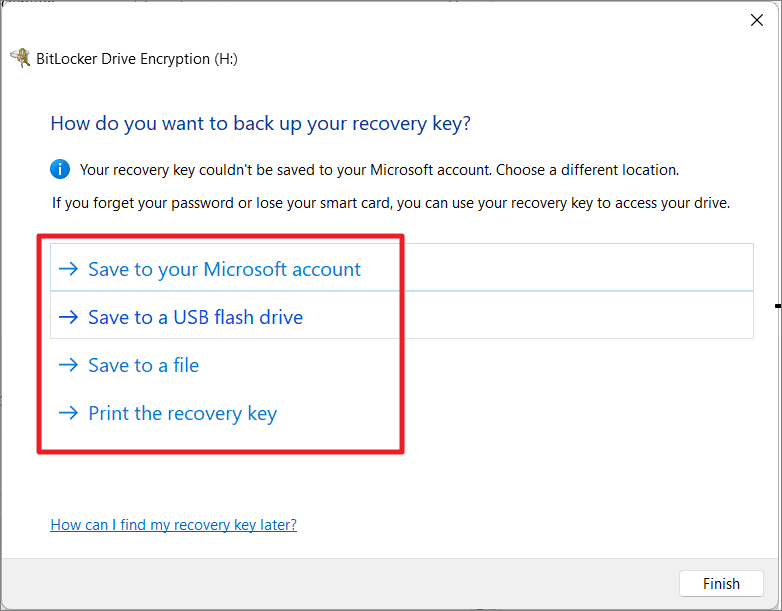
This is complete disinformation. Microsoft gives you the OPT-IN OPTION to save your Bitlocker encryption key to your account.

It's clearly labeled and you need to click on it to activate it:

https://allthings.how/content/images/wordpress/2021/11/allth...

Likewise, I am not too concerned about the NSA breaking into my laptop. I just want that if some kid finds it and tries to plug the SSD into his computer, my files aren't all there to be read.
This "middle-brow dismissal" should be downvoted and flagged on the first sentence alone. Not be the top comment.

The datacenter use case sounds useful—should have led with that.

I've edited my comment to hopefully clarify that I am talking about the piece and not accusing the author himself.

My problem with the piece is that it reads like the usual knee-jerk pro-Linux FUD that typically originates around scare words like "Microsoft", "secure boot" and "UEFI".

I didn’t read it that way. Was spirited, but no insults that I noticed.

And it’s not like those “scare words” didn’t become scary for a reason. Your response starts with reverse FUD.