Does this fix your issue? When I use my wife's Air on my Dell non-retina monitor, I can either have crisp but tiny text, or big and blurry. This utility perfectly solves it for me. https://github.com/waydabber/BetterDisplay
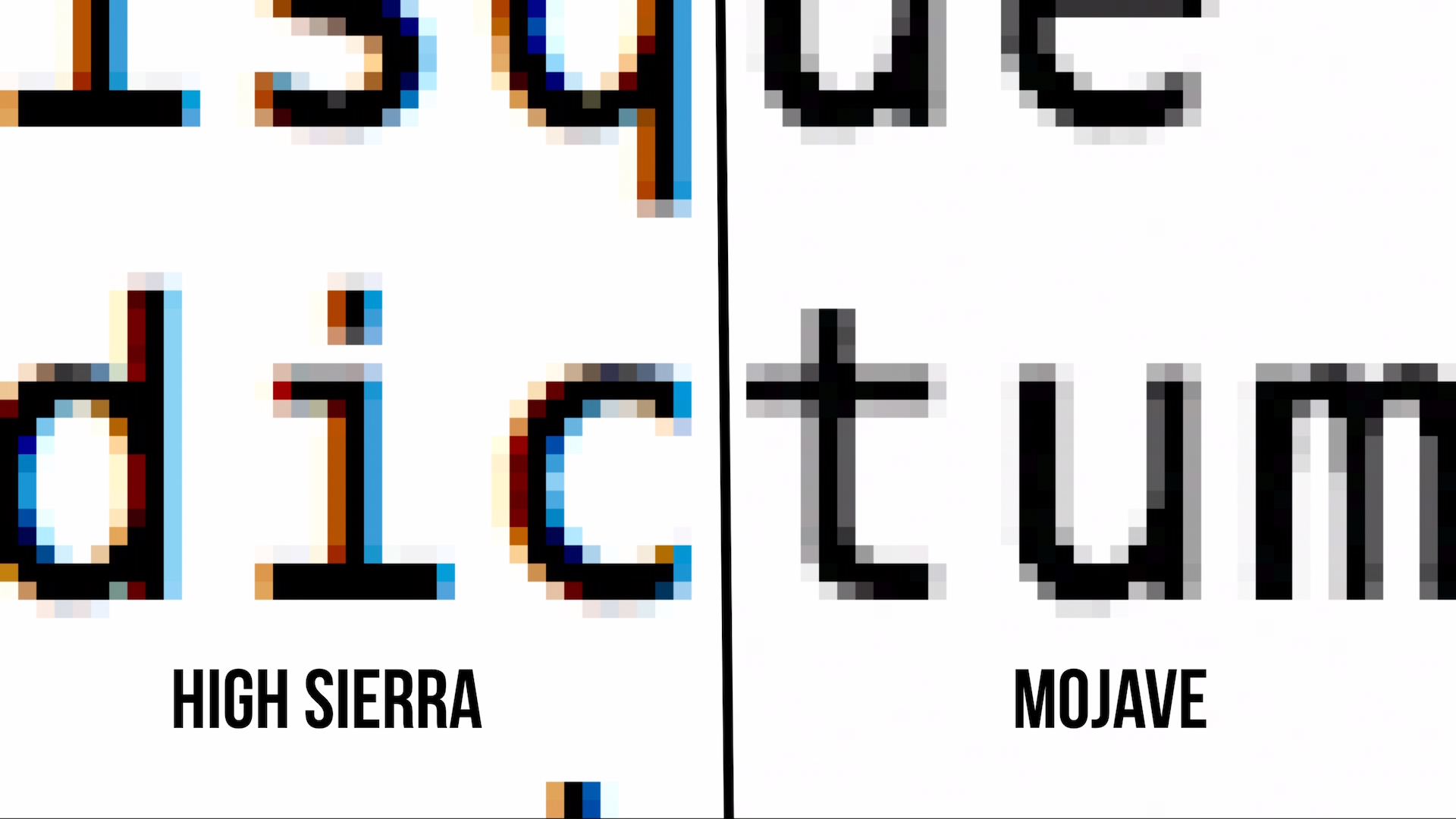
They didn’t stop antialiasing. They stopped sub-pixel antialiasing and snapping stems to the pixel grid, which is less relevant on retina displays, to avoid artifacts when text is translated and animated.
I had the 24" 1920x1200 Apple Cinema Display for several years, and I vividly remember that text looked objectively worse after I upgraded from Mavericks to Yosemite.
I now use a 27" 1440p monitor and I'm always struck by how bad text looks on it compared to my 2009 MBP that's stuck on Mavericks until it dies (not due to text reasons, it's just slow as hell/no benefits to upgrading).
They did something that was relevant to 1x displays, because it used to be better.
Yeah, you can really tell no-one at Cupertino uses @1x displays. I don’t find it to be unusable, but jesus christ it’s ugly—far uglier than the same monitor driven by a Windows machine. It’s not just text either, throughout the UI a lot of scaled images (e.g. App Store preview images) look awful. You can tell it’s just not a priority.
The problem is my alternatives are a 4K display with non-integer scaling on macOS, or a 5K Studio Display that my Windows work laptop can’t drive which costs almost as much as my MacBook again[0]. So I guess I’ll stick with what I’ve got.
[0] I’m intrigued by the recently announced 5K Samsung ViewFinity S9, but I’m not expecting it to be meaningfully cheaper than the Studio Display considering it’s a captive market.
Is this because the computer is sending YPrPb color instead of RGB? It seems to be a common problem on Dell monitors. A hacky work around: https://github.com/sudowork/fix_m1_rgb
The one thing I appreciate about windows is that you can completely disable cleartype/anti-aliasing, if you'd like. As far as I know of, it's not possible to do that in any version of macOS (including Ventura).
In fact Checking "Antialias text" in the Terminal.app settings profile just didn't do anything on a non-retina external monitor for 2+ years.
It's difficult and memory-expensive to do subpixel font rendering in the presence of things like transparency/colors/blur effects - eventually you'd end up in a situation where it's just missing half the time anyway.
How expensive would it be? Windows XP (circa 2001) does it without GPU acceleration with ease on a 512MB ram machine. Windows Vista runs on 2G of ram, with transparency everywhere (to the point that it is distracting).
A lot worse than that. They didn't have 5K HDR 120fps displays and macOS has some significantly more demanding things than plain old transparency going on.
You get used to it. I went back to a nonretina 2012 mac as my daily driver. From 2 feet away, you can't see any pixels so it really doesn't matter much. Enjoy the increased performance from driving fewer pixels.
This happened to me the other day when I plugged my MacBook Pro into an external monitor. Sadlky I cannot use it in laptop mode at all anymore as it has a butterfly keyboard so of course not all my keys work.
It's unusable with text that blurry. I thought something was broken at first.
I guess they want to force us to buy a Pro Display XDR. No thanks, instead I'll buy a new computer and run Linux.
EDIT: My mistake, they now have the Studio Display for "only" 1500£
I think the last time was in 2020, when you could still get the non-retina MacBook Air?
That said, the Mac mini and Mac Studio are reasonable to consider here, since they're sold without displays and I'd be shocked if the majority of them aren't used with regular 4k displays. (We're less than a year out from Apple having a first-party retina monitor at a vaguely reasonable price-point, still.)
No, but you can use Apple products with external displays that may not be hidpi. And of course with the mac mini an external display is the only display option.
This answers my question - In recent years I have used MacOS with 3 different external displays, and have never had a problem. Their resolution was always QHD.
It usually doesn't look as good, but it's not like distractingly bad.