Well this is... eerie. I just released Stictionary[1] on Friday.
It is an offline, ad free, dictionary that remembers words you look up. It gives a word of the day and provides (admittedly underfeatured atm) flashcards to review your word lists. It includes optional syncing to keep your word lists across devices. I've been holding off posting about it while i complete the website[2].
Love to see someone else had such a similar idea. Great confirmation of the unmet need in the space. Really awesome execution as well. Congrats on the launch!
On a personal note, i built Stictionary after tracking all the words i looked up manually for years. Now i have an app that does it for me (and was a blast to build).
It's very stupid, but I check dictionary definitions in an incognito window because I'm horrified of someday people coming across my browser history and thinking "Wow, he didn't know the definition of that?! What an idiot!" The idea of a dictionary that tracks my searches horrifies me in a silly way. Ha!
I look up words for which I already know the primary definition all the time. Sometimes it's just to confirm that it doesn't mean something subtly different than I remember. Sometimes it's to find alternate/secondary uses. Sometimes it's to confirm spelling. Sometimes it's a jumping off point for synonyms or related words. I wouldn't assume you were totally unfamiliar with a word just because you looked it up.
I’m amazed how often I “know” the primary definition, only to discover I’m wrong when I look in a dictionary. Same with pronunciation of words I’ve only seen written.
> Same with pronunciation of words I’ve only seen written.
I had the opposite experience when visiting the US for the first time. I saw a bag of 'luh-too-ché' in the store. For about 10 second my mind was wondering what it was. Then I realized that the word that is (to my Dutch brain) pronounced as 'ledice' is not spelled that way, it's spelled 'lettuce'. I came to the US with C2 level proficiency (thanks to subtitled media and MMORPGs), but I still had a lot to learn!
I do this all the time to look up pronunciations. I'm interested in linguistics so I taught myself IPA, and with things like stress being pretty unpredictable in English, while I might know the meaning of a word I like to make sure I'm pronouncing it correctly
Honestly, 99% of the time that's what I'm doing too. I'm pretty sure I'm using it correctly, but want to double-check before embarrassing myself in front of all of 10 people still on Twitter.
> Misusing words because you assume you know what they mean, that is stupid.
But if you're sure you know what it means (albeit incorrectly), because that's what you've picked up or been taught and no-one has ever corrected or queried you, where would the impetus to look it up in a dictionary come from?
You might have a case for "deliberately misusing words [...] is stupid" but there's a long comedic and literary tradition there...
I suppose you could look at it that way. I certainly did, and it has taken me a very (stupid) long time come to a slightly different understanding. Not saying it is better necessarily. I just find it closer to true more of the time in my life.
Misusing words may or may not be stupid—without more information, including some nebulous stuff about intent and interpretation, I have no way of saying for sure in a given encounter.
What I would say instead is that many people seem to see “misuses words because [cocky/pretentious/know-it-all/careless]” as a heuristic for stupid. It isn’t a great heuristic, but knowing that people use it to rank you and choosing speech accordingly…isn’t stupid.
I think this is also a mechanism for languages to evolve: for whatever reason people start using a word differently from the dictionary definition. After a while if it has enough support the new usage gets added in. Sometimes the new way can be so entrenched that the old definition becomes archaic.
Consider this very popular hn link: http://jsomers.net/blog/dictionary it gets posted once a year at least and strongly recommends looking up words you already know.
Me too, it’s the most low-key killer feature of the OS imo. I use it automatically just to check my assumptions most most of the time; it’s just so easy and easily ingrained.
Apps that work offline are my favourite as even though I have 4g and wifi, these connections can sometimes be slow or just down and it’s sad seeing apps just not work in those scenarios.
Edit: I know you said it’s not finished, but that website is impressively broken!
Fantastic tool, thank you! Any chance you could include usage in a sentence for each word? As a non-native speaker, sometimes it is not obvious from the description on how the word is typically used.
> Great confirmation of the unmet need in the space.
Hmmm, I've been using a dictionary app for years that is offline, ad-free, remembers words you look up, and has a word of the day feature. Also has favorites and you can add personal notes on entries. It's also free. It's based on Wictionary. I use the ones for Spanish and Portuguese but I think they have versions for many languages. The name is fairly generic "Spanish Dictionary - Offline" by Livio.
I love it, it definitevely cover and unmet need, as a no native english speaker it is important to me to keep track of words that I have looked up, thank you, please let us know when it is available in android.
Great list of features! I was thinking of building exactly the same app few years ago. So agree with your statement that it is all verification of “unmet need in the space”
Yeah, mobile is brutal right now. The website is incomplete by every measure and i've been experimenting with a dekstop concept so far. I'll post a proper Show HN this week once the website is complete and i am on the play store!
I've also tracked a lot of words I have needed to look up, but made little posts out of the interesting ones. Of course, I immediately forget all these definitions, but that just makes it fun to go back through them.
Sorting the definitions by length is a nice touch. What's with the different 'editions'? I thought that they were grouped by perhaps subject or book, but can't figure out what for instance WRITHEN SHINE EDITION exactly represents.
Actually, iOS already has built-in support for dictionary and thesaurus. In any native text input field, select a word and choose Define or Look Up. The choice of dictionary is customizable; I usually choose New Oxford American Dictionary and Oxford Dictionary of English (not to be confused with the venerable Oxford English Dictionary). They are high quality dictionaries. They are basically the same except that the pronunciation for the latter is in IPA which I'm more used to.
When I need to look up a word, I create a new note from control center, type in the word, double tap to bring up the contextual menu and then the dictionary.
It pretty much checks all the boxes. For distraction-free reading, turn off "Content from Apple" in the Siri settings to avoid those obnoxious Siri knowledge panels.
Not sure if I’m missing something about this method, but in many apps you can long-press the word directly to get the context menu with “Look Up”, without having to type the word into a note.
The use case here is to look up a word whilst reading a book, not to look up words that are already on your phone screen. If you see a word you don't recognise, you write it into a note and it gives you the definition instantly
Pro-tip: Now you could also use iOS' camera app to recognize the text, select it and look it up. I'm not sure if it's faster than the note route but the option is there.
Awesome. Did not know I could disable that content. Also, dropped a few dictionaries I had enabled (Russian? Spanish? German?) - hopefully the swipe-to-text will improve accuracy now, too.
This was the feature that sold me on Mac OS X in 2003 or so. Having an operating system where I could get the dictionary definition of any word in any input field, or web browser, or piece of UI just by mousing-over it and hitting ctrl+command+D
I was a Windows user at the time and the _consistency_ of this dictionary lookup throughout the UI just blew me away
I'm thrilled to read all the comments with ideas and improvements. I will try to answer and keep up with the thread.
Kudos to all the similar initiatives trying to solve the problems I outline in the article. It's wonderful to see a zeitgeist about dictionaries.
Who wants to jump the article and try the version I built, feel free to download the iPhone [1] or Android [2] version or run it by itself with the open source repo [3]
How did you manage to get the dictionaries for all those languages? If I didn’t miss it, that part is left open in the article after explaining how highly priced they are…
Ever since reading that, I have tended to use the 1913 Webster’s as my primary dictionary, supplemented by various modern ones where necessary. I found an acceptable iOS app for it - the UI is not good, but at least it has those shimmering definitions.
My dream would be if you could make a version of Wordnote that uses 1913 Webster’s as a dataset.
Wow, that blog post is fascinating. Thanks for sharing.
For those who haven't read the blog post yet, it also includes an archive.org link to the out-of-copyright 1913 Websters, and ways to install it on Mac, iPhone, Android, and Kindle.
Where the blog post compares the very different definitions of "pathos" in 1913 Webster's & 2010 New Oxford American, I'm reminded of Orwell's "Principles Of Newspeak" appendix at the end of Nineteen Eighty-Four. The appendix imagines how the definitions of words kept being further narrowed until the final Eleventh Edition of the Newspeak Dictionary, to diminish the range of possible thought.
James Somer's excellent blog post (and mcphee-draft-no-4) provoked a fundamental shift in the way I rewrite. Can't understate its effect. Not the least of which is that I now turn to the 1913 Webster's several times a day.
Agreed that the UI on the present iOS app is less than ideal. That said easy mobile access to those sublime definitions is super helpful. Gratitude to the dev.
Will definitely be using Wordnote (great work!) and I echo the wish that the 1913 Webster's be incorporated somehow.
> Noise Free It's incredible how many distractions this kind of app usually has: extra clicks, unnecessary features, rectangular ads, and too many typography styles.
I very much like this adaptation of the term noise. I’m starting to realize a growing angst against intrusive noisy products that present junk to me I did not ask for. I realize there’s a non-zero cognitive load to ads and variable UI that’s unrelated to the product and it increasingly a source of minor frustration in my life I could do without. Social media has socialized the UI to dump suggestions and guides and other junk that gets tossed out in times that are inappropriate, one of those “not now please” moments. That noise can at times break my concentration and then it becomes a strong negative in my mind with a cost to it all. It’s like coming home and finding your desk surface not how you left it then you realize someone moved something trivial or some solicitor left you a note. These visual deltas no mater their motivation, should all be permission opt in settings.
I use ad blocker rules to cut out a lot of that noise. I found the internet impossible to use without it. I have stopped using apps because they bypass those rules.
The worst ones are suggested content feeds. They're everywhere, including in your operating system.
Very true indeed they're cluttering up the OS's and it feels like there's no escape.
This unexpected change to the windows taskbar broke my concentration on some task I was doing the other day, and right away I stopped what I was doing to go chase down how to disable the thing so I wouldn't lose more moments of concentration in the future.
https://superuser.com/questions/1725905/get-rid-of-decorativ...
Such a crazy idea of our own OS's being the source of interruptions. Even iOS is getting in on this with the Maps app I noticed the other week, I'd even count iTunes displaying a bunch of random album titles that are on the ugly end of the spectrum in my opinion. At least iTunes uses the same batch of images so one can train to ignore it. It's kind of interesting to conceptualize the OS as like this pesky idle assistant just hungry for attention and with nothing to do who likewise feels its owner is just as idle as them with free time and free attention to spare. "My owner isn't doing anything special or fun, let me bug him with this visual distraction". It's even funny at a meta level to even observe myself getting riled up over this growing assault.
It's interesting you say impossible to use without it, I wonder if a certain subpopulation of folks are more prone to these traps. Basically those with a high degree of attention to detail, those with sharp powers of observation, and those juggling a ton of things in their lives where spare mental capacity is on the short end of the spectrum.
It's clean, it has whole sentences mixed in the vocabulary, it links phrases parts to their sub-definitions, and lets you paste a whole sentence at once, defining word by word.
To keep track with the ever changing APIs, and look&feel, of the host OS.
I agree that some apps are feature-complete enough to be both useful and left without updates for years, but sadly they will eventually bitrot after some time and be increasingly annoying to use. This is usually the moment the maintainer is nowhere to be found as they lost interest, are busy, or dead.
The class of software that never needs updates is shrinking rapidly — unless you're ok with using software that looks like it was made for Windows 98. It's fine, but not great
> No Lock-in This principle comes from the local-first software movement: users taking back data ownership so they can export and manipulate what they have created.
I’d love for this to become a well-recognised badge of honor, bringing more visibility to lesser known tools.
I built a couple of iOS apps that happen to use org as their portable file format. The fact that its org is less relevant. The iOS apps stand on their own with mobile-friendly UI. If you want to peek at the org content, you can too of course:
There are a handful of other org-based tools out there. Org apps are great for those with an org background, but these apps can be equally recommended for new-comers. What’s important is these apps serve a purpose while also respecting privacy, portability, etc.
Great execution, I like the "always-on" dictionary definition panel.
I built an offline mobile dictionary app about 10 years ago for a language where there was no existing app - New Zealand Sign Language. Fortunately, the dictionary work had already been done by the Deaf Studies Research Unit at Victoria University of Wellington [1]. They kindly gave permission for me to use the dictionary data (and images for every entry, because it's a visual language). As a result they properly licensed the dictionary data as CC-BY-NC-SA, so anybody can use it now.
All the dictionary entries and images were built in to the initial download of the app. This was a bit amusing in 2012 when there were still 50 MB app download size limits, I had to sacrifice some image quality (converting PNG to JPEG, among other things) to get the file size small enough. I had always intended to add an optional download of all the sign videos, but never did get around to it, and online on-demand access to the videos always seemed to work well enough for users. (My #1 user is my wife, I built this app at the start of her studies and she is now a qualified NZSL interpreter and still uses the app every day.)
Since then, the DSRU has done a lot of work on the online dictionary web site [2], and I have passed on the responsiblity of app maintenance onto them. All their work (website, apps, conversion scripts) is now open source [3].
What I love about this piece is that the author lays out a specific set of goals for their project. I find this is immensely helpful to do at the start of a project. I often have an idea that I think is cool but after writing down what I want to do I realize that it’s not such a great idea.
While we are talking about dictionaries, I really wish more word games would include definitions. My kids (well, me as well) really enjoy word games like Bookworm Adventures, Wordscapes, etc. However occasionally these turn into random guessing of letters until something is accepted.
It would be really neat (and educational) to have the option to view a word's definition after you play it.
> I promise I didn't have my expectations too high, I only had a few core principles
Proceeds to list 6 pretty high requirements.
The author’s not wrong, those are good requirements, but not to be expected from any standard app these days.
To dig on the first: “ Offline support”, this in itself requires a lot of work.
Going the technically easy way will often go in direct opposite to your business model (mobile ads or access info sales). Going for subscriptions or other mechanisms will have you do harder technical solutions, making that specific innocent requirement a decently high hurdle.
Yes, this is of course one of the saner options. It brings a few issues down the line if you intend to have a server component for synching, or plan to maintain the app for a long enough time and/or expand its features etc, as paid upgrades are a PITA in iOS. But it could make sense.
This brings back so many memories. I was in a same situation (reading a book) and needed on digital offline dictionary. I couldn't find anything for my phone back then. It was a Sony Ericson phone with 64MB memory and J2ME as development environment.
So I wrote a offline dictionary with a friend of mine based on wordnet and J2ME polish. It was my first real world project - http://cornucopia.sourceforge.net/
Nice UX! I imagine I'd prefer your app since it gives me a constant feedback loop with the writing process (vs the select to look up native UX). I've downloaded it and will give it a try.
Just fyi, "Donwload" at the bottom is a typo. Figured as a dictionary app, you'd want someone to flag that
Congratulations! Super cool. One of the first applications I was blown away by, for many different reasons, was OmniDictionary <https://web.archive.org/web/20050310043334/http://www.omnigr...>. It was something that I couldn't imagine existing, but did, and it was one of the first apps the company I worked for at the time had created. (It relied on a server!? This was an ENTIRE app?)
And 14 years ago, some servers still existed. They're hard to find now.
It always struck me as something fantastic to a) learn how to interface with a server b) learn cocoa/objective-c/etc c) redesign a simple app (https://www.omnigroup.com/assets/img/app/graffle-7/mac/full-...). Something you've just described in detail. Well, most of it.
Dictionaries are one of those things that should be free, at least the digital version. This is 2022 - shouldn't governments pay the dictionary creators using tax payer money and make the digital version available for free, to anyone for any use?
How much does it cost to maintain a dictionary anyway? A few million dollars at best? It is crazy that a ton of projects don't even get started, because these APIs are so expensive and unfriendly
Dictionaries are more free today than ever before. It's actually surprising how free they are given that (good) dictionaries are actually very labour intensive to create.
It is the case in France. We have the Académie Française, an institution that edits an "official" dictionary. Unlike other dictionaries that describe the words that are in current usage, this one is supposed to act as a reference for "proper French".
The Académie Française is not a ruling body anymore, however, there is a committee that decides on which words to use, following a very bureaucratic process. French people are still free to use French as the way they want (thankfully!), but it is mandatory for official government communication.
And in case you are wondering, the ones who decide are usually famous French writers who got a honorific position for their past work. They tend to be completely out of touch with the modern world, and with a bureaucratic process that doesn't help the result is more silly than manipulative.
A dictionary is a creative, curated and editorial work. While I could see, in the US for example, the National Endowment for the Humanities supporting the work, it is very far removed from something like the National Institute if Standards and Technology.
It is not a given that such work is best handled through the public purse.
Governments fund the arts all the time. Why is there automatically an assumption that this will end with the government editing the dictionary to control speech?
Sounds like it was a bit tedious (and expensive) to hammer the server for 30 hours... vs. a downloadable database (which, granted, could get out of date).
The source they used (freeDictionary) does all of the work of parsing wiktionary and giving you simple json object for each word. (It actually started life as a way to get the definitions out of Google's "define:" operator, but it seems those days are over)
It also, turns requests for some words, like "rolling" into definitions for their root word like "roll", even when wiktionary has distinct and useful definitions for the word, which makes it less than ideal for me.
I wondered the same. The main downside is that you need to do some processing to extract the entries from the dump and get the plain text of the fields you want.
I'm also a little surprised they didn't think Wiktionary was sufficient for languages apart from English. I could be wrong, but my impression is that it's pretty good for major languages[1].
It seems to put the "transitive verb" definition at the top, followed by the noun, even if the verb-usage is less common. Is there metadata that indicates which is more common, to adjust the order?
For those interested in alternative dictionary apps for the English language I'd also recommend checking out the advanced english dictionary [1] as well. It certainly checks all the boxes the author asked for and then some more.
EDIT: Just noticed the author was kind enough to share the source code. That's super cool - kudos for doing that.
I have always used WordWeb (https://wordweb.info) and I’m yet to find something better (and simpler) either on desktop or mobile. It gives me pronunciations using sounds from commonly spoken words. Sound. Offline support. Multiple dictionaries. Multiple language combos if I want it.
It’s my most favourite and most useful dictionary, only second to the Oxford pocket dictionary I owned as a child and later as a teenager while I learnt English as my second language.
For anyone else considering to build a dictionary app, and you know a bit of HTML, I recommend making a static web site/app which uses service worker to cache all words for offline use, and web app manifest so mobile users can add the "app" to their home screen. Then use a static site generator to generate an index - then you can add a bit of javascript that searches that index. It will be blazingly fast, cross platform, and you don't have to deal with the app/play store.
Nice app. Keep every word queried in a list and revisit them to enhance memory. This is exactly the same way I expanded my English vocabulary 10 years ago.
My simplistic solution was a command-line script which googles "define {word}" and extracts the definition into the console. The query history is appended to a text file (partitioned by date) saved in Dropbox.
Someone tried to use it in an Alfred workflow. Don't know if they made it or not. It seems it's hard to query google in a script now.
This is bring back a lot of memories - in a former life I took care of digital products for dictionaries at Pearson Longman, and one of my favourite projects was developing a generic dictionaries platform for iOS apps, that allowed me to produce about eight dictionary apps published on the app store. All long gone now - no trace of them which is a shame.
The Longman brand was associated with English as a second language, so all our digital products came with audio pronunciations, plus a lot of photos/illustrations. In some products we also had a simple quiz engine to test comprehension. So a lot of data to cram into each app.
Like now, it seems that SQLite does a lot of heavy lifting. A lot of time was spent making a pipeline that could get lexicographic material in to a searchable database, plus the associated sound and image assets. I recall that the SQLite lib built-in to iOS wasn't good enough, so I had to compile my own build and bundle within each app.
The Longman dictionary data was really good. At the time a lot of the free dictionary apps were using WordNet (which isn't even a typical dictionary) because wikitionary wasn't where is it now. I bet there are more avenues to acquire decent, free, lexical resources.
I recently hit the same wall of finding good, freely-available dictionary data. My family and I like to play Quiddler here and there(where you get cards and build words with them) and I wanted to make a Quiddler solver that would take your hand/top card in discard and would give you a list of the best combination of words by total points, by word length with points as a sub sort, and by number of words with points as a sub sort. I found multiple sources of JSON data with inconsistent formatting or missing information. I mainly wanted the list of words and what the word type of each definition was so I could quickly filter out words that didn't have a whitelisted type. I ended up settling with just a Scrabble dictionary which was a list of strings and manually removing words here and there as they came up if they didn't belong. Understandable that the big names in dictionaries spent a lot of resources getting to where they are. That said, it's hard to believe something as fundamental as a record of our language doesn't have an open source and well-organized dataset accessible by API or download.
Excellent project, and like many here I have also considered writing such a dictionary app for my own personal purposes - precisely because nothing out there does what I really want: give me the ability to easily change dictionary databases and work with the entire corpus in productive ways.
For example, I would LOVE to have a dictionary app that allows me to paste in some text, and have it build a custom dictionary that defines every single word in that text - with the option to do it recursively so that the user ends up with a dictionary containing all the definitions for all the words in the dictionary - that is, the user can construct a complete dictionary, rather than a partial one, for any particular text - which, when used with the text, will allow the user to understand any word in the original text, plus any they encounter in the definitions themselves.
This would be immensely useful for technical documentation writers and other authors for whom it is necessary to use uncommon terms.
Anyway, off to parse the rest of the thread to discover everyone elses' dictionary projects before I .. start my own .. ;)
I used a Casio electronic dictionary for many years. I bought it when I moved to Japan, then kept using it for several years after moving back to the US. You'd be surprised how often a word comes up that you assume you know, and, just to be sure you double-check and what-do-you-know, you were way off!
The pre-color dictionary models would wake from sleep instantly after opening the cover. Then you type your word in on a physical keyboard, glance at the definition, and then close it again. The AAA batteries would several months. Compare with a phone where you have to put in your password to unlock it, you type on a screen, the keyboard takes precious screen space where you need to display definitions, you have to recharge every day, etc.
But I absolutely love the ideas expressed in the post. Offline-first, data freedom, basic study support, simple layout. Data freedom, in particular, is something Casio's never had (using Oxford, etc.).
Done well, a good dictionary makes collecting words as fun as collecting Pokemon was.
While iOS comes with high quality, built-in dictionaries, it still lacks an app.
Since the dictionary works as a pop-up on any selectable text, then if I look up a word and there's a "see other word", there is no way to jump to the next word. If the definition contains a word I don't understand, there is no way to click through to that word.
This is the dictionary I'd like to see on my phone.
Exactly and I don't know why dictionary apps don't take advantage of it. I wonder if it's against App Store guidelines to make a dictionary app based on the built-in dictionary.
There are a lot of dictionary apps out there but I think most developers miss the forest for the trees. I don't know why there's still not a single dictionary app that is blazing fast, use the built-in dictionary and have some common sense design choices (literally not came across a single dictionary app that doesn't enable keyboard as soon as you open it -- it's a dictionary app, why do they think I open the app?!).
Kotoba (https://github.com/willhains/Kotoba) is almost perfect but there's no way to download it from the App Store and I don't want to deal with the hassle of sideloading on iOS as a non-developer.
It has the added benefit of being integrated with the system dictionary, so if you add any extra dictionaries to the system, such as foreign languages, they will also be immediately supported in Kotoba.
Unfortunately: "App Store guidelines disallow using the built-in system dictionary to create a dictionary app"
That's too bad. I wish there was an alternative App Store version that used another dictionary because I really like its design choices. At least I did, when I tried it on my iPhone, but I don't imagine they had drastic changes since then. I didn't stick with it because of weird limitations Apple has with sideloading apps. (IIRC, that 7 day limit was the deal breaker.)
Nice! Especially your execution to create the offline database from the API. I built the WordDefiner[1] app: a lightweight, ads-free online dictionary recently using the same freeDictionary API[2]. In terms of functionality, it's simpler given that it only returns the phonetic transcription, pronunciation and meanings based on part of speech.
I really like the idea of making the main input a saveable textarea that can hold multiple words rather than just one. Reminds me of Numi and Soulver, which do this for calculators (I never went back to a traditional calculator app after discovering them). I wonder if there's other apps that could be made more powerful by replacing the single-input with a textarea.
Related: what do people use for bilingual (translation) dictionaries (i.e. X-English or English-X)? Most of the apps I have found for the languages I use are full of ads and not very usable. (Translation apps like Google Translate are much better and more usable, but there are some use-cases where a dictionary really is better).
This is really cool. Glad to see people are wanting and working for better dictionaries. I also had a similar thoughts while trying to create a Pashto dictionary a few years ago. It needs to be offline, fuzzy-search as you type, etc. But sooo many dictionaries out there work in more clumsy ways. I decided to build a PWA one from scratch using React and a LokiJS in-memory database. Later on I added a verb conjugation and phrase generation engine (big thanks to phrase structure analysis and TypeScript!)
You can see a little demo of it here - I'm planning on open sourcing the core soon.
I've been looking for a GOOD dictionary app that works with StarDict files for years. I am not interested in the crummy free internet dictionaries that people use when I've got the complete OED. (The actual OED, not some random dictionary that has "Oxford" in its name).
I tried the same kind of offline popup dictionary w/ history, favourite 3yrs back for android, it also had a first-of-a-kind sentence parser to choose a word for meaning. Apparently android restricted access to clipboard & this feature became futile :-(
I too wrote a similar app for my personal problem and also served to be a good way to learn about kotlin and Android ecosystem. I also tried a rewrite in flutter and compose. The idea was to use select the word and then click meaning from context menu so that meaning occurs as notification and disappears in 15 seconds. I used Wiktionary as dataset source and app works offline.
I used rewriting as a learning experience. I found flutter to be simpler with respect to UI and state management compared to using XML by default for UI. Since mine was a crud app flutter was okay. I later found jetpack compose which has flutter like UI composition and I liked it better since I can access the existing Android library ecosystem too.
I find that reading books is a great way to pick up new words; it was quite useful to challenge myself and read while I was learning English.
I never really saw the need to look up words in a dictionary though, you just eventually learn what the words mean as they are repeated throughout the book in various contexts (most authors appear to like using the same words over ans over).
I think it's actually more valuable to learn like this since it develops your ability to infer meaning from the various bits of context that you have, as well as the grammar and word structure.
For example the guy looked up "stiffened". That's a fairly weird thing to look up, why didn't he look up "stiff"?
Looking up unknown words during reading is not very effective for gaining understanding of a foreign language. My personal habit is to look up words only if I can remember having wondered about its meaning for at least five times.
The two techniques, intensive or extensive reading, are valuable. Usually I lookup every word during the first few chapters of a book, to make sure I have a solid base for the story, then only lookup words that I've seen many times before.
I tried to give this a shot as the blog post resonated with me but I simply couldn't get the app to work on my iPhone (13, iOS 15.6). When I first launched it I waited the database to setup ("Loading language database...") for more than two minutes. Knowing for sure it couldn't take that long, I restarted the app but it was the same issue. I then re-installed the app but then the app just gave me a blank white screen.
It's a new app, shit happens, and if there's a way I can do to help you diagnose the issue on my end, I'd be happy to.
Beautifully done! Kudos for the concept and the application of it.
Flashcards is such a natural extension for such an app and I had just pitched flashcards to someone asking me for ideas for a new Dictionary app for Math. Thank you for the validation haha
Do look into one app I especially like called Memorize on iOS using flashcards very effectively for vocab learning.
When I hear/see a new word I write it in a google doc along with it's definition (from www.tfd.com/<word>) and reference to where I came across it (e.g. a quote or link to youtube video).
The doc has a short and distinct name so can quickly be accessed via command + L (to go to address bar) and the distinct 5 character name for chrome to auto suggest it.
It's now ~10 years old. I used to add to it often, but the pace slowed as my vocabulary grew. It contains around 1-2000 words. I occasionally review it. One day I'll parse/analyse it.
The flashcards feature of this makes it seem super useful for language learning. Unfortunately, it doesn't seem to support non-English languages? At least on iOS, the OS has built-in dictionary support for a huge variety of languages. It would be super cool to see something just like this app, but with support for more languages, perhaps through the OS's dictionary (although I'm not sure if iOS makes that available to apps)
Learning language is much more than drilling vocabulary. And I say this as someone who has built at least 3 different flashcard apps for myself over the years. It is very low down on the list, especially if it is words only.
And no, it doesn't seem like iOS gives us access to its dictionary as developer, unfortunately.
That's unfortunate. I'm lucky enough to have studied my target language on & off for over a decade and one of my main issues at this point is vocabulary. But you're not wrong - it's not useful for everyone.
Hey, a bit unrelated, but the blog looks great :-D May I as if it's a next.js public template (and, if yes, which one) or a private design you are using ?
For me as a non-native speaker who had this problem too, reading on Kindle helped learn the language immensely. You can long-press any word and it will show results from a high-quality dictionary (there are few to choose from, including the Oxford dictionary) — offline, and without putting the book away, which would be a deal breaker for me. It will also remember all the words you look up so that you can practice later.
> I was worried about the speed of react-native querying a 21MB SQLite database.
I often have similar concerns when writing code. Then I remember that "normal" applications send the query over the network to another continent, where a server has to query a HUGE database, and relay the result back.
It's amazing how we have such powerful devices, but are so accustomed to underestimating their capacity.
Downloaded an tested, well done!
I'm also non-native eng speaker and user case is the same, reading lot of e-books with my phone.
I would really like to have a typeahead that would help if i don't remember the word correcly or the word is not in the basic form? in the book
or does the sqllite not support LIKE 'word%' queries?
At first I thought this wouldn’t be interesting, then after seeing it in Hacker Newsletter 615, I gave it a read. It’s almost like the author had read my mind and actually acted on it! Nice Job and I cannot wait for the Flashcard feature!
I'm reading 'Love in the Time of Cholera' atm and was literally too afraid to look up words for fear of distraction. I can't wait to use flashcards! A favorites section might be a cool feature - for words you want to start working into conversations
A bit unrelated but, I tried to search for this app on the AppStore. Typing "wordnote" returns it in the 30-40 results. This is despite the fact that there is no other app named wordnote or a derivative of that.
but wow, this is very eerie—i have not written an app but thought about it!
i am using a combination of three iOS applications right now to achieve what both these apps are offering. the built-in dictionary of course, notes, and reminders. after looking up words using the built-in dictionary, i put them in notes. then about once a week, i do a review and set reminders for a few select words.
i have been doing this for a few years now. it's heartwarming to see these ideas validated not in one but two applications.
Well, I am preparing for IELTS and last weekend I was looking for an API to build a dictionary web app with a great UX, UI and accessibility. Thanks. I'll definitely try this one.
More recent iPhones can do OCR into (any?) text fields - hold on the text field and select "scan text" or the little box with some horizontal lines in it. It's not perfect for some things (underscores and more unusual punctuation) but it's usually correct
wanted a dictionary app that tracks the words I looked up too. ended up writing an iOS short that queries an online dictionary and posts the word to an ifttt webhook which then adds the word to an airtable. with a bit of manual work, the card view in Airtable can even function as a rudimentary flash card. it's pretty basic and never going to have fancy features such as spaced repetition, but hey not bad for not writing a single line of code
Eudic is a dictionary app that has all the features you wanted. It has clients across all platforms. I have been using it for many years and it works like a charm.
Nice tool. I would like to announce our movement. It is called "Life without a smartphone". We are the minority of today. We love to use real computers and open web for our daily work and avoid using smartphones, data silos and user hostile products.
Our "extreme" view is that no amount of optimization and local storage will save your mind from dark patterns of your smartphone.
P.S. We love to be downvoted to oblivion on HN. Thanks.:)
> So I created a script to download the definitions of the most 300.000 common words in English and insert them into an SQLite database.
It seems like if you're limiting yourself to 300k words starting with the most common ones isn't the best heuristic for filtering. Surely people are going to look up less common words more often? Or maybe even the most likely words to be misspelled.
I saw a few posts discuss using the Wiktionary dump directly vs. the freeDictionary API, which is difficult to do because the raw wiki text isn't immediately usable. I actually created and open sourced a project several years ago that I never publicized that lexes and parses the Wiktionary dump:
Specifically it can understand and execute 21 different wiki text templates (e.g. "cog", "borrow", "gloss", "prefix", "qualifier”), e.g. {{inh|es|la|gelātus}}:
And eventually parse it into this structure, which has a list of all definitions (distinguished into nouns, adjectives, verbs, adverbs, etc...), etymology, links, and descendants for a given word:
Further parts of the pipeline turned different relationships into edges that I could stick into a graph database and do certain graph queries. This allowed me to do certain queries like find French, Spanish, and English words that share a Latin root.
I ended up parallelizing this specific query using Apache Beam and then dumping the results into Firestore so they could be queried via a web app. Here's an example for the Spanish word: helado
Under the "Cognates" section, it knows that it comes from the Latin root "gelatus" from which English has borrowed the word "gelato".
I originally started this project when I was learning Spanish. If you just look up the definition of helado (ice cream) it doesn't necessarily help you learn it. But I found that if I could relate it to languages I already knew (e.g. English and French), it was easier to remember. In this case helado is related to gelato, but you won't find that in e.g. Google Translate or SpanishDict.
Ultimately, I found that while the Wiktionary data is amazing, it’s also a bit of a quagmire for finding cognates. I would miss certain etymologies where you had to follow a descendant tree 2 or 3 levels deep. Or a definition would just mention a word it was related to. But if I expanded the query to include these instances, then it significantly increased the amount of non-cognates that showed up in the results.
So I created a useful set of tools (which I never wrote about until now), but I realized the end result of a web UI that showed the relationships between words would require a significant investment in data quality that likely wasn’t possible without changing Wiktionary itself / community investment.
Thanks! Yeah I've seen a few similar projects (particularly written Java which I wasn't excited about). That looks like a nice project. It's written in Python and says it can take from an hour to several days depending on the computer and they don't recommend running it on a Mac.
I don't have up-to-date benchmarks but my project is written in Go and everything was designed to be as highly parallel as possible, broken up into multiple pipeline steps (splitting the Wiktionary dump, lexing, parsing, resolving, etc...) with a high emphasis on performance so I would assume it's faster but would need to do a head-to-head test.

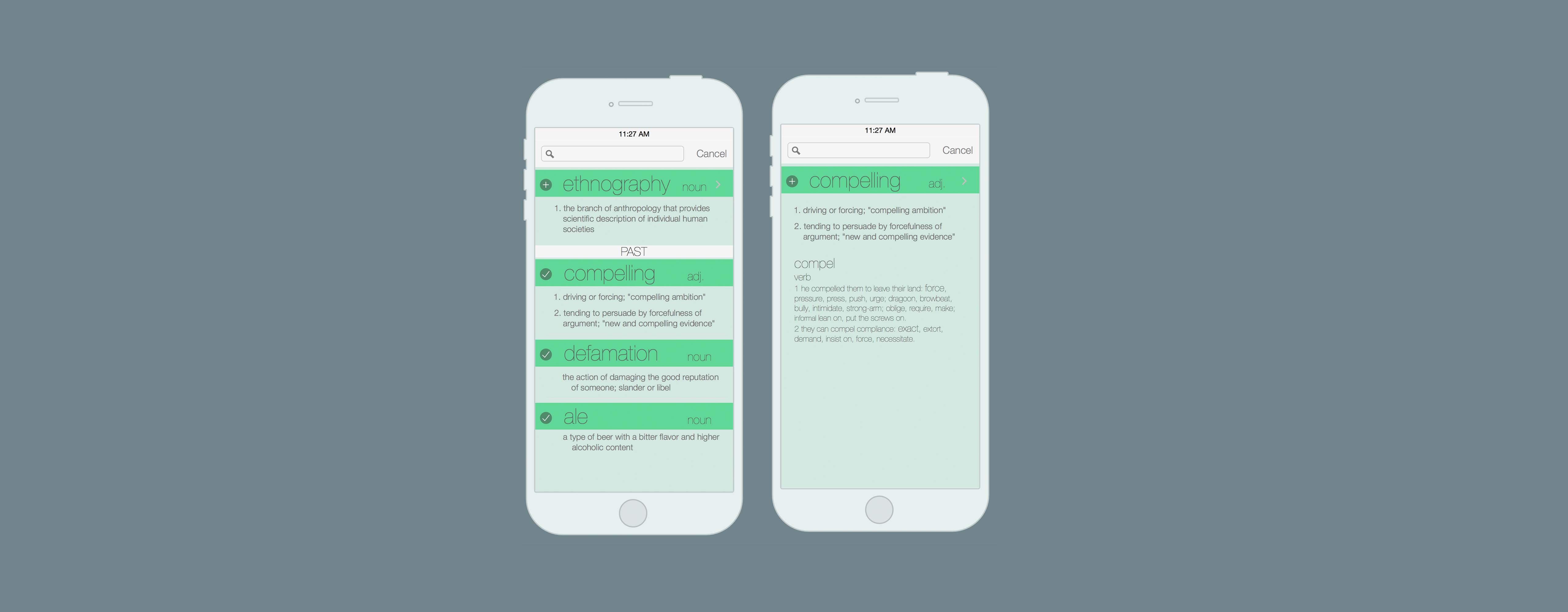
It is an offline, ad free, dictionary that remembers words you look up. It gives a word of the day and provides (admittedly underfeatured atm) flashcards to review your word lists. It includes optional syncing to keep your word lists across devices. I've been holding off posting about it while i complete the website[2].
Love to see someone else had such a similar idea. Great confirmation of the unmet need in the space. Really awesome execution as well. Congrats on the launch!
On a personal note, i built Stictionary after tracking all the words i looked up manually for years. Now i have an app that does it for me (and was a blast to build).
1: https://apps.apple.com/us/app/stictionary/id1613214660?platf...
2: https://www.stictionary.com/