Hacker News new | ask | show | jobs
by xiaomai 1588 days ago
I'm the same way. I've tried the various tiling WMs over the years. To me the ideal is just letting me manage the windows myself, and then if you give me some keybindings to snap a window into a certain half or quadrant of the screen then life is real good.
7 comments

IMHO it's like your actual desk. Some people like it clean and organized - others have a cluttered mess of objects.

My desk is a tragedy, but I much prefer tiling window managers and rigid, well-organized computing environments. Great to see the variety of options provided by KDE. I'll have to give this a try.

That's exactly how I feel too!

For MacOS, I love Rectangle, which is both great and open source:

https://github.com/rxhanson/Rectangle

Yeah, I'm still on Spectacle, which is basically the same thing. It's all I need as far as tiling-alike stuff goes and is the very first thing I install after Homebrew, on a new Mac. In fact, Homebrew, Spectacle, and using the Settings GUI to set my caps lock to an extra ctrl, is the entirety of my new-Mac setup routine, as far as stuff that never varies. I've tried "real" tiling WMs on Linux and don't really get it. I just need quick and consistent keyboard shortcuts for send-to-quarter, send-to-half, and maximize. That's plenty.
It seems that spectacle is not being actively maintained anymore.
I'll stop doing `brew install spectacle` and look for something else when it stops working :-)

M1 Mac, but I'm still on Big Sur. Maybe Monterey breaks it. Guess I'll find out soonish.

I'm reluctant to change a piece of software that's never given me so much as a hiccup in years of use, until I have to.

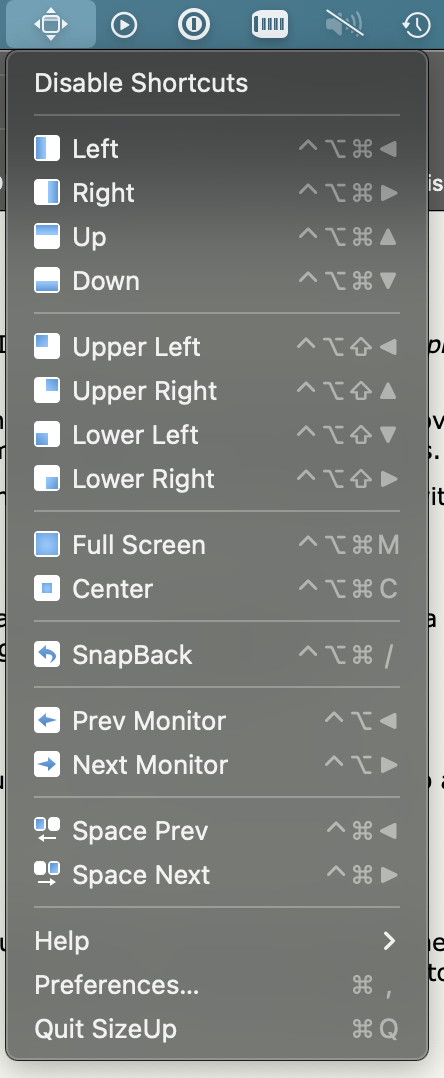
This is all I need. I use an app on macOS called sizeup that let's me do this. I can center a window for reading text on my larger display. Fullscreen a window without using the actual native full screen on macOS. Snap left, snap right, up down etc. It can also keep track of hardware profiles, so windows will restore to their bigger sizes and positions when I plug my laptop into a display.

https://s3.whalesalad.com/images/sizeup.png

Just so you know, KDE does all this natively.
Am I the only person left who still uses Expose? I feel like Apple is going to kill it off, they already rolled it into "Mission Control" and removed all the keybindings.
I use it constantly, but usually via the trackpad. I hadn’t actually noticed any key binding changes!
I concur to whole this thread. Have no need for tiling VM especially on macOS. With trackpad gestures I can manage all windows quickly and conveniently (and to be fair I did not know about keyboard shortcuts).

Though I use spectacle.app for those rare occasions when I want to snap a window to the left or right.

Is it still there? I thought they had already killed it. How do you open it?

I'm not on Mac but I missed the real expose too. Mission control is too cluttery for me. And I really really missed the desktops in a grid. In a line does not work for me, I just have too many and I want them to have fixed places, not to jump order when I maximise something.

I really dislike the full screen on macOS. I wish the little green balls would maximize, not full-screen. Even on modern hardware, the transition between spaces is a waste of time and resources. I much prefer immediately switching to an open application.
I use it and love it. I use three finger swipe up and hadn't ever looked for a keyboard shortcut. It seems to be set to ctrl-uparrow in the 'Mission Control' settings page. Or am I confused about terminology here?
There’s mission control which shows all the windows of every app and then there’s expose which shows all the windows of the current app.
Funny, because that feature seems to be what inspired the entire Gnome 3+ desktop, and it's now wonderfully polished there.
For me, the PowerToys tools are the gold standard here (https://docs.microsoft.com/en-us/windows/powertoys/fancyzone...), especially the Canvas mode: remember where I like my applications, and put them there, including whatever peculiar layout that I think is important.
Agree.. but if only we could stop windows from stealing focus.
Ah well. Stealing focus is happening more and more in macOS. A great annoyance…
Indeed. I switched from macOS to Windows about a year ago now and I have to say I really appreciate how on Windows stealing focus is much, much more rare than it was on macOS.

I honestly found it infuriating on my Mac.

I know right? Especially when you've just booted up and half your apps are still realising they've just been opened and screaming for attention. They should just open in the background and only appear when I look for them. I don't understand why they haven't tackled that in 18 macOS versions. Simply launching an app with a flag saying "this is not a user-initiated launch but a reopen, stay back" would fix it.

At least bootup is a lot quicker on the latest M1s (privately I use KDE now but for work iIm still on Mac)

Apps used to open in the background in macOS. Also OS dialogs would not steal focus iirc, or maybe those modal dialogs dood not exist. Not stealing focus used to be one of the top rules in the Apple human interface guidelines.

I’m really not sure what happened.

lookin' at you, onedrive popup! so many half sentences submitted as email addresses
I didn't use any tiling window manager so I don't really know what I'm missing. But I've come up with a system based on my own needs.

I use Hammerspoon (https://www.hammerspoon.org/) and a few little Lua methods to do the following and it works perfectly:

- Resize windows

- Position windows around the screen

- Instantly jump between apps I frequently use (this is especially good, for example with option+1 I can focus on the browser, with option+2 I can focus on my text editor, no more cmd+tab)

This is basically what Windows 11 is doing now. It's a sensible middle ground IMO.
Sooo... Windows? :-D