Hacker News new | ask | show | jobs
by whalesalad 1588 days ago
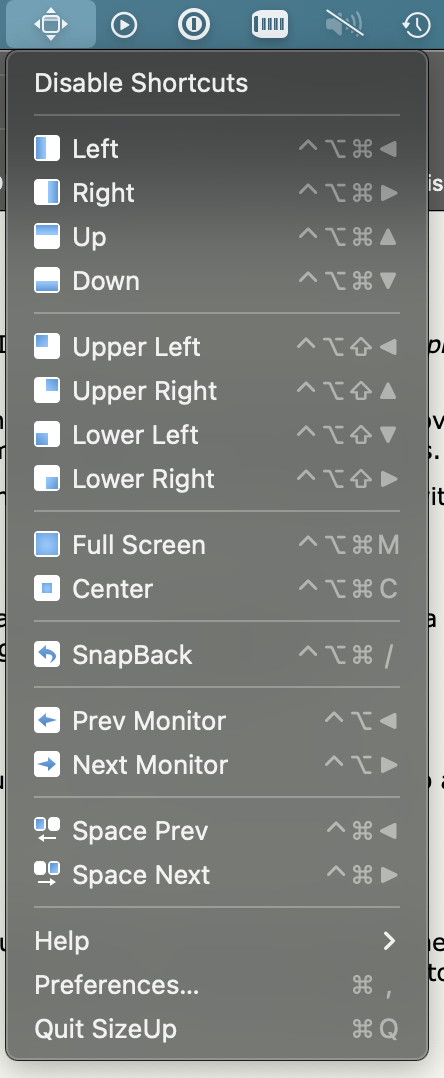
This is all I need. I use an app on macOS called sizeup that let's me do this. I can center a window for reading text on my larger display. Fullscreen a window without using the actual native full screen on macOS. Snap left, snap right, up down etc. It can also keep track of hardware profiles, so windows will restore to their bigger sizes and positions when I plug my laptop into a display.

https://s3.whalesalad.com/images/sizeup.png

2 comments

Just so you know, KDE does all this natively.
Am I the only person left who still uses Expose? I feel like Apple is going to kill it off, they already rolled it into "Mission Control" and removed all the keybindings.
I use it constantly, but usually via the trackpad. I hadn’t actually noticed any key binding changes!
I concur to whole this thread. Have no need for tiling VM especially on macOS. With trackpad gestures I can manage all windows quickly and conveniently (and to be fair I did not know about keyboard shortcuts).

Though I use spectacle.app for those rare occasions when I want to snap a window to the left or right.

Is it still there? I thought they had already killed it. How do you open it?

I'm not on Mac but I missed the real expose too. Mission control is too cluttery for me. And I really really missed the desktops in a grid. In a line does not work for me, I just have too many and I want them to have fixed places, not to jump order when I maximise something.

I really dislike the full screen on macOS. I wish the little green balls would maximize, not full-screen. Even on modern hardware, the transition between spaces is a waste of time and resources. I much prefer immediately switching to an open application.
I use it and love it. I use three finger swipe up and hadn't ever looked for a keyboard shortcut. It seems to be set to ctrl-uparrow in the 'Mission Control' settings page. Or am I confused about terminology here?
There’s mission control which shows all the windows of every app and then there’s expose which shows all the windows of the current app.
Funny, because that feature seems to be what inspired the entire Gnome 3+ desktop, and it's now wonderfully polished there.