Hacker News new | ask | show | jobs
by tangoalpha 1723 days ago
This would be a large personal disaster and a full time personal project if the service provider decides to shut down the service. One would have to crawl through all services they have signed up for to update the email addresses.

Instead get a domain. Configure email as well as a catch all address. Example anything@yourdomain.com would reach name@yourdomain.com which you use as your primary email address.

And say, if I am signing up for Netflix, I would give the email as netflix@yourdomain.com. The email automatically reaches my single primary inbox with the catch-all behavior. And if I find a lot of spam to netflix@yourdomain.com, I know which service is leaking my email address and I can quickly block all emails sent to netflix@yourdomain.com

10 comments

One mild word of caution on this method. I too have done this forever but recently I have been running into a few businesses that get really upset if their name is in your email address and they will flag it as fraud despite there being no logical reason to do so. It isn't like I am using a domain name matching their name. The most staunch and stubborn of these I ran into recently was The Tractor Supply Company. I've been trying for a month to get a gift card reimbursed that they cancelled the order on because I had their name in the email address. There are a couple gaming companies that do this as well. Just pick a name that is unique and put it in your password database.
Yes, although so far I have not run in to being flagged for fraud, some have been very confused by it. So I have started doing short variations of it to make it less obvious, so The Tracor Supply Company would be something like trasu@s.domain.tld

And instead of having a catchall on my domain.tld I have it on a subdomain, like s.domain.tld , easy way to keep them separate.

I ran into this with a store credit card backed by Wells Fargo. They wouldn't accept

    accounts+wellsfargo@my.domain
but they accepted

    accounts+wellsfargosucks@my.domain
just fine. Seems like someone messed up the regex :)
Huh, I haven't had any problems using tractorsupply@mydomain.com

I've had a few people ask "That's your email?" and just briefly explained that I own the domain and get all email sent to it.

Your account may be old enough that the more aggressive anti-fraud measures have not kicked in. They made it clear to me that their system would flag my email by having their name it. I've explained to no less than 5 support members what a canary is and they still have not resolved my issues. I even changed my email, still no luck.
I haven't run into many companies that disallow their name in email addresses. AliExpress and Amazon come to mind.

I have, however, run into a number of large companies where I've been talking with employees who see my email for whatever reason, and have received the "Oh, do you work here too?" question.

A custom domain with wildcard for catch all is how I have been creating logins for the past 17 years. It is fascinating to see which addresses suddenly start getting spam down the road.

It is also very easy to nuke an address this way once it is a spam trap.

About 10 years here and hundreds of different addresses given out. I get surprisingly little spam. Most spam I get comes to addresses that were leaked in data breaches, or email to my old gmail address which is forwarded. I'd say maybe 5 of them have ever started getting spammed.
Been wanting to get into hosting my own email. This is genius. Thanks for the tip.
Do you have any issues with spam being sent to whatever_random_user@yourdomain.tld ?

This concern has been my #1 reason for not doing the same setup. Basically a fear of a never-ending list of random addresses to blacklist, which won’t have any meaningful effect because the next spammer will just use a different random value.

I recently abandoned this setup.

1. It’s not frequent that someone hands out your address to a 3rd party and when it does, it’s usually exactly the site you would expect. I’ve had it happen 1 time in the last 3 years across 150 different aliases.

2. It doesn’t work well for apps with weird URLs (lots of subdomains, shared domains etc.). You forget how you the address and now can’t login. Yes, maybe you have a password manager, but password managers fail frequently in my experience (e.g. they record the wrong username etc)

3. You are still traceable since ultimately all your addresses are in the same domain. Sure, advertisers aren’t looking for that pattern, but it’s not like you are truly hidden.

4. Domain hijacking can happen. So now you have to be mindful of your domain since it’s a juicy target; Someone hijacker’s your domain, redirects your banking email for a password reset.

1. Not sure how this is a problem.

2. Again, not a problem. Everyone should be using a pass manager.

3. If you use the same domain/email for your banks (or any other financial/important service) as you do for social media/gaming/whatever, then that's on you. It's basic security practice to separate the important things so basic hacks like the one you mention are useless.

4. The purpose of this is basic privacy and security, not to be truly hidden.

Good point. It is a bad idea to set up something as lasting as email addresses with a somewhat proprietary solution by two commercial entities and stray from pure standards. Temporary convenience turning into long term lock-in is a poorly understood issue, especially by people that don't necessarily have a technical background.

I have used aliases to catch spam and have gathered about 200 email aliases this way over the last 12 years or so, and it works well. Rather than using a catch-all, I manually create the alias with a script.

In this day and age, if you don't own the domain, you don't own your email. It is worth the 10 bucks to get your self a domain just so you can have a long term email.
That is exactly what I do.

There has to be a name for it; the closest I've come across is a canary trap.

https://en.wikipedia.org/wiki/Canary_trap

> A canary trap is a method for exposing an information leak by giving different versions of a sensitive document to each of several suspects and seeing which version gets leaked.

How do you pick emails consistently?

If you sign up for league of legends, which email do you use? Riot? RiotGames? Lol? LeagueOfLegends?

Presumably you can always scan backwards to find your email address in your inbox, but maybe not. I guess maybe a password manager can help you remember, if you're diligent about always using it (and never end up locked out of your vault).

I recently started signing up for things with the + trick for gmail, but now I'm worried about having a bunch of email addresses I have no way of keeping track of.

Note that Fastmail already supports this even without 1Password, see “subdomain addressing” and “catchall aliases” in their help pages.
Okay, you convinced me that this is a good idea.

I can get a domain pretty easily but I hate the idea of managing my own email. Do you recommend a particular provider? Zoho or something?

Ideally, one would use me+uber@domain.tld / me+amzn@domain.tld / me+apple@domain.tld but then the identity me@domain.tld isn't masked.

If you prefer email forwarding, then: Cloudflare announced a free email-forwarding service just yesterday [0]. Not sure if they provide unlimited email forwarding rules. Other domain registrars like domains.google and namecheap.com also support email forwarding at no-cost.

If you prefer a managed mailbox, then: Zoho Mail, Fresh Mail, AWS WorkMail et al are nice if you'd also like to send emails using the address you sign up with.

Other than that, if you're technically inclined, then have SES plonk incoming emails in to S3 [1]

Be careful registering domain.tld without whois shield and/or with TLDs that require registrant to publicly reveal ownership (like .in)

See also: simplelogin.io and anonaddy.com

[0] https://archive.is/BEKi7

[1] https://archive.is/2iQCN

I use fastmail for this. It works great although my email address sometimes confuses people. For example, a small company I ordered something online from called me to ask why their business name is in my email address. I have 2 separate domains going to the same inbox, each domain can have any subdomain and email address I want. I can send emails from any of those addresses as well.
You can add a rot13 transformation on the company name (if there is a human on the other end), to be less confusing for them.

https://rot13.com/

Nice tip. I've encountered the same thing. Love to see an email generator using this automated in bitwarden/keepass.
I'm extremely happy with mxroute, pricing is great and support is quick. I even host the email of two small companies there.
Many registrars offer catch-all forwarding (to your free personal email), which would be your best bet if you don't expect to need to send email.

If you can afford $6/mo, Google Workspace isn't bad, there's generally better security and it grants you a lot of control over your account's settings (and will remove ads from the Gmail app on your phone, even when only looking at your @gmail account inbox).

Otherwize, Zoho works, but now costs $12/user/year (it used to be free) so ymmv. Great if you were planning on pure POP/IMAP usage anyways.

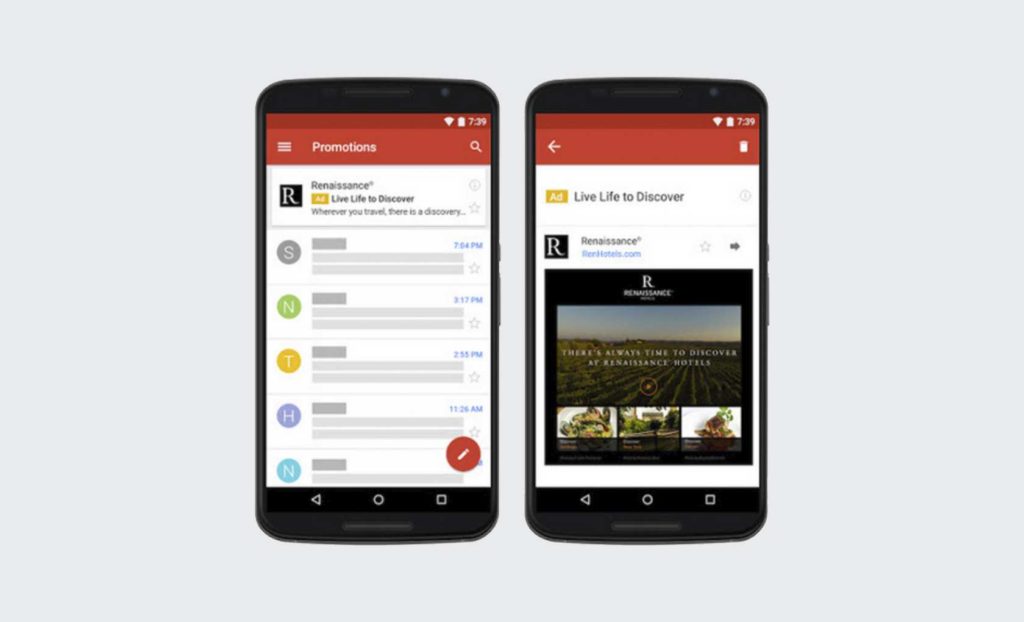
Wait, the Gmail app on phones has ads?
Yes, it's unfortunate. I had forgotten about it since I've had a GSuite locally for a while but I see them when someone else opens their app.

https://www.queryclick.com/app/uploads/2015/10/Gmail-ads-101...

https://support.google.com/google-ads/answer/7019460?hl=en

Ah, I guess they're only for the Promotions and Social inbox categories, and I have inbox categories disabled.

If I saw an ad in my email client, my immediate action would be to find a new email client.

I can strongly recommend 33Mail for this. I've used it for years with zero hiccups. $1/month allows you to connect a custom domain. https://33mail.com/