Hacker News new | ask | show | jobs
by elnygren 1771 days ago
I've always preferred Docker for setting up databases and database-like services on a development machine because then everything is nicely isolated. i.e no need to worry about random files in /etc/foo, easy to setup many versions per project etc.

This is what I've been using for Postgres:

        docker volume create postgres
        docker run -d \
          -p 127.0.0.1:5432:5432 \
          -v postgres:/var/lib/postgresql/data \
          --name postgres \
          --restart always \
          postgres
(this one is just latest, but adding a version is trivial)
13 comments

I went down this road for a long time and eventually realised I was gaining very little from it and picking up a bunch of downsides.

Obviously everyone’s experience is different because we’re all doing different things but I mostly work with Rust and Node, I use Postgres.app as a local dev database and just run the code natively, sometimes Node via nvm when I care about specific runtime versions.

It works great. It performs better then any Docker-based solution (I’m on a Mac) and doesn’t leave me with a bunch of weird dangling images/containers/whatever taking up resources. I still like the idea of using the same Docker environment in dev that I use in production but in reality I just don’t need it.

I love docker I just get really confused when the networking gets involved in the mix. Like I tried to make a airflow cluster with docker and I gave up.
I’ve been burned by using Docker’s networking directly too many times to count, especially in the context of Docker for Mac (where “the host” sometimes means “your computer”, while other times meaning “the VM Docker runs in”, arbitrarily.)

However, Kubernetes on Docker (microk8s or whatever it’s called) has always been extremely predictable in its (development-time, single-node) networking behaviour for me. Set up the right Deployment + Service + Ingress resources, ask kubectl(1) for the external IP and port to talk to, curl it—just works. Does the same externally-observable thing on your workstation that it does in prod.

Of course, that requires you to learn Kubernetes… which is a much bigger pain than it should be. But once you've got it, it's pretty simple/lightweight to wield Kubernetes at a problem; and the results are much more widely-applicable to everywhere you'd want to deply than e.g. Docker Compose is.

Docker for Mac's builtin Kubernetes cluster keeps getting better. These days (as of a year or so ago?) if you create a LoadBalancer Service it will wire up the port forward to your Mac's localhost, which is really nice. If you set up a local CA cert (minica makes this easy) and add an entry in your hosts file like "127.0.0.1 localhost.myhost.com", you can actually get full HTTPS to your development pod, using a production-like LoadBalancer Service setup.

I haven't tried microk8s, does it do full Service proxying to localhost? I did try Minikube a few years back and the Service proxying wasn't implemented yet.

I'm a big fan of fully replicating the production-like environment (including TLS) in your dev setup, at least for iterating on k8s-layer config changes; taking the cycle time for k8s changes down to seconds makes for a very pleasant development experience.

I've been using Minicube so far. Seems like Microk8s is a bit more lightweight, as it doesn't require a full vm, and you can just install it with a simple sudo snap install microk8s --classic without the need for Docker on your system.

That's very cool, will definitely give it a whirl!

I find Docker great for dev and test, as I can spin up and destroy databases from scratch in seconds - pretty useful for running tests in CI too. Also, the Docker image runs migration scripts at startup if needed, which is pretty useful.

Over in production, being consistent with dev is really nice, and having a consistent upgrade experience is a good benefit too.

With docker, I like that I can instantly switch between projects that all use postgres, each in their own container.
I love using Docker Compose in theory, but I've found it really difficult to do local development with a "Docker only" setup on Mac, due to the performance issues with the filesystem layer (even when using cached volumes, etc). Ruby gemfiles and node_modules are big culprits here, since they involve a lot of filesystem accesses to load/install dependencies. It might be more manageable if I was just using Postgres from docker and had e.g. rubyenv and nodenv installed locally, but that sacrifices a lot of the benefits you gain from having a docker-compose setup, and I've never had any problems with managing multiple PG versions in my Postgres.app install.
You could look into Nix for Ruby and Nodejs. I'm not a particularly experienced Ruby developer, but having Nix take care of all versioning and dependencies for me made the whole ecosystem really accessible (in the sense that I don't need to care about most of it). Everything is still in your filesystem so there shouldn't be any performance issues, and you still get the isolation benefits from Docker (like versions and dependencies not leaking from one project to another).
You mean Nix as a base image?
No, Nix installed in your system.
I don't know much about Nix.

But is there really any isolation if it's installed on your host os? I always thought Nix was primarily a package management tool. Like brew?

Docker isolation is different.

Nix is primarily a package management tool, yes, but it provides isolation in the sense that you don't have to globally install anything (except for Nix, of course). A tool I use extensively when developing is a "nix shell", which is a shell that's configured with a `default.nix` file.

For example, in project A I use Node.js v12. The project root contains a `default.nix` file that says it needs the package `nodejs-12_x`. When I run `cd /project/root && nix-shell` I'm dropped into a shell that has `nodejs-12_x` along with the rest of my "normal" shell. Once I exit it, `nodejs-12_x` is no longer available. If in project B I use Node.js v14, all I have to do is declare in its `default.nix` file that it uses `nodejs-14_x` and there will be no conflicts whatsoever.

Of course this is different from the isolation Docker provides, but I find that for development it is the perfect middle-ground between "everything is installed globally and conflicts with each other" and "everything is so perfectly isolated I can't get anything done".

Nix is more sort of a… content-addressable executable environment manager.

Brew has a single shared “brew env” that it executes all its installs in the context of. Which is better than nothing, but it still means that different programs can’t be fixed to rely on different locked+resolved commits of the same symbolic-named ref of a dependent formula. (And Brew is very “naive” in this regard, as formulae can’t even specify a version constraint for their formula dependencies. If a lib updates, and breaks its dependents? Too bad, the Brew maintainers need to go update all the dependents. This creates long-standing update PRs in the homebrew-core repo, as the same PR that introduces an update, is expected to also then fix all the problems that introducing that update created for the rest of the ecosystem.)

Slightly more savvy package managers, like Rubygems, allow version constraints, but only globally; there can only be one resolved version of each package (this is a fundamental limitation — loading multiple versions of the same library into a single Ruby runtime would generate namespace collisions), so Rubygems emits “constraint resolution failures” when different deps want incompatible versions of something.

And then there’s the Node.js approach, where everything can specify its own version constraints, and gets those specified versions installed recursively into its own nested node_modules dir. Which is nice, but 1. still requires all the code to be “source compatible”, as it’s all still being loaded into a single interpreter, and 2. makes it impossible to “share” deps and deduplicate the work of building them, even if you explicitly create two dependent libs that both depend on the same fixed version of an upstream. (I think this latter part is hacked around by tools like yarn, but it’s still part of the “architecture” of the Node.js package ecosystem.)

In Nix, meanwhile, each “package” is a really a build environment, consisting of:

1. specific, locked commits of all upstream build environments;

2. a listing of build artifacts from those upstream build-environments that should be linked into this build environment;

3. a specific, locked commit (or a release tarball with an explicit SHA) of the upstream source of the package.

When you “install” a Nix “package”, you’re really just doing the moral equivalent of a recursive git-submodule checkout — each dep tells Nix to check out explicit refs of its own deps in turn, build those deps, and then link artifacts from those deps into this Nix build env.

But unlike Node.js modules, or git submodules (which form trees of refs), Nix environments form a DAG of references; so if two things in your tree share the exact same “submodule ref”, they can share/reuse the existing build env and its artifacts. (But if they don’t—if they envs they reference are even slightly different—they’ll do separate builds. Though perhaps they’ll share a git-repo cache for separately checked-out worktrees.)

Note that this mechanism isn’t really unique to “packages” per se. It’s less about packages, and more about build environments.

In other words: Nix is a manager for defining reproducible/deterministic chroots, which bootstrap themselves by grabbing other previously-defined reproducible/deterministic chroots and doing things inside them.

Nix “Packages” are just chroots that define build steps, so that other chroots downstream of them can ask the upstream chroot to build itself, and then import/link build artifacts from it. But these chroots don’t have to have build steps. You can totally use Nix to create a leaf-node chroot that doesn’t emit any build artifacts, but rather is just a perfectly-set-up environment to run something in.

Throw an nsenter(2) on top of that chroot(2), and you’ve got yourself a container!

Or take a flattened snapshot of the final chroot, and call it a Docker image. (Nix provides tooling for this: https://nix.dev/tutorials/building-and-running-docker-images)

I personally just .dockerignore the node_modules directory and run the front end outside of docker, but still get all the benefits of backend isolation, databases and caching layers via docker-compose, etc.
This is off-topic, but I feel this more for live reloading/watching of rebuilding a node/webpack app vs. databases. For databases locally, I'm doing so little write usually that it's not a big deal. For coding and recompiling/hot reloading it's a big deal, and the perf is a pain. I really love working with Docker, so I hope they make the Mac experience more friendly soon.
Using docker-sync helps alot, and then using it's ability to ignore certain folders (like folders with high churn like tmp and log folders) helps even more. Over time the performance story has improved, but I still find docker-sync to be the best approach for me, and I've been 100% Docker Compose for about 4 years now (even on projects that don't deploy to Docker)
I used docker-sync for a long time, but last time I tried it (2019) it was too unreliable—I spent 30 minutes to an hour every week diagnosing issues with out of sync files and broken sync processes.
I've had good luck with it, but there are a few times I've had to go into the project's issues to find a solution for problems.
I've run into problems bind-mounting node_modules, so I just do an install for the image. There are the performance problems you mentioned, but also sometimes libraries build differently in Linux vs. Mac.
Yes, we no longer bind-mount node_modules or bundled gems, but I still run into a lot of performance issues with Docker generally (especially very high kernel CPU usage). Additionally, not having node_modules and bundled gems accessible from my development environment makes it harder to diagnose dependency issues when I need to (e.g. pull up the source code for a gem and see why it's not working).
Last I checked, docker for mac also couldn't do bridge networking, which makes it a pain in having to map every service to a port on the host.
Windows is a much better Docker host these days.
Postgres.app supports multiple versions, and doesn't put random files in /etc/foo - everything is in the right place for a Mac app, i.e. Postgres itself is in /Applications and the database is in ~/Library/Application\ Support/Postgres.
That's interesting, but my situation is that I'm developing on macOS and deploying on a linux box so my postgres setup with docker can look virtually identical.
Why worry about one more level of abstraction, if using the same version of Postgres should be enough?
> if using the same version of Postgres should be enough
If you're using Docker on the server, too, then it saves you from dealing with package management & version availability across multiple operating systems or distros to ensure that everything's at the same version no matter where it is. Config also looks very similar and lives in a consistent location regardless of the platform, which is nice, and between the docker file and either the startup command or the docker-compose file, you've also got documentation for exactly where any important data for the dockerized service lives and can easily prove that you've located all the important data (destroy the container, bring it back up... still looks good, no data loss? Then it's all documented). Again, with a single tool, regardless of platform.

No one has to give any shits that Fred's workstation runs the latest Ubuntu and Sally likes Arch and John is on macOS and the server is Debian Stable. They'll all run the same versions of your project's service dependencies... and the correct versions of the other five projects you're all working on, which don't need to be updated in lock-step, and Amy the part-time remote contractor you just brought on doesn't have to have her machine polluted with actual installs of any dependencies for your project outside the repo itself, just easily-eradicated containers.

Docker on Mac is a performance and battery hog in my experience.
I have a few boxes at home in a lab setup (accessible externally via VPN) that I use for these sorts of things. The less crap running on my Mac the better.

That being said - when you have a handful of clients who are all running in Docker compose… it’s nice to say “down” on one, “up” on another as though I’m switching git branches.

Working on transitioning to kube so I can IaaC a lot of it - but it’s nice to have my local machine freed up.

A slight tangent, but what kind of hardware are you using for this kind of home lab setup?
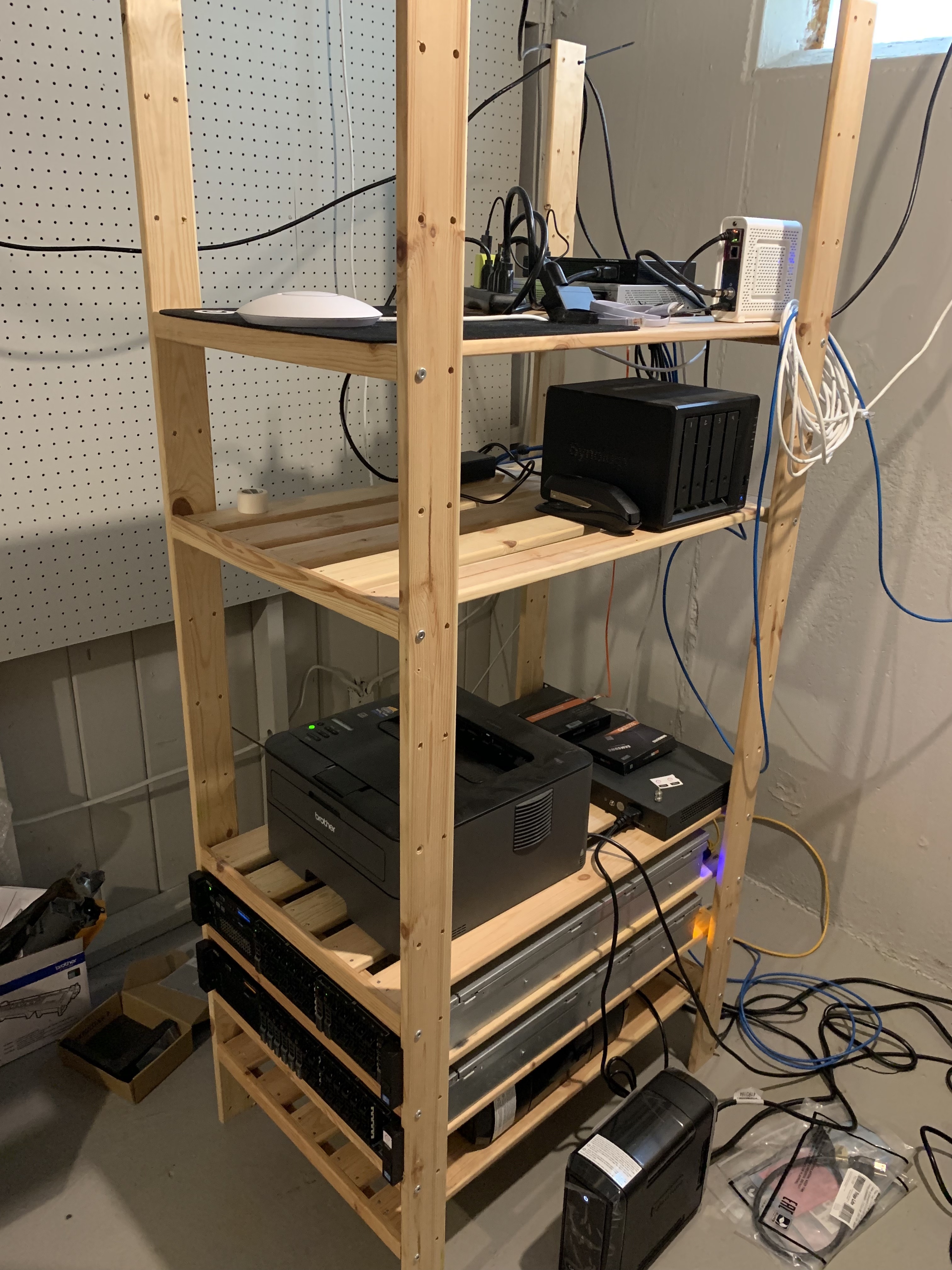
I have 2x Dell R720's and a consumer-grade i7-3770k box, some shiny ubiquity gear mixed with ugly network gear, and a Synology DS918+ for personal storage.

I tend to lean on straight up Debian linux for most things. One of the R720's is a VMWare ESXi host, the other is a k0s box running on Debian Buster, and the 3770k runs Fedora because I wanted to taste the redhat/dnf fruit but I am diehard Debian.

Pic: https://s3.whalesalad.com/misc/rack.jpg (super messy, in dire need of a cleanup)

I've seen that book case before. Is it IKEA?
It also keeps yammering on and on about new versions and required updates. Just that is reason enough to get rid of it.
"Oh no, I have to update my software!"

Are you serious?

Docker is notorious for completely breaking everything with their updates. They are also very intrusive about it, and make ignoring updates a paid feature.

This isn't just a "i don't want to update" issue. It's a "docker is terrible software and their business model is just as terrible".

Literally never had anything break due to upgrades in the ~7 years I've used docker (on Linux), but ok. Do you have any examples?

They renamed some packages a few times but no big deal, just uninstall the old ones and reinstall the new ones and everything's back up & running with all data kept. The worst thing was when they switched from aufs to overlay2 but that was years ago.

Countless examples of automatic updates borking installs on the github issue tracker.
You misunderstand. I am not annoyed that it notifies me. I’m annoyed that it keeps notifying me about the same version and locks the ‘skip this version’ button behind a subscription.
When they tell you that you need to upgrade if you want fewer updates, you know the daily updates aren't necessary.
It's so bad I just install a RHEL VM and use podman instead. The difference is insane.
In my experience, docker-machine-nfs has the best performance on mac. No syncing of files.
Obligatory shilling for openSUSE Tumbleweed :) Newer libraries, Podman, rolling release and higher perf.

Disclaimer: Just a fan.

My entire homelab is Suse based, love love love it. I use RHEL for development at work becase our entire infra is RHEL based and that's it, everwhere I have a choice I use Suse.
Yep, consistently uses 10-20% of a core even when I have absolutely nothing related to docker running.
So is any Electron-based app (like Slack and VS Code) and Chrome.
Let's see... the user could download an app, click it, and run Postgres. Or they could figure out how to install Docker, then run a terminal, then type two obscure and inscrutable commands into it. Perhaps administrator privileges are required along the way.

Sure, the Docker route is better in many ways. But perhaps you're not understanding the audience for a packaged Mac application.

I think it's a bad take to assume that everyone using a Mac needs a 1-2 click. If someone finds terminal commands "obscure", I'd hate to see what their SQL looks like, in which case maybe they shouldn't be running a database server.

For what it's worth, installing Docker on Mac (the audience we're talking about) is as easy as installing Postgres.app (download an installer and open). No administrator privileges necessary, unless you have a weird setup, in which case you'll run into the same issues running Postgres.app.

> If someone finds terminal commands "obscure", I'd hate to see what their SQL looks like, in which case maybe they shouldn't be running a database server

I think you are wrong. You are gatekeeping something extremely basic like a database from 1. beginners, 2. hobbyists, 3. even professionals that might have a different background than you (sql server on windows? Back when I used to write software for windows server, while using linux on my personal laptop, the command line was all but necessary), 4. my laptop died, I have to lead a dev workshop in 3 hours and I just got a new laptop but I don't have a full blown system that sets up my dev env because I literally have to do it once every 5+ years when I get a new computer, 5. more..

And I'm saying this as somebody who would probably go for the "command line" solution in most situations.

As a software engineer with significant experience with Docker, I love the Postgres.app for local dev precisely because of 1-2 click. I also run Postgres in Docker when I need to isolate something but for most general purpose database work - I just use the Postgres app.
> I think it's a bad take to assume that everyone using a Mac needs a 1-2 click.

Huh? Nobody said everyone using a Mac needs it. Where did you get that from? You seem to be putting words into GP's mouth.

But some people certainly could prefer it, which is the whole point of it existing, for those people.

Also, your comparison isn't even close to equivalent. It's not the ease of installing Docker vs Postgres.app... it's the ease of installing Docker and then figuring out how to configure an instance with Postgres vs Postgres.app. Obviously Postgres.app is easier. Some people have no need or desire to figure out Docker, they just want to use tools installed locally.

Perhaps I worded it poorly, but I was addressing the idea "the audience for a packaged Mac application", which to me suggests a less technical user. Which is fine for non-dev tools, but I wouldn't consider a user needing a database to fall into that category. (though perhaps that's true of developers who don't write SQL, but only rely on an ORM)

> Obviously Postgres.app is easier

Not necessarily. I used Postgres.app prior to switching to Docker Compose. It's a great option if you work on one app, don't need to switch between multiple versions, and don't need to work with a lot of different extensions or configs. I personally prefer keeping all of my config in source code, in the context of my application.

I've come back to this comment like three times and can't hold my tongue any longer. How dare you say something like "maybe they shouldn't be running a database server". Particularly hilarious in the context of Apple and Macs which has literally built their entire history on making computing more accessible to people. I get it, you're a super ninja rockstar programmer who is comfortable with the command line and SQL and probably wishes he still had to toggle the boot loader into the console. Meanwhile there's lots of folks doing work who appreciate tools that make things more accessible. Including databases.
> super ninja rockstar programmer who is comfortable with the command line and SQL

These are junior level skills.

Read my comment not in isolation, but in context of your comment, particularly, "perhaps you're not understanding the audience for a packaged Mac application". I agree that audience exists, and the Mac makes computing easy for that audience. I just don't feel that audience would be running a database server. If there was a WYSIWYG that let people build React apps via dragging and dropping components and avoiding Javascript, the response would be the same (and completely appropriate).

As long as postgres is your only external service, this is fine.

But looking at my docker list of auxillary services for 8 projects, I see redis, postgis, postgres 10, postgres latest, memcached, mailcatcher (fake smtp), ldap, a custom oauth, kafka, MySQL, piwik(matomo), in various forms and configs.

Sure, abstraction layers and adapters keep many such dependencies out of the way in Dev and testruns. But the inevitable debugging and troubleshooting does require a quick way to run such a service.

Eight projects, wow, you are very impressive. Good job! Perhaps you are not the audience for "The easiest way to get started with PostgreSQL on the Mac".
I'm not probably.

But why the snarkily tone? It is really uncalled for.

A bit OT, but what are you using for LDAP?
I've used these type of apps which bundle a common infrastructure component and a management GUI on Windows before when starting out, back in the XAMPP / Apache2Triad days.

I found they'd cause more problems than they solved ultimately, as they didn't provide clear upgrade paths, often had opinionated default configs which left newbies wondering why public documentation didn't work, and there was a lot of churn as to which one were currently in vogue and maintained.

I’m yet to see people who use docker for development do it faster than People who don’t. They always end up having to mount specific folders etc which nullifies the isolAtion point and you lose so much because even something as simple as ide debugging becomes a complicated (if not impossible) task.
You don't have to use Docker for everything. I personally use Docker for services my application needs (Docker, Redis, etc) and Nix for the application itself.
I do something similar (minus the Nix part). I don't bother to dockerize my applications, but I use Docker as a cross-platform dependency manager for daemons they use. Before that, I used Vagrant with a full VM, which has the benefit of looking more like a provisioning script for a full server, but the down-side of being tied to whatever OS or distro you choose for the VM.

Either way, it's a way to document exactly how to get your dependencies in order and the project running. That's a big improvement, operationally, at a lot of places. If Docker died tomorrow with no replacement, I'd go back to the Vagrant thing. Installing that stuff directly on my workstation sucks, for a bunch of reasons, and I'll not go back to that if I have any way to avoid it.

I've spent far too much time with build errors for environment issues that I do prefer docker or other environment management tools. I just have an alias for mounting relevant folders and value of docker is not isolation for my code, but isolation for system libraries.

A good example is recent mac update to big sur broke pip/python installs for a lot of people. Spending a while reading github issues to make something as basic as python and pip install numpy work is why I like docker for dev environments. There are IDEs that support docker extensions well.

I also do run most of my workloads on clusters so having things dockerized makes it much easier to reproduce a failure locally. Our CI that currently isn't dockerized occasionally has environment issues that are quite annoying to debug as I lack a good way to explore it's environment and see the mismatch.

I use docker (well, podman) for postgres on my personal machine because it's the one package that causes me headaches in my rolling release distro. Postgres n -> n+1 always requires a migration process (and you can't shortcut n -> n+x), so if I spend a period of time not working on my Postgres using projects, I find I've updated from n -> n+2 or more and need to figure out how to get the old version installed again since it's a dependency of the migration tools to have both versions available.
While Postgres works fine on macs, being able to run MySQL in a docker container and not have to deal with actually keeping it running on our macs has been a huge time saver.
I trust OS packages for main daemons like database, smtp, http daemons.

How are you meant to apply only security patches on docker containers?

What's the point of "isolating" daemons to avoid "random" files in /etc?

It just makes it harder to git control and back up /etc by splitting it all over the containers.

Yeah, same. I usually use docker-compose per-project and manage the database (and other services) using that.

The idea of a "system" postgres is kinda wierd, since that single instance has to work with all my projects -- which might have conflicting needs.

On a Mac, I like using DBngin until I need something fancier...

https://dbngin.com/

Doesn't the OS X .app format package everything in a nicely isolated single file too? That's what it seems postgres.app does.
> because then everything is nicely isolated

This is why we use SQLite for all the things. I don't even remember what a database installation process looks like anymore. It's just a nuget dependency and some code for us.

Are you using SQLite in production too? I'm curious about your domain - is it a web application or something else?
We do use it in production. Have been for years.

We use it as part of the back-end of a business workflow automation system. Handles 100-1000 concurrent users without any issues.

Thanks for the details.

I would be afraid to use SQLite over Postgres as SQLite is much more... flexible with it's database constraints (or at least, this used to be the case).

Not knocking your engineering choices - if you've been running it in prod for years, then it's working for you - just interested.

Do you lean into DB constraints much or do you do more application level checking/enforcement?

Not parent but mentioning nuget suggest parent is on dotnet, ie C/F# ergo semi-/typesafe. Parsing (not validating) at the edges should take care of it.
> Parsing (not validating) at the edges should take care of it.

Precisely. We use a tiny ORM on top of Dapper to make sure everything goes in and out of columns as expected.