|
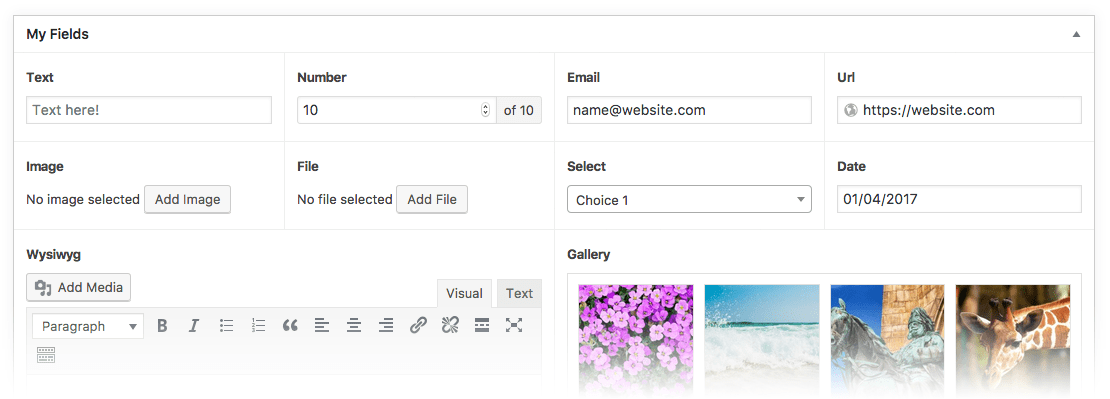
Hey, we're in a similar situation and we just evaluated a bunch of different options. Just wanted to share some findings. One, in terms of integration, if you're considering headless you probably already are thinking of a decoupled solution (meaning frontend and CMS are separate anyhow). In that case, it might help to think about the CMS as just another generic API that your frontend has to speak to instead of "integrating" with via bespoke SDKs. These days, many vendors offer GraphQL output for their content delivery APIs, and that's really easy for Gatsby or Next.js or graphql-request or node-fetch to consume. The resulting shape (object schema) you get back as a response is easy to map into component trees and iterables. Many (most?) headless vendors offer GraphQL endpoints now, and while it's not perfect, for most pages it'll be easier than having to join together multiple REST calls (like one call for posts, another for authors, a third for tags, a fourth for related items). GraphQL makes that all one API call returned as a nested JSON. Among headless options, there were initially 20+ vendors to choose from (this site has a list: https://cms-comparison.io/). As the primary dev, I did a first pass and eliminated a few right off the bat that I didn't think would fit our needs. Then we asked the other stakeholders to participate in a pretty exhaustive weighted features comparison (https://airtable.com/shrDPlmk7R3B4ddO1), having each stakeholder compare features across each CMS, then weighing each feature by their importance to our project. While we didn't choose the final winner this way, it did help narrow our initial list of 20+ options down to a more doable 2-4 finalists. We built functional prototypes (choosing a complex enough page to showcase the CMS's capabilities) and demoed them to the stakeholders and began contract negotiations. We learned a lot from that process for our own needs, and I'd encourage you to pick a few and run a similar analysis just for yourself and your client, based on their needs. For example, will they require deeply nested content models (like a page that contains a section that contains an accordion that contains a WYSIWYG that contains a paragraph with a CTA button that opens up a modal that they can define in the CMS). Some of the options are better at handling that sort of thing (GraphCMS, Contentful), but that comes with tradeoffs in other parts of the editor experience. It seemed in our evaluation that the CMSes that were the most flexible in terms of nestable content models were also the ones that didn't offer as good a page composition experience, as in being able to visually drag and drop things around a page (move the accordion above the hero) in an intuitive way. The market is still trying to figure out how to best do their UIs and UXes. Some of them treat every field and model as equivalent primitives, meaning you build everything up from the deepest nested layer (usually something like a "button" or "image with caption") then add containers within containers on top of that. But that quickly becomes visually and mentally overwhelming for the editors, who usually think about pages not in terms of nested schemas but the functionality that they want to add. Some of the other options, then, purposely avoid the "everything is a model" design and break things down into pages, posts, blocks, etc. (DatoCMS, Storyblok, ButterCMS). In any case, it's worth poking around a few of them and trying to model a complex page or two in their schema builder (model editor) to see if the resulting page would be easy enough for a non-dev editor to use and edit. Among open source packages, to my overwhelming surprise, Wordpress with Advanced Custom Fields (https://www.advancedcustomfields.com/) was far and away the MOST powerful of any of the headless CMSes, offering extremely flexible field layouts that none of the proprietary headless vendors even came close to. This created, IMO, the best editor experience in that it was the only one where you could present columns as actual side-by-side columns, accordions as repeater fields, etc. Of all the options we saw only ACF closely mirrored the actual HTML structure while still being good for editors to use. All the others required workarounds in editor experience or developer experience, usually in some form of DRY-breaking similar but redundant models, like 5 types of accordions depending on what they had inside. If your pages are super complex ACF would be the one I look at first. The downside is that it's still Wordpress at its core, which means you having to maintain a separate stack in PHP, along with requisite plugins for Wordpress shortcomings (translations, GraphQL, taxonomies, image handling, etc.) On the plus side, if you use Wordpress + ACF in a headless way (with either Wordpress REST API or Wordpress GraphQL plugins), it circumvents most of the Wordpress security issues since all you're doing with it is exposing a read-only REST endpoint, which you can further cache behind Cloudflare or similar if you want to. You never have to touch Wordpress's theming, for example. Hosting Wordpress on a managed stack like Pantheon or Gridpane helps a lot with both the developer experience (automated backups, updates, recoveries, etc.) and the reliability since they manage all of the scaling and CDN and such, which would normally be hard to do with something as LAMPy as Wordpress. I can put in very strong recommendation for Pantheon; they are one of the best companies I've ever worked with. ACF was SO much more powerful than other open-source headless CMS solutions (Ghost, Directus, Sanity, Strapi, Grav) that it frankly surprised me. Never did I expect that an old plugin for the Wordpress monolith would actually be one of the best headless options. But if your site doesn't require complex modeling, one of the headless vendors might just be fine, and it would be a lot less for you to have to maintain. The ones that stood out to me (in no particular order) were: * DatoCMS for its fairest pricing (vs Contentful's enterprise-only mentality) and its small but very responsive team. It's a hidden gem in a field mostly run by bigger companies, an underdog for now but quickly catching up to the bigger players. It also had one of the best editor experiences, a great media library system that handles cropping via "focal points", and Imgix image transformations built-in and included. * Prismic.io for its remarkably clean editing environment for simple pages (but the lack of field validations was an issue for us) * GraphCMS for the sheer cleanliness of its schemas and being one of the few to offer GraphQL mutations (which means you can edit/add content via GraphQL; most of the others only support reads, and writes would use more traditional REST APIs). This one just seemed the most technically sound, but with tradeoffs in the editor experience (like something as simple as a dropdown field uses only machine-readable values and no human-friendly labels) * Contentful is definitely the industry giant here, but they are very expensive and have shifted their business model away from small developers. Basically either you fit within their starter plan or you have to jump into their enterprise tier. They don't really cater to small businesses anymore. * There are so many other options, like AgilityCMS, ButterCMS, CosmicJS, CraftCMS, KeystoneJS, NetlifyCMS... and they are all rapidly changing, so check in on them for latest features if none of the above ones are quite right for you. As a final note, if your client's needs are SUPER simple, something like a Google Sheet or Airtable's REST API (https://airtable.com/api) might suffice. Those are far easier to edit (like if all they needed were simple blog posts or product pages) but not very powerful/extensible in the long run. Hope that helps. |