Hacker News new | ask | show | jobs
by kstrauser 1822 days ago
I keep thinking I’ll like paper, but I just don’t. A few years ago I started keeping a daily journal: not so much a diary with today I feel… but a record like changed the van’s oil. Drove the kid to camp. Called Mom.. [0]

I was using Drafts on my iPhone as a kind of bullet journal, with an action group I wrote. [1] After a year of this, articles like this one convinced me to switch to a paper journal and to get a nice fountain pen. [2] I've done this for about a year and a half now, and when I fill up this current notebook next month, that's it. I'm going back to digital.

Turns out, pen and paper is vastly inferior to digital in every way I care about. Other people love it and that's awesome, but I can't escape the fact that I hate handwriting stuff, and I often cut my thoughts short so I can quit scribbling. Worse, the analog notes aren't actionable. My Drafts workflow turns my day's worth of bullet-style entries into a set of digital diary entries, new calendar events, and tasks in my task manager. I'm already carrying my iPhone with me everywhere [3], so I don't have to remember to drag something else along. If I'm jogging and think of something, I can say "hey Siri, remind me to..." and it makes a note for me without me having to pause and jot it down. Paper seems nice for impromptu drawings, but since keeping a paper journal, I've literally never drawn something in it.

For me, for my workflow, digital is vastly superior. Paper has its strengths, but none of them apply to how I want to use it. I mention all this for the benefit of other people reading this article and feeling vaguely guilty for not toting a paper notebook with them all the time. I think the important part is the note taking itself, not the medium they're recorded with.

[0] As an aside, this is enough for me to remember that day when I look back at it later. It’d be useless for anyone else reading it, but I write for me, not for a hypothetical person who gives a care about what I was doing in 2021.

[1] It got kinda popular: https://actions.getdrafts.com/g/1Sd

[2] Rhodia Webnotebook A5. Lamy Safari, Noodler’s Baystate Blue ink.

[3] None of this applies while on camping trips. I take a paper notebook with me to write stuff down because I don't have to charge it.

4 comments

I can and happily will second the A5 Rhodia Webnotebook recommendation. They're small enough for convenience, big enough for depth, sturdy enough to stand up to prolonged and heavy use, and full of beautiful Clairefontaine paper on which it's a positive pleasure to write. I've been using them for my diary for years now, and expect to go on doing so as long as I can still get them.

(Fwiw, I like a Decimo better than a Safari, although probably not as a first fountain pen - you want to start with a steel nib, which will be more forgiving as you learn a lighter hand, and the Decimo is both gold-nibbed and fairly expensive among pens that aren't coded "luxury". That said, if you're looking for a change, a Decimo is also light and comfortable to use, and durable in real-world use; I carry mine in my shirt pocket, and the only thing so far to give it trouble was a Labrador who was very excited to see me again for the first time in some years. Some folks do have grip trouble with the pocket clip, but all I can say is it's never bothered me, and the sheer understated elegance of the pen's design - in every way the opposite of the "look at me!" that a lot of more conventional pens convey - is a pleasure in itself, besides.)

Ooh, that’s a beautiful pen! The pocket clip seems like it’d serve the same purpose as the triangular grip on the Safari: “however you want to hold me, this is how you’re going to.” The Safari is the first pen that ever coerced me into holding it the “right” way (instead of my natural “lateral tripod” grip; see https://www.scoopwhoop.com/pencil-grip-names/) and I love it for that. Also, I’d be bummed if I lost my Safari, but seriously upset if I lost a Decimo.

But the Webnotebook is seriously wonderful with a nice pen and ink. It’s the perfectly level of minimal roughness that grabs ink while still feeling utterly smooth.

Oh, I worry about losing mine too, but if I'm doing anything that might pose a risk of it falling out of my pocket, I'll have my backpack with me and can stash it safely there. Other than that, it's either on my person, on my notebook, or in my hand. (Or in the car, if I'm visiting with my friends with the dog. I puppysat her for a week once, during what must have been an impressionable time in her youth - she greets me the same way every time as if it were the first time in years.) I might just be unusually good at keeping track of my things, though!

The clip is useful for the reason you describe, and that serves the user's purpose in a way I think most pen reviewers don't use a Decimo or Vanishing Point for long enough to discover. The whole design intent of the pen is that it should be easy and convenient to use entirely one-handed, and having the clip placed as it is helps the pen nestle neatly between the user's fingers as they change grip from "uncapping" the pen to writing with it.

After a while, just like with any other click pen, you barely have to look at it or even think about it to do it - I haven't done the latter in so long that I had to do the former just now in order to know how I use it at all. Most of the time I just use it. It's pure muscle memory at this point, and the clip is the only reason that can be true - not that the more deliberate process of preparing a conventional, round-sectioned fountain pen for use isn't pleasant in its own right, but the Decimo's lower overhead makes it much better suited to the way I think and write, as well as to regular carry and use with no need for special handling and no more need for special care than, say, my glasses.

(Sheesh, I should get Pilot to pay me a word rate...)

The only advantage of paper notebooks I've seen so far is that in certain specific corporate settings, you'll be seen as more professional/serious/"executive".

Otherwise, for me, if you want to do art, then sure, paper like any medium is a valid matter of stylistic choice. And I fully understand the tactile and visual pleasure of choosing and touching and interacting with a finely crafted physical product. But if you want to do practical / functional, digital beats paper the way paper beat clay tablets. Just the sheer convenience of having all of my notes and tasks, EVER, organized effortlessly, on any device I happen to be near, is a pure slam dunk. Shareability, automation, reminders, analysis, updates, backups... list goes on.

(I'll still be more excited to receive a nice paper letter than a quick text, of course :)

Which setting did you have in mind? I’ve brought my iPad with keyboard case to C-suite meetings and felt good about it, but I’m imagining a TV-style board meeting with no electronics to be seen.

You summed up my own relationship with paper very well. I don't begrudge people who use it as their primary system, but all the advantages you describe (plus the fact that I can type for infinity while my hand cramps up after a page of writing) make digital the clear winner.

I still write paper letters to my mom, but typically by printing them from text and including a picture of the grandkids.

On digital devices it's not clear if you're taking notes or writing an unrelated email.

Paper notebooks can't send email, so if a person sees you interacting with it they'll think you're taking notes, which means you're taking them seriously.

Yeah, I could see that. Good point.

I deal with that in other contexts, like Zoom meetings, by narrating what I’m doing:

Coworker: Could you do X for me?

Me: OK. I’m writing a reminder to myself here… type type type

…which seems to get a positive response from people I’m talking to.

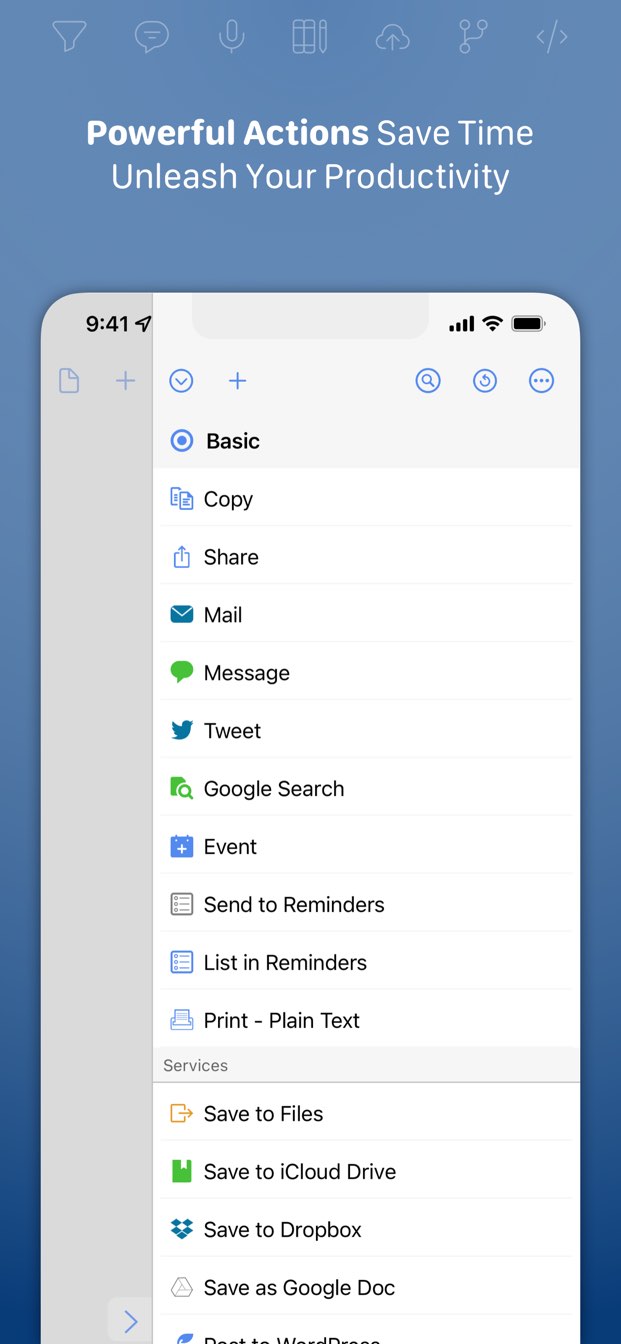
Wow that Drafts action thing looks amazing. I’ve not used Drafts much, how does the action group run: you do it manually somewhere within Drafts?

And then once you run it, you archive that day’s notes and start a new one for the next day?

I imported it and m currently trying to find where you run custom actions in ios Drafts.

It’s in the action sidebar (like https://getdrafts.com/assets/img/custom/screenshots/ss-03.jp...). You can type some information into a new draft, then run the “Append to Today’s Journal” action. It’ll find (or create) a new draft with a name like “Journal for 2021-06-26” and append the next of your current draft onto it.

At the end of the day, go to today’s “Journal for …” draft (or run the “Go to Today’s Journal” action to jump straight to it). Then run “Process journal actions” and it’ll process each line of today’s journal draft, then archive the draft.

Each of those actions has a keyboard shortcut so you can run them pretty quickly if you have an external keyboard.

Edit: Actually your reward also includes a bug report. Go to journal and append to journal work perfectly. However, process isn’t creating any tasks in omnifocus. I’ll test the other actions.

Format is:

* Do laundry

Ok, fantastical worked. Drafts opened fantastical. It did not ask to open omnifocus.

—————-

Oh, got it, thanks! I had to click manage in actions then enable your set, now it shows easily and the actions are straightforward.

It’s very hard to tell whether this will be a thing I fiddle with for a couple days and then set aside, or if it changes everything. But this has definite potential to be one of those things that changes everything. (My notes are a mess of notes and todos and never knew how to process well.)

Thanks for making this and for writing up the comments about it!

As your reward you get a feature request haha. If you’re ever adding to this, I would love Reminders support.

Look for a draft called “Quick Journaling settings”. Edit the line “* OmniFocus” to say “* Reminders”. That should make it create reminders instead of OF actions.

I wrote this to mirror my own personal workflow, so I admit that it’s not for everyone. I love how frictionless it made recording everything I needed to record, though. “At the dentist.”, then cmd-opt-A (for “Add”) records that I’m at the dentist. “* Call Joe.”, then cmd-opt-A will remind me to call Joe later.

Oh, if you want to keep (or throw away) the daily journal draft, edit the “Process journal items” action and change the “after success” action.

Edit: After taking a year and a half off from that action group while I scribbled stuff in notebooks, I’m about out of paper and will be resuming development on it very shortly.

Hmm. Have I done something wrong? I entered this:

% Test

* Test

And these are my journal settings

@ Fantastical

* OmniFocus

- Day One

% Reminders

Omnifocus opens, reminders doesn’t

(Note that they aren’t double spaced. Just did that cause Hn doesn’t like lists)

Reminders doesn’t open for me when Drafts sends things to it. If you open Reminders, to you have a Journal list with a new reminder in it?
I personally don't like paper much because I write terribly, so either it takes a lot of time, or I can't read half of it. This makes writing either frustrating or useless.
That’s a legitimate issue. Handwriting makes my hand cramp up quickly, and has since elementary school. The moment I was allowed to stop writing and start typing, I leapt at the chance. Turns out I enjoy stringing words together when it’s not physically painful.

My experimentation with fountain pens helped a lot. You have to use a much lighter touch; if you mash a fountain pen against the paper the same way you would a crappy ballpoint, it’d make a huge mess and probably rip through the paper. Being forced to dial the pressure waaaayyyy back, and in the case of the Lamy Safari to hold the pen with a “proper” grip, make writing dramatically more comfortable. But know what’s many times more comfortable than that? Almost any keyboard that’s not completely awful. I’m writing this with an Apple Smart Keyboard Folio, which isn’t even in the same league as my main desktop keyboard, but is still vastly better than any pen I’ve ever used.