Other commenters are rightfully pointing out the continued performance issues, but just as important for me is the platform citizenship of electron apps.
The glut of new ones I use for work on macOS: VSCode, Slack, Notion and Height all have different keybindings than any other apps, some completely disable command+? which I use to find/learn commands for operations I don’t already know. Some just don’t use the menu bar at all. Layout is awful in them, like slack threads being a sliver of the right side of the window, or notion’s usable area maxing out at 800 pixels, or height’s window being fixed to a minimum of 800. Some don’t respect auto dark/light mode. Notion has completely upended many tried and true patterns from word processing. Links take you to the browser based version instead of deep linking to the app.
Of course there are some things I do like about each app, but for me they aren’t worth the tradeoff for the ramp up time on a new product coupled with the annoyances I encounter when using these new apps. I can get things done just fine in a github repo full of markdown, or apple notes, or email, or Xcode, or textedit or sublime text, and on and on. Not to forget the venerable command line. I think the one web app I legitimately enjoy using is trello.
Not GP, but Electron apps to me have a specific “smell”. When you run one, you get to know it’s an Electron app without prior knowledge of that fact. Slow launches, massive memory usage that initiates thrashing, standard OS keyboard bindings not working, actions within the app being sluggish (especially if this is not the only app running and there are other apps using some RAM), and sometimes several crashes too.
I know that there are some Electron apps that behave well and perform well (responsiveness and RAM usage), but those are in the minority. One could always run a bloated Electron app as the only foreground app on the system and give it more resources, but the usability compromises are hard to get over if you’re someone who likes learning and using keyboard shortcuts and other OS specific interactions.
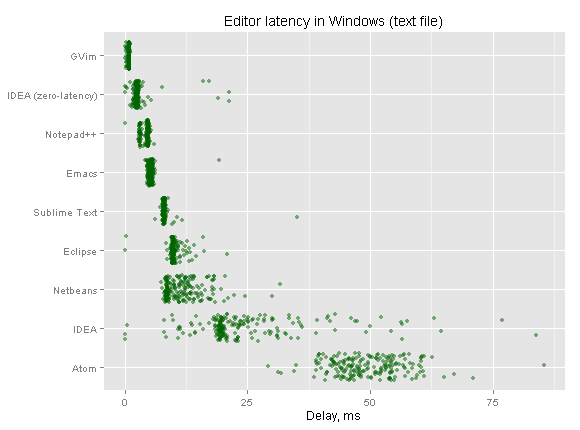
VSCode is handling a lot of the heavier stuff in C++, but it's still an Electron app, with the sluggishness that comes with it. Compared to things like nvim or sublime text 3, VSCode performance ranges from "meh" to "ugh".
It's true that VSCode is somewhat usable (unlike Atom). However, it is not impressive, despite so much effort being put into its performance (including a vast amount of core code being written in C++).
For this reason, I take VSCode as the perfect counter-argument to Electron: It shows you that the absolute best case is somewhere between poor and mediocre responsiveness with pretty high resource consumption for the task.
(Anyone who finds VSCode to be snappy is either too used to the sluggishness of web, unfamiliar with how a responsive application feels, or has just thrown so much hardware at the problem that it ends up being decent.)
I mean I use vs code daily and don't think it's any less "snappy" than a native app. Quite the opposite really, Chromium's rendering engine is faster than most native cross platform toolkits. The memory consumption doesn't bother me either or come anywhere close to bottlenecking me, because I'm a professional using professional hardware.
Sublime is also pretty featureless compared to VSCode as well.
> Chromium's rendering engine is faster than most native cross platform toolkits.
Which toolkits are you referring to, and do you truly just mean the renderer, or the entire engine?
Chromiums renderer is pretty fast. Not as fast as direct rendering like Sublime Text does, but for very complex scenes, it will beat Gtk and Qt.
However, it's expensive to build scenegraphs for it (needed on every change), and partial updates are far more expensive than they need to be.
The end result is that, for something like an editor, Gtk and Qt will beat Chromium for responsiveness by a large margin, despite having much less performant renderers for the time being.
(You can get around some of these costs by using WebGL of course, but if you're doing manual rendering you have already thrown most of the reason for Electron out of the window, so why not do it natively where it will be even faster?)
> The memory consumption doesn't bother me either or come anywhere close to bottlenecking me, because I'm a professional using professional hardware.
This is an awful argument. That I have beefy workstation machines doesn't really matter when I'm usually mobile on a low-power laptop.
The difference between using VSCode and sublime/vim is several hours of battery life, and the difference between a comfortable lap and a warm lap.
This idiocy of "it's fine, there's enough resources" is why my colleagues expensive MacBook Pro's are hyperventilating 24/7, and it's a problem for poorer individuals that might not afford a powerful machine.
> Sublime is also pretty featureless compared to VSCode as well.
Matter of taste.
Sublime Text still has a very long list of plugins, and certainly does everything I will ever need an editor to do. I see no reason to pay the penalty of Electron to get support for NyanCat cursor plugins.
VSCode is also pretty featureless if you compare it to vim, and if we pull Emacs into the discussion, VSCode ends up looking more like nano/Notepad.
Its too early in the morning for me to get into a flamewar about this.
So all I'll say is that I get a lot of value out of VS Code as a tool, and I don't think it's slow. I think every point you bring up comes from a lack of experience and knowledge of the tool/platform, and it's not worth arguing about online.
> I mean I use vs code daily and don't think it's any less "snappy" than a native app. Quite the opposite really, Chromium's rendering engine is faster than most native cross platform toolkits.
it's definitely not. Just adding a `/*` at the top of a file takes a noticeable delay to update the whole text, while it's completely unnoticeable in e.g. QtCreator.
I just took this video on my screen, notice how everything lags in VS Code (left) in contrast with QtC (right) :
What's worse, VS Code uses GPU for its rendering while QtCreator uses a software rasterizer, which should in theory perform less well (in practice, GPU font rendering is definitely not there yet). Both use the same backend for C++ syntax parsing (clang) so the problem is not there.
> it's definitely not. Just adding a `/*` at the top of a file takes a noticeable delay to update the whole text, while it's completely unnoticeable in e.g. QtCreator.
Conversely, Qt Creator is rather anemic and featureless when compared with vscode. I mean, it doesn't even support very basic features such as editing yaml or json files, it barely supports any form of refactoring at all, doesn't support any form of project other than the old hardcoded C++ support piggybacking clang, etc.
Heck, supposedly Qt Creator's main build system is cmake, and it doesn't even allow you to add files to a project without having to hand-tweak CMakeLists.txt files.
Perhaps if Qt Creator offered a fraction of the features already provided by a free text editor such as vscode then we could start to compare sub-milisecond differences in paint times. Until then, unnoticeable differences in performance coupled with far more functionalities make it a non-starter.
> and don't think it's any less "snappy" than a native app.
I have tried to adopt vs code multiple times and just end up going back to (n)vim, where opening a file is instantaneous and I never have latency when typing, etc.
However I do find Jetbrains' products like CLion/Goland are pretty nice.
From experience... with today's computer having 16GB+ ram, VSCode is fine. But if you start doing dev work on a 2011 Macbook Air with 4GB ram or even 8GB ram, you quickly notice how much memory electron apps consume. When switching between VSCode to something like Sublime, the consumption is 10X improvement. That is my only beef with Electron apps. It is a way to get something cross-platform extremely fast but with ZERO care for how expensive it is.
I like VSCode but also agree. Once you've felt the speed of native, like Sublime Text 3, especially when opening and working with a lot of files at once, it's really hard to use anything else, IMHO
That said, there are use cases for VSCode that don't really apply to ST3, etc
As long as there's no latency when actually editing text, which is my experience with vscode, I don't think it's that big of an issue. As someone that's moved from vim+plugins to vscode, I'll take the few milliseconds of latency here and there as the price of having an environment where everything just seems to work out of the box, including plugins. Sure vim is snappier, but does it really matter if I have to constantly debug why youcompleteme isn't finding my header files or whatever.
Theoretically that doesn't have to be trade off. Theoretically it's possible to build an editor like vscode with a native interface. In the actual world it doesn't exist for whatever reason, so I'm going to keep using vscode.
Theoretically it's possible to have a not-buggy vim. It's not fair to exclude everyone who is able to configure a more performant editor just because you can't.
Your claim that "in the actual world it doesn't exist" is just not true. Thousands of lifetime vim/emacs users are scratching their heads.
Configuration is maintenance that I'd rather not do, it's not a matter of "can't". I used vim as my main editor for years, and I had it very much configured to my liking. Any time you have to set up plugins for a new language or a new environment though, it can be annoying, which is why I started using vscode as a front-end for neovim. Now I have a nice-feeling well-supported IDE with all the power of vim for editing.
I no longer consider vscode to be an electron app. You would need a ton of expertise and lots of c++ to have your electron apps perform anywhere close to vscode (and you would still be slower than native)
I always see Visual Studio Code trotted out as an example of a relatively fast Electron app. I do use Visual Studio Code (for complicated reasons), but if I were to describe it to someone, the first thing I'd mention is that opening a new window (i.e., the `⇧⌘N` shortcut) is incredibly slow. For this action, it's easily the slowest of any application I use regularly, I can count to three before the window appears, a normal application is ready for input practically instantaneously.
I don't think this has been mentioned yet, but dark mode on a Mac is very adaptive, and has lots of material which adjusts to the color of your desktop.
Compare these 3 screenshots of the same window (https://imgur.com/a/UNXtweJ) - and that's not a translucent or blurred window, it's just a solid background color. The only change I made between taking those was picking a different desktop image.
When I open Slack, it doesn't match any of the native apps because it doesn't use the native color blending. It's just drawing a different palette of colors.
In this case, I don't know if QT is going to be any better if it is just drawing all of its own controls. There's another native Git client that I use, and it looks amazing and blends right in with the rest of the apps I use everyday.
I don't understand how this sort of question gets pummeled with downvotes. Having developed Qt and XAML applications, I have to say that the DOM approach makes a lot more sense than wrestling loosely bundles of widgets. In the end Qt apps end up with a widget tree, but the path that they take to get there is convoluted and packed with unnecessary fusion of UI responsibilities and data and even business logic.
I don't think end users decide which GUIs they like based on their "DOM approach" any more than they decide what milk they like based on the milking approach.
I'm pretty sure that users like good software with pretty GUIs that are easy to use and navigate around and extend.
DOM-based frameworks make this sort of stuff trivially to implement, and some of them evem come with gesture and animation support out-of-the-box. Meanwhile, feel free to take a look at Guitar's source tree to figure out if that is trivial to work with, and at best it looks like an app from 1998.
Looks pretty much the same as stitching DOM elements to me, and various runtime modifications in HTML-based frameworks remind me of the "put widget into container" code style of Tk. There's even a CSS-based styling support for Qt.
The main difference is that there is easy way to make a visual designer for the QT .ui files, so it's actually even easier to write GUI apps there.
And DOM based frameworks do nothing to ease of use, ease of navigation, or pretty much anything done by end user*. They make it easier on making portable GUI, yes, but that's on developer side, and with significant costs associated to everything, including reputation of the application and developer.
Qt and widget based programs are absolutely not difficult to make. I don't know where this comes from. They are fast and responsive by default instead of laggy and sluggish on a many core xeon loaded with ram. Even using PyQt and embedding python is like a feather compared to electron and that approach is extra easy.
That's a good question but what's the point of all this if no one can use the app if they don't have a minimum of 8gb ram? My wife couldn't run Spotify, slack at the same time cause her machine started swapping.
The developer experience is vastly superior in electron and it's reach is massive. There's no denying. But the underlying problems are pretty serious and the people who complain are not just hating for random reasons.
I hope you get how insane it is when your cpu fan starts spinning because of an app that plays music in the background!
So far the pro electron arguments are concerned only about developer experience who generally have beefier specs in their machines.
The lowest common denominator in end user machines are very different and I request you please keep that in mind!
P.S: I'm a web developer and I fully understand how much valuable electron is for me.
> I'm pretty sure that users like good software with pretty GUIs that are easy to use and navigate around and extend.
I don't know about other users, but I like good software with functional UIs that are easy to automate and extend. In my experience, that's definitely _not_ Electron-based UIs. It's also not most GUIs either for that matter.
I absolutely do _not_ want "gesture" and "animation" support. Gestures are a hack for a shitty touch-screen input with zero tactile feedback. Animation is just a power hog for, like you said, a pretty interface. I don't want a pretty interface if it costs performance, costs battery, costs usability.
Plenty of people seem to not use Electron apps despite their sometimes superior UX, because the inherent problems with it are so off putting that the improved functionality doesn’t make up for them.
That said, if superfluous animations are a big part of the benefit, you can count me out in any case.
> <div> elements stitched together to pretend to be something else than boxes of text.
As a Norwegian <div> makes perfect sense, as "div" is a common shorthand for "diverse" meaning "various" or "miscellaneous". At least that's what I always think of when writing <div>.
For me, something being an electron app isn't the worst thing in the world. What is problematic is the JavaScript ecosystem.
I use and occasionally contribute to a distro that's very strict about all dependencies of an application also being packaged in the distro. That's just infeasible for most JavaScript apps these days; most that I've seen have on the order of 500-1000 dependencies.
The glut of new ones I use for work on macOS: VSCode, Slack, Notion and Height all have different keybindings than any other apps, some completely disable command+? which I use to find/learn commands for operations I don’t already know. Some just don’t use the menu bar at all. Layout is awful in them, like slack threads being a sliver of the right side of the window, or notion’s usable area maxing out at 800 pixels, or height’s window being fixed to a minimum of 800. Some don’t respect auto dark/light mode. Notion has completely upended many tried and true patterns from word processing. Links take you to the browser based version instead of deep linking to the app.
Of course there are some things I do like about each app, but for me they aren’t worth the tradeoff for the ramp up time on a new product coupled with the annoyances I encounter when using these new apps. I can get things done just fine in a github repo full of markdown, or apple notes, or email, or Xcode, or textedit or sublime text, and on and on. Not to forget the venerable command line. I think the one web app I legitimately enjoy using is trello.