Hacker News new | ask | show | jobs
by qppo 2246 days ago
I mean I use vs code daily and don't think it's any less "snappy" than a native app. Quite the opposite really, Chromium's rendering engine is faster than most native cross platform toolkits. The memory consumption doesn't bother me either or come anywhere close to bottlenecking me, because I'm a professional using professional hardware.

Sublime is also pretty featureless compared to VSCode as well.

7 comments

> Chromium's rendering engine is faster than most native cross platform toolkits.

Which toolkits are you referring to, and do you truly just mean the renderer, or the entire engine?

Chromiums renderer is pretty fast. Not as fast as direct rendering like Sublime Text does, but for very complex scenes, it will beat Gtk and Qt.

However, it's expensive to build scenegraphs for it (needed on every change), and partial updates are far more expensive than they need to be.

The end result is that, for something like an editor, Gtk and Qt will beat Chromium for responsiveness by a large margin, despite having much less performant renderers for the time being.

(You can get around some of these costs by using WebGL of course, but if you're doing manual rendering you have already thrown most of the reason for Electron out of the window, so why not do it natively where it will be even faster?)

> The memory consumption doesn't bother me either or come anywhere close to bottlenecking me, because I'm a professional using professional hardware.

This is an awful argument. That I have beefy workstation machines doesn't really matter when I'm usually mobile on a low-power laptop.

The difference between using VSCode and sublime/vim is several hours of battery life, and the difference between a comfortable lap and a warm lap.

This idiocy of "it's fine, there's enough resources" is why my colleagues expensive MacBook Pro's are hyperventilating 24/7, and it's a problem for poorer individuals that might not afford a powerful machine.

> Sublime is also pretty featureless compared to VSCode as well.

Matter of taste.

Sublime Text still has a very long list of plugins, and certainly does everything I will ever need an editor to do. I see no reason to pay the penalty of Electron to get support for NyanCat cursor plugins.

VSCode is also pretty featureless if you compare it to vim, and if we pull Emacs into the discussion, VSCode ends up looking more like nano/Notepad.

Its too early in the morning for me to get into a flamewar about this.

So all I'll say is that I get a lot of value out of VS Code as a tool, and I don't think it's slow. I think every point you bring up comes from a lack of experience and knowledge of the tool/platform, and it's not worth arguing about online.

I'm not saying that VS Code is not valuable as a tool - that would be a stupid thing to argue over.

I used VS Code for about a year, and occasionally revisit to reevaluate. Hell, I even gave Atom a (rather unwarranted) fair shot.

What I am evaluating is just performance and resource consumption, which is much worse than it needs to be due to the design choice of using Electron, which has little to nothing to do with the functionality it provides.

For me, the performance makes it uncomfortable to use. Others less fortunate will be experiencing something much worse than I am.

I agree that VSCode is not "slow," at least not when you get used to it and definitely not in comparison to other Electron apps. I used Sublime Text 3 for a long time before Atom became popular. Immediately, I noticed that Atom was nowhere near as snappy as ST3, and was constantly hanging even on opening large folder structures.

VSCode was a breath of fresh air compared to Atom and the extension support was even more impressive. But very recently when I found out about the Sublime LSP package, I decided to give Sublime another look. The snappiness difference between ST3 and VSCode is night and day. Even though by no means does VSCode feels "slow" for my day-to-day work, the small speed improvements of using ST3 compounds to make for a greater experience overall to me.

I can add that extra heat from laptop on your lap running electron may cause fertility problems.
> I mean I use vs code daily and don't think it's any less "snappy" than a native app. Quite the opposite really, Chromium's rendering engine is faster than most native cross platform toolkits.

it's definitely not. Just adding a `/*` at the top of a file takes a noticeable delay to update the whole text, while it's completely unnoticeable in e.g. QtCreator.

I just took this video on my screen, notice how everything lags in VS Code (left) in contrast with QtC (right) :

https://vimeo.com/410735827

Just look at the scrolling : super smooth on QtC, all janky on VSCode (I let my scrollwheel in free wheel mode in both cases) :

https://vimeo.com/410739729

What's worse, VS Code uses GPU for its rendering while QtCreator uses a software rasterizer, which should in theory perform less well (in practice, GPU font rendering is definitely not there yet). Both use the same backend for C++ syntax parsing (clang) so the problem is not there.

> it's definitely not. Just adding a `/*` at the top of a file takes a noticeable delay to update the whole text, while it's completely unnoticeable in e.g. QtCreator.

Conversely, Qt Creator is rather anemic and featureless when compared with vscode. I mean, it doesn't even support very basic features such as editing yaml or json files, it barely supports any form of refactoring at all, doesn't support any form of project other than the old hardcoded C++ support piggybacking clang, etc.

Heck, supposedly Qt Creator's main build system is cmake, and it doesn't even allow you to add files to a project without having to hand-tweak CMakeLists.txt files.

Perhaps if Qt Creator offered a fraction of the features already provided by a free text editor such as vscode then we could start to compare sub-milisecond differences in paint times. Until then, unnoticeable differences in performance coupled with far more functionalities make it a non-starter.

I don't think any of this is relevant to rendering time.

> and it doesn't even allow you to add files to a project without having to hand-tweak CMakeLists.txt files.

I don't know any IDE which does this well and don't think that this is a solveable problem at all. e.g. where would a source file be added there ?

    set(COMMON_SOURCES a.cpp b.cpp ${SOME_OTHER_SOURCES})

    if(SOMETHING) 
      add_executable(foo WIN32 main1.cpp ${COMMON_SOURCES}) 
    else()
      add_executable(foo main2.cpp xyz.cpp ${COMMON_SOURCES})
    endif()
    
    if(FOOBAR)
      target_sources(foo PUBLIC foobar.cpp PRIVATE baz.cpp)
    endif()
I've tried looking in VSCode to test where it would go but cannot find a command that would add a new file to a CMakeLists. File > New file > save as .cpp definitely does not and I don't see a right-click option that would do it.

> , it barely supports any form of refactoring at all,

c'mon, here's my experience with Qt Creator when comparing with VS Code (with the C++ extension installed):

- vscode: https://vimeo.com/410950170

- qtc: https://vimeo.com/410950345

I'll agree that QtC (https://doc.qt.io/qtcreator/creator-editor-refactoring.html) has less than for instance CLion in the refactor department, but than VSC? Maybe with ten additional extensions or so ? But qtc works from the get-go without needing to go fetch plug-ins elsewhere.

Note also how QtC helpfully tells me bugs and issues in my code along me typing, without making typing slower.

In contrast, I really have trouble concentrating with VSC (and also JetBrains IDEs & VC++) operating latency (and that's on a 8c/16t top-end desktop i7).

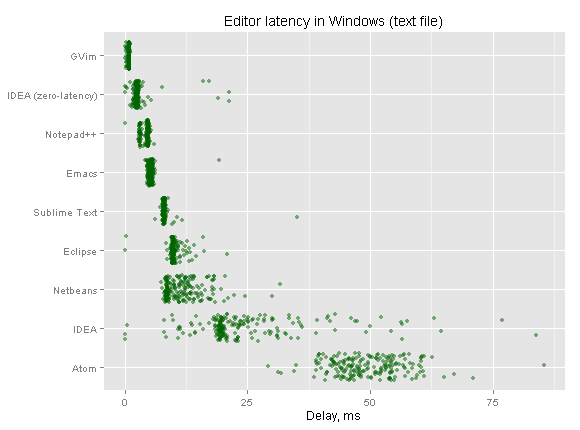
>mean I use vs code daily and don't think it's any less "snappy" than a native app

it's objectively worse.

https://pavelfatin.com/images/typing/editor-latency-windows-...

https://pavelfatin.com/typing-with-pleasure/

atom (electron based editor) has the highest latency of all. VSCode isn't listed but here's a benchmark by a random github user: https://camo.githubusercontent.com/7a5b91ed14a0173f861b8478c...

It’s not slow, but it is not responsiveness. Electron has terrible input latency compared to native.
> and don't think it's any less "snappy" than a native app.

I have tried to adopt vs code multiple times and just end up going back to (n)vim, where opening a file is instantaneous and I never have latency when typing, etc.

However I do find Jetbrains' products like CLion/Goland are pretty nice.

From experience... with today's computer having 16GB+ ram, VSCode is fine. But if you start doing dev work on a 2011 Macbook Air with 4GB ram or even 8GB ram, you quickly notice how much memory electron apps consume. When switching between VSCode to something like Sublime, the consumption is 10X improvement. That is my only beef with Electron apps. It is a way to get something cross-platform extremely fast but with ZERO care for how expensive it is.

FWIW, I use VSCode...

I'm looking to edit some text or view JSON quickly, I will always reach for Sublime first because it starts up at least twice as fast.