Hacker News new | ask | show | jobs
by cjoy 2946 days ago
I’ll be happy if the only thing that ships with 10.14 is a bugfix for the Preview.app. It amazes me that they have not yet unfucked the PDF rendering with a minor release. It amazes me even more, that this issue is not present on the linked wishlist. Do people not view PDFs on their Macs?
4 comments

I never had such a problem and I use a lot of PDFs so it seems the problem is not as widespread as you think.
The Preview PDF handling drives me mental too. Luckily it's not outright unusable for me, but it's still a pain. Buy Apple, they said... Apple always looks after the details :(

Happens on both my Macbook Pros, too - a early 2015 13" (i7-5557U) with Sierra, and a mid 2014 15" (i7-4980HQ with discrete GPU) with High Sierra. The symptoms for me, with the proviso that I'm not in OS X right now to double check:

1. set Preview to open PDFs at 100% zoom, 1 page at a time. Open a PDF. Preview opens the window at the right size, then pops some scrollbars in. Now the client area is smaller, and that means the window is the wrong size! - which means the mouse wheel scrolls the view, rather than scrolling from page to page. Gets me every damn time.

(This could be related, I imagine, to that setting that forces scrollbars always to be displayed. I suppose it's too much to expect Apple's QA to have a test matrix that encompasses this case)

2. scroll from page to page. Each new page appears blurry - or, if lucky, merely wonky - for a fraction of a second, then replaced with the clearer rendering one might expect. Actually quite distracting when scrolling page by page! - and when scrolling at keyboard repeat rate, the clearer version never has time to appear, making it impossible to scroll through a document visually at full speed

3. when resizing the Preview window, some sizes look mucky - looks like the sort of thing you get if you render to an offscreen buffer that's 1 or 2 pixel the wrong size, or add the 0.5 to only one edge of your quad, and so on. Really annoying

"scroll from page to page. Each new page appears blurry - or, if lucky, merely wonky - for a fraction of a second, then replaced with the clearer rendering one might expect."

THIS drives me nuts.

What kind of issues do you have with Preview viewing PDF's? I'll admit I do need to use Acrobat to fill out most forms that Preview seems to choke on.
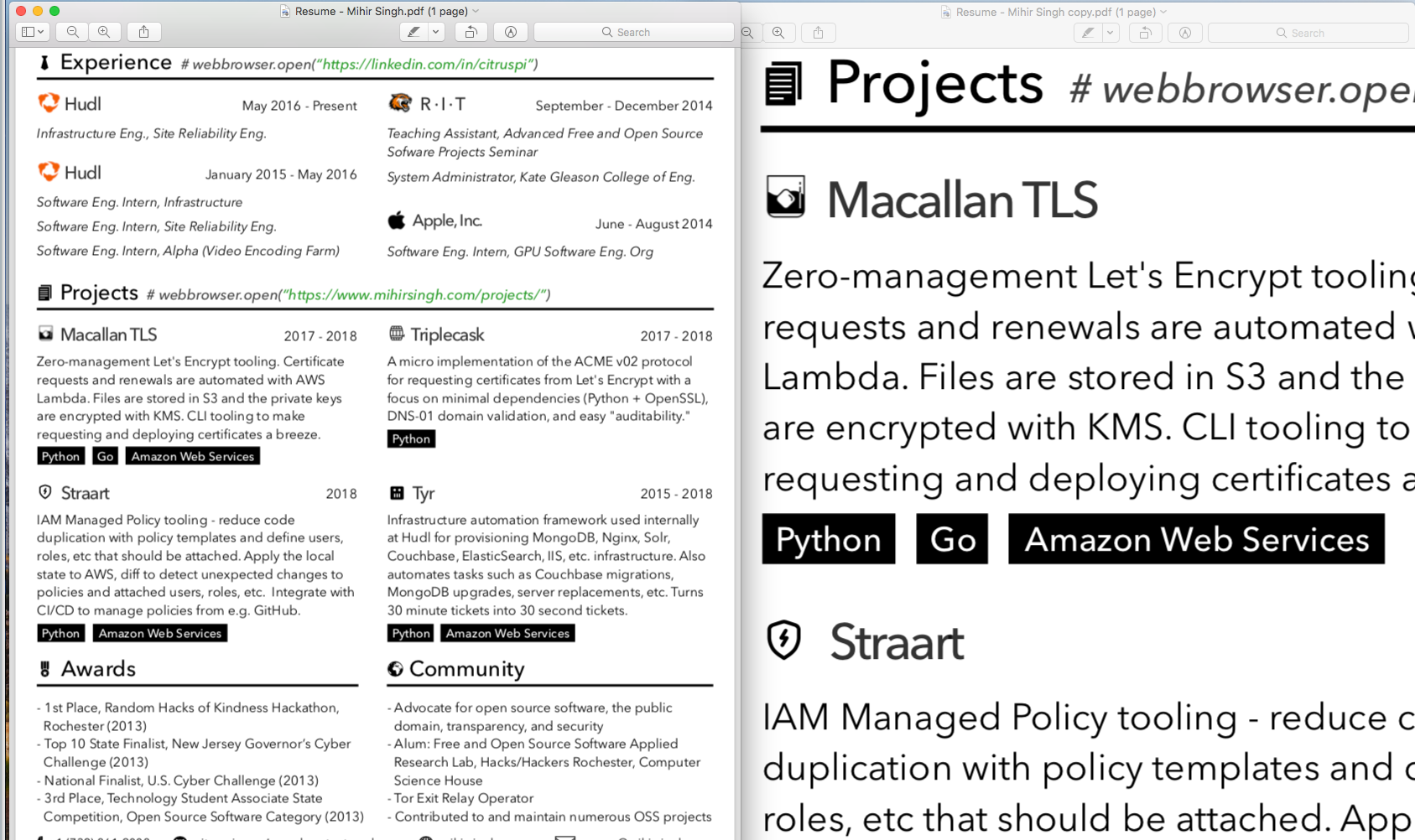
At 100% zoom level, the type is not rendered with crisp edges. It looks as if someone had applied a mild gaussian blur. Only once you zoom in, the outlines are sharp as they should be.

I have this issue on a 2012 and 2015 MBP as well as on a MP 5.1. With the built in screens, Eizos and a NEC SV. The only thing thats common across all builds is the OS.

If you think you dont have this issue, compare the rendering of Preview.app at 100% with that of Acrobat.

Curious: (1) Do you have some screenshots demonstrating this issue and (2) perhaps an example PDF that others could download for the purpose of issue reproduction? (I have not seen this issue, nor am I able to reproduce this issue after repeatedly trying under Preview. I have compared it with on-screen rendering under Acrobat XI, as well.) // Preview 10.0 (944.5), macOS 10.13.4 (17E202), MacBook Pro (13-inch, 2017)
Not the original commenter, but I've experienced

> At 100% zoom level, the type is not rendered with crisp edges. It looks as if someone had applied a mild gaussian blur. Only once you zoom in, the outlines are sharp as they should be.

a number of times.

Running on a 12" (Retina) Macbook w/ macOS 10.13.4 and Preview 10.0 (944.5).

1) Here's a screenshot (100% on left, zoomed in on the right) - https://s3.amazonaws.com/citruspi-tmp/Screen+Shot+2018-06-01...

2) PDF being used - https://cdn.beastnet.works/bfc7d34daac8e7630541d49b591b1b62/...

It also happens within the PDF viewer in Safari - text and icons look a lot crisper when zoomed in.

Same setup, 10.13.3, preview 10.0 (944.4). Unless I'm blind, no issue.

https://image.ibb.co/hXi53J/screenshot.png

15 inch MBP.

I think I've seen what you're talking about, but only on rare occasions. I would open a PDF in Preview and it would be strangely blurry. I would be wondering about the document itself when, as I investigated, I would do something that caused a sudden snap to sharpness. Closing and reopening would not reproduce it, and it happened so rarely and hasn't happened for so long that I forgot about it. I can imagine, though, that if it somehow got stuck in that mode, it would be infuriating.
I've never seen that
There are a lot of bugs that aren't reproducible with a short set of instructions. That doesn't mean that they should be ignored.