Yes, that's what I said. Parent price breakdown comment had "~$1300 for a professional 4K monitor" but I'm assuming you meant 5K monitor instead of 4K.
There aren’t good 5K monitors really for the PC they are either 30hz or requir 2 display port connectors which means you see 2 screens and there are calibration and sync issues the LG ones simply don’t work.
So my closest thing would be a 10bit calibrated 4K professional monitor which is well over $1000.
Ah, interesting. I've seen the 27" 5K Dell, didn't realize it needed two DP connections.
I assume that in theory the graphics drivers should be able to merge the displays and present it to the OS as a single screen. That's how my UP2414Q works, which is two halves driven by multi-stream-transport over a single cable. It was rather unreliable in Windows though.
EDIT - While my experience has been that the screen worked better on a Mac and sucked on Windows, other people have had similar experiences with multi-display problems in Mac land, so I wouldn't write it off as just a Windows problem. Recent discussion thread here https://news.ycombinator.com/item?id=15881207
So yes, a built-in display that probably works more reliably is definitely a bonus for the iMac Pro. Counterbalance that with the fact that when the computer's obsolete you're dumping the screen along with it.
The GPU doesn't emulate anything, it sees 2 displays so does the OS.
Which causes the problem, you effectively have 2 panels which can have difference in color recreation and there are some sync issues which can cause tearing with full screen applications.
For professional use especially video editing the best monitor I can think of is the UP2718Q.
The UP2718Q is a true 10 bit panel.
It supports a very wide color spaces: 100% of sRGB/Adobe RGB and Rec.709, 97.7% of DCI-P3 and of 76.9% Rec.2020.
It supports HDR which is becoming important for content creators these days and has a peak brightness of 1000nits which would allow you to produce HDR content and verify the end result in the same workflow without having to push it to a secondary true HDR display.
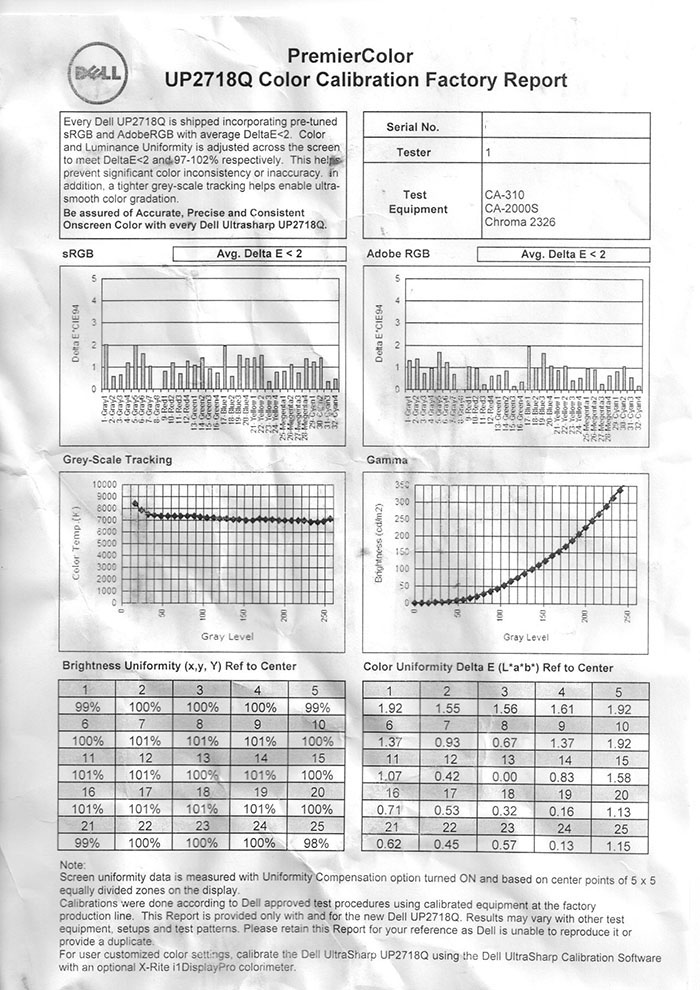
And since it's a PrimeColor display from Dell each monitor is individually calibrated at the factory and you get a full calibration chart with each PC monitor (they used to do it for each Ultrasharp, but these days it has to be US Primecolor) like this one: http://www.tftcentral.co.uk/images/dell_up2718q/img061.jpg
And most importantly it supports full hardware calibration so you can actually go into the OSD start the calibration process and update the hardware LUT table in the monitor itself rather than having to rely on color profiles.
The screenshots in this review show a single taskbar across the bottom as you'd expect with a single screen. If Windows were treating it as two screens you would expect the clock and systray to be in the middle of the screen, at the bottom right corner of the left half.
Windows has builtin support for multi monitor task bar since Windows 8 ;)
As for issues I would assume you don't have color profiles and aren't gaming on that monitor? Because while they aren't super common they do happen on the dual DP displays.
It discusses the TILE property communicated over EDID informing the drivers that the two signals should be merged into one panel, which is apparently being done automatically for 4K displays in Linux but not for 5K.
Since I can't find any similar complaints on the Windows side, I would assume that these are correctly tiling automatically at the GPU level, not using the multi-monitor taskbar.
Again not the same monitor (and 4K instead of 5K), but I can confirm that I had a single taskbar across the bottom of my UP2414Q under Windows 7 before the multi-monitor taskbar support was added in Windows 8. No user configuration was required. Similarly, hitting Maximize will make a window cover the entire screen, not just half of it as if they were separate displays.
So my closest thing would be a 10bit calibrated 4K professional monitor which is well over $1000.