| Yes, but at least it can do 60hz http://www.dell.com/ae/business/p/dell-up2715k-monitor/pd The GPU doesn't emulate anything, it sees 2 displays so does the OS.
Which causes the problem, you effectively have 2 panels which can have difference in color recreation and there are some sync issues which can cause tearing with full screen applications. For professional use especially video editing the best monitor I can think of is the UP2718Q. The UP2718Q is a true 10 bit panel.
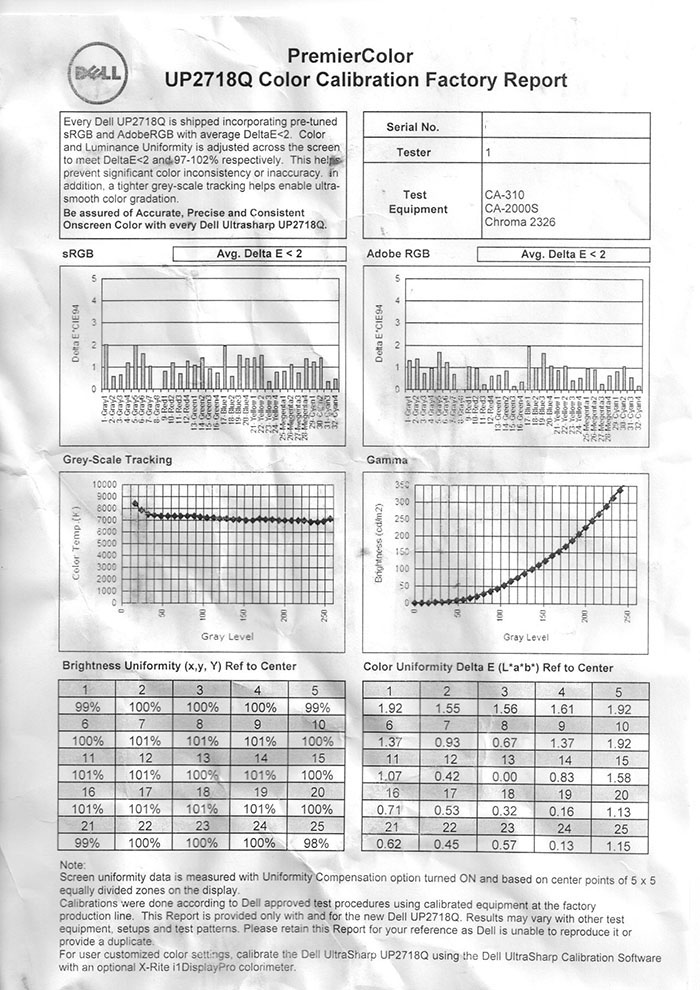
It supports a very wide color spaces: 100% of sRGB/Adobe RGB and Rec.709, 97.7% of DCI-P3 and of 76.9% Rec.2020. It supports HDR which is becoming important for content creators these days and has a peak brightness of 1000nits which would allow you to produce HDR content and verify the end result in the same workflow without having to push it to a secondary true HDR display. And since it's a PrimeColor display from Dell each monitor is individually calibrated at the factory and you get a full calibration chart with each PC monitor (they used to do it for each Ultrasharp, but these days it has to be US Primecolor) like this one: http://www.tftcentral.co.uk/images/dell_up2718q/img061.jpg And most importantly it supports full hardware calibration so you can actually go into the OSD start the calibration process and update the hardware LUT table in the monitor itself rather than having to rely on color profiles. |
https://www.digitaltrends.com/monitor-reviews/dell-up2715k-r...
I don't know at what level that problem is being solved, but it's getting merged to a single display device somewhere.
FWIW my UP2414Q at 60Hz with left/right driven by multi-stream transport hasn't had any color consistency or sync problems.