Hacker News new | ask | show | jobs
by derefr 3461 days ago
> rendering subtitles at the output resolution is better than rendering them at the video resolution

I would like to know what's wrong with this approach. I watch a lot of commentated speed-run videos: that's often something like ~244p video, plus soft subtitles. The subtitles get rendered at the source resolution (presumably, into the video framebuffer) and then upscaled along with the image, forcing them to be a tiny blurry mess instead of the crisp, readable text they could be.

5 comments

It's also missing the most common error I see: conflating subtitles with closed captions.

Closed captions are positioned on the screen to indicate who's talking, have descriptive audio for sound effects, and should be in a high contrast easy to read font (most people with hearing deficiencies also have problems seeing, ie: out of date prescriptions for both hearing aids and eye glasses).

As far as I know, QuickTime does it right but the Apple TV, Netflix, and YouTube fuck it up, but that's because I helped write the QuickTime one way back.

AFAIK, The YouTube implementation does all of those.

Here is a demo: https://www.youtube.com/watch?v=BbqPe-IceP4

Please do not spread falsehoods.

Disclamer: I work at YouTube.

The falsehood you're spreading is that youtube closed captioning is consistently usable for everyone by default.

This is how my subtitles / closed captions have looked for me on youtube for a year or so now [1] (on up-to-date Mac Chrome). The font is extremely small and blurry and practically transparent, and there is a horrible background color, which is usually yellow until a week or so ago, but has now changed to green for Christmas.

All I want for Christmas is readable YouTube text. I'm so glad YouTube is trying to keep up with the season's festivities by changing the background color of their absolutely unreadable text from yellow to green, but shouldn't they try to make the text readable by default somehow instead? Maybe a point size larger than 10 points, and a transparency higher than 10 percent, and a neutral or at least less nauseating background color?

Do all users have different randomly selected fonts and point sizes and colors? Why does it change randomly without any user intervention? Is this some sort of a/b/.../z testing? Get it together, YouTube!

I most certainly didn't do anything to configure the closed captions like this. Are there keyboard commands so power users can quickly switch fonts to strange colors and point sizes, that my cats may have pressed when walking on my keyboard?

[1] http://imgur.com/gallery/GOh1t

Oh my god, apparently it WAS my cat's [1] fault for walking across the keyboard!

Some genius at YouTube decided to implement persistent keyboard shortcuts that enable cats to easily and stealthily change the closed captioned text into unreadable colors!

My cat can press "o" to make the text lighter and fuzzier, and press "b" to cycle through a garish series of primary background colors plus black and white, including the same color as the text, rendering it invisible. There may be others, but I can't tell and I'm afraid to try.

Hoping that my opposable thumbs would enable me to get some help, I pressed "?" expecting to get a list of keyboard shortcuts, but that didn't do anything but violate the Principle of Least Astonishment [2].

It's not all my cat's fault, though -- some of the blame lies with YouTube: purposefully designing, implementing and not documenting such annoyingly cat-friendly but unhelpfully user-hostile keyboard shortcuts.

Googling for "youtube keyboard shortcuts" doesn't show any links to official YouTube documentation on the first page of results -- the top featured hit is an outdated page from an "SEO Consultant" full of social networking widgets and ads and self promotion, that doesn't even mention the closed captioning related keyboard shortcuts, which my cat discovered all by himself.

Does YouTube itself even document its own keyboard shortcuts online anywhere, let alone providing pop-up "?" help?

And does anybody really think that changing the transparency and background color of closed captioned text is so important that it deserved several dedicated undocumented keyboard shortcuts, no matter what the usability consequences were? Or that the user's inadvertent color and transparency preferences should be persisted across all videos instead of applied per-video? Who would even want partially transparent text anyway, let alone a key to change between several transparencies?

[1] http://imgur.com/a/33Mrt

[2] https://en.wikipedia.org/wiki/Principle_of_least_astonishmen...

>Please do not spread falsehoods.

Please assume the other side possibly doesn't know something you know (if that's really the case here), instead of being rude and accusing them of spreading falsehoods.

http://take.ms/fwwhx

That is frustratingly poor contrast.

I hate it when it does that, but you can change it with the gear thingy.
This might be because you might have changed your settings for CC in the past.

Here is what mine look like http://imgur.com/HLIVXQ6

You can click settings again to change font sizes, font family, colors, etc.

I have to change my CC settings every damn couple of days because they revert to the same white-on-white 400% bullshit. So thanks for that.
I am not sure, but the screenshot I submitted seems to be the default settings.

However, software that is 100% perfect is pretty much impossible to write, and if you think there's a systematic issue, please file a bug, so it can help others in same situation.

How many cats do you have? Any indoor pet chickens or chimpanzees? Or even mischievous children?
Okay, so how are subtitles different?
Subtitles are simply translations of speech or text into another language, and are generally (though not always) center aligned near the bottom of the frame.
This is wrong. Subtitles and closed captions serve the same purpose and the terms are largely interchangeable. It's an Americanism to associate subtitles specifically with translations or closed captions specifically with EIA-608.

The essential function of subtitles and closed captions is to enable a viewer to read dialogue (or contextual audio elements) without needing to either hear or understand the audio. It may be in the same language or not.

As one example, in some Chinese markets TV and movies are all subtitled in Chinese, not (primarily) for the deaf, but because the standard Chinese subtitles are intelligible to readers whose only spoken language is a mutually unintelligible dialect.

Sorry, but this is wrong. Closed captions may include non-speech audio as text for hearing impaired which subtitles will assume just speech translation not things like "[wind noise]".
I think that point should be amended to say "rendering subtitles at the output resolution is always better than rendering them at the video resolution." You don't want to upscale 244p soft subtitles to 1080p but you do want to default to giving video authors creative control over how the subtitles are displayed. The ASS subtitle format allows for some very complex styling that can be used as an artistic element in video (or just to make sure there's proper contrast, can be read by color blind people, character differentiation, etc.) so you generally don't want to assume anything. There's also the issue of coordinates for where the subtitles are supposed to be that all go to shit if you render them on a transformed (up/downscaled) frame.
This comment is pretty much what I was going for. I've reworded it to make it clearer.

The issue you can run into in practice is stuff like softsubbed signs, which can clash and look out of place with the native video if you render them at full res. There's also a related issue, which is that if you're using something like motion interpolation (e.g. “smoothmotion”, “fluidmotion” etc. or even stuff like MVTools/SVP), softsubbed signs will not match the video during pans etc., making them stutter and look very out-of-place - the only way to fix that is to render them on top of the video before applying the relevant motion interpolation algorithms.

Personally I've always wished for a world in which subtitles are split into two files, one for dialogue and for signs, with an ability to distinguish between the two. (Heck, I think softsubbed signs should just be separate transparent video streams that are overlayed on top of the native picture, allowing you to essentially hardsub signs while still being capable of disabling them)

Also, sometimes, rendering at full resolution is prohibitively expensive, e.g. watching heavily softsubbed 720p content on a 4K screen.

> There's also the issue of coordinates for where the subtitles are supposed to be that all go to shit if you render them on a transformed (up/downscaled) frame.

Sure, you have to transform the coordinates to the output. But still, better to render fonts at the final resolution; they'll always look better than if scaled after rendering.

> Sure, you have to transform the coordinates to the output. But still, better to render fonts at the final resolution; they'll always look better than if scaled after rendering.

The font will look better but you have zero guarantee that the subtitles will be better too. Furthermore, you will lose any artistic value that the creator intended.

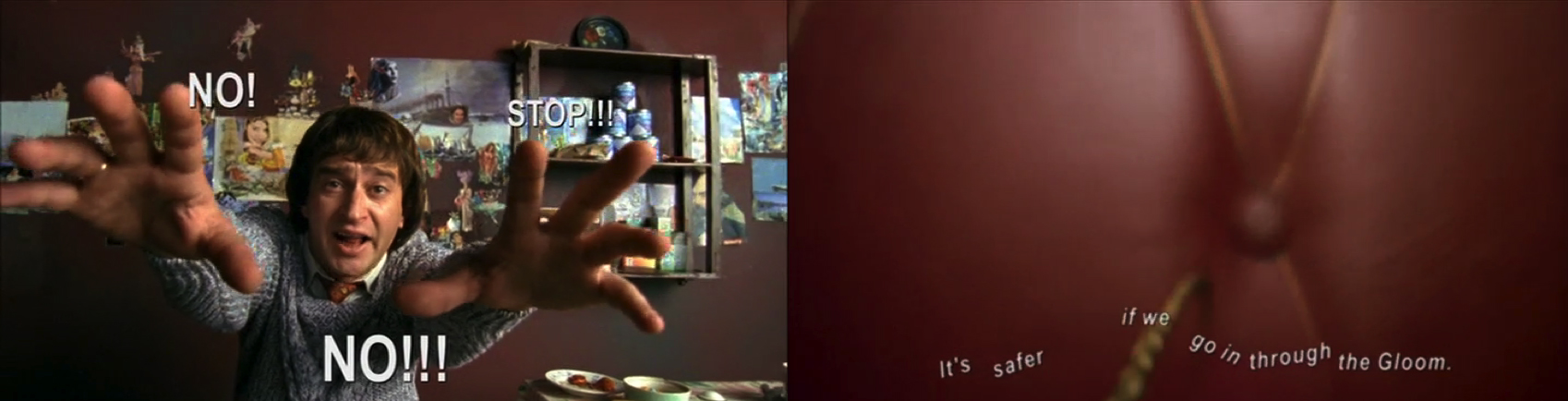
For example, go get the Russian movie Night Watch and watch it with the original subtitles hardcoded and as a separate file. The director insisted on doing the subtitles himself and he used them for great artistic effect throughout the movie [1]. Watch it with scaling and aspect ratio stretching to see how nicely rendered, crisp high resolution fonts can be inferior to a pixelated, stretched version created with intent by an artist.

[1] http://readingsounds.net/wp-content/uploads/2015/12/NightWat...

Maybe nothing is wrong; just that maybe it's not always strictly better. Suppose you are asked to form a plan for adding subtitle support to some unfamiliar video platform. It's probably best to start with an open mind about where in the pipeline subtitles will be composed with the video.
In fact, rendering subtitles at the display resolution is one of the big selling points of the xy-subfilter + madvr renderer combination.

The only practical downside I have noticed is that accurate rendering of subs containing complex vector graphics or effects (ASS supports that) at > HD resolutions takes a lot of CPU time, sometimes more than a single core can handle in realtime.

There probably is a lot of potential for optimization, but those are hobby projects for their maintainers.

the point is precisely that it is more complicated than this obvious interpretation.

whilst i don't necessarily agree... i do agree that if you want to conform to specs then you can't go thinking this way.