Hacker News new | ask | show | jobs
by ebbv 4019 days ago
While this is pretty novel (I don't recall seeing anything exactly like this in the past 25 years), I doubt that it's truly more ergonomic than a standard keyboard on a desk that's at the right height and distance from you.

With the keyboards at angles like that your hands are going to be pulled by gravity downward away from the keyboard at rest. Meaning you have to hold your hands in typing position. Additionally, those keyboards don't seem to have a lot of support and I foresee a bit of wobble, which is also not great.

When I was young (early teens) and a novice programmer/avid gamer I used to have wrist pain. It turned out this was mainly due to two factors; bad positioning of my arms and wrists while typing, and typing too hard. I retrained myself to position my arms and wrists such that they are truly at rest when typing (weigh resting on the heels of my palms) and to type gently, only using the amount of force necessary, and never pushing against the key while it is bottomed out, and in the following 25+ years of typing often >12 hours a day I never have wrist problems, despite a variety of keyboards.

Usually when I encounter people who are having wrist pain from typing, their posture and typing too hard are the problem. Sometimes changing out the keyboard helps induce a more mindful approach to typing and helps them relax, or adjusts their position such that it fixes the problem. But often times it doesn't, because the problem is their behavior, not the device.

Try typing more gently, and try adjusting your posture so you're not having to use your fore arm muscles to hold your hands in position. Those may help you.

Obviously everybody should do whatever works for them, but this is my experience. And I've typed a lot.

3 comments

You can definitely type without injury on a standard keyboard if you place it relatively low, tilt it to a comfortable angle (the best tilt depends on the height of the table), and bring it in close to your body, especially if you are only typing some of the time. (That is, if you are a writer or programmer rather than a professional transcriptionist or data entry clerk.)

However, having your wrists be less pronated also makes a huge difference. The most neutral position for your forearms/wrists when your arms are in a typical typing position is only pronated slightly compared to a vertical (“handshake”) type orientation. Typing on a standard one-piece keyboard, such that the palms are facing downward, even in the best possible position, still puts a lot of static load on the relevant muscles, and encourages the typist to hold the arms out to the side with the elbows up, as a way of reducing that strain, which causes various other posture problems.

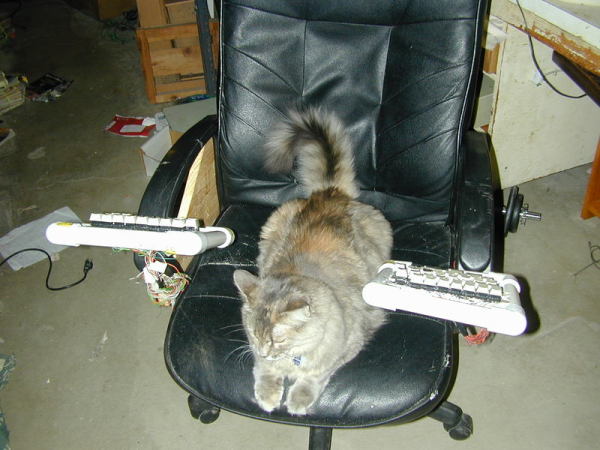
Yeah I'm definitely not claiming novelty (http://ohbah.com/mods/chairkey/images/cat.jpg). Over the past year I've tried a number of different solutions, and actually alternate among this, a mechanical keyboard and various (optimized) desks (standing and not).

The idea with this is that your arms will be pulled down (as you noted) but into the cushy arm rests, as opposed to your arms supporting themselves (if you are in the proper typing position). And they are tilted so that you end up resting your wrists on the side, as opposed to the bottom of your wrist where your tendons/nerves are most exposed. I don't know much about the science of ergonomics, but my arms do feel more relaxed in this position :).

But yes typing too hard has also been an issue for me in the past, the mechanical keyboard has been a huge help for that. Thanks for the comment!

I remember wanting an evolution keyboard mounted up to an aeron so badly back in the day but sadly I discovered them a year after they were discontinued. http://deskthority.net/photos-f62/ergonomic-keyboard-parade-...

I'm swapping between ergodox, kinesis advantage, and type matrix these days but always keeping my eye out for a better solution. Honestly the best thing I have found is a different keyboard, so these days I just keep cycling through them every few months.

If you use a mechanical keyboard, the keypress registers before bottoming out, about halfway down. Here are some animations.

http://superuser.com/a/366797/203540

Yeah I alternate between my Apple wireless keyboards and a cooler master mechanical board with cherry browns. I definitely enjoy them both but I find that it's the position of my arms that has the largest effect on wrist fatigue, not the key actions. Ideally I'd like to mount mechanical keyboards on the arm rests instead of Apple keyboards, but I haven't found a wireless one that I like yet...
I've tried several different varieties of "mechanical" keyboards, including buckling-spring keyboards, and I've come to the conclusion that I genuinely prefer laptop-style keyboards that have a hard stop for my fingers. (Specifically, I type on ThinkPad keyboards, even on desktops and docked systems; I use USB ThinkPad keyboards, complete with the mouse on home row.)

I don't type "through" the hard stop; my fingers know to stop right at the hard stop, but I prefer a physical stop rather than just a change (subtle or otherwise) in the amount of pressure I have to apply. I also like the very small amount of travel in the key.

I'd sort of agre with this, I find I type fastest these days on my bluetooth apple keyboard but my personal favourite is still my TiBook semi-trsnaparent keyboard, it had a comfortable amount of travel and great action.