Hacker News new | ask | show | jobs
by leonk 4236 days ago
There's a much bigger issue, the default iPhone settings has "Send as SMS" off, this means that if a failed iMessage attempt occurs, it will just give up (rather than sending by SMS).

I've tried disabling iMessage on my iphone several times. I then have nothing connected to my iMessage account, but I still miss out on loads of messages from people who have the "Send by SMS" option disabled. Their devices are not told that I am no longer using iMessage.

I went to the apple store to ask about this, and I was told the only solution was to get all my contacts to ensure "Send by SMS" is turned on. Which is frankly absolutely ridiculous!

4 comments

> the default iPhone settings has "Send as SMS" off

I don't think this is true. I have a phone here I only use for development where I don't think I changed that setting and it's on.

Nope, I've had to reinstall iOS several times recently and I can confirm that every time, it was turned off. Maybe this depends on your SIM/carrier?
Are you sure the setting wasn't backed up? I've never had this issue and done many upgrades and fresh installs.
I had to show this setting to my fiancée who just got her first iPhone, a 5c, as a free upgrade when her feature phone kicked it, and since she isn't paying for a data plan...

First we figured out how to disable cellular data, since the phone with the minimum data plan gets only 100MB of usage per month, it's definitely too much to ask that one should police their applications and "just not use data" -- I don't have to tell you how easy it would be to accidentally go over this cap if you are actually using apps or any features of the iPhone at all, and the incidental metered usage rates are just absolutely ridiculous.

Then we had to go and find the Send as SMS setting, which was disabled by default, because text messaging to other iPhones only ever worked when she was in a WiFi zone. She would receive a flurry of messages she was missing while out, immediately when she got home, obviously a symptom of this issue with iMessage.

Even now, with the setting enabled, other iPhones won't reach her if they try to send a message when she's not in WiFi zones, because they still have this setting disabled. You have to show all your friends with iPhones how to enable this setting, or to force one message through individually, or just bite the bullet and pay for a real data plan. It does seem to be all by design, some type of collusion with the phone carrier(s) to make more money on data plans.

I agree that iOS and apps could do more to help users stay within the limits of their data plan. Sometimes it seems like they assume data is free.

I once had Spotify eat my entire data for the month in a few hours because wifi was spotty and it just went on to stream (in max quality) over 3G.

Another issue, especially in Europe, is international roaming. When you're near a border, your device may be roaming in the neighboring countries network because their signal is stronger, so you really have to catch the "welcome to foo network" sms and turn off data roaming (or pay for an "EU Day Pack").

Your issue isn't send as sms, it's that she shouldn't be using iMessage in the first place.
This makes sense, I see now that you can disable it. But was this even an option before Apple published the "selfsolve" page referenced here in today's news?

I haven't seen any articles that suggest you should disable iMessage unless you are dropping your iPhone completely. It was totally not obvious to me that you can even do this, and I am professional. ^_^ (I don't have my own iPhone, so I've never had to wrangle with these issues on my own.)

That seems to be the case indeed. It's off for me as well after a settings reset.
Maybe the spooks have tagged a rogue imessage recipient key onto your account, leaving the total remaining count > 0 ;)
Did they say that with a straight face? I can't believe that would be serious advice! "You literally need to contact everyone in your address book and make sure they have the right settings."
No, you remove your number from the imessage "My Addresses" list and everyone else will see nothing different except the send button is green now.

the problem that really exists with iMessage is that it's easy to enroll but people forget to unenroll when they move their number away from iPhone.

You're wrong, and the comment you replied to is right. According to Apple, it can take up to 45 days to receive text messages from Apple products after you turn iMessage off.

http://support.apple.com/en-us/TS2755

This was the experience of the person who initiated the class action suit:

"21. Apple personnel informed Plaintiff that even though she had turned iMessage off in her old iPhone she may still not be receiving all her text messages because some texters using Apple devices may not be using the latest Apple iOS version. Rather than Apple coming up with a solution to a problem created by Apple, Apple's representative instead suggested to Plaintiff that Plaintiff get her text message senders to update their Apple iOS to the latest version, or have them delete and then re-add Plaintiff as their contact, or have Plaintiff and these unsuccessful Apple texters start a new text conversation with Plaintiff."

http://www.slideshare.net/harrisonrweber/apple-imessage-laws...

> There's a much bigger issue, the default iPhone settings has "Send as SMS" off, this means that if a failed iMessage attempt occurs, it will just give up (rather than sending by SMS).

So by default, it sends a secure end-to-end message, and you'd prefer it to fail back and send an insecure SMS logged by your telco? (Verizon, for example, makes your SMS history available in a web portal.)

I think the bigger issue would be if iMessage burned your SMS plan and sent insecure messages without you explicitly asking to.

Defaulting to losing the security and privacy seems more "frankly absolutely ridiculous".

That's a very generous reading of the situation. How many iPhone users bought their device because it offers secure end-to-end messaging? I'm going to say very few of them. How many of them even know what the blue bubble and the green bubble mean?

I think a lot more users would be surprised that iMessage doesn't burn through your SMS plan than those would be surprised if it did.

What? The correct behavior here is to realize that the target no longer supports iMessage and return to non-iMessage behavior. This should involve swapping the UI from blue back to green so the user is aware.
This is what happens. The setting is only what happens automatically: if the UI is blue and it fails to send. When it fails to send, the message is marked failed (with a red exclamation point), and then the UI switches to green because the recipient is not connected to iMessage.
Availability is part of security, right next to confidentiality and integrity. Systems that silently fail closed aren't secure in a meaningful way, because you can't distinguish a DoS from "working as designed".
Availability does not mean availability at any cost. When designing a system at no point should it be considered secure if it fails open.

The issue is that there is little information provided to the user to indicate why there is an issue, but it most certainly should fail closed.

Unless it opens the door to downgrade attacks, then things get a bit more murky: http://crypto.stackexchange.com/questions/10493/why-is-tls-s...
I'd rather have my telco read over my shoulder than Apple.

Telcos being in the business of handling my conversations anyway and Apple being a hardware vendor from a different continent.

He implies a nice middle road: don't automatically fall back to SMS, but inform the user that the recipient cannot be reached on iMessage and SMS must be enabled if you want to talk to them.
Why not just ask straight away if the user wants to send the message as SMS instead of having to change global configurations?
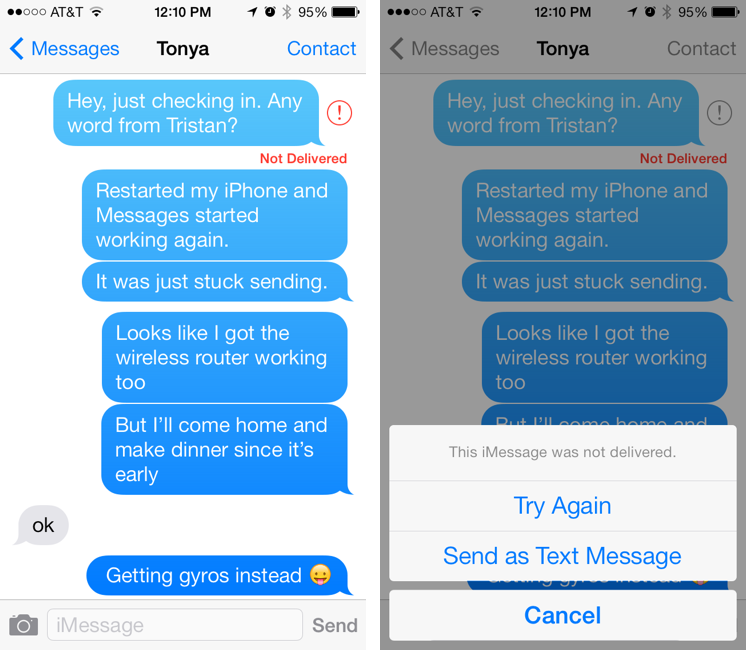
When iMessage fails you get a notification and next to the message appears a button which pops up a menu with “Try Again” and “Send as SMS”.

http://tidbits.com/resources/2013-10/iMessage-failure.png

(Unfortunately that didn't work for the issue fixed by this tool, since the iMessage never actually failed from the sender's perspective)