Hacker News new | ask | show | jobs
by dpe82 4505 days ago
> But this is exactly the same if you put your mp3 file through Audacity and increase it and play with WMP, or if you put a DirectShow filter that amplifies the volume after your codec output.

Indeed, and doing that destroys audio equipment just as effectively. It's the reason apps like SoundForge, Audacity and others have clip warnings on their level monitors: so users don't create audio data that destroys listeners' equipment.

The problem is VLC gives consumers (who, like you, don't know better) an exceptionally easy way to create clipped audio. Depending on the characteristics of the source, the degree of clipping VLC can create can destroy even pro equipment. If I were an engineer at Dell, I'd recommend denying warranty claims too.

1 comments

I thought they warned about clipping because it sounds awful.

There is no excuse, none, nada, zip, zilch, in 2014 for allowing userland software to generate signals powerful enough to damage built-in hardware.

Agreed in principal, however all the ways that could prevent rogue userland software from playing damaging audio (eg. using a limiter of some sort) would either distort or introduce quite a bit of delay to otherwise perfectly safe audio played by responsible software.
How would it distort audio played by responsible software? Pick a limit where "100%" doesn't destroy the hardware. Enforce it. No distortion, done.
It's more complex than that. Let me explain:

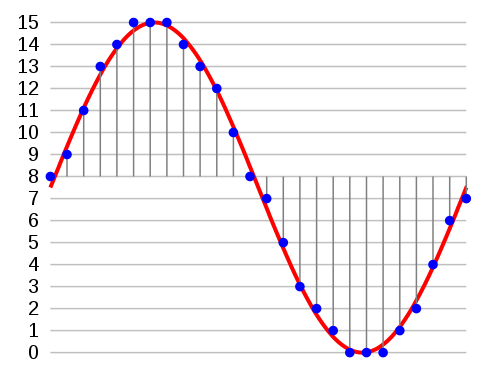
Audio is typically passed into a soundcard's digital audio converter (DAC) as integers representing samples of the audio waveform. For example, a full volume sine wave looks something like this[0]. That signal is perfectly safe to play on any hardware. However, if you take that same sine wave and increase the amplitude you end up with values outside the valid range so you have to cap them. You get something that looks like this[1].

Lopping off the tops and bottoms of the waveform is clipping, and the newly created sharp edges in the waveform are what can damage your speaker. They require a ton of energy to play (producing heat) and in some cases can trigger the buildup of high frequency harmonic oscillations in your speaker's voice coil that can eventually crack it. More expensive speakers last longer but virtually all speakers eventually "blow" under such circumstances.

The trouble is playing waveforms like that once in a while is totally ok and short bursts of very similar waveforms exist benignly in lots of stuff you listen to every day. And while it's trivial to know if you're creating clipped audio, it's very difficult (read: processor intensive) and error-prone to detect it after the fact. When you do detect it, your solutions are to either drastically lower the global volume so the edges have a lot less energy, or distort the waveform to make those edges more smooth. It's really, really hard to avoid false positives though and not end up "enforcing" against audio data that's natural and perfectly ok in moderation.

[0] http://upload.wikimedia.org/wikipedia/commons/thumb/b/bf/Pcm... [1] http://www.st-andrews.ac.uk/~www_pa/Scots_Guide/audio/clippi...

Thanks for the info. I was familiar with most of that, but didn't think the difference would be so big. How much of a "safety factor" are we talking about between the ability to handle normal audio and the ability to handle this sort of catastrophic case? In other words, how much would you have to turn down the maximum volume limit? Is it a factor of 2, or 10, or 100...?

If it's a factor of 2, for example, just take the 3dB volume loss and move on.

I don't see why detecting the situation is so hard, though. Build a simplistic model of the amount of energy dumped into the speaker and the amount dissipated, run the audio through that model, and then limit the volume when the amount still in the speaker gets too high. This would let through small amounts and limit large amounts, just like you'd want. For a really simplistic model, run the signal through a high pass filter, integrate the output, then apply a running average to that. When the running average surpasses a value that indicates the speaker is reaching its limit, cut the volume. I take it that this doesn't work?

It's hard to know. Speakers are insanely complex beasts whose electrical reactance changes depending on the signal. To simplify things we use measures like RMS current ratings for amplifiers because if you put a sine wave through a speaker they tend to approximate a resistive load due to most of the load being air, and we use nominal impedance to describe speakers because while even though for something as simple as a sine wave a speaker's impedance can vary 4x from nominal depending on frequency, it at least gives us something we can reliably measure.

Once the signal is more complex than a sine wave things get crazy. The more frequencies in a signal, the harder it is to model the power draw since different parts of a complex curve cause the speaker to act more like the low resistance inductor it actually is. Discontinuities and areas of constant voltage (both caused by clipping) are the worst, and to make things even more fun the amplifier is part of the system and affects things as well.

But assuming you know a lot about the speaker, the amplifier and the DAC you could probably build a model that works well for simple sinusoidal audio, but that doesn't cause problems anyway. All bets are off for anything more complex.

So instead you're left with a few options: buy reasonable gear and don't play crap audio, play crap audio but massively overbuild your system so you lower the risk of getting into the unknowable danger zone that changes depending on what you're playing, or use a bunch of heuristics on a signal and try to distort it in some way so it's less potentially damaging.

The problem with the latter is since you don't know where the line is it's easy to be overzealous and end up distorting lots of stuff you don't need to. Problem with the middle is you either end up with something much larger and more expensive than you need, or you cripple what you have to give you a wider margin of safety. Problem with the first is apps like VLC make it exceptionally easy to accidentally play crap audio. Pick your poison.

Could Dell spend a couple extra bucks for higher quality components and create a wider margin of safety? Probably yes. But at the same time the VLC developers are being reckless by putting a tool into consumers hands that makes it so easy to play potentially damaging audio signals.

Edit: clarifications

Remember that each technical measure you add to a design represents another (a) cost (b) size/weight, and (c) possible failure mode.

> When the running average surpasses a value that indicates the speaker is reaching its limit, cut the volume. I take it that this doesn't work?

No, it might work, but it's really a question of cost, complexity and represents an added failure mode -- something else that can go wrong.