Hacker News new | ask | show | jobs
by smashed 75 days ago
Lots of "just use X" comments but the article is about showing the bare minimum/how easy the core part of routing actually is.

Also, if you have ever used docker or virtual machines with NAT routing (often the default), you've done exactly the same things.

If you have ever enabled the wifi hotspot on an android phone also, you've done pretty much what the article describes on your phone.

All of these use the same Linux kernel features under the hood. In fact there is a good chance this message traversed more than one Linux soft router to get to your screen.

3 comments

Yeah I find it more interesting to see how it's built from scratch, then I can decide if it's worth doing myself or just using X. I think this is a good software principle in general.
Basically any computer is a router if you're brave enough.

Windows PCs had (have?) that Internet connection sharing feature for a long time. It was really just a checkbox to enable NAT too.

Sometimes I think combining a firewall/router/switch/AP/file server/etc into a device called a "router" really confuses people. Even people who should know better.

It is much, much easier than it used to be. The documentation and videos alone available make something like this a very welcoming learning experience that anyone can complete step by step by pausing a video and replaying it.
Like most things, really. I used to build routers from old PCs, but eventually those tiny appliances caught up with the performance/functionality I need.

You can do a lot of routing on a $70 Mikrotik, although they might not be "easy".

I really want to end up with one of these for at least a few months: https://mikrotik.com/product/rds2216
At $2k out the door that's way more reasonable than I thought it'd be.

Too bad I can't fill it with old spinning rust.

And no (mention of) ECC.
For sure, it's a path and passage towards devices like that.

Everyone has a starting point, starting with soemone has lying around is one thing.. the quicker they can get going the more they can get to leveraging the real power in most devices.

the naming is part of the confusion. consumer "routers" are really NAT gateway + DHCP server + DNS cache + WiFi AP + maybe a firewall, all in one box. separating them makes each piece clearer.
There's also a layer 2 switch connecting the pieces together.
You don't even need more than one NIC: https://en.wikipedia.org/wiki/Router_on_a_stick
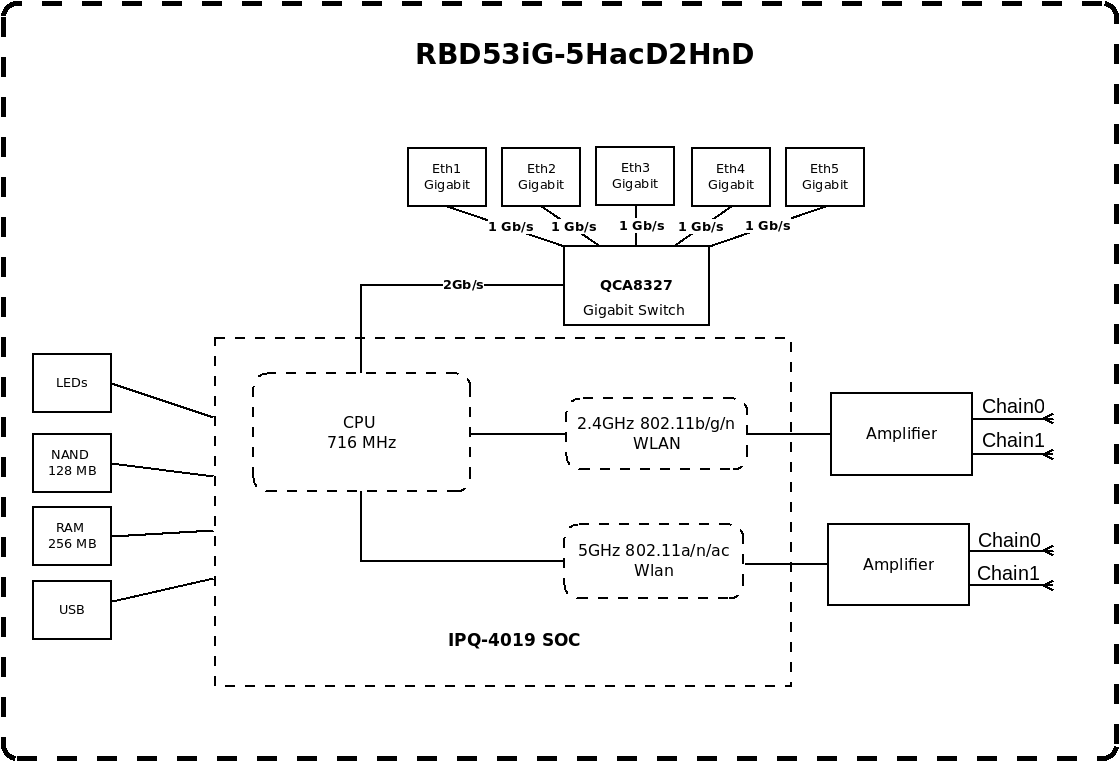
Iirc classic WRT-841 and similar "300Mbit WiFi" generation 4-100Mbit-ports Wi-Fi routers had the CPU attached via an on-SoC gigabit link to a vlan capable switch that has the 4 100BASE-TX ports exposed.
Are there links I can read up on this? Ethernet as on-chip bus blows my mind.

I guess it's cheaper than having to redesign an entire SoC, but still...

These SoCs are often purpose built for networking. The CPU just connects to an internal switch chip instead of an external jack.

Mikrotik makes block diagrams of some of their Routerboards available. This is a hAP AC3, for example

https://i.mt.lv/cdn/product_files/RBD53iG-5HacD2HnD_201031.p...

It runs on a Qualcom IPQ4019 single-chip Wi-Fi system-on-chip (SoC)

Not super practical for everyone, but definitely valuable as a mental model shift