Hacker News new | ask | show | jobs
by kccqzy 354 days ago
> doing the "draw at 2x scale and then scale down" dance that was popularized by OSX

Originally OS X defaulted to drawing at 2x scale without any scaling down because the hardware was designed to have the right number of pixels for 2x scale. The earliest retina MacBook Pro in 2012 for example was 2x in both width and height of the earlier non-retina MacBook Pro.

Eventually I guess the cost of the hardware made this too hard. I mean for example how many different SKUs are there for 27-inch 5K LCD panels versus 27-inch 4K ones?

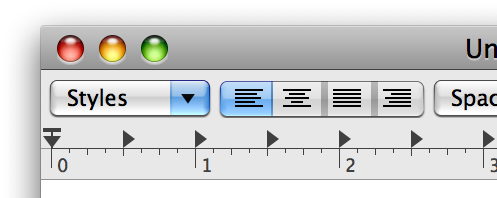
But before Apple committed to integer scaling factors and then scaling down, it experimented with more traditional approaches. You can see this in earlier OS X releases such as Tiger or Leopard. The thing is, it probably took too much effort for even Apple itself to implement in its first-party apps so Apple knew there would be low adoption among third party apps. Take a look at this HiDPI rendering example in Leopard: https://cdn.arstechnica.net/wp-content/uploads/archive/revie... It was Apple's own TextEdit app and it was buggy. They did have a nice UI to change the scaling factor to be non-integral: https://superuser.com/a/13675

4 comments

> Originally OS X defaulted to drawing at 2x scale without any scaling down because the hardware was designed to have the right number of pixels for 2x scale.

That's an interesting related discussion. The idea that there is a physically correct 2x scale and fractional scaling is a tradeoff is not necessarily correct. First because different users will want to place the same monitor at different distances from their eyes, or have different eyesight, or a myriad other differences. So the ideal scaling factor for the same physical device depends on the user and the setup. But more importantly because having integer scaling be sharp and snapped to pixels and fractional scaling a tradeoff is mostly a software limitation. GUI toolkits can still place all ther UI at pixel boundaries even if you give them a target scaling of 1.785. They do need extra logic to do that and most can't. But in a weird twist of destiny the most used app these days is the browser and the rendering engines are designed to output at arbitrary factors natively and in most cases can't because the windowing system forces these extra transforms on them. 3D engines are another example, where they can output whatever arbitrary resolution is needed but aren't allowed to. Most games can probably get around that in some kind of fullscreen mode that bypasses the scaling.

I think we've mostly ignored these issues because computers are so fast and monitors have gotten so high resolution that the significant performance penalty (2x easily) and introduced blurryness mostly goes unnoticed.

> Take a look at this HiDPI rendering example in Leopard

That's a really cool example, thanks. At one point Ubuntu's Unity had a fake fractional scaling slider that just used integer scaling plus font size changes for the intermediate levels. That mostly works very well from the point of view of the user. Because of the current limitations in Wayland I mostly do that still manually. It works great for single monitor and can work for multiple monitors if the scaling factors work out because the font scaling is universal and not per output.

What you want is exactly how fractional scaling works (on Wayland) in KDE Plasma and other well-behaved Wayland software: The scale factor can be something quirky like your 1.785, and the GUI code will generally make sure that things nevertheless snap to the pixel grid to avoid blurry results, as close to the requested scaling as possible. No "extra window system transforms".
That's what I referred to with "we'll be finally getting that in Wayland now". For many years the Wayland protocol could only communicate integer scale factors to clients. If you asked for 1.5 what the compositors did was ask all the clients to render at 2x at a suitably fake size and then scale that to the final output resolution. That's still mostly the case in what's shipping right now I believe. And even in integer scaling things like events are sent to clients in virtual coordinates instead of just going "here's your NxM buffer, all events are in those physical coordinates, all scaling is just metadata I give you to do whatever you want with". There were practical reasons to do that in the beginning for backwards compatibility but the actual direct scaling is having to be retrofitted now. I'll be really happy when I can just set 1.3 scaling in sway and have that just mean that sway tells Firefox that 1.3 is the scale factor and just gets back the final buffer that doesn't need any transformations. I haven't checked very recently but it wasn't possible not too long ago. If it is now I'll be a happy camper and need to upgrade some software versions.
In KDE Plasma we've supported the way you like for quite some years, because Qt is a cross-platform toolkit that supported fractional on e.g. Windows already and we just went ahead and put the mechanisms in place to make use of that on Wayland.

The standardized protocols are more recent (and of course we heavily argued for them).

Regarding the way the protocol works and something having to be retrofitted, I think you are maybe a bit confused about the way the scale factor and buffer scale work on wl_output and wl_surface?

But in any case, yes, I think the happy camper days are coming for you! I also find the macOS approach attrocious, so I appreciate the sentiment.

Thanks! By retrofitting I mean having to have a new protocol with this new opt-in method where some apps will be getting integer scales and go through a transform and some apps will be getting a fractional scale and rendering directly to the output resolution. If this had worked "correctly" from the start the compositors wouldn't even need to know anything about scaling. As far as they knew the scaling metadata could have been an opaque value that they passed from the user config to the clients to figure out. I assume we're stuck forever with all compositors having to understand all this instead of just punting the problem completely to clients.

When you say you supported this for quite some years was there a custom protocol in KWin to allow clients to render directly to the fractionally scaled resolution? ~4 years ago I was frustrated by this when I benchmarked a 2x slowdown from RAW file to the same number of pixels on screen when using fractional scaling and at least in sway there wasn't a way to fix it or much appetite to implement it. It's great to see it is mostly in place now and just needs to be enabled by all the stack.

Oh, ok. Yeah, this I agree with, and I think plenty of people do - having integer-only scaling in the core protocol at the start was definitely a regretable oversight and is a wart on things.

> When you say you supported this for quite some years was there a custom protocol in KWin to allow clients to render directly to the fractionally scaled resolution?

Qt had a bunch of different mechanisms for how you could tell it to use a fractional scale factor, from setting an env var to doing it inside a "platform plugin" each Qt process loads at runtime (Plasma provides one), etc. We also had a custom-protocol-based mechanism (zwp_scaler_dev iirc) that basically had a set_scale with a 'fixed' instead of an 'int'. Ultimately this was all pretty Qt-specific though in practice. To get adoption outside of just our stack a standard was of course needed, I guess what we can claim though is that we were always pretty firm we wanted proper fractional and to put in the work.

Thank you for that. The excellent fractional scaling and multi-monitor support is why I finally switched back to KDE full time (after first switching away during the KDE 3 to 4 mess).
> That's still mostly the case in what's shipping right now I believe

All major compositors support fractional scaling extension these days which allows pixel perfect rendering afaik, and I believe Qt6 and GTK4 also support it.

https://wayland.app/protocols/fractional-scale-v1#compositor...

That's great, however why do we use a "scale factor" in the first place? We had a perfectly fitting metric in DPI, why can't I set the desired DPI for every monitor, but instead need to calculate some arbitrary scale factor?

I'm generally a strong wayland proponent and believe it's a big step forward over X in many ways, but some decisions just make me scratch my head.

DPI (or PPI) is an absolute measurement. Scale factor is intentionally relative. Different circumstances will want to have different scale factor : dpi ratios; most software do not care if certain UI element is exactly x mm in size, but instead just care that their UI element scale matches the rest of the system.

Basically scale factor neatly encapsulates things like viewing distance, user eyesight, dexterity, and preference, different input device accuracy, and many others. It is easier to have human say how big/small they want things to be than have gazillion flags for individual attributes and then some complicated heuristics to deduce the scale.

The end-user UIs don't ask you to calculate anything. Typically they have a slider from 100% to, say, 400% and let you set this to something like 145%.

This may take some getting used to if you're familiar with DPI and already know the value you like, but for non-technical users it's more approachable. Not everyone knows DPI or how many dots they want to their inches.

That the 145% is 1.45 under the hood is really an implementation detail.

I'm not privy to what discussions happened during the protocol development. However using scale within the protocol seems more practical to me.

Not all displays accurately report their DPI (or can, such as projectors). Not all users, such as myself, know their monitors DPI. Finally the scaling algorithm will ultimately use a scale factor, so at a protocol level that might as well be what is passed.

There is of course nothing stopping a display management widget/settings page/application from asking for DPI and then converting it to a scale factor, I just don't known of any that exist.

> We had a perfectly fitting metric in DPI, why can't I set the desired DPI for every monitor, but instead need to calculate some arbitrary scale factor?

Because certain ratios work a lot better than others, and calculating the exact DPI to get those benefits is a lot harder than estimating the scaling factor you want.

Also the scaling factor calculation is more reliable.

I don't run a compositor, and with Qt6, Some programs like VirtualBox just don't respect Qt's scaling factor setting. Setting the font DPI instead results in weird bugs, like the display window getting smaller and smaller.

As it happens, VirtualBox does have its own scaling setting, but it's pretty bad, in my opinion. But I'm kind of forced to use it because Qt's own scaling just doesn't work in this case.

Seems like the support is getting there. I just checked Firefox and it has landed the code but still has it disabled by default. Most users that set 1.5x on their session are probably still getting needless scaling but hopefully that won't last too long.
It landed four years ago, but had debilitating problems. Maybe a year ago when I last tried it, it was just as bad—no movement at all. But now, it seems largely fixed, hooray! Just toggled widget.wayland.fractional-scale.enabled and restarted, and although there are issues with windows not synchronising their scale (my screen is 1.5×; at startup, one of two windows stayed 2×; on new window, windows are briefly 2×; on factor change, sometimes chrome gets stuck at the next integer, probably the same issue), it’s all workaroundable and I can live with it.

Ahhhhhhhh… so nice.

> The scale factor can be something quirky like your 1.785, and the GUI code will generally make sure that things nevertheless snap to the pixel grid to avoid blurry results

This is horrifying! It implies that, for some scaling factors, the lines of text of your terminal will be of different height.

Not that the alternative (pretend that characters can be placed at arbitrary sub-pixel positions) is any less horrifying. This would make all the lines in your terminal of the same height, alright, but then the same character at different lines would look different.

The bitter truth is that fractional scaling is impossible. You cannot simply scale images without blurring them. Think about an alternating pattern of white and black rows of pixels. If you try to scale it to a non-integer factor the result will be either blurry or aliased.

The good news is that fractional scaling is unnecessary. You can just use fonts of any size you want. Moreover, nowadays pixels are so small that you can simply use large bitmap fonts and they'll look sharp, clean and beautiful.

> The bitter truth is that fractional scaling is impossible.

That's overly prescriptive in terms of what users want. In my experience users who are used to macOS don't mind slightly blurred text. And users who are traditionalists and perhaps Windows users prefer crisper text at the expense of some height mismatches. It's all very subjective.

> In my experience users who are used to macOS don't mind slightly blurred text.

It always makes me laugh when apple users say "oh it's become of the great text rendering!"

The last time text rendering was any good on MacOS was on MacOS 9, since then it's been a blurry mess.

That said, googling for "MacOS blurry text" yields pages and pages and pages of people complaining so I am not sure it is that subjective, simply that some people don't even know how good-looking text can look even on a large 1080p monitor

You can only search for complaints because those who enjoy it are the silent majority. You can however also search for pages and pages of discussions and tools to bring Mac style text rendering to Windows including the MacType tool. It is very much subjective.

"Great text rendering" is also highly subjective mind you. To me greatness means strong adherence to the type face's original shape. It doesn't mean crispness.

The way it works for your terminal emulator example is that it figures out what makes sense to do for a value of 1.785, e.g. rasterizing text appropriately and making sure that line heights and baselines are at sensible consistent values.
the problem is that there's no reasonable thing to do when the height of the terminal in pixels is not an integer multiple of the height of the font in pixels. Whatever "it" does, will be wrong.

(And when it's an integer multiple, you don't need scaling at all. You just need a font of that exact size.)

You're overthinking things a bit and are also a bit confused about how font sizes work and what "scaling" means in a windowing system context. You are thinking taking a bunch of pixels and resampling. In the context we're talking about "scaling" means telling the software what it's expected to output and giving it an opportunity to render accordingly.

The way the terminal handles the (literal) edge case you mention is no different from any other time its window size is not a multiple of the line height: It shows empty rows of pixels at the top or bottom.

Fonts are only a "exact size" if they're bitmap-based (and when you scale bitmap fonts you are indeed in for sampling difficulties). More typical is to have a font storing vectors and rasterizing glyphs to to the needed size at runtime.

> The scale factor can be something quirky like your 1.785

Actually, you can’t have exactly 1.785: the scale is a fraction with denominator 120 <https://wayland.app/protocols/fractional-scale-v1#wp_fractio...>. So you’ll have to settle for 1.783̅ or 1.7916̅.

Aye, the "like" was doing a lot of heavy lifting in that sentence intentionally :).

But it's HN, so I appreciate someone linking the actual business!

Is it actually in Wayland or is it "implementation should handle it somehow" like most of wayland? Because what is probably 90% of wayland install base only supports communicating integer scales to clients.
It's in Wayland in the same way everything else is, i.e. fractional scaling is now a protocol included in the standard protocol suite.

> Because what is probably 90% of wayland install base only supports communicating integer scales to clients.

As someone shipping a couple of million cars per year running Wayland, the install base is a lot bigger than you think it is :)

Hmmm, sorry, but I don't care about install base of wayland in a highly controlled environment (how many different monitor panels you ship is probably less amount of displays with different DPI in my living room right now).
90% is still nonsense even in desktop Linux, tho.
What is the status of fractional pixels in GTK? Will GTK5 finally get what KDE/Qt has today?

I recall the issue is that GTK bakes deep down the fact that pixel scaling is done in integers, while in Qt they are in floats

> But more importantly because having integer scaling be sharp and snapped to pixels and fractional scaling a tradeoff is mostly a software limitation. GUI toolkits can still place all ther UI at pixel boundaries even if you give them a target scaling of 1.785. They do need extra logic to do that and most can't.

The reason Apple started with 2x scaling is because this turned out to not be true. Free-scaling UIs were tried for years before that and never once got to acceptable quality. Not if you want to have image assets or animations involved, or if you can't fix other people's coordinate rounding bugs.

Other platforms have much lower standards for good-looking UIs, as you can tell from eg their much worse text rendering and having all of it designed by random European programmers instead of designers.

> Free-scaling UIs were tried for years before that and never once got to acceptable quality.

The web is a free-scaling UI, which scales "responsively" in a seamless way from feature phones with tiny pixelated displays to huge TV-sized ultra high-resolution screens. It's fine.

You are correct. I worked on this for years at Mozilla. See https://robert.ocallahan.org/2007/02/units-patch-landed_07.h... and https://robert.ocallahan.org/2014/11/relax-scaling-user-inte... for example. Some of the problems were pretty hard but the Web ended up in a pretty good place --- Web developers pretty much don't think about whether scaling factors are fractional or not, and things just work... well enough that some people don't even know the Web is "free-scaling UI"!
It mostly works but you can still run into issues when you e.g. want to have an element size match the border of another. Things like that that used to work don't anymore due to the tricks needed to make fractional scaling work well enough for other uses.
Why wouldn't it work? The border-size accepts the same kind of length units as height or width, no?
That's actually a different kind of scaling. The one at issue here is closer to cmd-plus/minus on desktop browsers, or two-finger zooming on phones. It's hard to make that look good unless you only have simple flat UIs like the one on this website.

They did make another attempt at it for apps with Dynamic Type though.

I'm certain that web style scaling is what the vast majority of desktop users actually want from fractional desktop scaling.

Thinking that two finger zooming style scaling is the goal is probably the result of misguided design-centric thinking instead of user-centric thinking.

At the time I was trying and failing to get Java apps to do it properly, so please send this feedback to whoever invented Swing in the 90s.
> misguided design-centric thinking

More like “let the device driver figure it out” - Apple is after all a hardware company first.

User scale and device scale are combined into one scale factor as far as the layout / rendering engine is concerned and thus are solved in the same way.
The difference is developers are a lot more likely to have tested one than the other. So it's what you call a binary compatibility issue.

Similarly browser developers care deeply if they break a website with the default settings, but they care less if cmd-+ breaks it because that's optional. If it became a mandatory accessibility feature somehow, now they have a problem.

Out of curiosity, do you happen to know why Apple thought that would be the cause for low adoption among 3rd party apps? Isn't scaling something that the OS should handle, that should be completely transparent, something that 3rd party devs can forget exists at all? Was it just that their particular implementation required apps to handle things manually?
I can only offer a hypothesis. Historically UI sizing was done in pixels, which means they are always integers. When developers support fractional scaling they can either update the app to do all calculations in floating point and store all intermediate results in floating point. That's hard. Or they could do calculations in floating point but round to integers eagerly. That results in inconsistent spacing and other layout bugs.

With 2x scaling there only needs to be points and pixels which are both integers. Developers' existing code dealing with pixels can usually be reinterpreted to mean points, with only small changes needed to convert to and from pixels.

With the 2x-and-scale-down approach the scaling is mostly done by the OS and using integer scaling makes this maximally transparent. The devs usually only need to supply higher resolution artwork for icons etc. This means developers only need to support 1x and 2x, not a continuum between 1.0 and 3.0.

Even today you run into the occasional foreign UI toolkit app that only renders at 1x and gets scaled up. We’re probably still years out from all desktop apps handling scaling correctly.
Completely unrelated but man was Aqua beautiful