This is absolutely irrelevant to the above comment because there is no nested virtualization involved: the "high-privilege" VM will spawn other VMs as siblings of itself (in the root Hyper-V instance), not as nested VMs.
Even before the virtualization-based security feature was introduced this has been the Hyper-V architecture, on server and client SKUs. The management OS is referred to as the "parent partition" or "root partition," and it runs on top of the hypervisor: https://learn.microsoft.com/en-us/virtualization/hyper-v-on-...
It's various pieces are called Virtualization Based Security/Core Isolation/Hypervisor-Protected Code Integrity
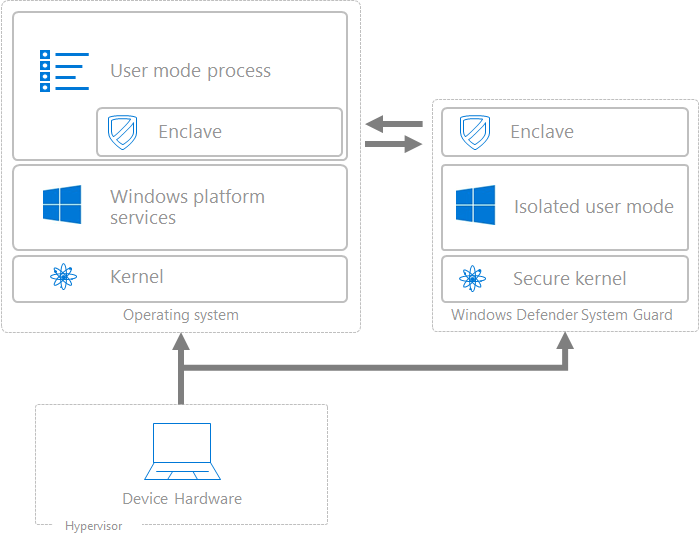
> Virtualization-based security, or VBS, uses hardware virtualization and the Windows hypervisor to create an isolated virtual environment that becomes the root of trust of the OS that assumes the kernel can be compromised.
> While VBS greatly improves platform security, VBS also changes the trust boundaries in a Windows PC. With VBS, the Windows hypervisor controls many aspects of the underlying hardware that provide the basis for the VBS secure environment. The hypervisor must assume the Windows kernel could become compromised by malicious code, and so must protect key system resources from being manipulated from code running in kernel mode in a manner that could compromise security assets.
As far as I know, this doesn't limit CPUs to 8th Gen and newer. Neither does VT-x and the other requirements.
Furthermore, there are supported ways of disabling VBS entirely so the gimped version of Windows 11 that doesn't use VBS you'd get for installing it on older hardware wouldn't be that different from an install you'd disable VBS on to get 15% better performance in video games.
Yes if you enable Hyper-V the main Windows installation is running under a hypervisor, but it's running with nearly complete access to the physical hardware.