Hacker News new | ask | show | jobs
by justinchen 6364 days ago
I haven't tried an alternative layout, but I do use a Kinesis countoured keyboard and that has made typing less painful for me. My hands rest very naturally on the keyboard and there's less distance to travel when tapping the keys. http://www.kinesis-ergo.com/advantage_pro.htm
3 comments

I went whole hog and switched to the Kinesis Contoured and to the Dvorak layout. I'm an Emacs user, and had been one since before the switch. I'd also touch typed qwerty before the switch.

A few comments:

* The first week or two is almost completely unproductive. You spend most of your time screaming at your fingers to just shut up and get used to the new arrangement.

* Once you make the adjustment, although your typing speed goes up, it doesn't go up by a large amount. The real benefit of Dvorak is typing comfort. Also, your accuracy will probably increase a bit.

* Switching to dvorak while using Emacs was not a problem at all. Not sure if it would be more difficult for Vim users.

* Switching to the Kinesis Contoured is a vast improvement over those "regular" keyboards most people use.

* After the switch, I rapidly and completely lost all my ability to touch type in qwerty. It just vanished in that first week or so. Nowadays, if I'm stuck on a machine without dvorak, I'm reduced to ridiculously slow hunting-and-pecking. If I were to open Emacs or Vim on such a machine (and I know the basics of Vim), I would scarcely be able to quit either program without damaging something.

* Things are a bit of a pain on Macs, since they have that extra "Command" key, and the Contoured only really makes Ctrl and Alt readily available (2 Ctrl keys and 2 Alt keys). You can remap Command to one key of one of those, but you don't want to lose any of them if you're an Emacs user.

Things are a bit of a pain on Macs

Do what I do:

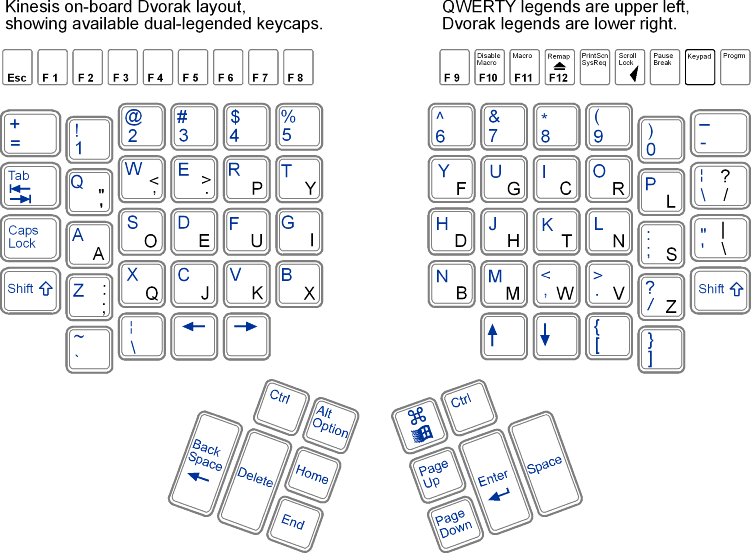
(Here's the default layout for reference (ignore the Dvorak stuff for the purposes of this comment). Note the placement of the thumb keys: http://www.ergocanada.com/products/keyboards/advantage_image...)

Remap both of the keys next to the control keys (Alt/Option on the left hand; Command/Win on the right hand) to the Mac Command key. There's a handy extra key cap provided with my Advantage Pro that lets you put the same Command/Win key cap on each of these keys, so it will even look right. (Alas, that trand won't last; see below.)

Now remap Home to Option. Remap Page Up to Option as well. Now you've got Control, Command, and Option under both thumbs. The only problem with this is that total strangers who are trying to use your keyboard will be unable to find your Option keys, but who cares about them? ;)

This takes away your Home and Page Up keys. I like having Page Up/Page Down available, so I remapped Ctrl-PageDown to PageUp. So I can hit PageDown to page down, and C-PageDown to page up.

I don't use the Home or End functions at all. I remap End to Escape, the Escape key to Caps Lock, and the Caps Lock key to F9. Then I set up F9 in Emacs to trigger my own personal keymap and, lo, I have an entire keyboard full of new two-keystroke shortcuts that I can program. (e.g. CapsLock g g instantiates Magit; CapsLock s opens a new shell in another emacs window, CapsLock m opens a manpage, CapsLock j is dabbrev-expand, etc, etc, ad infinitum)

Kinesis keyboards are fun!

I'm in the same boat as you mazer. A few weeks ago I ordered a Kinesis Advantage keyboard and used the opportunity to switch over to Dvorak.

The first 2 weeks were really frustrating, particularly since I was a relatively fast Qwerty typer (125wpm). About a month and a half in I'm hovering somewhere around 50-60wpm.

The keyboard itself is a lot more comfortable than anything I've ever used. The Dvorak layout makes typing as a whole a more efficient process but on the down side some common shortcuts are a pain to use. Although the Kinesis allows you to remap the keys I have not yet taken the time to do so.

I do see myself gradually improving as time goes by, but it's a long process and requires a lot of patience. For anyone interested in switching over make sure you give yourself at least a week to adjust. In the end it's all about practice.

That's one reason why I'm not so keen on learning Dvorak - you won't be able to write efficiently on any other computer than yours. Until now, it was just my assumption, that by learning Dvorak (or any other layout as a matter of fact), you'll lose your QWERTY-fu. Thanks for sharing.

I'll probably stick with QWERTY and a Kinesis keyboard.

I've been using Dvorak/Kinesis for about 4 years, and I agree mostly with what's said. After a while, I found I could still use QWERTY, at least at a decent enough level that I could just grab someone's computer and not bother remapping (though sometimes I do that too).

The funny thing is every time someone grabs my laptop, they are totally freaked out.

> you won't be able to write efficiently on any other computer than yours.

Not my experience, at all. It takes a second to switch gears mentally, but it's not at all different from people fluent in multiple languages. Context helps, though: I type Dvorak on my desktop, my laptop, and my computer in the office, but Qwerty on other computers.

I was a mediocre QWERTY typist when I switched to Dvorak. I lost what little ability I had in QWERTY. I heard of people who could switch between the two, but I haven't even tried. In some 5 years I haven't missed the ability to write efficiently in other computers.
I've played with one of these as well, and I've noticed that while typing raw text is considerably easier, I'm frustrated by the limited support for modifier keys. The control, alt, and Windows keys are put under the thumbs, which I found awkward to type. Also, they are distributed among four keys, so you can't have them all on both the left and right. You thus can't follow the recommended typing practice of pressing a modifier key with the opposite hand as the key being modified.

The function keys are also unusually small and difficult to locate by touch (and, given the above, some function key/modifier combinations are quite challenging). The Windows context menu key is gone entirely, which means you have to use shift-F10 instead, if you need it.

You thus can't follow the recommended typing practice of pressing a modifier key with the opposite hand as the key being modified.

One of the reasons for that practice is that modifier keys are typically pressed with your pinkie. You also use that finger for typing characters, so for these characters you need to break your habits. Eventually you build new ones, but it'd be better not to need this. Even for characters that you don't type with your pinkie, you may need to stretch your fingers in awkward ways.

Thumbs are only used for the space bar, which is seldom used with modifier keys --and you can use either thumb for it, so you can alternate. Also, thumbs are less 'coupled' with the other fingers.

I'd still prefer my modifiers duplicated on either side, but I can see how this may matter less if they go under your thumbs.

I was looking to get my thumb more involved in the action, which is what led me to the Kinesis Advantage. After seeing the built in Dvorak support and the natural contour, I was sold. 6 months in, I love it, and am considering buying a second for my home setup.

I remapped a LOT of the keys however. Caps -> Ctrl is crucial, put escape on an elevated thumb button... all the navigation keys to the "4th row"... basically I sat down and thought about where i wanted my control keys to be for easy access, and remapped them there. That solved all of my initial control key problems.

If you're the kind of person who's interested in learning Dvorak, and shelling out $200 for a keyboard, that's not much of a stretch.

A warning: I switched immediately to a Kinesis keyboard after first getting wrist pains. But Kinesis keyboard uses the thumbs (much stronger digit, right?) to press the modifier keys usually pressed by the little fingers.

Not a good move for me: despite eventually going off all keyboards and using voice dictation software, I have permanent damage in both hands and my thumbs are the first to start hurting.

What I've been told by experts is that the best thing to do is to switch among different layout keyboards every couple of days. Each uses slightly different muscles, and if you switch often enough, you may not fatigue any of them--but there are no guarantees on anything!

yeah, there's alot more emphasis on using the thumbs for the most repetitive motions. interesting idea to keep switching. I'll have to give that a try.