Hacker News new | ask | show | jobs
by hk1337 639 days ago
Why do people use gzip more often than bzip? There must be some benefit but I don’t really see it, you can split and join two bzipped files (presumably CSV so you can see the extra rows). Bzip seems to compress better than gzip too.
6 comments

Using gzip as a baseline, bzip2 provides only modest benefits: about a 25% improvement in compression ratio, with somewhat more expensive compression times (2-3×) and horrifically slow decompression times (>5×). xz offers a more compelling compression ratio (about 40-50% better), at the cost of extremely expensive compression time (like 20×), but comparable decompression time to gzip. zstd, the newest kid on the box, can achieve more slight benefits to compression ratio (~10%) at the same compression time/decompression time as gzip, but it's also tunable to give you as good results as xz (as slow as xz does).

What it comes down to is, if you care about compression time, gzip is the winner; if you care about compression ratio, then go with xz; if you care about tuning compression time/compression ratio, go with zstd. bzip2 just isn't compelling in either metric anymore.

> at the same compression time/decompression time as gzip

In my experience zstd is considerably faster than gzip for compression and decompression, especially considering zstd can utilize all cores.

gzip is inferior to zstd in practically every way, no contest.

Practically, compatibility matters too, and it's hard to beat gzip there.
The benefit from zstd is however so great that I even copied the zstd binary to some server I was managing but couldn't easily compile it from scratch. Seriously, bundling zstd binary is that worthy by now.
If you can control both sides, definitely go for it!

But in many cases, we unfortunately can't (gzip/Deflate is baked into tons of non-updateable hardware devices for example).

> if you care about compression time, gzip is the winner

Not at all. Lots of benchmarks show zstd being almost one order of magnitude faster, before even touching the tuning.

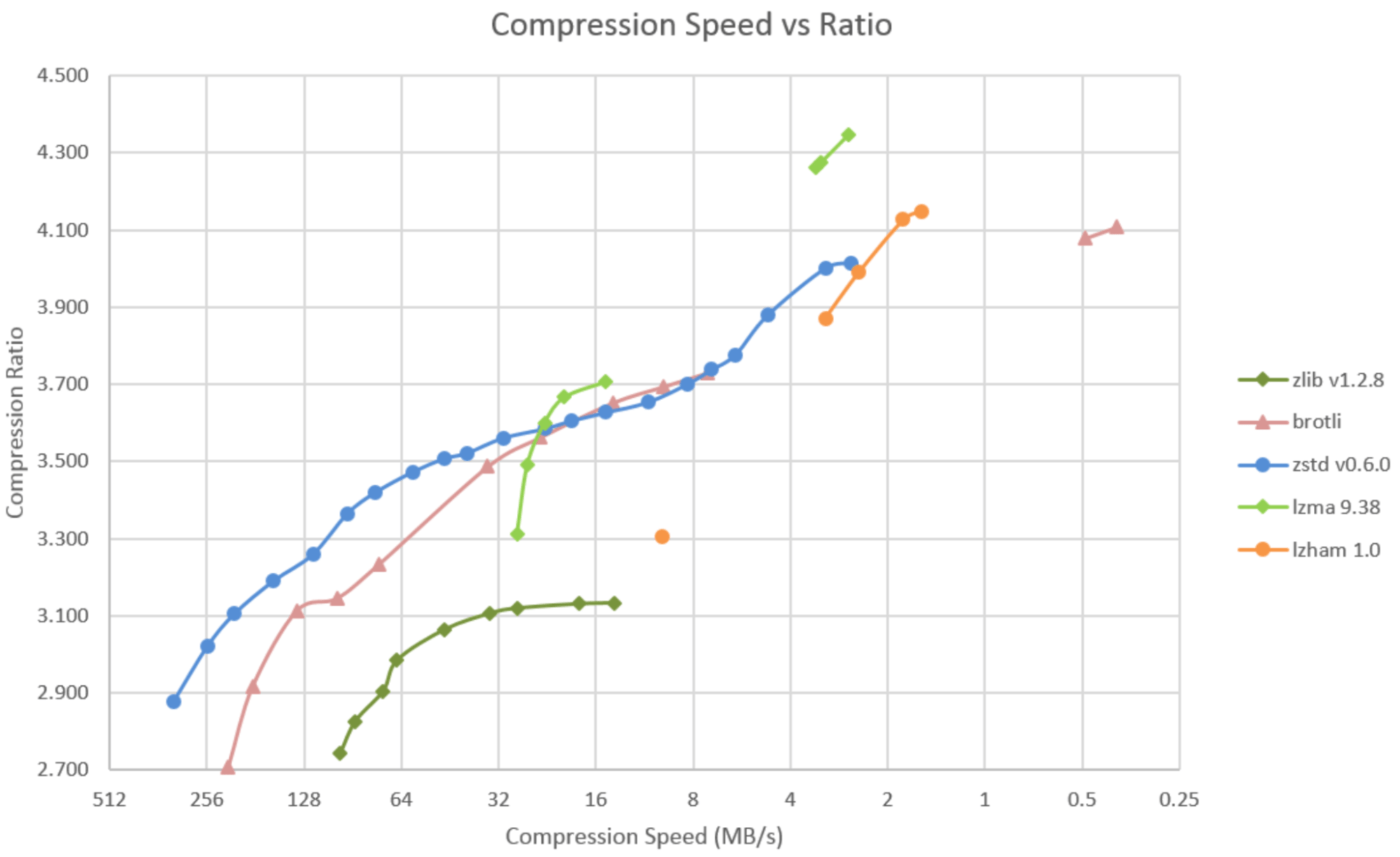
Adding to this: I like looking at graphs like https://calendar.perfplanet.com/images/2021/leon/image1.png . In this particular example, the "lzma" (ie xz) line crosses the zstd line, meaning that xz will be compress faster for some target ratios, zstd for others. Meanwhile zlib is completely dominated by zstd.

Different machines and different content will change the results, as will the optimization work that's gone into these libraries since someone made that chart in 2021.

Faster than most alternatives, good enough, but most importantly very widely available. Zstd is better on most axes (than bzip as well), except you can't be sure it's always there on every machine and in every language and runtime. zlib/gzip is ubiquitous.

We use xz/lzma when we need a compressed format that you can seek through the compressed data.

bzip2 is substantially slower to compress and decompress, and uses more memory.

It does achieve higher compression ratios on many inputs than gzip, but xz and zstd are even better, and run faster.

TBF zstd runs most of the gamut, so depending on your settings you can have it run very fast at a somewhat limited level of compression or much lower at a very high compression.

Bzip is pretty completely obsolete though. Especially because of how ungodly slow it is to decompress.

> TBF zstd runs most of the gamut

Yep. But bzip2 is much less flexible; reducing its block size from the default of 900 kB just reduces its compression ratio. It doesn't make it substantially faster; the algorithm it uses is always slow (both to compress and decompress). There's no reason to use it when zstd is available.

Oh I completely agree, as I said bzip2 is obsolete as far as I’m concerned.

I was mostly saying zstd is not just comparable to xz (as a slow but high-compression ratio format), it’s also more than competitive with gzip, if it’s available the default configuration (level 3) will very likely compress faster and use less CPU and yield a smaller file size than gzip, though I’m pretty sure it uses more memory to do that (because of the larger window if nothing else).

I agree about the practical utility of bzip2. It's quite an interesting historical artefact, though, as it's the only one of these compression schemes that isn't dictionary-based. The Burrows-Wheeler transform is great fun to play with.
Muscle memory. We've been doing gzip for decades and we are too lazy to remember the zstd commands to tar, assuming the installed version of tar has been updated.
... --auto-compress ... foo.tar.zstd
That's cool! Is that a GNU tar only thing? Based on it being a longopt, I'm guessing a GNU tar only thing. That's the problem with these things, it takes a while to get pushed to all the installed copies of tar running around. Perhaps it's time to check:

  * MacOS Sonoma(14.6) has tar --auto-compress and --zstd
  * OpenBSD tar does not appear to have it: https://man.openbsd.org/tar
  * FreeBSD does: https://man.freebsd.org/cgi/man.cgi?query=tar
Not quite fully baked yet.
Both libarchive ("bsdtar") and GNU tar have -a, which I guess are the only two upstream tar implementations that are still relevant? You're right, it can take a while for these things to propagate downstream though.
Some of us use OpenBSD: https://man.openbsd.org/tar
Ooh interesting. I'd assumed (incorrectly) that OpenBSD tar was just libarchive like FreeBSD and NetBSD. I prefer BSD libarchive tar to GNU tar as /bin/tar on my Linux machines too for what it's worth.
gzip is fast (pigz is even faster), supported everywhere (even in DOS), uses low amounts of memory, and compresses well enough for practical needs.

bzip2 is too slow.

xz is too complex (see https://bugs.debian.org/cgi-bin/bugreport.cgi?bug=1068024 ), designed to compress .exe files.

lzip is good, but less popular.

zstd is good and fast, but less popular.

Another factor is that gzip is over 30 years old and ubiquitous in many contexts.

Zstd is awesome, but has only been around for a decade, but seems to be growing.

Parallel compression (pigz [0]) and decompression (rapidgzip [1]), for one. When you're dealing with multi-TB files, this is a big deal.

[0]: https://github.com/madler/pigz

[1]: https://github.com/mxmlnkn/rapidgzip