Hacker News new | ask | show | jobs
by reason 5105 days ago
I cannot stand their new aesthetic.

I saw a demo of Metro on a tablet at the Microsoft store a few weeks back and was really, really turned off. Why are the app squares of variable sizes? The guy accessed a settings menu out of nowhere. I was so confused I had to ask him to show me how he did it. There were no indications, cues, hints, etc, that would've led me to believe the menu was there. This isn't only limited to the settings menu.

I don't want to turn this into an iPod/iPad vs. WP8/Surface debate, but the first thing that popped into my head after I walked out of the store was "Jesus, my mom would have a hell of a time learning how to use that." She's a pro with her iPad, and it'd take her a very long time to reach that same level of savviness with a tablet running Metro.

Metro isn't designed for the average person. There's nothing that directs you, there are no consistent UI elements that carry on throughout the design. Every app the guy opened was designed differently. With iOS, I at least have the top (and often bottom) nav bar to guide me. I, a guy who's been playing with computers for years, was utterly confused and put off from Metro.

I think they've got a long way to go if they plan on seeing the same adoption of their WP8 phone that the iPhone has seen. I'm not sure if that's what they want, but I assume they do.

5 comments

>"There were no indications, cues, hints, etc, that would've led me to believe the menu was there. This isn't only limited to the settings menu."

You're right. You're totally right. What I think you're missing though is that this is a pattern. And once you learn this pattern ONCE, it applies to EVERYTHING. That means that the settings for EVERY app are accessed the same exact way. Sharing from ANY app is accessed the same exact way. Etc.

This, I think, will be very powerful. Sure the charms menu is a little unintuitive at first (especially with a mouse) but once you figure it out, it makes your life much easier in the long run.

Good point. How do you access settings for an iOS app? Some are in the Settings app, under that app's name. Some are in the Settings app, under Notifications. Some are in a settings view within the app itself that's accessed by a gear icon somewhere on the screen.

In Facebook you go to the pop-out side menu, scroll to the bottom and find settings. In Twitter, you go to the Me tab, scroll to the bottom and find settings. In Foursquare you touch the Foursquare logo to show notifications then touch an icon with gears to get to settings.

It's interesting that this understanding exists. To note a few case: the Windows Phone was awarded the most intuitive phone, and another one that said it's the best phone for people over 50 (or 60?). Also user satisfaction is right up there with the iPhone.

What do you think about Android? Personally I find it confusing with menu lists in several places (apps, settings, etc.). The iPhone I agree is very intuitive. And I tend to think the WP is even simpler.

That is interesting because I really like the aesthetic. Some of the apps I have used are indeed not consistent but I found the same on iPhone and android as well.

Another thing I think to keep in mind as well is designing and implementing for a 'metro' UI is new for many developers and it will take time to get used to (and create) the conventions. I can't recall: when the iPhone came out was there a period of 'flailing' as devs figured out conventions that worked?

I can see "liking their aesthetic"

But I think that's because "like" and "aesthetic" wasn't quite the words the gp was aiming for.

It's more like their User Interface Paradigm just doesn't work.

A cool sports car with no door handles or keyhole, that the cool kids open with right twist of the wrist or something can have a really nice aesthetic but be really annoying in the real world. Multiply that by a thousand and you've got something where the right mindset will get you love while the rest of us will hate and hate. Especially, menus in invisible places. That's a terrible designers are often tempted towards but should know better. If I ever have to use that stuff, some karma bolts be stinging the aestheticians who dreamed them up.

I have news. The average person is less, less - not more - less patient with "getting used to the conventions" than developers. The average person may wind-up using "conventions" but probably couldn't "describe conventions" more easily than they could solve differential equations.

If how you use the thing isn't screamingly obvious, how do you expect Joe Average to shell out the big bucks for something they still expect to be "mostly just a phone".

>I can't recall: when the iPhone came out was there a period of 'flailing' as devs figured out conventions that worked?

When the iPhone came out you couldn't develop apps for it.

There was a period of time when everyone was just using the Apple supplied apps and they laid the groundwork for establishing nearly all the conventions. New conventions have since been established (ie. pull-to-refresh) but the 'tone' was solidly set by Apple.

I like the idea of tiles but as they get more numerous and varied (with photos and custom apps) it starts to look like the classified ads. I don't know where to look and feel disoriented.
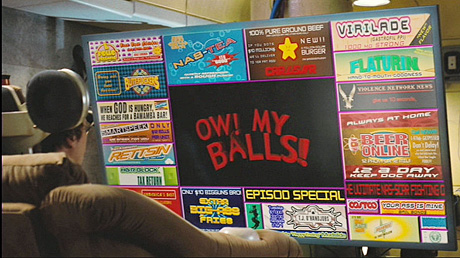
Yes. The white on solid color tiles look good with a couple of colors on the screen but once there are 8 animated tiles in different colors and background images on the screen, it looks more like the TV ads on Idiocracy: http://creativebits.org/files/idiocracy-tv.jpg
How is this different than the iPhone or Android metaphors? There you have a bunch of tiles that are all the same size. Is that more confusing than different sizes?