The web page which that image is sourced from[0] and the reddit page it is in turn sourced from[1] makes a lot of hand-wavey analogies to optical balancing (which is a real phenomenon[2]) but doesn't make any compelling arguments for why they apply in this specific case.
An alternative explanation is that this intentional imperfection exists to match the unavoidable imperfection which occurred when the cursor graphic was originally drawn as tiny low resolution 1-bit pixel art. It looks correct because we're used to it being slightly wrong. And when viewed at a normal size, the difference is barely perceptible anyway.
I'm honestly not sure any explanation is needed here. Early UX design wasn't always done with as much thought and sophistication as today's software designers (are claiming to) apply. The first Windows systems had plenty of UI blunders that make the cursor thing look insignificant by comparison, and I can promise you they weren't all about "visual balance" or similar. Lots of them have carried over to later versions.
> there's a (pre-release) 1985 HIG that's quite different. It includes e.g. case studies (useful!), and an extended discussion of Jung's theories of intuition and how they should influence your designs (!!)
The most modern "designers" read is the labels on grocery store items.
Microsoft did a lot of user and interface research. It wasn't as streamlined as Apple's, but it's incorrect to say that they didn't give it much thought.
What's with this myth that Microsoft never cared about UI/UX design? It's simply not true. They're especially not any better at it now than in the 90s and 00s. Modern designers don't put even a fraction of research into UI design than what Microsoft used to do.
Making things intuitive and easily usable was absolutely a priority of Microsoft back then, and they put a lot more thought in that than most modern "UX" design.
Making things pretty wasn't a priority for Microsoft the same way it was for Apple. But I wouldn't call that UX.
I always thought it is obvious - it was done so that it will be well visible on predictable background patterns. Otherwise (if it would be a clean vertical, horizontal, 45 degree design) it would easily "hide" in plain sight, sticking to grids, window borders. Blend in too easily.
UX may not have been as big back then but there’s nooo way no one noticed it being uneven if there was any designer involved. I just always assumed it was an artist’s style choice.
I'd assume it was a deliberate choice because I'd think it'd be easier to implement a graphic with straight lines than with lines just off enough to be noticeable.
I think the apparent contradictions here can be explained quite easily: Apple cared about design, and Microsoft did not.
Looking back from an era in which Apple's sensibility has prevailed, it's quite hard to explain the extent to which Microsoft, at least until the late '90s, really didn't care whether their software looked good. They genuinely didn't see it as important.
Well, Microsoft did hire Susan Kare to design the Windows 3 icons. Kare previously and famously did a lot of early Macintosh GUI design work for Apple. But while Apple saw GUI design as a holistic effort, at Microsoft, the good stuff (e.g. Kare's icons) and the bad stuff (e.g. the sloppily designed mouse cursor) just went hand in hand. Which adds to your point.
The current high-resolution cursor seems like a scaled-up version of the original cursor. Perhaps it's that way for compatibility reason since there are tons of monitors using 100% scaling.
At larger scale factors, Windows renders the cursor from an SVG source. It's not clear if there would be a compatibility issue with straightening the arrow image at larger scales since it uses a hardcoded .cur image at small sizes.
Additionally, Windows 10/11 go to some extent to hide cursor scaling from applications. Win32 GDI/USER calls only see the base 32x32 arrow cursor and only DXGI Output Duplication (screen capture API) can see the real cursor. This causes other problems, though, such as various bugs and inconsistencies with custom cursor images.
a recurring peeve of mine is small tooltips becoming unreadable underneath the cursor which blocks them from being read... then you move the cursor away the tooltip disappears from view... this could actually be fixed at some point in the future
Because Windows is made with poor attention to details and in a tasteless manner. For instance, when Windows XP came out, I remember clearly how some stock icons weren't properly aligned on the same baseline (it was corrected in some later SP).
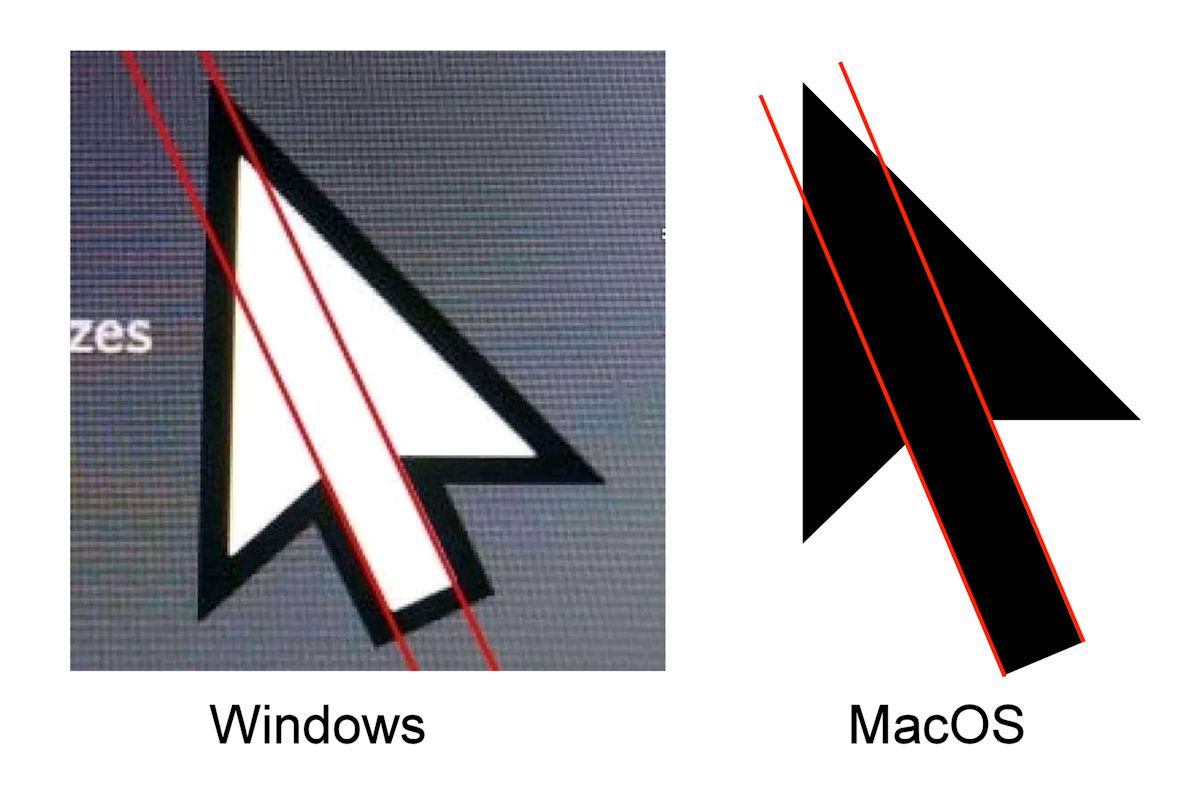
An alternative explanation is that this intentional imperfection exists to match the unavoidable imperfection which occurred when the cursor graphic was originally drawn as tiny low resolution 1-bit pixel art. It looks correct because we're used to it being slightly wrong. And when viewed at a normal size, the difference is barely perceptible anyway.
[0] https://mspoweruser.com/why-windows-10s-asymmetrical-cursor-...
[1] https://old.reddit.com/r/TIHI/comments/fwnep0/thanks_i_hate_...
[2] edited, thanks jusuhi