Hacker News new | ask | show | jobs
by carlosrg 1085 days ago
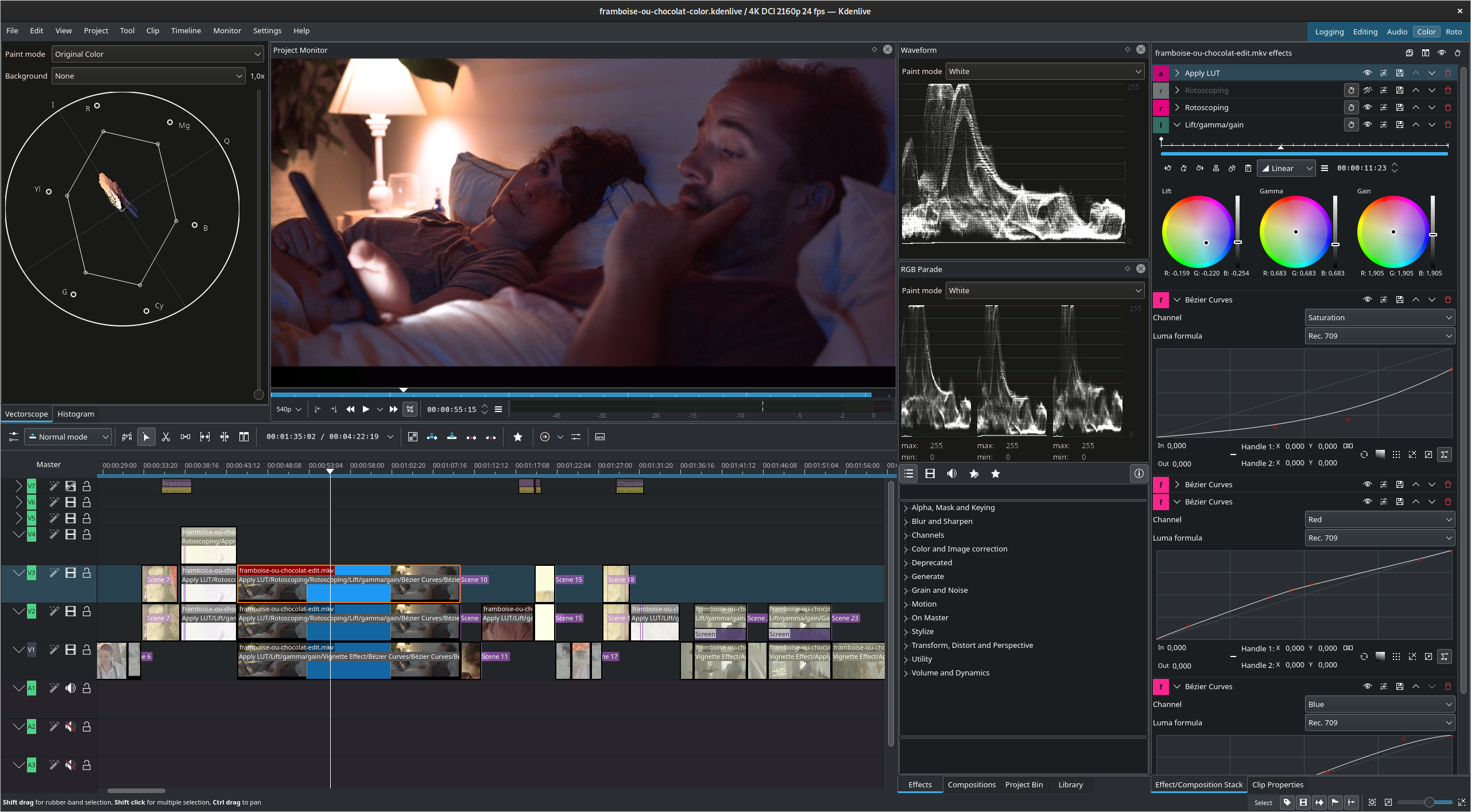
GNOME applications look so... mobile. Large controls, large title bars that lack maximize/minimize, simplistic layouts. It might be good for this kind of frontend apps but I can't see software like Krita or KDEnlive being done for GTK4/GNOME as of today (for reference: https://kdenlive.org/wp-content/uploads/2022/01/271174170_10...)
4 comments

I believe the apps are designed this way so that they’re easily adaptable to GNOME shell on mobile[1].

I think the UI elements could be a tad smaller on desktops, but I’m still happy with how they look. Easily the best UI design out of any Linux desktop environment right now. At least in terms of clarity and consistency.

[1]: https://blogs.gnome.org/shell-dev/2022/09/09/gnome-shell-on-...

You can't be serious about Gnome, the UI elements are all over the place, inconsistent styling, sizes, spacing, not to mention the system apps are inconsistent with each other.

Gnome is the most ghetto desktop environment out there.

I am serious! I really do think GNOME looks the best by default of the DEs I have used and seen.

> inconsistent styling, sizes, spacing

I’m going to be honest, I have not noticed these things at all. But I am not a UI designer, and mostly look at these things from the perpective of a regular user. However, I have noticed those inconsistencies with Plasma. I’m not denying that there may be such inconsistencies in GNOME as well, but if they’re small enough that I don't notice them, then I’m fine with them. The most important thing for me is that the apps/components, individually, are easy to look at and interact with. I think GNOME does this well.

A GNOME version of KDEnlive might look similar to Final Cut (https://support.apple.com/en-gb/guide/final-cut-pro/ver92bd1...).

GNOME applications are pretty simple and there's no software like Krita and KDEnlive, but I don't think that GNOME HIG is the limitation for that.

There is Pitivi, which is pretty close to old Final Cut: https://www.pitivi.org/

Not a very productive editing experience in my opinion though, definitely still prefer KdenLive or Davinci Resolve.

16x16 icons used to be large on 640x480 screens. Microscopic controls is not how GUIs were originally intended to look.
That may be the case, but microscopic controls are how some of us want our GUIs to look. Using Windows 7 with the classic theme on a 1920x1080 display was near perfection. Even for Aero, I'd have my toolbar set to small icons and CTRL+MW_DOWN on the desktop to shrink my icons. The closest I can get now is to up my display resolution to offset the giant bars that take up more of my screenspace than they need to. Not having the option really sucks.
You can change display scaling to make GNOME small.
Microscopic.. sure, they weren't intended to look microscopic.

But you're painting an inaccurate picture here, GNOME controls are a larger ratio than they've ever been to screen real estate;

For context, this is how it looked on a 640x480 display https://commons.wikimedia.org/wiki/File:GNOME-escritorio-1.x...

I don't care about how they were intended to look, I care about what the best look & feel is for me.
I like GNOME because of its design choices in 3.x+. I really appreciate the aforementioned large controls, title bars (often integrated as toolbar menus) and resignation of menus in favour of dedicated pop-overs. IMHO it is a step forward in providing simpler UI, but yes - it has some drawbacks too.

Ironically, I see the designers of macOS built-in applications (e.g. Finder.app or System Settings.app) are following their GNOME counterparts rather than the other way around. Since Maverick, Apple has lagged behind in terms of UI innovation and it is the GNOME designers, who are pushing forward with new ideas. The addition of a header bar in Finder.app and Nautilus made them much more usable for me [0] [1]. The same can be said for System Settings.app [2], which now follows the design and layout of the GNOME Control Center. GNOME has been a copycat for many years, its UI was inspired by macOS/iOS, but now the roles are reversed.

The missing piece of the puzzle is searchability, which GNOME 3.x+ lacks and which GNOME excelled at in the days of Unity DE. Hopefully GNOME 40+ will bring some improvements in this area.

> I really appreciate the aforementioned large controls, title bars (often integrated as toolbar menus) and resignation of menus in favour of dedicated pop-overs.

Heh, those are all on my list of things I hate about Gnome. Funny how different people can be.