Looks great, but not very realistic. The real Win11 start menu doesn't open immediately, it glitches in various ways for 3-4 times before actually working. Realism 7/10
Since I installed PowerToys[0] and activated Run, I barely use the taskbar to start any program. It works like alt+f2 on Ubuntu, which is the experience I find most useful.
Powertoys feels like one arm of Microsoft to fix windows’ shortcomings due to the other arm via an independent app rather than fixing the actual component because doing so is too fraught with politics and incentives.
So Microsoft does know how to fix the problems with Windows, but simply chooses not to because of internal politics? Because I keep wondering how such a big, well-established company full of smart people can create such a piece of crap as their flagship product.
> This project aims to enhance the working environment on Windows.
Thats all I get in the project description.
How can I find out more on what it does without installing it? If Raymon Chen blogs about some "desktop enhancement software", it must be popular, at least among powerusers/devs.
It failed once recently after an system update. Blank desktop with no shell. Had to ctrl-shift-esc and manually download latest `ep_setup.exe` and run it to get the desktop back. https://devblogs.microsoft.com/oldnewthing/20230324-00/?p=10... Raymond did not point out which "desktop enhancement software" it was but I suspect this is it.
> We have to hope that enough of the users whose systems are crashing realize that it’s due to the “shell enhancement” program (rather than blaming Windows itself, which is the more likely case)
I would 100% blame Windows (or Microsoft, rather) for making the shell so awful that people have to resort to these tactics.
You can't cripple the steering wheel on a car and then blame people for not finding perfect aftermarket substitutes.
>Unfortunately, these patchers also cause Windows customer satisfaction numbers to plunge every time an update goes out,
I've refused/blocked updates for as long as I remember since long before Explorer patchers were a thing, because updates break my shit and waste my fucking time.
I've had more of my time and nerves wasted by updates breaking my shit than "all the bad guys trying to take advantage of unpatched systems". Saying my system is "insecure" is concentrated snake oil.
Seriously, fuck updates with a rusty spork.
I only run Windows Updates once a year or two when I've set aside a few days to work out all the inevitable borkages, and I damn well like it that way. My computer is a tool and an appliance, not a mentally ill schizophrenic who changes their personality every hour.
but i'm afraid that your computer is indeed a 'mentally ill schizophrenic' which is here to stay, because fixing it would shift the focus/blame back to the operators.
Ah I miss the youth. Now that my PC holds passwords to all of my accumulated wealth, even a tiny risk of being owned is not something that I’ll live with, if it can be prevented.
For me, once a day it crashes Explorer.exe which promptly restarts by itself and life carries on without harm. Takes one or two seconds to rebuild the taskbar when it happens and it's fun to watch.
No data is lost. No program closes. It just restarts the taskbar process.
The START MENU? TEN YEARS? My friend, how about simple file management? They've been at that for DECADES and still can't get it right?
"Oh, you dragged something over the top of a network drive in Explorer, let me waste the next 3-5 minutes trying to connect to that drive for you". Or how about this: "Oh you plugged in a USB drive that was setup as a live CD? Let me crash for a second and mash your MBR to bits".
How is Windows still mostly garbage at this point?
I don't use windows daily but was trying to add an additional keyboard layout (US English) to a family member's windows 10 PC today.
Searching for such a simple thing in the control panel was infuriating to say the least. I finally found it, random clicking in every potential places and it was in the most unintuitive place you could think of.
You would expect "keyboard layout" search to bring helpful results but it does not.
I seem to get a link to the right settings place after typing "ke" into the start menu on Windows 10. "keyboard layout" indeed does not work, but "keyboard" or part of it does.
It doesn't? I'm multilingual and always had 3 keyboard languages in parallel and never had any of those issues happen in 15+ years and 6 versions of Windows.
Most likely he was hitting alt+space by accident which cycles through them without him realizing.
Hot take: I feel like a lot of Windows issues people raise are actually user errors/accidents, then blaming the OS for it.
I switched to Linux entirely (but may reinstall windows as a second OS for some games if I get the wild hair...), and while it can still be buggy at times here and there (Arch Linux, so go figure), it's usually my fault, and it can be remedied most of the time.
Still a thousand times better of an experience than Windows.
The funny thing is that I encountered the exact same issues OP complains about (network not available = let's stall forever, insert USB drive = let's crash hard) on various mainstream distros. Especially the first one is super common and on various levels and through various protocols.
I'm curious, what games would you need Windows for?
Between Wine frontends and Steam, I haven't really booted Windows for almost a year now, and I play a healthy balance of modern and ancient games of every production quality.
The only thing I miss is ShareX, which is a screenshot tool that seems to have been designed with me exactly as its sole target audience, because it is incredible, intuitively discoverable and packed with features that Just Work. Yes, Linux also has some screenshot tools, but they are at most 1% of what ShareX is. (And it doesn't work under Wine :(... )
Me too. Ubuntu 22.04. It's come a long way since I last Linux in... 1999 and 2003! Haha!
Now I'm even considering FreeBSD as I friggin' love that OS. It's rock solid, predictable, and fast. I just need to make sure a few things can be made to work, even if it's via the browser, like Zoom.
i'm not a designer, but use Krita for very basic edit tasks and Inkscape on occasion. can't use GIMP well because it's GTK2 and the UI doesnt work well for pixel-scaled (HiDPI displays), and GTK3-based GIMP 3 dev builds often fail to compile: https://aur.archlinux.org/packages/gimp-devel
That kind of attitude leads to user blaming. I have fond memories of the workgroup network scan freezing my computer for extended durations in the xp days
Or just download a large file, choose save as on a drive other than the C drive because it is too big, and watch IE proceed to fill up the temp dir on the C drive, completely ignoring the fact you asked to save on another drive.
Or if you had enough space, still waste minutes copying the deleting the file...
that 'save to temp-dir first and copy later' behavior is so frustrating because it's inconsistently applied and not easily avoided, yet somewhat incomprehensible to the average user.
I've been using Windows since 1998 and I can confirm all the issues described. The last time I enjoyed hanging Explorer was yesterday, and it was exactly because Explorer was trying to open a network link that I didn't ask to open.
To be fair I have that constantly on Linux. Default applications like ark trying to query every connected drive on every use and just hanging there until they get a response even when all you want to do is open a zip file on a local ssd.
Agreed but if talking about default file managers, its even worse on ubuntu. Nautilus is imo very bad compared to win file manager (hitting a key starts a global search in that folder, it crashes very often etc.). Does anyone know if they plan anything with it?
The start menu was not released 10 years ago. the start menu was released when windows 11 was released. Yes, it's still called the start menu. No, it is not the same application, nor does it share any code with previous applications.
Now, my new TV has an interface where if press the favorites list button and don't touch anything, it times out and closes. The problem is, if I keep scrolling through the favorite channels, it still closes after this timeout. How long has the Favorite Channels menu been around on TVs - 40 years? I can't believe they still can't get it right.
That my friend, is the logic you are using.
Just like in Linux, you have your choice of a bunch of different start menus made by all kinds of people and companies. Always had - even in the win3.0 days you could replace the shell variable in win.ini with whatever exe you wanted. Heck, you can make windows look like a mac interface if you want.
There are features and choices microsoft makes as a default, and they don't fit yours or my requirements. They do however fit the requirements of an edgy teen who does most his computing on a cell phone, a soccer mom who thinks deleting a webmail email will get rid of the out of space message on her PC, and the priests who only know how to launch a browser for looking up underage gay porn.
Microsoft did not make the start menu for you, they made if for the largest portion of their target market. Because people like you can easily change it, and people like them would have trouble using a computer at all otherwise.
> How long has the Favorite Channels menu been around on TVs - 40 years? I can't believe they still can't get it right
Where this analogy falls apart is that the favourites menu on TVs hasn't always been implemented by the same people, Microsoft is always the one (re)implementing the start menu - they should have figured out how to not screw it up this badly by now
> The start menu was not released 10 years ago. the start menu was released when windows 11 was released. Yes, it's still called the start menu. No, it is not the same application, nor does it share any code with previous applications.
i hope we can agree that if functionality was not a priority while reimplementing, it should not replace a working product.
In the past, the Start menu only listed local apps. Nowadays, the Start menu is a glorified webview that loads arbitrary ads from remote networks and integrates with a half-baked AI. No wonder it's slow and buggy.
Open Shell (formerly Classic Shell) is a godsend that restores some semblance of sanity to the Start menu, but I'm not sure if it's compatible with Windows 11.
It was pretty buggy when it came out with the release version of win95 and it didn't even have the ability to automatically search the web for things I wasn't looking for. We're just in a bad start menu decade at the moment.
Surely adding a shortcuts on the desktop obliviates the need to use it. All of my programs add one automatically so it's super easy.
yesterday I saw an ad in start menu right between app names asking to pass some unrelated non ms survey. I thought i got malware, but it was “show suggestions occasionally” that I disabled a month ago enabled again.
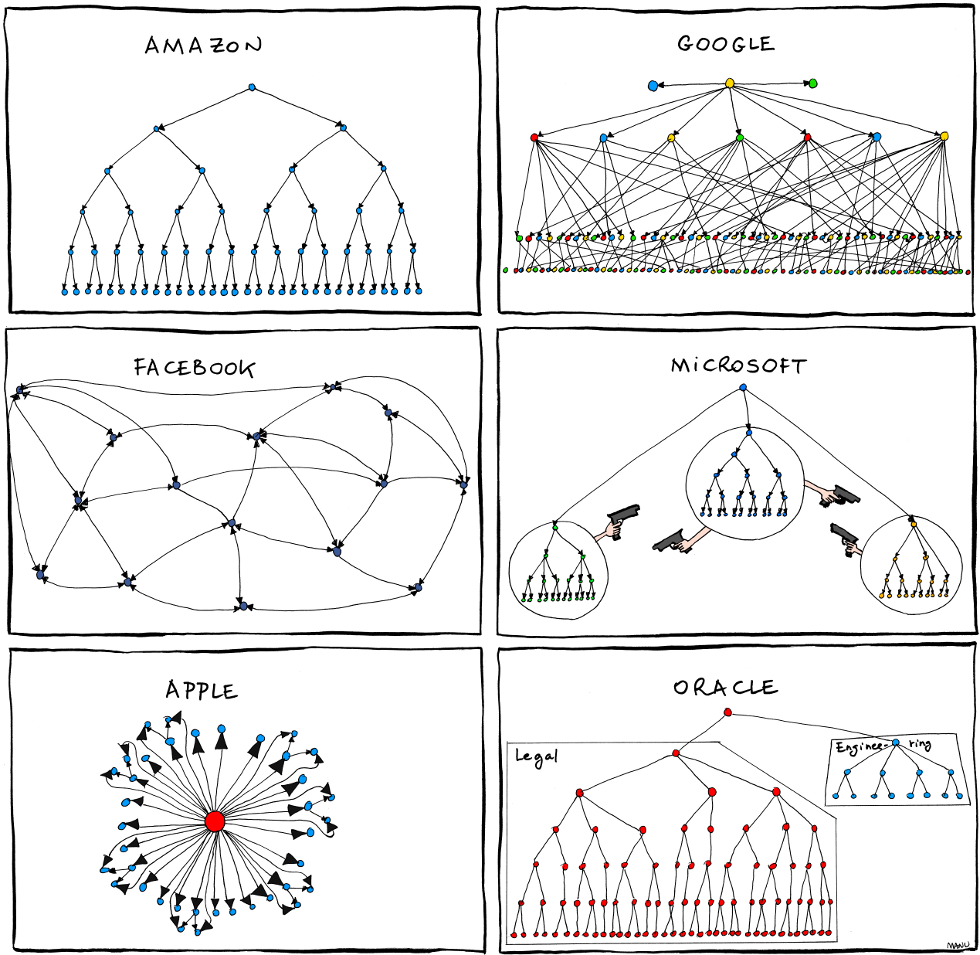
Can't imagine using Windows without it.