Hacker News new | ask | show | jobs
by icybox 1519 days ago
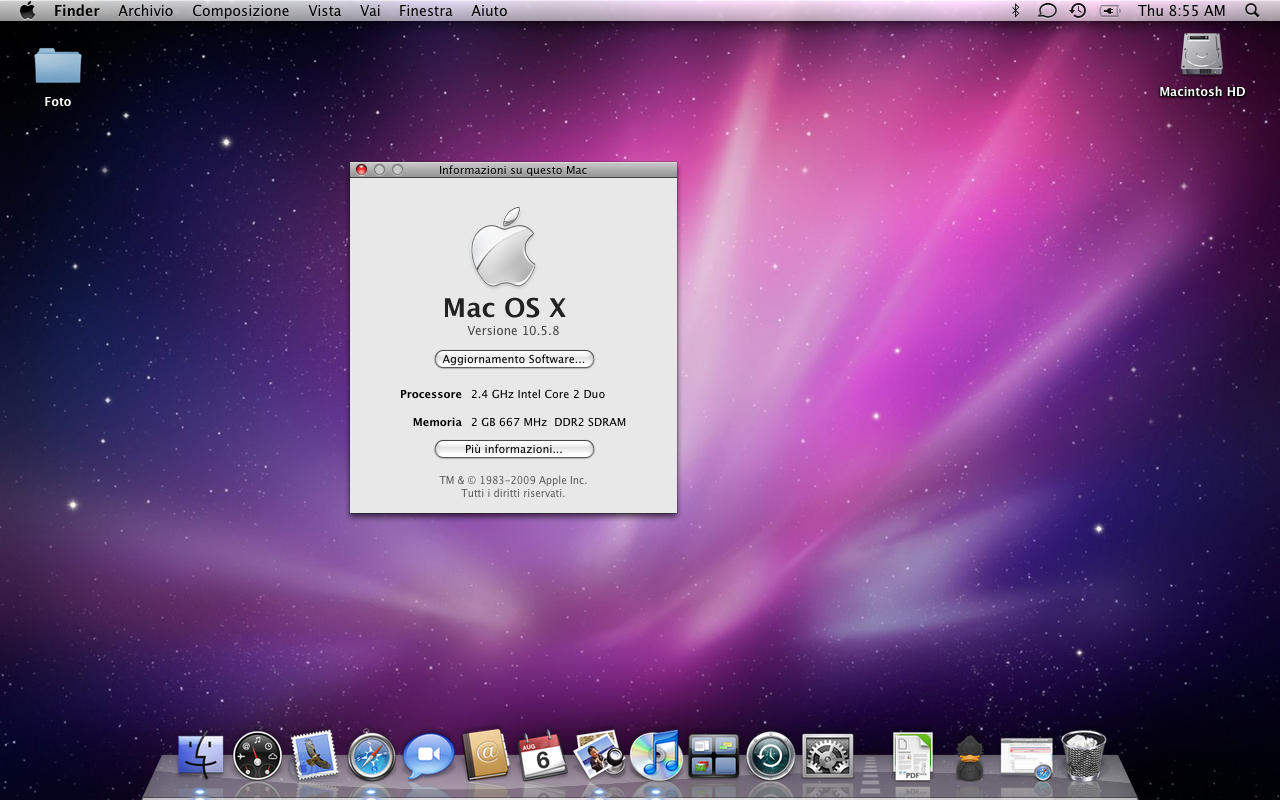
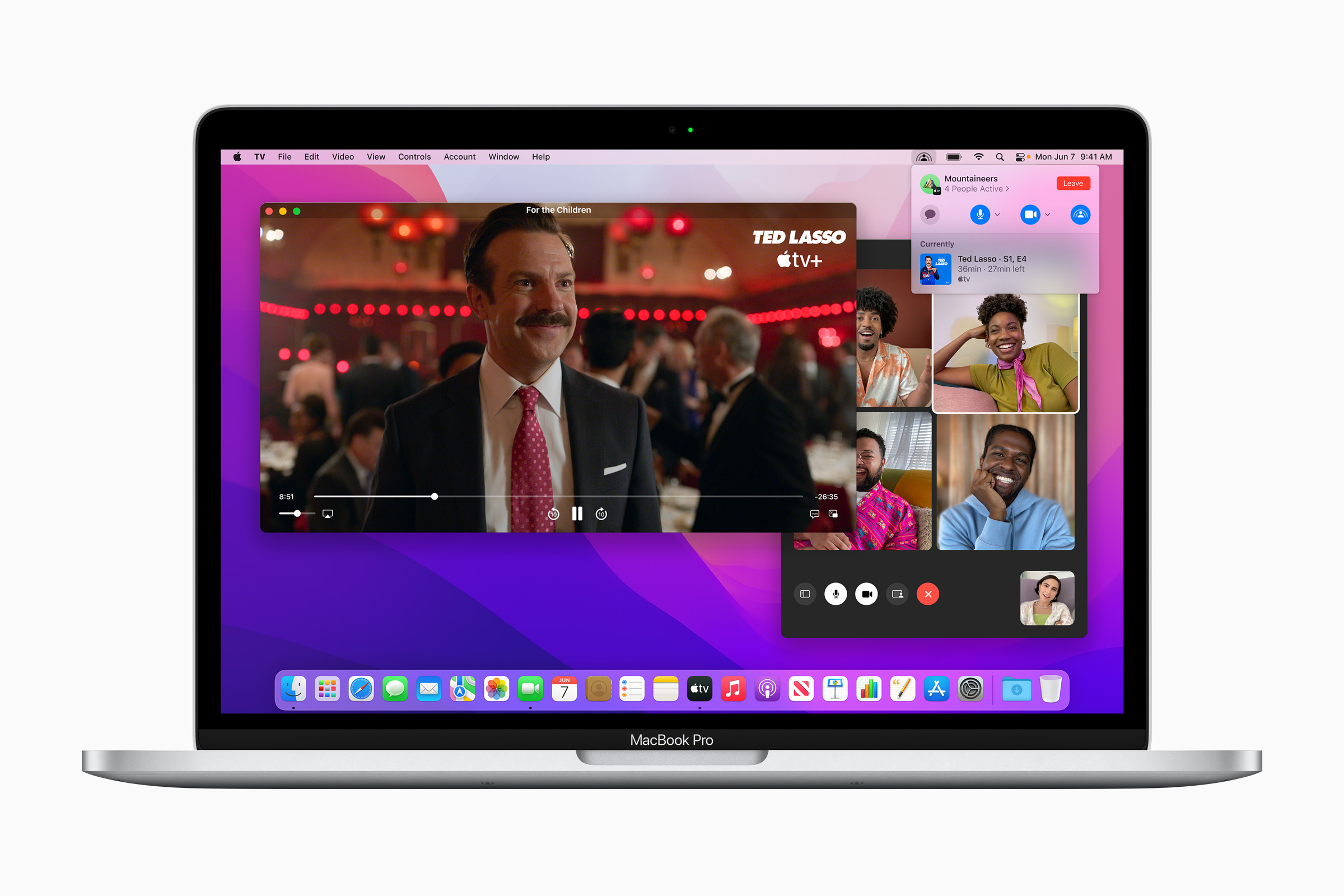
I really miss the colors and contrast of Snow Leopard. I was able to relatively okay with things up to High Sierra. Mojave brought random freezes on wake (~10s) on my Macbook Air 2015, Catalina brought call-home on every executable. Big Sur redesign just killed it. I don't like the unicorn coloring book for kids to be my OS! There's no contrast, there's just too much wasted space everywhere (I don't use external monitors). So all and all, I'm running ubuntu unity ( https://ubuntuunity.org/ ) with Ambiance. Those have the right contrast for me. And I brought in Menlo and Lucida Grande fonts in for GUI and terminal. Those more round corners since Big Sur get on my nerves too :-( I'm sure I was using it wrong tho ... :-P
5 comments

Up to Snow Leopard, OS X updates felt like little Christmas mornings. It went downhill starting with Lion. I’ve stopped caring about new features, there’s too much churn anyway.
In the early 2000th when I was introduced to Apple Macs (G3 iMac MacOS9) I couldn’t understand who wanted to work with these machines. I tried out macOS-X in the school Labs and the only piece of software I actually liked was iTunes (I know weird). It took years and then I saw a machine running leopard and the coverflow in Finder etc. I thought wow this looks and feels so much cooler than my ugly windows XP/Vista. I convinced my wife to buy a MacBook and bought the Snow Leopard update. Freaking unbelievable. I switched to Mac myself and it was such a joy ride. Everything was just working and I actually felt real joy. Updates later and I don’t feel like this anymore. It started with the 2017 MacBook I got from work (the worst machine I ever had to use) This was only hardware. But the software broke under me as well with the introduction of Catalina. I still run a Mac at work cause the company only supports windows and Mac. At home I switched to Linux and try to become the maker of my own joy.
I think they ran out of low hanging fruit pretty fast. Tiger was great, and once they added multiple desktops that was all they really had to do with OSX and it was complete, lightweight, performant. Too bad the more recent stuff has been just taking away things (32 bit, eventually x86 compatibility if thats the trend), or making it annoying (having your OS yell at you every time you open something not from the mac app store is patronizing).
2009 marked the last year of good Operating System releases with both Windows 7 and Snow Leopard shipping that summer. After this point, bloat became good, non-flat design became bad, and existing system apps started to be replaced with buggy alternatives.
Lion did introduce the notification center, the one feature that was truly long overdue. I don't miss Growl.
Lion was a bad release filled with bugs, but it introduced a lot of features I don't think I could live without. Things like high DPI support, the ability to render emoji (!), and the ability to rename a document from an app's title bar. Behind the scenes, Lion is when Apple introduced Automatic Reference Counting. And, while I know they're controversial, I really like how Apple implemented full screen and auto saving, particularly after the Apple tweaked them in Mountain Lion.

Mountain Lion went a long way towards fixing Lion's problems, and Mavericks just about finished the job. Which is why I run Mavericks. The only remaining Lion things I really dislike are the Launchpad, the hidden Library folder, and some minor-ish aesthetic differences. I've patched some of these.

Hi Wowfunhappy, you got me thinking. Like ... really thinking. So, to cut long story short, I've installed Maverics in a VM to do a short & free PoC, how much would I like this "retro" experience with iWork, iLife and friends. Turns out, very much! So I've grabbed a refurbished mac mini from 2012 and now I'm running Maverics on real hardware and absolutely love it! I've even patched the snow leopard window controls, so I'm one happy camper! Thank you!!!
> Behind the scenes, Lion is when Apple introduced Automatic Reference Counting.

Hm. I've never written anything serious for Apple platforms but of course played around for a bit. But, I've always assumed ARC is implemented purely in the compiler, isn't it? I remember disassembling something I wrote and learning that the compiler inserted retain/release calls as necessary.

> Which is why I run Mavericks.

Actually, I ran Mavericks for several years after it was superseded. I was made fun of by some people (who complained about glitchy WiFi on Yosemite, lol). Had to finally update when I got a new job and needed to compile an iOS app, which required latest Xcode, which required latest macOS. Then I stayed on Mojave for like 2 more years, refusing to update to Catalina to keep using 32-bit apps. And then several months ago I bought an M1 Max MacBook, which means Monterey.

I don't really understand how ARC works, but I can tell you it's tied into the OS somehow.

ARC does partially work on Snow Leopard, but only for 64-bit, and it's limited (namely, you can't use weak references).

At some point they decided they need to sync the OS updates with the rotation of the planet for some reason. This is when it went downhill.
I haven't been excited for a MacOS update since Mojave. Since then, it's always been a question of "how much are they taking away this time?" instead of "what have they added?"...
This is why I typically put off updating MacOS for at least three versions, when I no longer have a choice.

Updating MacOS means I have to spend weeks:

1. Finding third-party utilities to replace what Apple took away.

2. Finding ways to disable the shiny new things Apple added that get in my way and are not officially turn-offable.

3. Finding workarounds for new bugs Apple introduced.

And recently,

4. Disabling all the new phone-home daemons Apple added.

MacOS has become a shitshow.

> 4. Disabling all the new phone-home daemons Apple added. Would you care to elaborate what do you disable?

I didn't use any icloud stuff and was kinda shocked how much the OS called the mothership after installing little snitch ... Never properly gotten into finding what every daemon does and if I could disable it.

The script at this gist [0] has been my starting point for disabling Apple daemons.

I typically have to spend some time bisecting this script to keep the few services I need (e.g. Messages) running. It's time-consuming because some services depend on others that have different names, so it's not as straightforward as simply re-enabling every daemon that contains the string "message."

Little Snitch [1] is also quite useful; it's probably easier to install LS with everything disabled and then gradually reenable the daemons you want. I use LS more than I use the above script these days...although LS still allows the daemons to run and consume CPU time, which the script stops. Probably best to use some combination of both approaches, and keep track of any edits you make to the script because Apple will likely reenable everything the next time you upgrade MacOS.

[0] https://gist.github.com/pwnsdx/1217727ca57de2dd2a372afdd7a0f...

[1] https://www.obdev.at/products/littlesnitch/index.html

many thanks dreamcompiler!
10.6.8 was the absolute pinnacle for OSX for me, but I can't resonably use it daily anymore, so now Mojave is my stopping point. Too many of my necessary applications don't run on Catalina. I worry about the security of staying behind, but none of the new features are relevant to me.
There's an accessibility setting to add borders to toolbar buttons, I had to turn that on to undo all the cLeAnLInEsS and make the damn thing practical. I still wish I could undo the toolbars combined with title bars as well — they're cramped for no good reason yet "airy" because of way too much padding. But then these things apparently don't inconvenience me enough to patch the OS to have it my way.

Switching to other OS is not an option for me at this point. Everything else is even worse. Windows is a piece of malware at this point (in addition to being a UX consistency clusterfuck and Microsoft's insistence on making touchscreens a thing), desktop Linux is as much of a nightmare as it's always been.

I am happy to see someone else recommending Ubuntu Unity, especially as being Mac-like. It remains my default OS for my laptops and it continues to improve; version 22.04 uses mainly MATE accessories, to provide proper menus and toolbars, and also supports Flatpak.
It however didn’t seem to make the move to Wayland…

And unity8 (now Lomri) is in perpetual beta, and written in Qt.

> It however didn’t seem to make the move to Wayland…

"You say that like it's a bad thing."

> And unity8 (now Lomri) is in perpetual beta, and written in Qt.

Is it now? I wonder if it's a descendant of Unity-2D then. That was in Qt and seems to be forgotten now.

Yes, it does seem mired in dev hell, and I wonder how much is really left to do.

Canonical got a lot of stick, especially on here, about Unity etc. (and still do over Snap).

https://news.ycombinator.com/item?id=14002821

I think it's undeserved. Unity was and is a damned good desktop, it's just different. Some people are neophobic. There's more to life than the Win95 desktop.

IMHO Canonical's only big mistake, really, was Mir.

Wayland remains controversial, and I'm not qualified to judge why. But like systemd, it is basically the new standard, and so going with it would have been pragmatic.

Trying to write a new WM _and_ a new desktop _and_ a mobile OS _and_ a new packaging format _and_ a new display server was a big stretch. Eliminating one big chunk of it seems like a win to me.

Apparently not to them: they pressed ahead and then abandoned the whole thing.

Damned shame. _Someone_ in the Linux world needed to address mobile/tablets. It is the entire herd of elephants stampeding about the room.

IMHO a few sketchy efforts based on GNOME and KDE are not really enough.

I mostly agree with everything you've said here. Frankly, I don't think Wayland has the functionality to support what people want to do on Desktop Linux. Wayland apologists will claim "that's the point", which I would be willing to agree with if the development of things like Mutter and wlroots weren't so spread apart. It's resulted in a scenario where two and a half desktops actually support Wayland, and even those don't have feature-complete implementations. GNOME, Sway, and especially KDE are still playing catch-up with x11 functionality. That's simply unacceptable for a software project that's 10 years in the making.

Wayland is going to have a hard time being "the new standard" if it continues down it's path of less hardware compatibility, less software compatibility and less overall functionality. I'm willing to point the finger squarely at GNOME here too, because they've intentionally gimped Wayland's development over the years under the guise that they're the lead implementation, while giving the rest of the community the pittance of wlroots. This has been disastrous to the development cycle of Wayland, and ended up splintering the wrong projects and blocking the right features. Stuff like app tray indicators have been completely depreciated on a system level solely because GNOME said they didn't want them. It's really petty, and it certainly isn't moving desktop Linux forward.

In general, everything GNOME-related after Unity has just been a really slow downhill decline. The freshness and uniqueness of the desktop is dead, all we're left with now is a lame Mac clone that can't even play nice with the rest of the community. This is probably a real "old man yells at cloud" moment by most respects, but watching their behavior in recent years frustrates and disappoints me. They used to be a pretty respectable group of maintainers; now it's just drip-fed patches, gutting old features and setting inane new precedents as "the standard" and getting mad at downstream maintainers when they don't adopt them.

Yup.

I would quibble over:

> Frankly, I don't think Wayland has the functionality to support what people want to do on Desktop Linux.

The problem is that people don't want one single thing from desktop Linux. For some people, for instance, remoting the whole GUI over the network is really important, whereas TBH I suspect that for most people, it isn't important at all and in fact is not only irrelevant, it's actually a hindrance to stuff they want, such as (random examples) very high frame-rate 3D-accelerated true-colour graphics driven by a modern GPU.

And I suspect that you can't have it both ways.

Me, I want independently settable fractional scaling on multiple monitors. I don't give a stuff about frame rates, resolution, hi-DPI support, OpenGL, any of that, but what my 2015 Retina iMac does -- plug in a screen and whatever its DPI the OS just magically adjusts the display settings so everything remains the same size -- that is very important to me. I don't want to do it myself. I don't want or care about or need 3D or anything. I just want all my screens to be nice and sharp and show the same thing at the same size. Resolutions are a trivial implementation detail I don't care about.

My impression is that this isn't on the radar of any mainstream distro.

As for my desktop, I want to be able to place toolbars or panels on the edges of the whole desktop, across 2 or 3 or more screens, where I choose, not where the programmers chose. GNOME is not even able to think about this idea. You get what the designers chose because they know best.

KDE used to do it, badly. KDE 5 does it worse. I don't like it, either.

Oddly, for all the hoopla about Gtk $VERSION and weird stuff about refresh rates and stuff I don't care about, Xfce, the old-fashioned low-tech desktop does this best. Go figure.

All of them are rubbish compared to how macOS handles this stuff, and Windows 10 was only a bit better. Windows 11 is as broken as GNOME etc.

That's progress. Apparently.

It makes me want to go back to a text-only console sometimes. But I am very very old and opinionated, and then I blow the minds of all the xNix fans by saying that I don't actually like the xNix shell and never did. Any of them from `sh` to `fish`, they all annoy me. I preferred the MS-DOS and OpenVMS command lines, myself.

Since most other people who can remember before xNix ruled the waves are retired or dead, that is foul heresy to most techies alive today.

There is an option "increase contrast" in accessibility, plus a slider to adjust the display contrast, plus a set of color filters for color blindness that can be quite useful even if you don't suffer any of the specific conditions.
Thanks! I'm aware of this. I don't know how to describe it properly - the old OSX icons, even the "lickable" control buttons in snow leopard look just right. It's almost like there's a black line around the icons, the saturation is right and also colors go right together. I don't see this in Big Sur or Monterey. It's just oversaturated pastels without clearly defined borders. Looked slightly better in dark mode, but I prefer light mode. Snow Leopard (https://apparelever169.weebly.com/uploads/1/2/4/9/124908212/...) vs. Monterey (https://scr3.golem.de/screenshots/2106/MacOS-Monterey/Apple_...) - random searches for screenshots.
The increase contrast option in modern macOS increases the contrast at the expense of making everything ugly.

Aqua in OS X 10.9 and below are naturally designed with high contrast and tonal range in mind.

I'm partial to Tiger myself, but Snow Leopard is a close second.