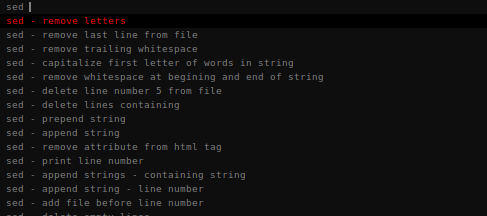
| hotkeys that launch dmenu instances displaying various text items.
handling all the dmenu stuff is simple bash scripts using core utils; sed, grep, cut. > dmenu is a fast and lightweight dynamic menu for X. It reads arbitrary text from stdin, and creates a menu with one item for each line. [0] When I use the following hotkeys, a dmenu list pops up at the top of my screen, I can type into it with fuzzy search and select an item. alt+h - history - my last 30 clipboard contents are shown, when i choose one, it's added to the clipboard alt+c - commands - descriptions of frequently used commands, appended with the utility name, choosing one adds to my clipboard [1] alt+f - functions - random scripts / workflows that i want to launch without adding to .local/bin alt+d - dmenu - and of course, using dmenu itself as my programs launcher, as it was intended. launches instantly, searches all my programs instantly, it's really all i'll ever need. [0] https://wiki.archlinux.org/title/dmenu [1] https://files.catbox.moe/2p14to.png |