Hacker News new | ask | show | jobs
by achn 1633 days ago
I don’t see how anyone can have this opinion. If you are producing code for which VS was designed (.net for example) it is obviously and definitely one of the greatest IDEs ever produced. If you are having to fight with VS, then you may not be using it for one of its main use cases. I certainly don’t think it is perfect (git support being quite annoying at times) but to say that it isn’t an incredible achievement is ridiculous.
12 comments

I'm one! I work with VS daily and I think it's pretty bad. Some examples; I cannot get a plain folder view. Intellisense is very inept compared to Jetbrains products. Bad refactor support, can't find things you're looking for etc. File tabs are hard to keep organized. The source control support has been worst of the worst up util recently (blame view taking minutes to show up etc), and now it's only mediocre. Best way to find stuff is through "find all", which is an order of magnitude slower than grep. "Track changes" resets on file close, not when you save or commit, making it rather useless. VS also crashes quite frequently if you aren't gentle with keypresses. Single-threaded plugin model causing keyboard input lag. Etc etc. I could go on.

The good parts of VS is hot-reload (when it works), the debugger, and the profiler. Otherwise I'm not a fan.

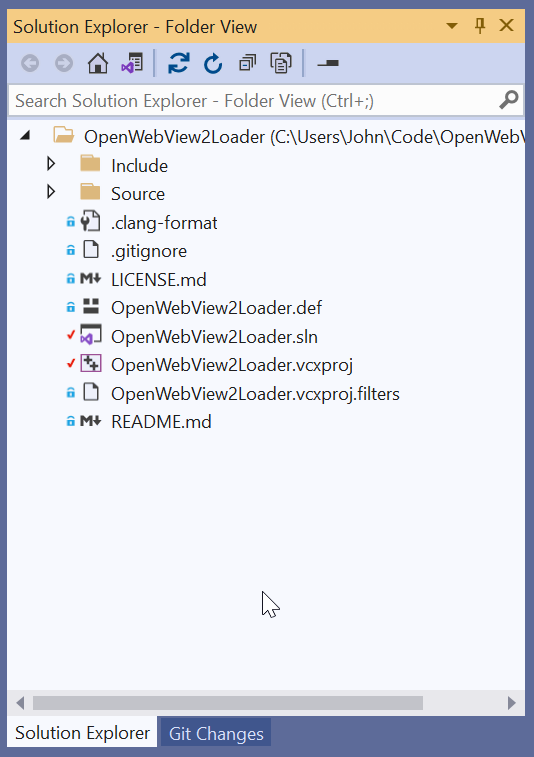
>I cannot get a plain folder view.

Like this?

https://raw.githubusercontent.com/jchv/files/main/devenv_G81...

Use the "Switch between solutions and available views" button and select "Folder view." Seems about right to me.

> Visual assist is very inept compared to Jetbrains products

Jetbrains does have better refactoring, but you don't really have to choose one or the other; Resharper and Resharper C++ give you the best of both worlds. Jetbrains is missing some stuff that Visual Studio can do, too. Visual Studio does some static analysis to detect out-of-bounds errors and other mistakes, which is useful to have as quick feedback in the IDE, in my opinion.

I actual like vs (but that is more inertia than anything). But that is one annoying thing about it. The features are usually there, but buried in some inscrutable way. It is one of the more robust IDEs out there. But you kind of have to do it the VS way or you will get mad at it.

There are hundreds of things the prog does. But literally have no icon to click on or short cut bound to them. You have to dig them out of the options and bind them or add them to a menu item to even get at them. Its been like that since the mid 90s.

Sure, I'm aware and have ReSharper C++ plus the clang linting enabled.

VS isn't all too shabby, they've been shaping up recently. But it certainly isn't the best, or even among the better, in my opinion. Even the file editor is pretty weak compared to other editors IMO.

Have you used VS without major extensions like Resharper for a decent length of time?

I find Resharper slows everything down significantly and makes VS worse overall.

Yes, I have. And although Microsoft claim otherwise, I find intellisense sorely lacking in a lot of areas. Indexing is bad, search is bad, and their refactorings miss the mark a lot of the time. It's clear that Jetbrains lexical analysis is a lot better. I can search for implementers, find usages, rename and restructure without thinking twice, most of the time.

ReSharper has been really slow, yes, but it's also much better than intellisense and noticably better than Visual Assist. As of now, it's at least usable for me. Have to turn off full solution scanning, but other than that it works.

I agree that the general experience is degraded by ReSharper, sometimes severely, but VS is just too dumb without it, IMHO.

I've recently uninstalled Resharper, mostly due to slowness and frequent VS crashes. For refactoring I've found Roslynator to be a fairly good replacement. In the codebase I'm working on ice noticed the worse options for jumping to derived types, etc., but at least I know that codebase very well so I have other means of going where I need to. It's generally been more than offset by having a responsive IDE.

Code completion is over thing that previously caused me to reinstall, but Intellicode is good enough by now. That one also comes with one very nice feature that I've used a few times by now: turning manual code changes into refactorings. Once you start editing the same thing over and over it starts suggesting you too do the same as a refactoring. And so far it's been very good with detecting such pattern changes and changing them on its own.

FWIW I (a daily VS user and someone who is generally fond of it) don't particularly like the VS folder view. I find it slow to open and a bit clunky; accordingly I often have VS Code or a terminal or Explorer open in addition to VS.
Last time I had to use Visual Studio (about 10 years ago) I used emacs to write my C# code and used Visual Studio to manage the "project" and run builds. Mainly because I had 2 decades of Emacs muscle memory and I kept fighting it in VS (yes, I tried the emacs keybindings in VS).
>I cannot get a plain folder view

Yes you can. Change from solution view to folder view.

>The good parts of VS is hot-reload (when it works), the debugger, and the profiler

So everything you want from an IDE?

What are you actually angry at?

I can't use file view, since it has some side-effect that messes up our solution completely. And before you blame me, it's a cmake import.

I'm not angry, I just don't think it's fair to claim that VS is a good IDE.

If that's all you expect from an IDE, I understand why you're happy with VS :D

Yes, but what do YOU expect from an ideal IDE? That was the question.

If you're targeting .NET or C++ development for Windows, there's not a lot of competition to be able to claim that there's something substantially better. Rider, IMO, is on par, with better refactoring. However, VS debugger is still better.

You're right in that it might be the only viable option for some usecases, but that doesn't make it good. It makes it passable :)
To add to this list: if something happens on disk it practically has an aneurysm. VSCode and JetBrains products cope without even blinking.
Try programming for Xamarin, UWP, or anything involving multitargeting.

The list of actions for which closing visual studio, deleting a bunch of random folders, and restarting is long. Unfortunately it includes any changes to project files, because the project system is super broken with anything multitargeting related. That basically means I have to completely restart my IDE and run a script to clean everything maybe 15 times a day. And fuck me if I’m trying to find where a regression happened (which means changing dependencies, which live in the csproj).

I remember when I didn’t have to restart VS 30 times a day, and memorize which build errors actually aren’t errors, and do random sequences of events to work around bugs, and memorize which unsuppressable warnings are legitimate and which are not. Before those days, Visual Studio was indeed an incredible accomplishment.

> Try programming for Xamarin, UWP, or anything involving multitargeting.

The complaints in the original article fell rather flat to me, but this is one area where it's absolutely fair to criticize VS. More generally, the reason that build tooling in the .net sphere is such a mess is because of historical baggage from VS.

With that said, if you're coloring within the lines[1], VS is very powerful and productive.

[1] To an extent. There definitely are use cases that are "supported" only in name.

> More generally, the reason that build tooling in the .net sphere is such a mess is because of historical baggage from VS.

This is part of why the .NET hot reload fiasco was such a big deal to me; it felt like doubling down on one of .NET's biggest weaknesses.

I used VS for years across a couple of C/C++/C# projects, and it was second to none with one exception.

The exception was Xamarin/Xamarin.Forms. Seriously, congrats to the Xamarin people for getting that project going, but it was (at least into Xamarin.Forms 1-3) more than a little hacky and extremely frustrating. Granted, it kind of had to be though given that it was intended for a broader audience targeting completely different platforms, and at least initially didn't have a lot of MS support iirc.

I think the issues surrounding cross-platform targeting were/are less a problem with the IDE itself than what it was/is forced to work with. The whole iOS "code in VS on Windows, but build on a Mac" was a nightmare, I don't know if things have gotten any better.

They’ve actively gotten worse. I should have clarified that my “I remember when” comment applied to 5 years ago, not 15. Reverse progress on that timescale just isn’t acceptable IMO. MAUI is supposed to fix it, but I’m not sure they’ll have a developer community left to use it by then.
>I remember when I didn’t have to restart VS 30 times a day, and memorize which build errors actually aren’t errors, and do random sequences of events to work around bugs, and memorize which unsuppressable warnings are legitimate and which are not. Before those days, Visual Studio was indeed an incredible accomplishment.

This is because the software you're building today is far more complicated than before (from the IDE's perspective), and it doesn't do a good job of keeping up. There's a reason why so many people jump to VSCode these days - it gives you less bells and whistles, but it won't blow up on you when you try to do something moderately complex.

> If you are having to fight with VS, then you may not be using it for one of its main use cases.

So I worked on VS tooling for a few years and I'm proud of what me and my peers achieved, but I don't think this is the right perspective. People should not be surprised by the behavior of their tools, and they should not be frustrated by random freezes or crashes all of the time. What the person you're replying to has experienced is very real - I saw it come up again and again and again in reports - and I hope that things improve for them with subsequent releases.

VS 2022 is a fantastic new release (64-bit solves so many perf and user-perceived reliability issues), but there is so much more to go. VS still relies on a very very old COM-based UI model with one of the most convoluted and complex threading models to manage it that I've ever seen. It's so easy for any little component to mess things up, hang the UI, and make someone have a terrible experience. I know folks on the inside are working to improve this dramatically (they know roughly how to do it), but it's a long road ahead.

You should be very proud. I remember the early .NET 2.0/3.0 days where you had to have ReSharper installed and it made VS almost unusable. Nowadays (the last 5-6 years) I use Visual Studio without any third party extensions - it's a blast!

I believe Visual Studio to be one of the crown jewels of Microsoft.

I'm not sure you can comment on this, but: any idea what the long-term plan is for UI in Visual Studio?

WPF has been more-or-less abandoned by the Windows team, and that's a little scary since VS uses WPF so much...

I won't speculate on things, but I will say that WPF is far from abandoned: https://github.com/dotnet/wpf/blob/main/roadmap.md
From the outside it seems to be in maintenance mode. It hasn't received new features in a decade (other than the port to .NET Core, if that counts). The Windows team has staffed it with a skeleton crew (a manager and 2 devs last I checked). They don't have bandwidth to review most community PRs, and even the .NET team doesn't get responses to issues: https://github.com/dotnet/wpf/issues/3811

idk, I hope I'm wrong but they have been promising improvements for a while and I'll believe it when I see it.

Ooof, yeah, I should have looked at the commit history. It does look like a skeleton crew and all the knowledge of WPF is in another team now. What a shame. At least WPF is stable for what it is though.
> 64-bit solves so many perf and user-perceived reliability issues

I love how in tech everything is always evil one day and the next one nearly the panacea. Now I understand the timing component is actually not to get rid of entirely, in the sense that maybe a 64-bit VS would have been a bad idea the year AMD released x64, but among the stated reasons to stick to 32-bits not so long ago, and even one of the main, there was: performance.

I suspect the cold reality was that the code base was not ready and the migration just took some time :)

>but among the stated reasons to stick to 32-bits not so long ago, and even one of the main, there was: performance.

Yeah, this was from a series of articles that were a great example of managing to be right about all kinds of things but still be wrong in the end.

Specifically, the articles laid the blame for things like memory usage (which when high enough, causes a foreground GC in the devenv.exe process that freezes your UI), on language services that get all too happy to allocate tons of memory. If you make this 64-bit, pointers double in size and you could observe even more memory usage. 64-bit is also objectively slower than 32-bit in terms of CPU time to execute stuff. The solution it suggested was for memory-intensive components to move out of process, which is actually what many of them did in VS 2017 and VS 2019.

But the problem with this article is that it was entirely speculation. It did not account for several things:

* A 64-bit devenv.exe process gives the GC more "room to work with" and do more background GCs rather than foreground GCs, which will pause the UI far less

* Marshaling data between processes still requires use of the UI thread in VS in various scenarios, due to a wildly complicated threading model that people mess up all the time

* You really don't know what the impact of something is going to be until you actually do it

* If you commit to something ambitious like going 64-bit only, engineers can meet the challenge and produce something very good

My personal belief is that 64-bit could have been reasonably accomplished many years ago, and it would have been the right call to do it then. But I won't be looking a gift horse in the mouth. The codebase I contribute to is so much more pleasant to work in with VS 2022.

> I don’t see how anyone can have this opinion.

it's pretty common amongst those who used Delphi 15 years ago (or those that use JetBrains products today)

I've been a long time VS user. Started with Visual C++ 6... In my experience, it's never been a straight forward conclusion of version X is better than the one before. With each release, it does somethings better, or new, but others worse, sometimes cripplingly so. And one of the most frustrating things for the longest time was that if you needed a specific C++ compiler major version, you were stuck using the specific VS version that shipped with the compiler (unless you were willing to ditch projects and go with makefiles). Only in 2019 did that finally change. And speed of the IDE itself has been dodgy at times, even for brand new projects. I've tried the 2022 preview (I have not yet tried RTM), and there are excruciating pauses in the UI for seconds to create a new file in an empty project! But, there are great new features in there, too...

Like Pretzold, I have a love hate relationship with IntelliSense. I think I can boil down my gripes with this: IntelliSense is wonderful for consuming APIs. It is an active hindrance for writing/designing APIs. It is great for telling you about what exists, but falls on its face when you're trying to write something new. If I am undoing the suggestions I didn't want, yet it insisted on placing, it is counterproductive. Personally, I get rather tired of slapping the escape key to cancel IntelliSense multiple times just so I can write out a dotted expression.

> If you are producing code for which VS was designed

That's literally what GP is trying to say: "either you do it the VS way or screw you."

> to say that it isn’t an incredible achievement is ridiculous

It takes like 20s to search source filenames of large projects, with fast SSD and 64 cores.

> I don’t see how anyone can have this opinion. If you are producing code for which VS was designed (.net for example) it is obviously and definitely one of the greatest IDEs ever produced.

Hard disagree. VS makes code harder to navigate than any other popular IDE out there to the point where even vscode is more intuitive and capable, it's extremely slow at that too, and makes even the tiniest change to a build config something that requires jumping through a myriad arcane menus.

Having used other IDEs to develop Java, C# and C++ code, the only explanation I can find to explain Visual Studio's adoption, besides privileged access to Microsoft's emergent technologies and frameworks, is the boiling frogs analogy.

> If you are having to fight with VS, then you may not be using it for one of its main use cases.

I guess that writing software and building projects are not Visual Studio's main use cases, then.

Lately VS has been breaking my code with its autocomplete, for example lets say I'm working on a web project and want to wrap an element in a div, I may have some existing code I want to reuse so I will copy and paste the opening tag for example, <div style="some styling" class="class1 class2 class3">, then I will hand code the closing tag like so, </div> but VS will 'correct' it to this </div>> for some reason and my code wont work, I start debugging only to find that the autocomplete has again broken my code.
Couldn't agree more - love visual studio (on windows), and vs code even more (lighter weight, but less features) when I am on a mac or ubuntu.

Also use Visual Studio on the Mac - that one I could agree is terrible - but hope it will improve over time.

Probably helps that I have used every version of VS since it was released - so like anything else, if you are used to it and use it every day for 20+ years you become biased - but for C# programming, imo, nothing even comes close.

On the Mac I use Rider which is in many ways a huge improvement over Visual Studio. No visual editing of XAML files though, so I am slowly migrating the codebase to use views fully written in C#.
Not all portions of VS are maintained to the same degree - their BI tools were horrible for years, and there was not much in the way of alternatives. I'd often spend more time fixing/triaging the IDE issues than I would my own code/projects. And when you then start to add multiple versions of VS into the mix (this was required for the BI projects + newest SQL Server database projects) it gets even worse.
I would think visual c++ must be one of the intended use cases. it's far from the worst c++ ide, but it can be pretty frustrating. you basically can't trust "find all references" in large projects.