Hacker News new | ask | show | jobs
by beaumartinez 5423 days ago
The real problem isn't the browser. It's the screen. Large horizontal 16:9 screens are great for video but poor for text and pages.

In similar iOS style, screens should be rotatable and shift their content accordingly.

Watching a video? Great, put the screen to horizontal. Browsing the web? Writing a letter? Coding? Put the screen to vertical.

7 comments

> In similar iOS style, screens should be rotatable and shift their content accordingly.

I have a 24" rotatable screen.

1. The amount of cabling hooked to the screen makes it a pain. The size also makes it unwieldy, and if your desk is anything worse than spotless you'll likely have to move a lot of crap around before you can rotate the screen without shoving stuff around and on the floor

2. A 24+" 16/10 (let alone 16/9) screen is very wide, putting it in portrait means you have your nose in the middle of the screen when the screen touches the desk, it requires significant (and uncomfortable) neck movements in the vertical plane

i do use smaller screens in portrait mode as "side windows" to the main one, but I would not work with a big widescreen in portrait.

And even more so for coding: widescreens let me keep IDE crud (content panes) on the sides out of the main content, and when using a text editor (Emacs) it allows me to view multiple files side by side (or — with follow-mode — multiple sections of the same file).

In portrait mode, I tend to center whatever I'm looking at, but having a wide vertical aperture still makes it a lot easier to navigate a large document. Though it's annoying when I'm reading the bottom of the document and can't center it.
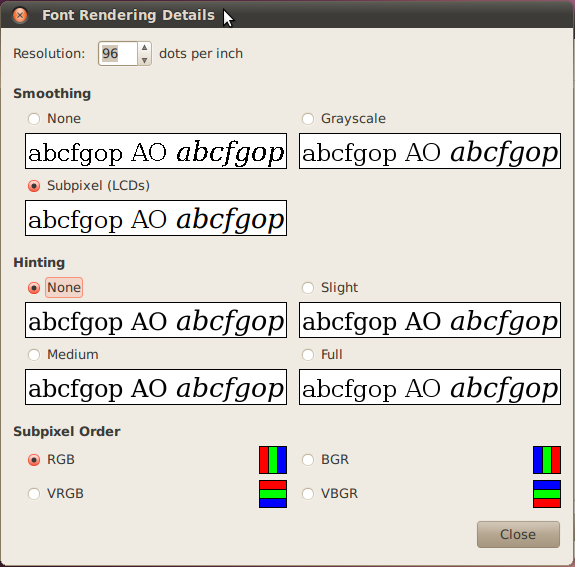
Except now your fonts are rendered like trash because the subpixel rendering and hinting assumes each RGB pixel triplet is in a horizontal line.
I know nothing about the technical details of font rendering algorithms, but isn't that just an implementation detail? How hard would it be to write a font rendering algorithm that works when each RGB triplet is a vertical line? And having done that how hard would it be to implement a font renderer that switches between the two algorithms depending on screen orientation?
My gut reaction is that well-made typefaces for digital use, which are often designed with hinting in mind, would lose their benefits. For most fonts, though, it shouldn't make a difference whether antialiasing or subpixel rendering is done vertically or horizontal, and I know you can manually specify your subpixel information in Linux.

Edit: natesm posted a response to the grandparent of this comment with a screenshot of the subpixel orientation selection in Ubuntu.

I've read that the RGB (horizontally) allows better rendering than VRGB (vertically) because (at least in the Latin alphabet) extra horizontal resolution is more often more useful than extra horizontal resolution.

Eg. 'm' and 'w' would benefit more from extra horizontal resolution, while 'e' would benefit more from extra vertical resolution.

Modern operating systems can handle this correctly I believe.
I tried a ~22" screen vertical for a while, primarily for coding, for exactly the same arguments you made. I switched back because I found I was still only using about as much of the screen as I was when it was vertical - I'm much better about looking side to side than I am up and down - and because I'd rather have two or three windows open side-by-side than one on top and one on bottom.
I have an external 1280x1024 screen, and I've switched it to portrait. I wish I'd done it long ago, as it's perfect for Xcode help docs, and for reading PDFs generally. It also runs the iPad simulator without scrollbars, but sadly only when it's the primary screen.

I totally agree with you.

> The real problem isn't the browser. It's the screen. Large horizontal 16:9 screens are great for video but poor for text and pages.

This is why I suggest to [some] others to vertically mount a monitor.

I've tried that, and I have a few issues with it:

* For good ergonomics you need to align the top of the screen with your eye level. I couldn't figure out a way to make this happen, so I always had one non-ergonomic aspect.

* Making big saccades (window-to-window) is easier for me when the windows are side-by-side than top-to-bottom. Windows 7's dock-to-edge feature is really convenient, and I don't know of a good alternative for vertical arrangement of windows.

* As someone else points out, the screen is unwieldy to rotate.

Good luck with trying that on a laptop.
Asus Transformer styled detachable screen with two connectors (one one the long side, one on the short) should do the trick.
This article was not about laptop displays.