Hacker News new | ask | show | jobs
by com2kid 1937 days ago
See, I disagree, I use home/end/pageup/pagedown all the time, and having them separate in an awkward spot is annoying. I prefer having them overlaid on the arrow keys, with fn to access them. IMHO that is the one area laptop keyboards can superior to full size keyboards.
3 comments

We probably need laptops with configurable keyboard layouts then, so that you can choose a variant when purchasing it and then replace it with different one if you find out you don't like it.

(And then, let's not forget that keyboard layouts are somewhat configurable in software. It's easy to bind pageup to mod-uparrow and pagedown to mod-downarrow. But it can't be done if the physical keys are missing, so physical keyboard layouts with more keys are preferable to those with less keys. Unfortunately fn-combos are usually hardwired in the Embedded Controller and can't be changed easily in software.)

> We probably need laptops with configurable keyboard layouts then

https://puri.sm/posts/librem-14-adding-librem-ec-freed-embed...

By configurable, I mainly meant the physical layout of keys, configurable at purchase time. So that one can get a laptop with a trendy 6-row chiclet, or a proper 7-row classic ThinkPad keyboard.

But yeah, being able to override the key mapping in EC is an important feature as well, and I'm glad someone's doing it! I really hope for the future where all these pieces come together: a laptop with a good physical keyboard (configurable/swappable, so that everyone can get their meaning of "good"), with configurable EC, replaceable components, etc. That would be a dream.

This is what makes newer ThinkPad keyboard layouts great at least in terms of arrow keys - the useless icon keys from the GP's posted image are now PgUp/PgDown, meaning you can access at least two out of the four without annoying two-handed operation. Home/End can still be bound to arrow keys plus modifier, but even there it's nice to have a dedicated key available.

Basically, full-size arrow keys are what really makes the difference, and at that point you could get the best of both worlds anyway.

(Let's not talk about other recent/misguided ThinkPad keyboard developments though.)

I actually use those "useless" keys (back/forward in the browser) more often than PgUp/PgDown, as I usually scroll using the touchpad.

But it doesn't really matter, as long as the physical keys are there. They can be remapped.

Never said they were useless! I also use them all the time. There is, however, only space for two extra keys in the holes of the four-arrow layout.
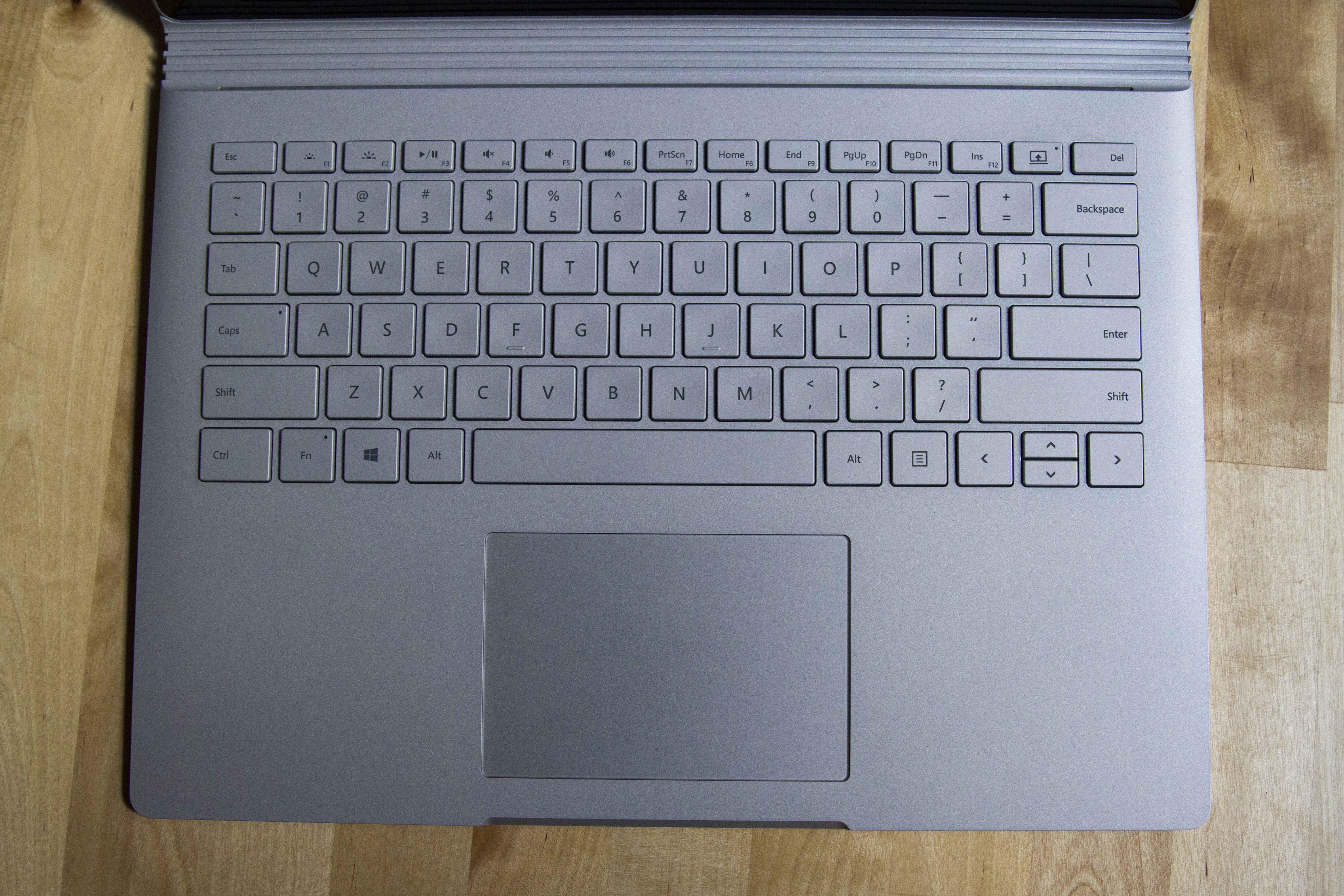
This is one of the reasons I actually really like the Surface Book keyboard [0]. It has home/end/pageup/pagedown as primary keys in the fn row, where they all fall to hand just by moving your right hand up from the home row.

Key size and placement is generally pretty perfect for the size imo (backspace, shift, enter, etc aren't cramped), and key travel and feel is up there with the best.

The up/down arrow keys and lack of brightness control in the fn row are the only real problems.

[0] https://cdn.arstechnica.net/wp-content/uploads/2015/10/IMG_3...