Hacker News new | ask | show | jobs
by ska 1963 days ago
I suspect the biggest (build time) benefit to most c++ workflows and toolchains was the move to ubiquitous SSD. Prior to that in my experience excepting expensive RAID array dedicated build machines, it was really easy to build a system that would always be IO bound on builds. There of course were tricks to improve things but you still tended to hit that wall unless your CPUs were really under spec.

edit: to be clearer, I'm not thinking of dedicated build machines here (hence RAID comment) but over all impact on dev time by getting local builds a lot faster.

5 comments

SSDs help, but nothing beats core count X clock speed when compiling.

Source code files are relatively small and modern OSes are very good at caching. I ran out of SSD on my build server a while ago and had to use a mechanical HDD. To my surprise, it didn’t impact build times as much as I thought it would.

I did a test a while back where I had a workstation compiling linux with SSD and one with a HDD -- it turns out all the files were cached in the memory (measely 8gb). But for general usage and user experience I would reccomend SSD without any question.
Hmm. Maybe the tradeoff has changed since I last tested this (to be fair, a few years ago). But I'm also not focused on build servers especially, it's always been possible to make those reasonably fast. Unless you have a very specific sort of workflow anyway, your devs are doing way more local builds than on the server and that sped up a ton moving to SSD, in my experience anyway. YMMV of course.
Last time I benchmarked C++ compilation on SSDs vs HDDS (compiling the PCL project on Linux which took around 45 minutes), SSD didn't help in a noticeable fashion.

I believe that this makes sense:

In a typical C++ project like that which use template libraries like CGAL, compilation of a single file takes up to 30 seconds of CPU-only time. Even though each file (thanks to lack of sensible module system) churns through 500 MB of raw text includes, that's not a lot over 30 seconds, and the includes are usually from the same files, which means they are in the OS buffer cache anyway so they are read from RAM.

However, if the project uses C++ like C, compilation is a lot faster; e.g. for Linux kernel C builds, files can scroll by faster than a spinning disk seek time would allow.

Back in 2012 at a previous job we tested compilation performance on spinning disks versus solid state. On Linux it made almost no difference what so ever, on Windows however it was a game changer. The builds were an order of magnitude faster so it was well worth it making the switch.
Well, you can always move your code to a ramdisk, I suspect any C(++) isn't more than a few GB anyway ?
Most compilers won't fsync will they? The output is likely not being written straight to disk.

It's caches all the way down.

And to max out disk bandwidth before you max out your CPU cores you need a really terrible disk.

I don't think many 8-way Xeon Platinum boxes have eMMC storage.

Well, using ramdisks will let you compare and make sure the disk isn't the bottleneck, at least.
But all compilers will close(). Compare compile times on tmpfs and you will see an improvement.
You don't even need to do this just cat all the files to /dev/null to prime the cache
With gentoo i use tmpfs and it works really well
Do you have details on how to enable this?
Just mount a ramdisk over your portage TMPDIR (default /var/tmp/portage). You will need a decent amount of ram though for larger packages like LLVM. Disabling debug symbols will reduce the required space a bit.
You know I wonder how much of an impact this has had on the recent move back to statically typed and compiled languages vs. interpreted languages. I had assumed most of the compilation speedups were due to enhancements to the compiler toolchain - but my local laptop moving from 100 IOPS to > 100k IOPS and 3GB/s throughput may have more to do with it.
CPUs got faster too. My MacBook pro is a lot faster than the 6yo top of the line Mac Mini.

In fact, if compile times are being limited by storage there should be some quick wins in configuration terms - building intermediates to RAM, cache warming, etc - that can enable better performance than faster storage.

i (and some teamates) actually put HDDs on some workstations as SSD just die after 2-3 years of active build on them and with modern HDDs you have practically unlimited storage while you can have only limited number of 400G builds on SSD (the org has psychological barriers to having more than 1-2Tb SSD in a machine) and the SSD start to have perf issues when at 70-80% capacity . With HDD the build time didn't change much - the machines have enough memory for the system to cache a lot (256-512G RAM).
> i actually put HDDs on some workstations as SSD just die after 2-3 years of active build on them

That sounds very low for modern SSDs, even consumer-grade. Have you tried different vendors?

If spending hours a day at 100% utility, SSDs will rarely last 5 years.
If your SSD would be at 100% utilization it’s going to take a lot of HDD to reach that kind of bandwidth. To the point where for high bandwidth loads SSD’s actually cost less even if you have to replace them regularly.

100% utilization and 30x the bandwidth = 30x as many HDD. Alternatively, if HDD’s are an option you’re a long way from 100% utilization.

SSD have hard time sustaining 200-400Mb/s write where is 4 HDD do is easily. Our case isn't that much about IOPS.

Anyway, reasonably available SSDs have up to [1000 x SSD size] total write limit, so doing couple of 400G builds/day would use up the 1TB drive in 3 years. At worst times we had to develop&maintain 5 releases in parallel instead of regular 2-3.

4 HDDs can do 200-400MB/s _sequential_ IO, 1 modern SSD can do 150-200MB/s _random_ IO and 400MB/s sequential IO while 4 HDDs would have a hard time doing IIRC more than 8MB/s random IO
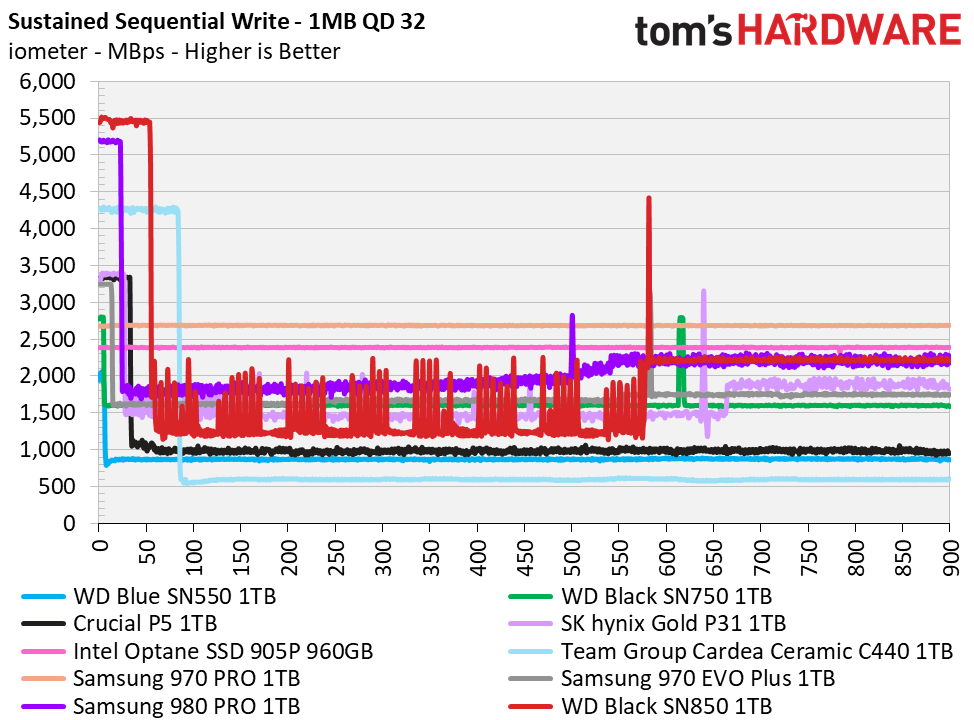
Urm what? A modern NVMe drive will sustain ~2 GB/sec write.

(See e.g. https://cdn.mos.cms.futurecdn.net/Ko5Grx7WzFZAXk6do4SSf8-128..., from Tom's Hardware)

Depends on the kind of SSD. If it's using SLC, the write endurance is much much higher. If you're going with cheap SSDs (TLC or QLC), your write endurance will suck.

see: https://www.anandtech.com/show/6459/samsung-ssd-840-testing-...

SLC seems to be going away pretty quickly, if it hasn't already been phased out. It just can't produce the price / GB of the better tech. Also, that article you linked is almost 10 years old.

You're best bet for long-term reliability is to buy much more capacity than you need and try not to exceed >50% capacity for high write frequency situations. I keep an empty drive around to use as a temp directory for compiling, logging, temp files, etc.

Also, my understanding is that consumer-grade drive need a "cool down" period to allow them to perform wear leveling. So you don't want to be writing to these drives constantly.

I recently bought an external 32GB SLC SSD (in the form factor of an USB pendrive). Its random read/write speeds are quite insane (130+ MB/s both) while consumer SSDs like the Samsung 850 Evo barely manage 30 MB/s read/write. It's also advertised as very durable.

I plan on using a couple of those as ZFS metadata and small block caches for my home NAS, we'll see how it goes but people generally and universally praise the SLC SSDs for their durability.

> You're best bet for long-term reliability is to buy much more capacity than you need and try not to exceed >50% capacity for high write frequency situations. I keep an empty drive around to use as a temp directory for compiling, logging, temp files, etc.

That's likely true. I am pondering buying one external NVMe SSD for that purpose exactly.

It's actually not better tech, instead it's more complicated, more error prone and less durable ways to use the same technology that produces more space for a lower price. MLC is pretty much okay but TLC is a little too fragile and low performance in my opinion. I prefer spinning HDD's over QLC since the spinning drives have predictable performance.
What kind of workload will do that?
a build server recompiling multiple branches over and over in response to changes.
And logging all of those unit tests associated with all of those builds (and rolling over those logs with TRACE level debugging).

Every build gets fully tested at maximum TRACE logging, so that anyone who looks at the build / test later can search the logs for the bug.

8TBs of storage is a $200 hard drive. Fill it up, save everything. Buy 5 hard drives, copy data across them redundantly with ZFS and stuff.

1TBs of SSD storage is $100 (for 4GBps) to $200 (for 7GBps). Copy data from the hard drive array on the build server to the local workstation as you try to debug what went wrong in some unit test.

A way to have your cake and eat it too - check out Primocache. It's pretty inexpensive disk caching software (especially for Windows Server which is where I really leverage it!).

Pair it with an Optane for L2 cache and it will speed up normal SSD use too ;)

How does it compare to default linux caching algorithm?
The default one that caches disk data in memory? It solves a very different problem by caching data from slower disks onto faster disks. It can accelerate reads and it can also act as a writeback cache.
It's most comparable to lvmcache or bcache. As in, Primocache does three actually useful things:

  - It can pre-populate an in-memory disk cache. Not massively useful, but depending on your workload and uptime it might save some time. Nothing I know of does this on Linux.
  - It can act as a level 2 block cache, i.e. caching frequently accessed blocks from slow (HDD) storage on fast (SSD) storage. This is massively useful, especially for e.g. a Steam library.
  - It can force extensive write buffering, using either main memory or SSD.
And yes, it can also act as a block buffer in main memory, but I don't find that helpful. Windows' default file cache does a good enough job, and Linux' VFS cache works even better. (Though ZFS' ARC works better yet...)

Its write bufferin increases write speeds massively, inasmuch as it delays actually writing out data. Obviously, doing so with main memory means a crash will lose data; what's not so obvious (but amply explained in the UI) is that, because it's a block-based write buffer, it can also corrupt your filesystem. Primocache does not obey write barriers in this mode.

What's even less obvious, and where it differs from lvmcache / bcache, is that this still happens if you use only an L2 write buffer, not a memory-based one. The data will still be there, on the SSD, but Primocache apparently doesn't restore the write-buffer state on bootup. Possibly it's not even journalled correctly; I don't know, I just got the impression from forums that fixing this would be difficult.

So, overall, bcache / lvmcache / ZFS* are all massively superior. Primocache is your only option on Windows, however, unless you'd like to setup iSCSI or something. I've considered that, but I'd need at least a 10G link to get worthwhile performance.

*: ZFS supports cache-on-SSD, and unlike a year ago that's persisted across reboots, but it doesn't support write-buffer-on-ssd. Except in the form of the SIL, which is of dubious usefulness; that buffer is only used for synchronous writes.

However, ZFS is a transaction-oriented filesystem. It never reorders writes between transaction groups, which means that if you run it with sync=disabled -- which disables fsync & related calls -- it's still impossible to get locally visible corruption. The state of your filesystem at bootup will be some* valid POSIX state, as if the machine was suddenly but cleanly shut down. You still need to tweak the filesystem parameters; by default transaction groups end after 5 seconds, which is unlikely to be optimal.

Alternately, you can run it on top of lvmcache or bcache.

Those are pretty beefy workstations, does every developer have one or are these really build servers? As I noted you could always throw money at this and end up somewhere reasonable, but it introduces workflow considerations for your devs.
It is one per dev, and in reality it is at least a couple - I have 4 of them for example. The product itself is a beast too.
That works! It helps that "plenty-of-ram" is more achievable than it used to be, also.
What are the signs of an SSD that's about to die?
anecdotally i'd see filesystem errors and write speed dropping, sometimes writes practically hanging, especially if the drive is close to 90% capacity.
SMART monitoring.

In my experience the SMART data on SSDs is pretty good at pointing to failures.

Either that or the SSD simply disappears from the system. But that happens to HDDs also.

Don't SSDs have a finite TBW? 50GB of writes everyday (possible on large projects) will consume that in a couple of months.
I've had a Crucial 256GB SSD (MX100) since early 2015 and I use it with Windows 10. WSL 2's file system is on there along with Docker, which I've been using full time since then. That means all of my source code, installing dependencies, building Docker images, etc. is done on the SSD.

The SMART stats of the drive says it's at 88% health out of 100%, AKA it'll be dead when it reaches 0%. This is the wear and tear on the drive after ~6 years of full time usage on my primary all around dev / video creating / gaming workstation. It's been powered on 112 times for a grand total of 53,152 running hours and I've written 31TB total to it. 53,152 hours is 2,214 days or a little over 6 years. I keep my workstation on all the time short of power outages that drain my UPS or if I leave my place for days.

Here's a screenshot of all of the SMART stats: https://twitter.com/nickjanetakis/status/1357127351772012544

I go out of my way to save large files (videos) and other media (games, etc.) on a HDD but generally most apps are installed on the SSD and I don't really think about the writes.

As a counterpoint, I burn-tested several random M.2 NVME drives over a period of a month of 24/7 writes and reads and all but one model failed before the month was up
Heat dissipation can be an issue. Writing continuously generates a lot of heat.
Part of the purpose of a burn test is to see how it handles temperature under load. We didn't have the option of adding cooling, many of the product installations took place in a hot climate, and nobody wanted to pay for a hardened part...

Anyway, my point is that SSD drive reliability varies wildly

Nvme does, SSDs as in sata doing this burn test will probably work fine
Something like the Samsung EVO 960 (typical mid-range SSD) will take 400TB of writes in it's lifetime. So that's 8,000 days of 50GB writes.
Hmmm. Looks like I need to move my temp dir for GeForce instant replay off of my SSD. It records about 1.6GB/5min which is 460GB per day. RAM disk would probably be the best option.
I'm pretty sure it doesn't record the desktop with instant unless you have specifically set that up, so you'd only be writing to the drive while you're in game.
True, true.
At my current job I do at least 150-200GB of writes per day. 50GB for code temporary files, 70+ GB for data files, x2 that for packing them, and then also deleting some of those to make some room to do it again.

Also the disk that it's on is over 50% full so that also degrades it faster as there's fewer blocks to wear level with.

The larger your SSD the more flash cells you have, so the more data you can write to it before it fails.

You can see this from the warranty for example, which for the Samsung 970 EVO[1] goes linearly from 150TBW for the 250GB model up to 1200TBW for the 2000GB model.

So if you take the 1000GB model with its 600TBW warranty, you can write 50BG of data per day for over 32 years before you're exhausted the drive write warranty.

[1]: https://www.samsung.com/semiconductor/minisite/ssd/product/c... (under "MORE SPECS")

They do but it's really large. The Tech Report did an endurance test on SSDs 5-6 years ago [0]. The tests took 18 months before all 6 SSDs were dead.

Generally you're looking at hundreds of terabytes, if not more than a petabyte in total write capacity before the drive is unusable.

This is for older drives (~6 years old as I said), and I don't know enough about storage technology and where it's come since then to say, but I imagine things probably have not gotten worse.

[0]: https://techreport.com/review/27909/the-ssd-endurance-experi...

> things probably have not gotten worse.

I am afraid they did, consumer SSDs moved from MLC (2 bits per cell) to TLC (3) or QLC (4). Durability changed from multiple petabytes to low hundreds of terabytes. Still a lot, but I suspect the test would be a lot shorter now.

The TLC drive in that test did fine. 3D flash cells are generally big enough for TLC to not be a problem. I would only worry about write limits on QLC right now, and even then .05 drive writes per day is well under warranty limits so I'd expect it to be fine. Short-lived files are all going to the SLC cache anyway.
I've swapped hundreds of terabytes to a terabyte SSD (off the shelf cheapie) with no recognizable problems (the gigapixel panoramas look fine).
SSDs avoid catastrophic write failures by retiring damaged blocks. Check the reported capacity; it may have shrunk :) Before you ever see bad blocks, the drive will expend spare blocks; this means that a new drive you buy has 10% more capacity than advertised, and this capacity will be spent to replace blocks worn by writes.
SSDs never shrink the reported capacity in response to defective/worn-out blocks. Instead, they have spare area that is not accessible to the user. The SMART data reported by the drive includes an indicator of how much spare area has been used and how much remains. When the available spare area starts dropping rapidly, you're approaching the drive's end of life.
I so happened to know this already, but I must say I've always found the approach somewhat weird. Wouldn't it make more sense to give the user all the available space, and then remove capacity slowly as blocks go bad? I guess they think people would be annoyed?

Imagine if we treated batteries like SSDs, not allowing the use of a set amount of capacity so that it can be added back later, when the battery's "real" capacity begins to fall. And then making the battery fail catastrophically when it ran out of "reserve" capacity, instead of letting the customer use what diminished capacity was still available.

Shrinking the usable space on a block device is wildly impractical. The SSD has no awareness of how any specific LBA is being used, no way to communicate with the host system to find out what LBAs are safe to permanently remove. You can't just incrementally delete LBAs from the end of the drive, because important data gets stored there, like the backup GPT and OS recovery partitions. Filesystems also don't really like when they get truncated. Deleting LBAs from the middle of a filesystem would be even more catastrophic. The vast majority of software and operating systems are simply not equipped to treat all block devices as thinly-provisioned. [1]

And SSDs already have all the infrastructure for fully virtualizing the mapping between LBAs and physical addresses, because that's fundamental to their ordinary operation. They also don't all start out with the same capacity; a brand-new SSD already starts out with a non-empty list of bad blocks, usually a few per die.

Even if it were practical to dynamically shrink block devices, it wouldn't be worth the trouble. SSD wear leveling is generally effective. When the drive starts retiring worn out blocks en masse, you can expect most of the "good" blocks to end up in the "bad" column pretty soon. So trying to continue using the drive would mean you'd see the usable capacity rapidly diminish until it reached the inevitable catastrophe of deleting critical data. It makes a lot more sense to stop before that point and make the drive read-only while all the data is still intact and recoverable.

[1] Technically, ATA TRIM/NVMe Deallocate commands mean the host can inform the drive about what LBAs are not currently in use, but that always comes with the expectation that they are still available to be used in the future. NVMe 1.4 added commands like Verify and Get LBA Status that allow the host to query about damaged LBAs, but when the drive indicates data has been unrecoverably corrupted, the host expects to be able to write fresh data to those LBAs and have it stored on media that's still usable. The closest we can get to the kind of mechanism you want is with NVMe Zoned Namespaces, where the drive can mark individual zones as permanently read-only or offline. But that's pretty coarse-grained, and handling it gracefully on the software side is still a challenge.

I can imagine, OSes in general are not prepared to such reported numbers shrinking. There would be a hole.

What if a moment ago my OS has still 64G and then all of the sudden it only has 63G. Where would the data go? I think something has to make up for the loss.

For me it makes sense to report logically 64G and internally you do the remapping magic.

I wonder, how some OSes deal with a hot-swap of RAM. You have a big virtual address space and all of the sudden there is no physical memory behind it.

Hm.

Now I'm curious how the kernel responds to having swap partitions resized under it.
Not quite how it works. The SSD will never have a capacity lower than its rated capacity.

For the failures I've seen, once the SSD goes to do a write operation and there's no free blocks left, it will lock into read-only mode. And at that point it is dead. Time to get a new one.

Now I'm really curious. I took the drive I swapped hundreds of terabytes to, and put it in a server (unfortunately not running a checksumming filesystem) and it ran happily for a year.
We had ultra fast HDDs as developers with sound proof housings because they were so loud. Glad for SSDs.