Hacker News new | ask | show | jobs
by kronholm 2349 days ago
Once you get used to two panes, it's hard to go back.

From ~1990 to now (yikes, 30 years!), I've used these:

- Amiga: Directory Opus (DOpus)

- MSDOS: Norton Commander (NC)

- Windows: Total Commander

- Linux: Midnight Commander (mc)

- MacOS: Tux commander

Looking back at old Directory Opus screenshots tickles the nostalgic bone. I miss the colourcoded buttons.

I wonder if Directory Opus was the first 2-split navigator, but probably not.

13 comments

These types of file-managers are called 'Orthodox file managers'. [1]

In answer to your question of which was the first, the answer appears to be PathMinder (1984) and Norton Commander (1986). Both were for DOS so it seems to be an original innovation from the DOS world. Directory Opus first came out in 1990.

I wasn't familiar with PathMinder before looking at the wikipedia article but I was familiar with Norton Commander, as I think nearly everyone who used DOS in the late 80s would be. I personally favoured XTree (1985) more. Xtree didn't originally have the two pane view, but added it in 1989.

[1] https://en.wikipedia.org/wiki/File_manager#Orthodox_file_man...

"Double Commander (https://doublecmd.sourceforge.io/) is a free cross platform open source file manager with two panels side by side. It is inspired by Total Commander and features some new ideas."
Can you tell me about what "new ideas" it features?
> _Once you get used to two panes, it's hard to go back._

Just as a data point, I tried that and I never could figure out how to populate the left pane and the right pane in such a way that it was helpful. (I.e. that copy and move did the right thing.) It just felt pointless to me.

I've used vifm a few times, but only after figuring out how to turn off the two-pane split :-)

De gustibus non disputandem, I guess.

definitively try macOS MARTA https://marta.yanex.org/ - beautiful file management
Love the UI but can't make its font bigger even though I edited the configuration seemingly correctly. Reading the docs currently.
There were also PC Tools from 1985 which included a shell and other programs.

https://books.google.nl/books?id=ki8EAAAAMBAJ&pg=PA34&redir_...

I love how "FORMAT your disk without leaving your spreadsheet" is a feature

In the days of applications with no concept of standard file dialogues, running on single-tasking operating systems, for platforms where disc media were sold unformatted, and needed low-level formats, it really was.

Being able to format a floppy disc and continue to do things on OS/2 without applications becoming seriously jerky was also a feature. (-:

CentralPoint PC Tools seems little remembered nowadays. It was quite an extensive toolkit, as I recall. File viewers for various types of database/spreadsheet/wordprocessor files. Disc and file hex editors. Repair utilities. Extended directory change. A uniform look and feel, and a fairly good manual.

The Graham Utilities was another one.

* http://www.warpspeed.com.au/Products/OS2/GU/graham.htm

There seems to be no trace of things like InspectA (another OFM for OS/2) on the World Wide Web.

> CentralPoint PC Tools seems little remembered nowadays.

Indeed, up to the point that the name was usurped by some unrelated software.

It was very useful even in the later DOS era; it was a standard part of my travelling tech toolkit. It had one of the fastest floppy formatters around, and just about the fastest DOS disk-defragmenter I ever saw, nearly an order of magnitude quicker than Norton's.

The PC Tools backup/restore tool was also superb and extremely fast. It used an extended disk format, squeezing about 1.6 MB onto an HD 3½" floppy, and compressed data on the fly, so many megabytes of software or data could be squeezed onto the minimum number of floppies.

Benchmarks: http://www.oldskool.org/guides/dosbackupshootout

Unlike rival extended formats, if you tried to DIR the disk from DOS, you got a warning message: http://www.os2museum.com/wp/the-central-point-backup-floppy-...

What doomed Central Point software is that it did a licensing deal with Microsoft. Cut-down versions of PC Tools Backup and the separate Central Point Antivirus were bundled with MS-DOS 6. Microsoft promised CP that CP would make money from DOS 6 customers wishing to upgrade to the full versions.

In actual fact, people got by with the freebie versions and CP's sales of standalone products _and_ upgrades both stagnated.

MS tried similar tactics on STAC in the hope of bundling the Stacker disk-compression tool with MS-DOS 6. STAC, wisely, said no.

So Microsoft just stole the code and used it anyway.

STAC sued, won, and got $120M damages.

https://www.latimes.com/archives/la-xpm-1994-02-24-fi-26671-...

It used the money wisely, to diversify the company out of disk compression by acquisition, buying vendors of remote-control software (ReachOut) and enterprise backup (Replica).

Sadly, this was long before ubiquitous Internet connectivity, even by dial-up modem. ReachOut mainly worked by direct-dial modem-to-modem comms -- useful, but expensive, as each machine to be controlled needs a modem, a telephone line and its own phone number.

It wasn't enough and STAC ended up going broke. Central Point Software was bought out by Symantec, like Quarterdeck and Norton and others.

MS-DOS 6 was badly buggy anyway and MS had to release a free update, MS-DOS 6.2. (Note, at this time, product updates, service packs, etc. were extremely rare.)

Then, when it lost the STAC lawsuit, it released another update, MS-DOS 6.21, which simply removed disk compression altogether.

Then MS rewrote the offending code and released MS-DOS 6.22, another free update, replacing the infringing "DoubleSpace" with "DriveSpace" -- basically the same tool but with different compression/decompression routines.

This was the last-ever version of MS-DOS, and thus DOS 6 has the dubious distinction of being the most-patched release in history.

There are details of this on Wikipedia but it's been sanitised by MS PR so it merely mentions patent infringement, rather than the direct code theft involved.

https://tedium.co/2018/09/04/disk-compression-stacker-double...

I can't believe DOS Navigator [1] is not mentioned - true MDI in TUI using Turbo Vision. Ran circles around Norton Commander. Even had a freaking spreadsheet built-in!

[1]: https://en.wikipedia.org/wiki/DOS_Navigator

I think it was relatively unknown outside of former USSR (having been created by a team in, of all places, Moldova).

It was insanely good.

for the current windows platform there is far manager: https://www.farmanager.com/ Unlike Norton it has plug-ins and there are a lot of them available.
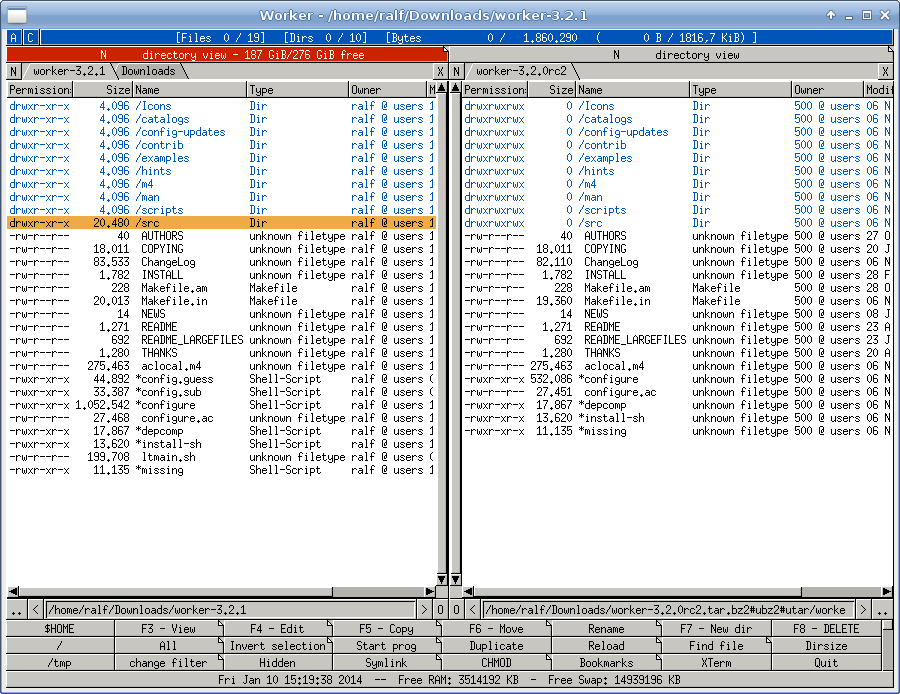
Try Worker, it is as close to Directory Opus as possible.

https://www.tecmint.com/wp-content/uploads/2016/06/Worker-Fi...

Its available on FreeBSD so it must be available on Linux and macOS at least ... not sure about Windows.

If you are on Windows, then go for the real deal[1].

It's (also) ActiveX (generic scriptig host, COM objects from/with scripts, etc.) scriptable and fully configurable. Just like in the good ole' days.

[1]: https://gpsoft.com.au/

Counter data point here. NC/VC since 90-ish, TC, MC, Far. Then suddenly it all lost fit and explorer/finder felt much better, with many windows and quick access pins. Explorer still lacks Finder’s inplace folder expanding, but that’s bearable.

Idk what happened exactly, but now I can’t stand commanders at all.

I'm a big fan of muCommander as well.
Fixing the number of panes at 2 seems a little arbitrary. I used dired in emacs and open precisely the number of panes I want: most of the time 1, fairly often 2, once in a blue moon 3, and I've never needed 4.
I’ve always found 2 panes to be extremely limiting
What is the best modern file manager for MacOS? Using ForkLift but it's not Total Commander.
You can try Commander One - https://apps.apple.com/us/app/commander-one-file-manager/id1...

I've used it as a replacement for Total Commander on the Mac. Another posted posted Marta, which I just downloaded and it seems to have almost the same features as Total Commander but in a free/open source offering.

Double Commander seems to be the most popular and featureful among cross-platform two-panel managers. However, its integration with the rest of the system is rather lacking on Mac.

Forklift made some questionable choices in the version 3. The app became much slower.

Check out nnn - https://github.com/jarun/nnn

To install - brew install nnn