Hacker News new | ask | show | jobs
by qwerty456127 2770 days ago
For my whole life I've been "drawing" real GUIs and writing the logic code, not GUI code then. It started with VisualBasic 1.0 for DOS, then there were different versions of VisualBasic for Windows, then Borland C++ Builder and Delphi (I was using the former), then NetBeans Swing designer and WinForms designer in VisualStudio. And now building a GUI is such a problem that a huge number of almost-useless (I really prefer pen and paper over drawing with a mouse) "mockup tools" has emerged and we have to use artificial intelligence to produce the actual UI code or just code it manually...
4 comments

It really is disappointing how modern web GUI environments are harder to use than what was around 20+ years ago.

There are still Visual Basic Apps from the 1990s floating around in large corporations and in government.

Users who were expert in the process but not expert developers could easily code up tools to their exact specifications.

https://en.wikipedia.org/wiki/Visual_Basic#1990s

Admittedly the deployment of web applications is much better and they can run on different devices.

Hopefully when web assembly takes off easier to use tools will reappear.

It really is disappointing how modern web GUI environments are harder to use than what was around 20+ years ago.

Yes. We had drag and drop UIs decades ago. Now you can't even get a decent GUI program for laying out a web page. CSS/Javascript got so messy that even Dreamweaver became useless.

Part of the problem is that ad code requires a messy environment, so that ad blockers and click generators have a hard time. Google, by policy, does not permit you to put their ads in a iframe, where they belong. You can't even put Google Hostile Code Loader ("tag manager") in an iframe sandbox.

Part of the problem is that ad code requires a messy environment, so that ad blockers and click generators have a hard time. Google, by policy, does not permit you to put their ads in a iframe, where they belong. You can't even put Google Hostile Code Loader ("tag manager") in an iframe sandbox.

I believe the proper term for this is "Well there's your problem.". That sort of antisocial behavior is what caused the issue in the first place and rather than solve this by being civil enough to the user that they don't try to block everything they double down on the untrustworthiness and act /even more/ malicious.

> Yes. We had drag and drop UIs decades ago.

We had _simple_ drag and drop UIs decades ago.

Computers operated within a lot more limited constructs back then. UI windows didn't resize, or it was reasonable to expect that they're fixed. How did those drag and drop tools back then handle creating a UI for screens ranging from 400pt wide to 2560pt wide?

> How did those drag and drop tools back then handle creating a UI for screens ranging from 400pt wide to 2560pt wide?

For simpler forms you'd just set anchoring properties of the widgets in question (akRight/akBottom in Borland's VCL or whatever its counterpart is called in WinForms or what was its predecessor). Nowadays it's even easier with things like, say, GTK's HBox/VBox.

> Computers operated within a lot more limited constructs back then.

Resource limits didn't stop web browsers of the era from rendering complicated tables in a variety of sizes.

In WinForms, it's still called Anchor (it really did take a lot from VCL), but since enums are scoped in .NET, you have Anchor.Left, Anchor.Top etc.

WinForms also had Dock (Left, Right, Top, Bottom, or Fill) which basically forced the control against that edge of its parent, taking up full length and/or height accordingly in one dimension, and using the explicitly specified size in the other. With multiple controls with Dock, they'd gradually fill the available space in Z-index order, stacking up against each other; then whatever control had Dock=Fill, would fill the remaining space.

So yeah, resizable windows were common, and easy to deal with. The real problem is dynamically sized controls themselves, e.g due to DPI changes, or because the control contains dynamic content of unknown size. With those, anchors no longer work well, and you need some kind of box and grid layouts. Which are available - but it's kinda hard to edit them visually in a way that's more convenient than just writing the corresponding code or markup.

The closest I've seen to visually editing UI that can accommodate dynamically sized controls was actually in NetBeans, which had its own layout manager for Swing. That thing allowed you to anchor controls relative to other controls, not just to the parent container. Thus, as controls resized according to their context, other controls would get moved as needed:

https://netbeans.org/kb/docs/java/quickstart-gui.html

https://youtu.be/_ZW4ktG1DEE?t=129

Still, you needed to be very careful in the UI form editor, to make sure that controls are anchored against other controls in ways that make sense.

Fundamentally, I think the biggest problem with UI designers today is that they can't really be WYSIWYG, the way they used to be in the RAD era. The DPI of the user machine might be different, fonts might be different, on some platforms (Linux) themes can be different in ways that drastically affect dimensions etc.

> Fundamentally, I think the biggest problem with UI designers today is that they can't really be WYSIWYG, the way they used to be in the RAD era. The DPI of the user machine might be different, fonts might be different, on some platforms (Linux) themes can be different in ways that drastically affect dimensions etc.

WPF and UWP can deal with it perfectly fine.

Using anchors and docking was extremely intuitive and easy in WinForms, I miss these heavily. I'm trying to build an UI with Qt Designer right now and using layouts instead is quite a pain when building something sophisticated. Perhaps everything can be done with them but becoming fluent in their behavior and tweaking is going to take time.
> 400pt wide to 2560pt wide

There are 2 major strategies for responding to such a difference:

1. Vector scaling. It will make the difference irrelevant and the resulting UI will look approximately the same on whatever a resolution.

2. Capacity scaling. I.e. keep the same font letting more information to fit in the control without scrolling.

It may be a little bit hard to formalize but these two can be combined intelligently. It is also important to know which one the user prefers (e.g. I mostly prefer the second while many prefer the first).

Note I mentioned display _points_ rather than display _pixels_ - how do you create a UI that scales from a phone to a 27" monitor. This is more than just scaling up assets and turning on word wrap.
> UI windows didn't resize, or it was reasonable to expect that they're fixed.

This isn't true at all. The original Mac in 1984 had resizable windows for most apps. Most other WIMP GUIs followed suit.

An early desktop publishing program, Ventura Publisher (v3 of 1990) could easily reflow complex document layouts and allowed alternate stylesheets to be applied to the same text. This is not exactly UI, but the layout was more sophisticated than what HTML can do. The idea of same content and different rendering is certainly not new.
Interface Builder has been building complicated and resizable UIs for literally decades.
It's a real shame. If you start with a blank file, HTML/CSS/Javascript are so much nicer now, if you don't need anything cutting edge browsers are generally great, too. I think our technology is not so much the bottleneck as how it's used.
Then you are overusing CSS and JavaScript. It is not needing so much to put. And then, just use a pure text editor you can write the HTML codes.
We've built an explicitly Visual Basic-like development environment for the web, which I think fits your bill: https://anvil.works.

It's got a drag'n'drop UI creator, you use Python to build the front-end and the back-end (with proper autocomplete, VB-style), and it even has a built-in database if you need one.

"Drop a title here" wtf what does the app doesn't create one for me when I double click (maybe ask me for confirmation if you think user intent is not clear)

Don't create your own icons, use already known icons, Ab and Ab-but-with-underline doesn't clearly mean "Text" and "Link" but the word "Text" and the famous anchor icon do.

Seems really cool but the selection of controls looks too humble (no TreeView? I'm choosing a trchnology to build an app on right now and I need a tree) - IMHO this is a severe limitation for the platform usefulness, I really hope more controls are going to be introduced.

Also as far as I can understand it won't let you export apps the way one could run them on their own outside of your servers - this limits the usage too.

quick glance, looks interesting.. but without "won't let you export apps " - I would never buy in.. if you can export, then it suffers from the same lack of easy to understand that webflow has suffered from it's initial launch.

I liked the tree view that netobjects fusion had years ago, it makes bigger sites easier to work with.

Still trying to carve out time to try pinegrow to see if it's got enough drag and drop and resize to make me no longer miss netobjest fusion.

just curious - why would web assembly make it easier for those tools to reappear?

I used to use hose 90s GUI tools - VB's, VC's, Symantec's and Borland's java gui tools. Although they did work well for fixed UIs (absolute positioning) -- they were rather hard to get non-fixed uis working. IMHO Bootstrap's grid system was a real leap in this regard and (to me) still a pleasure to work with.

Perhaps because I live in hope...

The main reason WASM and whatnot might make it easier is that instead of depending on thousands of Javascript libraries the way that so many modern web apps do perhaps a more controlled environment might include a better set of standard libraries and controls.

Also Javascript has evolved at a lightning pace which is remarkable but also makes any complex tooling for it tricky. 10 years ago jquery was the main thing, today React,Vue,Angular and so many other things are front end tools of choice.

But all that may be totally wishful thinking.

I'm confused as to how having a common target to have _any_ language, including C, running on the web makes tooling easier rather than harder.
The idea would be that WASM will facilitate a particular language with a good standard library would be used to create an easy to use GUI drawing and then coding setup.

But yes, it wouldn't support every language that could compile to WASM and you're right that would be even harder than creating a good tool for Javascript.

Such "easy to use GUI drawing libraries" would still need to be written in javascript. If you want actual things to appear in the browser you still need to interact with the DOM, which is actually harder with WASM, not easier.

And while it's technically possible to say, just compile QT to wasm and give it a CANVAS tag as a dumb drawing surface, you've just broken accessibility, and that's a deal breaker.

I hear you on the tooling complexity side...
> Admittedly the deployment of web applications is much better and they can run on different devices.

But is it really, if you take into account all the incompatibilities between browsers and the different UX paradigms between classes of devices?

Is Qt that much harder than it was back then?
We have such an environment, called Elevate Web Builder:

https://www.elevatesoft.com/products?category=ewb&type=web

Pros:

- Uses a statically-typed language (Object Pascal), compiled to JS, code compression is a simple build option, and the compiler is very fast:

https://www.elevatesoft.com/manual?action=viewtopic&id=ewb2&...

- Layout management is universal (not various, competing forms of layout) and easy to use:

https://www.elevatesoft.com/manual?action=viewtopic&id=ewb2&...

- You can create your own non-visual components and controls and install them into the IDE or share them with others:

https://www.elevatesoft.com/manual?action=viewtopic&id=ewb2&...

(the source code to the entire runtime and component library is included with the product)

- The look and feel of every control in an EWB application can be customized:

https://www.elevatesoft.com/manual?action=viewtopic&id=ewb2&...

- Uses icon fonts for icons (you can also use raster images, if you want), so applications look crisp on any device:

https://www.elevatesoft.com/manual?action=viewtopic&id=ewb2&...

- You can use any existing external JS code by coding an external interface to the external JS code (FFI), so even external JS code references will be type-checked by the compiler:

https://www.elevatesoft.com/manual?action=viewtopic&id=ewb2&...

Cons:

- The code editor is rudimentary and requires some more polish (code-completion, etc.)

- Debugging isn't supported via the IDE, yet

- There are still a few missing controls like a treeview and charts, but you can interface with JS products like HighCharts without issue

- The compiler still needs some work in the areas of interfaces, generics, and set support

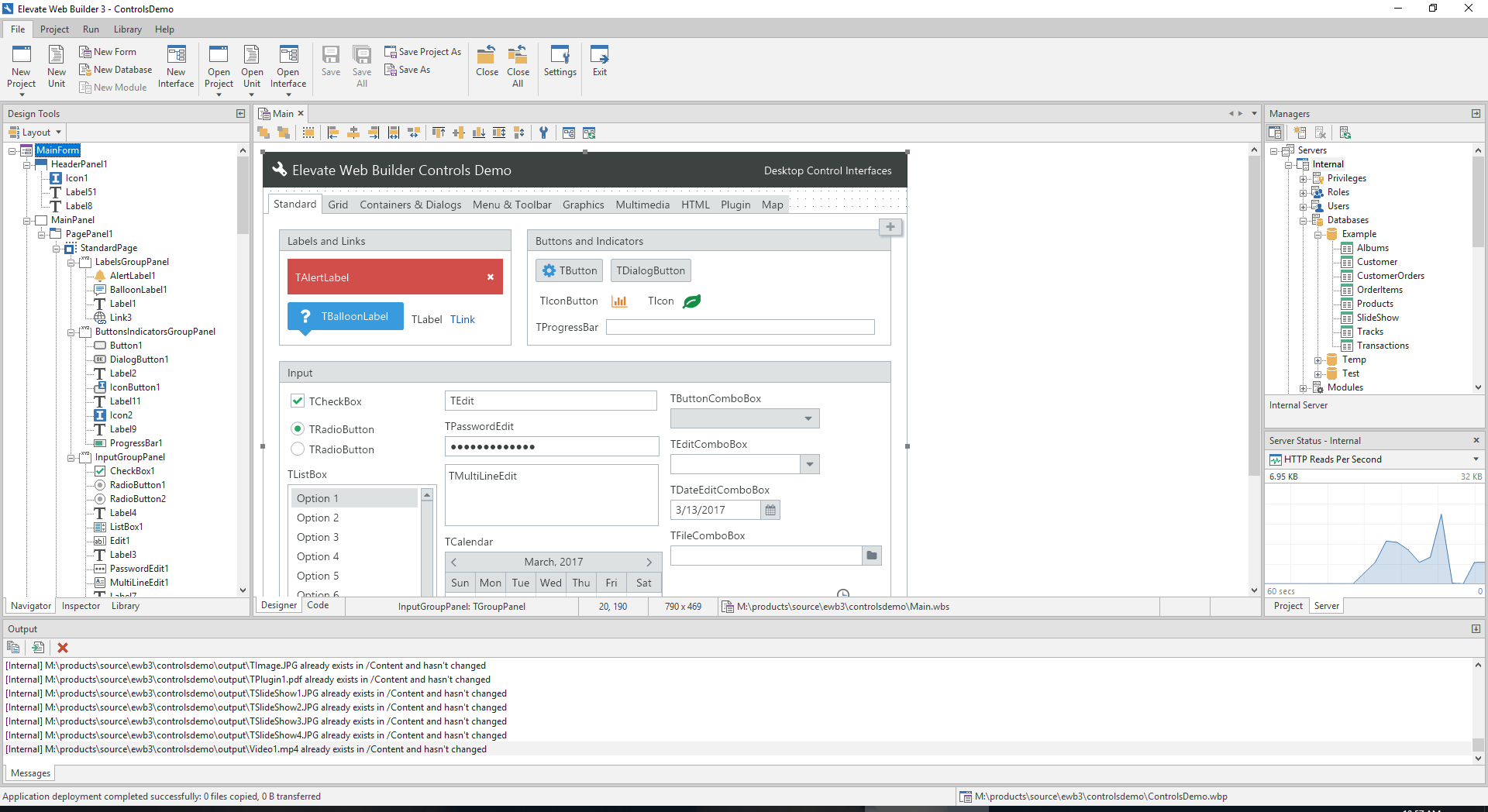
We have a new Elevate Web Builder 3 coming out soon that has a new IDE and web/application server with built-in TLS, authentication, session management, role-based access control, database API, remote application deployment, and event logging. You can, effectively, manage and monitor any EWB 3 web server remotely from within the new IDE:

https://www.elevatesoft.com/ewb3ide_screenshot.png

Initially EWB 3's web server will be available for Windows only, but we will be offering a Linux/Mac daemon version in early 2019.

The ultimate goal for the product is to provide a single-language solution to both front-end and back-end applications with one-click application deployment and deployment of server instances.

(Sorry for the "advertisement" - I just see this sentiment come up a lot here, and I think it's important for people to know that that there are companies working on solutions)

If you are a C++ user you might want to check out QtCreator. It makes it as easy to create GUIs as Visual Basic did back in the day, and it's free (both as in price and freedom).
Thanks. I used to be a C++ user when there were no better languages for rapid GUI application development around (C++Builder/Delphi were the best). I've switched to C# with WinForms many years ago. Now I'm going to try Qt5 with Python (just because there is no WinForms designer for Linux, nevertheless Qt Creator doesn't feel as intuitive as C++Builder, VisualBasic and WinForms designer did though I believe it can do the job) but I'm certainly interested in the web GUI world as writing a single app that is going to run on every computer (smartphones included) seamlessly via a web browser feels extremely appealing.
Yeah, sadly Kylix never worked out.

Borland really screwed up that attempt, it was anyway shortly before that whole Inprise stuff. :\

Just a note, C++ Builder, Delphi and it's open source counterpart - Lazarus (cross-platform) are still here and involving.
But they feel really obsolete. I don't feel like coding C++ or Pascal when there are modern languages like Python, Clojure, C#, Rust etc and intelligent code editors like Idea/PyCharm that are a lot less boring and more relevant. Sure, old-style visual RAD is still here but it has been forgotten behind as the programming languages progress skyrocketed.
Do you think they are exciting, and Pascal and C++ are not?

Python: slow, useless for threaded programming, full of obvious mistakes (anybody likes one-line lambdas?)

Clojure: a flaccid, viagra-less Lisp.

C#: basically same as Java, the yardstick on "boring" languages

How can they be exciting?!

However, I agree that Rust is exciting, very exciting, because it has fearless concurrency, zero-cost abstractions, move semantics, trait-based generics and efficient C bindings.

C++ is the industry standard for the game industry. How is it obsolete?
Agreed. Sometimes I could use a simple website and compared to Winforms or VB it's really hard these days.

I think if someone finds the right sweet spot between extensibility and ease-of-use for web apps they could make a killing. Something similar to what VB did for the desktop.