Hacker News new | ask | show | jobs
by yomritoyj 2932 days ago
As an outsider to 'enterprise-grade' computing, I'm curious about situations where a high number of cores in a single processor would be superior to multiple processors with the same total energy draw sitting on a single motherboard?

I can understand HPC applications where the high-speed interconnect on the chip would make a big difference.

But in business applications where the cores are dedicated to running independent VMs, or are handling independent client requests, what is really gained? There would still be some benefits from a shared cache, but how large quantitatively would that be?

7 comments

It has to do with memory. In server grade computers, each socket has memory local slots that it can read and write to very fast. Read this: https://en.wikipedia.org/wiki/Non-uniform_memory_access
It is already the case with Thread Ripper processors. They have multiple NUMA nodes inside one socket.
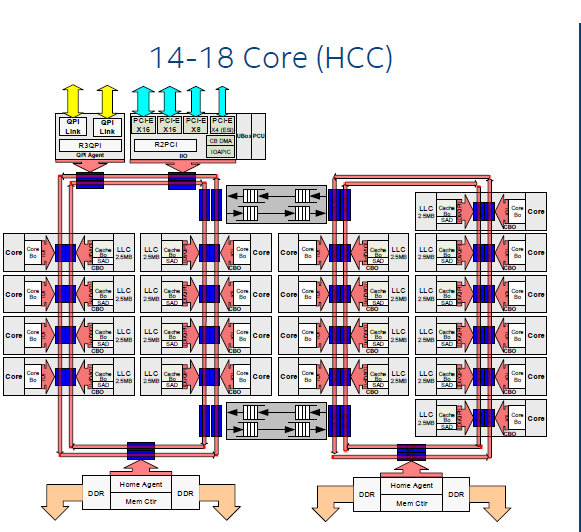
Exactly the same case as single die Xeon architecture with 2 separate rings inside with different memory modules attached to each ring - https://images.anandtech.com/doci/9193/HaswellEPHCCdie_575px...
It actually presents itself to the system as a single node:

On a TR 1920x system:

  $ numactl --hardware
  available: 1 nodes (0)
  node 0 cpus: 0 1 2 3 4 5 6 7 8 9 10 11 12 13 14 15 16 17 18 19 20 21 22 23
  node 0 size: 32107 MB
  node 0 free: 20738 MB
  node distances:
  node   0 
    0:  10
Threadripper ships in single-node interleaved memory by default, at least on my motherboard. This increases latency but doubles bandwidth (because now all 4-sticks of RAM are interleaved).

There's a BIOS setting. I personally enabled it using AMD's "Ryzen Master" program to setup NUMA mode (aka: "Local" mode in Ryzen Master).

I'm pretty sure you can change that, it should be a BIOS option [1].

[1] - https://www.anandtech.com/show/11697/the-amd-ryzen-threadrip...

This is from a 4 socket Xeon E7-4860 with 64 ram slots(16 in use)

  e7-4860:~ Mon Jun 11
  03:06 PM william$ numactl --hardware
  available: 4 nodes (0-3)
  node 0 cpus: 0 1 2 3 4 5 6 7 8 9 40 41 42 43 44 45 46 47 48 49
  node 0 size: 16035 MB
  node 0 free: 1306 MB
  node 1 cpus: 10 11 12 13 14 15 16 17 18 19 50 51 52 53 54 55 56 57 58 59
  node 1 size: 16125 MB
  node 1 free: 3237 MB
  node 2 cpus: 20 21 22 23 24 25 26 27 28 29 60 61 62 63 64 65 66 67 68 69
  node 2 size: 16125 MB
  node 2 free: 11004 MB
  node 3 cpus: 30 31 32 33 34 35 36 37 38 39 70 71 72 73 74 75 76 77 78 79
  node 3 size: 16123 MB
  node 3 free: 12044 MB
  node distances:
  node   0   1   2   3 
    0:  10  20  20  20 
    1:  20  10  20  20 
    2:  20  20  10  20 
    3:  20  20  20  10
The chart at the bottom of the output is the weight for accessing a memory pool from a CPU socket. This is the most important part of the output.

On this server, CPU socket 0 is hardwired to ram slots 0-15

CPU 1 to ram slots 16-31

CPU 2 to ram slots 32-47

CPU 3 to ram slots 48-63

If CPU 0 wanted to read something outside of its local ram slots, it would have execute something on CPU n, then copy that segment to its local ram group.

That's not normal. Is it set to Channel/NUMA mode?
windows is spectacularly poor at dealing with NUMA CPUS so threadripper is not displayed to the OS as NUMA.
Please don't say things that are obviously untrue.

I've got a Threadripper 1950x and got 2x NUMA nodes. You gotta enable a BIOS setting.

Second: "$ numactl --hardware " is a Linux command. The Windows equivalent is coreinfo.

https://docs.microsoft.com/en-us/sysinternals/downloads/core...

Really? I've been thinking of getting a TR for some NUMA coding experience, and if Windows can't see that then it really sucks.
It's togglable in the BIOS/UEFI.
When VMware charges per socket and not per core.
Big ditto for Oracle. probably others.
Realistically, it is easy to count cores. Some companies still count MAC addresses.
The way Oracle and VMWare bill is not bound by a technical limitation.
I am on POWER8 at work, the wiki article [1] gives a great description of the advantages of many cores per chip though ours only has 6/12 cores. Part of our hardware configuration to migrate from POWER7 to POWER8 was to have 40g of memory per core available. I think POWER7 was 30g. We use this in the iSeries environment but we have pSeries machines with the same hardware running AIX/Oracle and POWER7 VMs running many *nix implementations.

In my usage case, the core/thread count really helps DB2's SQL implementation as an iSeries is effectively a giant DB2 database with extras added on. Hence query engine (SQE/CQE see old doc [2] on our machine can make great use of many cores/threads. When serving data to intensive batch applications as well as thousands of warehouse users and double that through web services access to data is the name of the game.

[1]https://en.wikipedia.org/wiki/POWER8 [2] https://www.ibm.com/support/knowledgecenter/en/ssw_i5_54/rza... <- that is quite a few years old but describes the query engines available - CQE is 'legacy' and SQE is modern

Have you compared performance of the DB running in Linux on a property sized Intel/Xeon server?

I've seen several mainframe companies dogmatically believing their sales rep their workload is special and needs a high-end system. But none of them I've talked to have actually tested for themselves.

NUMA. Latency between sockets is far higher than in a single socket. If your workload is truly wholly independent threads as you've described, then it's quite possible there is no benefit. (Although, sibling comments bring up good points about licensing fees.)
I can see two answers to that.

First is that a single-socket motherboard is still a simpler design to produce with all the advantages that entails.

Second is that you’re allowed to stick two of these on a two-socket board for CPU-bound loads. Better density for when you have the thermal capacity to spare.

> As an outsider to 'enterprise-grade' computing, I'm curious about situations where a high number of cores in a single processor would be superior to multiple processors with the same total energy draw sitting on a single motherboard?

Databases are the big one I'm aware of.

Intel's L3 cache is truly unified. Intel's 28-core Skylake means that the L3 of a Database is TRULY 38.5MB. When any core requests data, it goes into the giant distributed L3 cache that all cores can access efficiently.

AMD's L3 cache however is a network of 8MB chunks. Sure, there's 32MB of cache in its 32-core system, but any one core can only use 8MB of it effectively.

In fact, pulling memory off of a "remote L3 cache" is slower (higher latency) than pulling it from RAM on the Threadripper / EPYC platform. (A remote L3 pull has to coordinate over infinity fabric and remain cohesive! So that means "invalidating" and waiting to become the "exclusive owner" before a core can start writing to a L3 cache line, well according to MESI cc-protocol. I know AMD uses something more complex and efficient... but my point is that cache-coherence has a cost that becomes clear in this case. ) Which doesn't bode well for any HPC application... but also for Databases (which will effectively be locked to 8MB per thread, with "poor sharing", at least compared to Xeon).

Of course, "Databases" might be just the most common HPC application in the enterprise, that needs communication and coordination between threads.

>Intel's L3 cache is truly unified. Intel's 28-core Skylake means that the L3 of a Database is TRULY 38.5MB. When any core requests data, it goes into the giant distributed L3 cache that all cores can access efficiently.

This is less true now. Intel's L3 cache is still all on one piece of monolithic silicon, unlike the 4 separate caches of the 4 separate dies on a 32-core TR. But the L3 slice for each core is now physically placed right next to the core and other slices are accessed through the ringbus or in Skylake and later, the mesh. Still faster than leaving the die and using AMD's Infinity Fabric, and a lot less complicated than wiring up all the cores for direct L3 access.

https://www.anandtech.com/show/3922/intels-sandy-bridge-arch...

If your cores are independent, you're blessed and can scale just by adding more cheap servers.
Yeah, embarrassing parallel stuff is not very interesting.

However when there is communication necessary - the length of the bus matters and having the dies next to each other does help a lot