Hacker News new | ask | show | jobs
by astro_robot 2980 days ago
How long did it take for Windows 95 to be developed? It would be an interesting contrasts between Enterprise and Charitable development.
2 comments

It's much easier to Greenfield your way rather than reverse engineer (bug-for-bug) complicated code.
Windows 95 still borrowed a lot of code from MS-DOS, though. That's why you could still exit to the command prompt. I think you could do that through WinME.
Huh? Why would you even say this? There's no MS-DOS code in Windows 95, and you couldn't exit Windows 95 to a command prompt. Are you just trying to throw some FUD into this conversation?
No, he's right. Windows 95/98/Me use MS-DOS as a bootloader, and Windows 95+98 still allowed you to exit Windows from the shutdown prompt, leaving you only at the DOS prompt. Windows Me took away the ability to exit, least without a binary hack to IO.SYS that can re-enable it.
You mean DOS Mode where Win9X GUI shuts down and reboots into DOS mode to run DOS software. I was a Win95 beta tester.
The original "It's now safe to turn off your computer" screen in Windows 95/98 actually sent you to a DOS prompt. Because the computer was in graphics mode you couldn't see the prompt but you could blindly type the commands to switch modes and continue to use the computer from DOS.
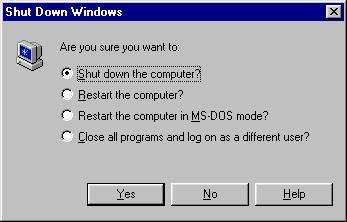
I didn't remember it either, but Windows 95 actually allowed to exit to DOS.

https://guidebookgallery.org/pics/gui/startupshutdown/shutdo...

You could even configure Windows 95/98 to boot directly to DOS by setting BootGUI=0 in MSDOS.SYS, and then you'd have to run "WIN" to boot Windows
Isn't MSDOS.SYS a binary? Are you sure you don't mean CONFIG.SYS?
According to Wikipedia, it became a configuration file in Windows 95 (MS-DOS 7.0): https://en.wikipedia.org/wiki/MSDOS.SYS
Interesting, never knew that.
That would've made one of my favorite tricks impossible. Here's what I remember doing about those pesky login screens asking for passwords:

1. Reboot the computer in DOS mode.

2. Change to Windows directory.

3. Delete the .pwl file for a user.

4. Reboot back into Windows 95.

5. Enter a new password in what was once a login screen asking for the old one.

Simpler times for hackers back then. :)