One is the one you know and enjoy using, the other is not your preferred method.
The world was beyond the emacs era and into the GUI editor when I started developing so it's a hump I've not been willing to climb, jrnl works well for me
> The world was beyond the emacs era and into the GUI editor
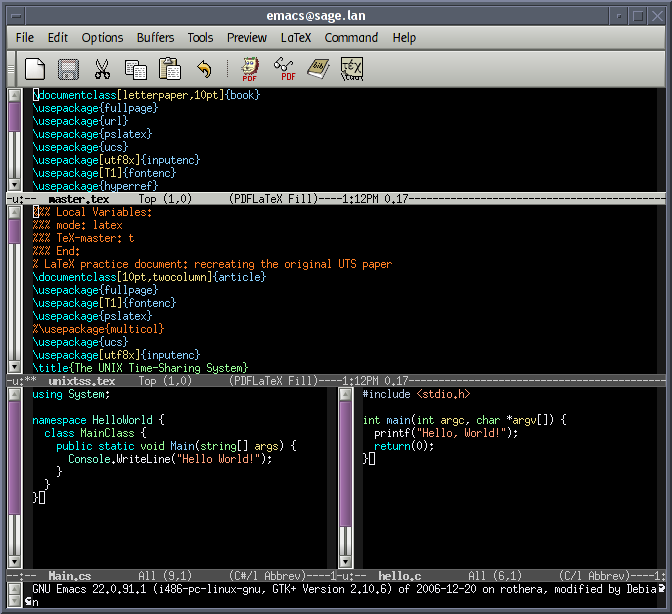
Emacs is a GUI editor (e.g. https://upload.wikimedia.org/wikipedia/commons/5/5a/Emacs-sc...), and the world still hasn't progressed beyond it. I'd love to be using something better than emacs, because it really is old & crufty, but literally no other environment is as powerful, as extensible and as pleasant to use.
That is a matter of opinion, which is what the OP before you was trying to point out. I know emacs, and use it as well when I'm in a shell environment, but I prefer to use Atom in a desktop environment where I may be copying and pasting from other apps. Pleasant is an opinion, which negates right and wrong.
A lot of people do not realize that they can use emacs on a terminal but also as a gui app. Also copying and pasting from other apps is possible and normal in emacs. For non ide languages i think emacs and vim are head and shoulders above any other editor, atom is really bad compared to emacs for example. The problem is that most people don't know how to use them.
It depends on your Atom config and your Emacs config, I imagine.
When I paste things into Atom or Jetbrains' Webstorm, my javascript usually gets auto-indented to The Right Place. Atom even did that when I _reordered_ lines, which was especially neat as I hadn't had Webstorm do it. This isn't something that my Emacs will do. I'd be _very_ surprised if there weren't some module, script, or Emacs configuration that I could use (or write) to get this same behavior. After all, Emacs' "Tab to The Right Indentation" was something that blew my mind years ago.
(Disclaimer: I have used Atom, but prefer Webstorm. I use Emacs, but only for Git things and the occasional quick edit.)
Not that you should have to know this, but for completeness' sake:
Out of the box in Emacs (with no config or extensions) you can simply select the pasted region and hit Tab to reindent the whole area correctly (what you called 'Tab to the Right Indentation').
Does what you'd like. This is all compositional, no magic here (and of course you can bind this all to one key press). Naturally lots of people make this auto-indent by default.
For me the most essential thing to know about those auto-indent modes is how to temporarily turn them off (like `:set paste` in Vim), since I so often need to bypass that behaviour for one reason or another (e.g. when resolving Git merges - trying to keep the original formatting).
The world was beyond the emacs era and into the GUI editor when I started developing so it's a hump I've not been willing to climb, jrnl works well for me