Hacker News new | ask | show | jobs
by parmesan 3146 days ago
I just updated - WOW! What an improvement! Compared startup time and scrolling around some over-monetized sites; Behaves just as well as Chrome. Time for a switch again, I've missed FireFox since I started having Chrome as my default browser back in ~2011
8 comments

I find the bit about Chrome interesting, considering I've never had a Chrome installation even without any kind of add-on that was as fast as FF Quantum. Even without any features at all Chrome is much slower and it doesn't even have proper extensions for most things.
On Linux, its still night and day difference in favor of Chrome.

I wish FF performance was as good as it is on Windows.

As much as I want to like Mozilla, even with Quantum, there's pretty much no hardware acceleration at all, missing out on potentially big performance benefits.

As others mentioned, e.g. VDPAU has been available for a long time now and there's no excuse for not taking advantage of GPU acceleration.

Now contrast this to evil Google and Chrome.

Firefox: https://imgur.com/mvtDenC Chrome: https://imgur.com/HBOpucc

For me it's exactly the opposite. While js and render performance might have been worse, scrolling has become more and more choppy with every chrome release while Firefox has absolutely no issues (even without quantum)
There certainly is hardware acceleration in Firefox on Linux, more then likely it has been disabaled because of your configueration/set-up/drivers. To turn it on go into your "about:config" and toggle the entry "layers.acceleration.force-enabled" to "True" and restart. Then Firefox is as fast as Chrome or faster, simple as that. Although it would be nice if there was a dialog telling the user their setup is incorrect/unsupported and giving them the option whtout digging into the config, I believe this is the number one reason people think FF is slower, cause their HW acceleration is disabled and they don't even know it is...
>There certainly is hardware acceleration in Firefox on Linux, more then likely it has been disabaled because of your configueration/set-up/drivers. To turn it on go into your "about:config" and toggle the entry "layers.acceleration.force-enabled" to "True" and restart.

Implying that it wasn't deliberately disabled. HW acceleration on Linux isn't enabled by default, and for good reason. Until those underlying reasons are changed, Linux does have a hardware-acceleration-on-Firefox problem.

Are there any articles that elaborate on what work still needs to be done?
yup.. enabled this option on Linux Mint 17.1, FireFox 51 .. crashed the nouveau driver 10 minutes later.. had to restart.
FF 57 is the first release of a big rewrite, I'm sure it will get VDPAU at some point, but they needed to get the base feature set stable first.
It looked great, up to the point that 70% of my addons were disabled. I rolled back in 5mins :)

I'll give it another chance in a couple of weeks, and hope that there will be a bypass that will force my outdated addons to work.

There won't be a bypass - Fx57 has completely dropped legacy extension support.

This is a good thing, and it's just a shame that so many addons haven't been updated yet.

This isn't quite true. Support for legacy extensions is disabled by default, but can be re-enabled via the `extensions.legacy.enabled` flag in about:config.
Don't expect it to work very well, though, given that a lot of the supporting code for legacy addons was already removed from Gecko 57.
Huh, thanks for mentioning that! I didn't realise there was still a flag for it - serves me right for not doing my research.

Though losing Electrolysis will defeat one of the main benefits of running Firefox 57...

Though you lose multi-process operation, I think....
only on incompatible MP plugins.

however I've just ran nightly and although it says vimfx will work as a legacy plugin it's not working, so the deal's off. I shall not use my mouse!

You can try vimium-ff (FF 57-compatible). There is also Tridactyl [1] currently in development.

1: https://github.com/cmcaine/tridactyl

Only in Nightly.
So while I'm still waiting on NoScript to get an update which is actually forthcoming (possibly tomorrow, but within about a week from what I gather), I took a look around to see which of my other add-ons were updated.

Other than a couple that were useful but ultimately not that important, and a couple I can do without until they get updated eventually, I managed to find that most of my Legacy extensions do have updated versions out. Namely, Video DownloadHelper and Greasemonkey, both extensions I thought would die with Firefox 57 out. That said, I wouldn't have known if I hadn't looked at the add-ons site as near as I can tell, while they still say "Legacy" in my Add-ons tab, they do have separate releases on the add-ons site specifically for Firefox 57 which are incompatible with my current browser and I'll probably have to install them again when I do update.* Assuming that is the case, you might find a decent chunk of that 70% already ready and you just have to take some extra steps to get them working again.

Overall, I am optimistic, lots of people have lots of nice things to say about 57 and the extensions situation is not looking nearly the sort of bad I was first expecting. I'm sure I've had more painful wait periods for my extensions going back almost a decade ago as it seems I really am waiting on just one and that one is coming shortly. Even those extensions which are now unsupported actually seem to have decent replacements and I've switched them over already.

* Note, this portion is entirely speculative, refer back to my commentary on waiting till an updated NoScript comes out before I actually install Firefox 57. It's possible they would just update once I do upgrade to 57 rendering my subsequent speculation entirely wrong.

Greasemonkey will be updated from legacy to the compatible one automatically, no user intervention needed. I assume this holds true for all such extensions.
If it as just as good as chrome, why should I switch? Especially given how good Chrome Dev tools are.
Aside from the privacy / philosophy / openness / counterweight-to-monopolization-of-the-Web angles which Yoric mentioned, you might find we're actually better than Chrome in some areas. Often small things, but I find I prefer the feel of Firefox to Chrome.

- If you do frontend work, our CSS grid inspector is unparalleled https://developer.mozilla.org/en-US/docs/Tools/Page_Inspecto...

- Firefox has built-in tracking protection (https://nakedsecurity.sophos.com/2017/11/12/firefox-to-offer...)

- Powerful add-ons like Tree Style Tab make managing large numbers of tabs much easier (https://addons.mozilla.org/firefox/addon/tree-style-tab/)

- Our WebAssembly performance tends to be better

- We should have better resource utilization when you have many tabs open

- You can mute audio on a page clicking the little speaker icon in the tab

If you want to contribute to the DevTools themselves, they're built using standard web technologies: HTML/JS, React/Redux, etc. https://github.com/devtools-html/

> - You can mute audio on a page clicking the little speaker icon in the tab

Although I don't know if chrome has this on by default nowadays as I turned it on so long ago.

But mute audio on per tab via speaker icon is available in chrome as well.

in chrome://flags/

* Tab audio muting UI control

If enabled, you can mute/unmute per tab via doing same thing.

Yes, it's been enable as default for a while now. But again firefox is awesome and the 57 version is simple blazing fast
Front end dev here. The main issue I have for now is that whenever I hit CTRL Shift C to open the console, you can clearly see the thing draw itself for nearly one full second. It would be fine if it somehow cached, but if you close it and open again, same delay.

Short of being able to optimize it soon, perhaps you could try buffering and displaying it at once. It would look less clunky and flimsy.

That said I'm giving FF57 a run as my main browser, will keep using Chrome Dev Tools for now.

You've switched to multiple processes model, but you don't have "task manager" as Chrome. Do you plan to implement it in the future?
Working on it right now, but no ETA yet.
Ok, thanks. I hope you make it even more informative than the Chrome's one :)
Please, that's one of the most useful troubleshooting tools in Chrome.
about:performance is a somewhat similar substitute for now. You can see stats of the various processes and close or reload tabs.
Yes.. Somewhat. For example can't see how extensions are doing from there.
> - Firefox has built-in tracking protection (https://nakedsecurity.sophos.com/2017/11/12/firefox-to-offer...)

Is there a way to selectively unblock certain trackers on a specific page?

I currently have the Tracking Protection set to Always and the block list on Strict. No problems yet, but I know there will be a few sites which won't correctly. Previously I always used Ghostery and there was a nice option to view exactly how many and which trackers were being blocked on each page. When viewing the blocked trackers, they could be selectively unblocked one at a time if required. This was handy to make some embedded video work, without necessary enabling Facebook tracking, which would occur if the whole page was unblocked.

Take a look at the eff's privacy badger add on, which let's you control each script/source on a per-page level
Try umatrix.
especially TreeStyleTab is considerably weakend with the new update (like all extensions that now have to fit into less powerful webextension). From my point it is so bad (I lose 4 out of 6 regularly used add-ons) I am actively considering of leaving firefox for the better.
What do you use? Some things are still a bit hacky, but it all comes together for me. I had everything packed, ready to move, but than came the ports :)
To be honest I have not switched yet, but the changes I have seen in TreeStyleTab make me question why I should stay at firefox with that because I can get the features of the new TST in Chrome as well. Also I won't work with Colorful tabs anymore. Further I think I will miss some of the decapriated features in the Zotero update.

(And I will have to find appropiate replacements for Leechblock and FireGesture)

Leechblock is updated. The developer made it into a separate add-on though.

https://addons.mozilla.org/en-US/firefox/addon/leechblock-ng...

What "TST in Chrome" are you referring to? Tree-Style Tabs are one of the main things that keeps me using Firefox over Chrome. All of the Chrome Tree-style extensions that I have tried are these hacky things that use an external window.
I tend to use Chrome for its devtools, but I'd add WebRTC support to the list of things Firefox excels at
It also has toolbar RSS feed support. I've been using this since when Firefox was in beta (Phoenix) and it's a killer feature for me. I may use Feedly on iOS but desktop/laptop I love having the same feeds right on the toolbar. Chrome doesn't support RSS feeds in this way because there's no way to advertise with them.

Always watch where the incentives run, Chrome is for Google's best interests, not the web's and not the user's. Always has been and always will be because it's a for-profit organization.

> If you want to contribute to the DevTools themselves

I wish I had the time. So I'll have to wait for someone else to add the element DOM properties tab in thr panel that has the style rules and layout. Firebug had it, Chrome has it.

The right click and then Show DOM Properties with the results in the console pane is just painful to use.

Tree-style tabs won't be around much longer.
Tree Style Tab is available on Firefox Quantum and will be with us for a long, long time. Piro, the author, wrote an excellent article about his experience porting TST to a WebExtension: http://piro.sakura.ne.jp/latest/blosxom/mozilla/extension/tr...
Nice extension, but no search for tab option. For now I use Firefox built-in option to search for tab: open new one and start typing the title of tab, I want to find. The drawback: that search is VERY dumb and you have to exactly type the proper name, no fuzzy logic or smth at all.
I got the new Tree Style tabs installed, but I'm still seeing the standard tabs at the top, is there a way to hide those?
I asked this exact question on Stack Overflow earlier today and found that someone else had already also asked it and got an answer.

https://superuser.com/questions/1261660/firefox-quantum-ver-...

(basically, hacking some CSS rules by creating a file in your AppData directory, so that the top bar is hidden)

Incidentally, I also discovered that Tree Style Tab's settings page under Firefox has a nice little box where you can configure the CSS it uses, which was nice because I prefer it with a smaller font and less padding.

What uglycoyote commented is the stopgap solution for now, but an API for doing that is in the works, so in a few versions from now, you shouldn't need that more-or-less hack anymore.
Better privacy? Non-profit? More open source? Cheerful community? Pick one or more :)
Privacy is about the same, Mozilla Corporation (who distribute the browser) aren't non-profit, both are open source. Correct on community maybe.
The privacy situation is absolutely different; Mozilla has no profit motive to monitor and monetize your activity on the Web. For example, Firefox Sync is specifically designed so that we have no knowledge of your browsing data.

In contrast, when you sign into Chrome, "Your experience in other Google products is personalized by including your Chrome history with your Web & App Activity."(https://support.google.com/chrome/answer/185277)

> Mozilla has no profit motive to monitor and monetize your activity on the Web.

But if a substantial portion of Mozilla's funding comes from an organisation that does have a profit motive to monitor and monetise my activity on the web, then surely that's almost as bad (for me as the end user)?

There's a world of difference. For Mozilla to sell out on user's privacy it would mean game over. They simply can't afford to do so, even if they wanted to (which I believe they don't). Google on the other hand? That's their main business, they are an advertising agency. Sure they make nice products too but make no mistake where their profit is coming from.
I donate to Mozilla because they claim to support privacy, and I want them to be less dependent on large donations.
> Mozilla Corporation (who distribute the browser) aren't non-profit

Mozilla Corporation is wholly owned by the non-profit.

> both are open source

Not to the same degree, as Chrome != Chromium

> Privacy is about the same, Mozilla Corporation (who distribute the browser) aren't non-profit, both are open source.

Chrome is not open-source. Chromium is, but Chrome is not.

I personally like how it handles hundreds of tabs. No matter how many tabs I have open they remain usable size, and the compact UI theme is even more compact than Chrome.

Tab containers are useful for having multiple accounts on the same site (Gmail/Github), or isolating work or most secure sites from regular browsing. The containers are more light-weight and more general than Chrome profiles (and they don't depend on having external accounts).

Pinned tabs don't close on Command+W. It's a small thing, but I kept accidentally closing my pinned tabs in Chrome.

Chrome Dev Tools are hard to beat, although Fx is slowly catching up there, too. I don't mind launching Chrome just for web dev.

> No matter how many tabs I have open they remain usable size

They were! I think they've shrunk, though that might be an optical illusion... And I can't see a simple way to make them bigger (simple as in: not editing the css file).

There is a pref that controls the minimum width now (browser.tabs.tabMinWidth). The default changed from 100px to 76px in Firefox 57. You should be able to tweak this to change the minimum width.
Fantastic. Many many thanks.
A lot of us in the dev community feel that some of the web standards that Chrome is pushing does not reflect the will of the community at large. Chrome is also tied to a company known to have a business interest in data collection, while Firefox is maintained by the community with some funding from a nonprofit.
To support a non-profit, so that they actually have the might to fight for us.
because Google has the worst biz model in the tech industry and is doing harm to the world.
I think Chrome and its DevTools has positive overall effect on the world.
I guess you were not around during the Halloween papers then.

Or the Sco Linux lawsuits.

i was not. def slimy stuff.
How so? That's a pretty bold claim...
Fortunately brave rebels fight against this harm in every way they can :)

https://blog.mozilla.org/blog/2017/11/14/firefox-features-go...

The real world is not Star Wars. For all the privacy considerations etc., this comment above reads extremely naive.

Honestly, I find it to be (subjectively, I didn't actually measure anything) much faster than Chrome. At least, it feels much snappier on my MacBook Air.
Yeah, if it's just for the good of the internet, openess, and society, who cares to jump to an equal (but better at those regards) engine?
Becasue Firefox Dev tools are better ? I feel the Chrome dev tools more hard to use.
Yes, it is even better if you have a precision touchpad and you disable smooth scrolling. Whole new world of reactivity! It is almost as smooth as edge!
Whoa thanks for the tip! This is so much better!
Now Google just needs to test their apps like Drive on it... I stopped using Firefox partly because they were so buggy on it.
If this were Microsoft in the 90s, everyone would be calling this anti-competitive behavior. Saying they're just buggy because they're not tested well is putting it much more nicely.
Same, and when you add script control with uMatrix it’s just perfect!
Firefox is pretty similar looking as Chrome now. I liked FF before cause it looked different, now everyone just copies Chrome look.
The dark theme looks much better than Chrome.
Does it? As a matter of fact, it's much more similar to MS Edge. With dark theme it's super close in terms of look. Rectangular, beefy tabs.
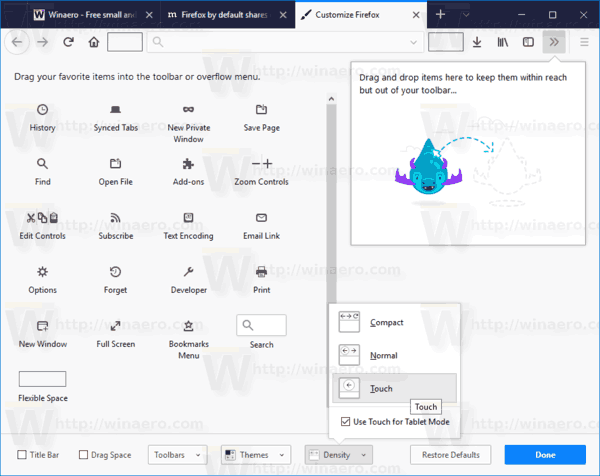
I'm not sure what you mean by "beefy". Do you mean the "touch" density with the very large tabs and icons? I'm on "compact" and it's very similar to Chrome except for the right-angled tabs. You can switch between three levels of density:

https://winaero.com/blog/wp-content/uploads/2017/11/firefox-...

While there are some similarities in the UI I don't think the photon design system is a chrome ripoff. http://design.firefox.com/photon/welcome.html