Hacker News new | ask | show | jobs
by twopoint718 5885 days ago
The solution that (mostly) works for me is a combination of multiple virtual desktops (I use 9), and a tiling window manager (dwm). I usually don't exceed 2 or 3 windows per virtual desktop and the number of desktops is fixed. I have it wired into my fingers that Super+<n> takes me to desktop 'n', and then, typically I'm on the window I want. If not, it is a constant number of "Super+n" to get me to the window (because I don't exceed 3 windows per desktop).

This works for me because I can remember the "place" where windows are, and it is usually one or two chords away.

3 comments

"I have it wired into my fingers that Super+<n> takes me to desktop 'n', and then, typically I'm on the window I want. If not, it is a constant number of "Super+n" to get me to the window"

So you have turned your workspace into a hash table.

I do the same, only instead of dwm, I use musca. And I have 11 virtual desktops assigned to Super+<1 through 0, and the key left of 1>. I also always use the same virtual desktops for certain tasks, so finding windows is easy: firefox? its in the web browsing desktops: 7 and 8! Pidgin? Thats desktop 9, etc etc.

Finally, switching between windows within a single desktop is a simple matter of changing focus in a direction by using Super+<cursor keys> (I can resize and swap by using Super+Shift+<cursor keys> and Super+Alt+<cursor keys>).

I can also cycle through windows in one frame (Super+c), but its not often I have more than one window in a frame (since I normally have either one fullscreen window in a desktop or i have two to four windows tiled), but when I do, its normally only one, so cycling is more of a "toggle between windows" for me.

Super, being the "windows key", is a great key to use for window management. Windows key is for windows management is easy to explain to people ;-)

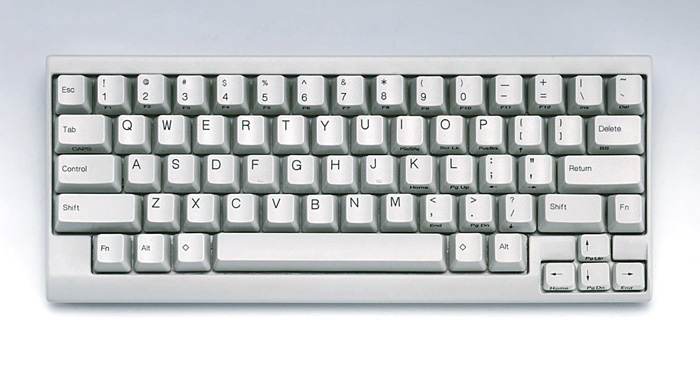
I was debating on whether or not "Super+n" was too much of a Linux/Emacs-ism. But, at least on my keyboard, it is a diamond: http://comedialabs.com/images-matti/lite2.jpg
I do that too, it's pretty great. I'm on Windows so I use Dexpot, which is pretty okay.
I hadn't heard of Dexpot - thanks for mentioning it. I've been looking for some decent tools for Windows and have been unsatisfied with others so far. I'll try Despot for a while and see how I like it.

First impressions are good, though (at least out of the box) the fullscreen preview doesn't play nicely with multiple monitors :-(

I'm a fan of VirtuaWin myself: http://virtuawin.sourceforge.net/