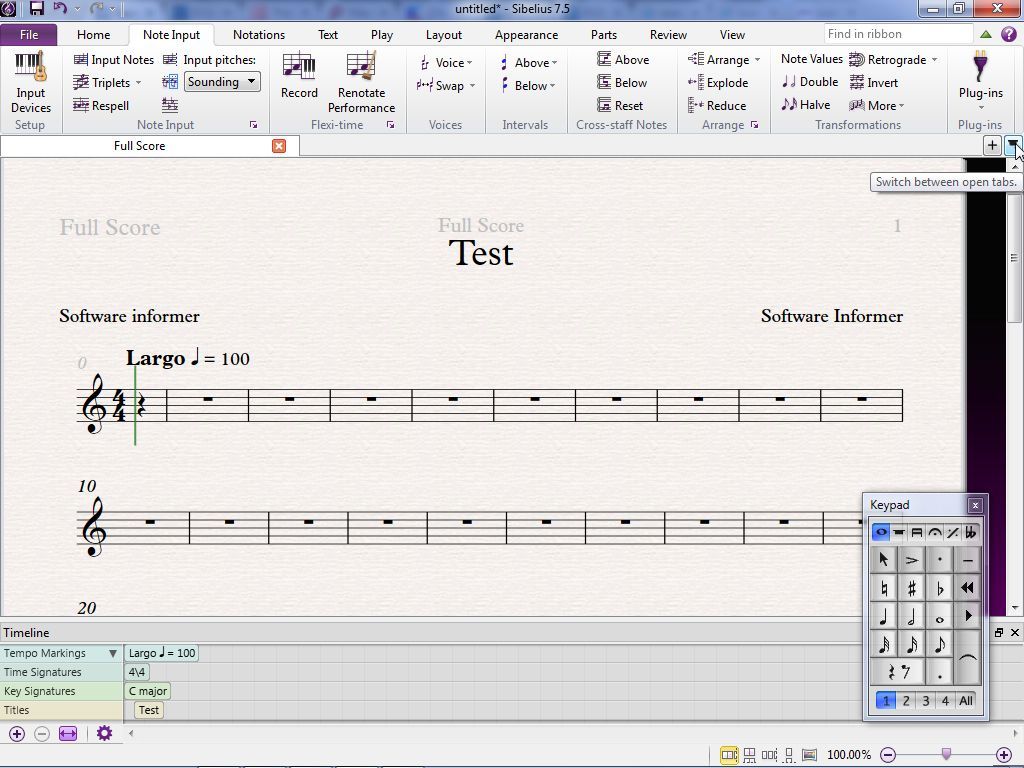
| What you're describing is more or less how existing programs work. For example, here is a screenshot of Sibelius: http://img.informer.com/screenshots/5045/5045272_3.jpg Notice that "keypad" in the bottom right corner. That's the "on-screen custom keyboard" you're talking about. But this isn't very convenient: 1. There are a lot of symbols. So many that the keyboard is divided up into six sub-keyboards. Unless you know the program well, it's a bit of a mystery where exactly to find the right symbol. 2. And it's actually more complicated than that because some of the symbols are actually modifiers of other symbols. For several of the symbols you see (sharp, natural, flat, dot, tie) you can't actually draw them independently, they only exist as attachments to another note. So the keypad works differently when you are dealing with those symbols. 3. Plenty of marks aren't even covered by the keypad and its six panels. For those you have to go searching in the numerous other menus in the app. You start getting a Microsoft Word-like problem: how do you design menu bars that show all the options without taking up the whole screen. I really think it would be easier to draw what you mean -- if the app is actually good at recognizing what you mean. |